episode
StreamYard vs. Zoom: Which Platform Reigns Supreme for Live Streaming and Webinars?
When it comes to online communication, two platforms stand out: StreamYard and Zoom. While both allow real-time video and audio, they serve very different purposes. StreamYard is a browser-based live streaming studio built for creators, while Zoom is the go-to video conferencing tool for businesses, schools, and organizations.
So which is better for your needs—broadcasting, webinars, or meetings? Let’s dive into a head-to-head comparison.
An Overview of StreamYard and Zoom
StreamYard: The Live Streaming Studio
StreamYard is designed for simplicity. With no downloads required, it lets creators multistream across platforms like YouTube, Facebook, LinkedIn, and Twitch. Features like custom branding, banners, overlays, and guest interviews make it easy to run professional broadcasts.
Zoom: The Video Conferencing Giant
Zoom is a household name for virtual meetings, webinars, and online events. Known for reliability and scalability, Zoom is widely used by businesses, schools, and organizations worldwide. While it’s primarily a conferencing tool, Zoom also supports live streaming webinars to larger audiences.
Feature Comparison
| Feature | StreamYard | Zoom |
|---|---|---|
| Primary Use | Live streaming & broadcasting | Video conferencing & webinars |
| Platform | Browser-based | Desktop & mobile apps |
| Guest Management | Up to 10 on-screen participants | Up to 1,000 webinar participants |
| Multistreaming | Built-in (multiple platforms) | Yes (one platform at a time) |
| Branding | Logos, overlays, backgrounds | Limited (virtual backgrounds, name tags) |
| Ease of Use | Very easy | Easy, but more advanced features |
| Video Quality | Up to 1080p | Up to 1080p |
| Recording | Local & cloud | Local & cloud |
| Pricing | Free & paid plans | Free & paid plans |
Core Differences
-
StreamYard: Built for broadcasting, with easy multistreaming and custom branding tools.
-
Zoom: Built for meetings and webinars, with breakout rooms, polling, Q&A, and large-scale participant support.
Unique Features
-
StreamYard: A backstage area for prepping guests before going live.
-
Zoom: Breakout rooms, perfect for group discussions during webinars and workshops.
Pricing
-
StreamYard: Free plan (20 hrs/month, with branding). Paid plans start at $20/month, unlocking multistreaming, branding, and higher streaming limits.
-
Zoom: Free plan allows 100 participants for 40 minutes. Paid plans start at $14.99/month, with longer meetings, cloud recording, and webinar options up to 1,000 participants.
Ease of Use
-
StreamYard: Extremely beginner-friendly, minimal setup, live in minutes.
-
Zoom: Also user-friendly, but its advanced features (like breakout rooms and reports) come with a learning curve.
Video & Audio Quality
Both offer up to 1080p.
-
StreamYard: Great for streaming, but quality depends on your internet connection.
-
Zoom: Optimized for stability—even in low-bandwidth environments—though quality can dip with larger participant counts.
Guest Management
-
StreamYard: Up to 10 guests on-screen; link-based invites make joining seamless.
-
Zoom: Supports 100–1,000 participants; powerful tools like registration, breakout rooms, and webinar modes.
Integrations
-
StreamYard: Integrates with YouTube, Facebook, LinkedIn, Twitch, plus services like Restream and Ecamm Live.
-
Zoom: Vast app marketplace, with integrations for scheduling, CRMs, project management, and marketing.
Customer Support
-
StreamYard: 24/7 live chat, knowledge base, and forums.
-
Zoom: 24/7 phone, chat, and email support, plus a large help center and community.
Who Should Use Each?
-
StreamYard is best for:
-
Live streamers and podcasters.
-
Creators who want multistreaming and branding.
-
Businesses hosting live virtual events.
-
-
Zoom is best for:
-
Businesses and organizations needing reliable meetings.
-
Schools and educators hosting classes.
-
Large-scale webinars and corporate events.
-
Conclusion: The Final Verdict
Both are excellent platforms, but they serve different purposes:
-
Choose StreamYard if your priority is professional live streaming with branding and multistreaming.
-
Choose Zoom if you need a scalable video conferencing platform with advanced webinar tools.
Both offer free plans, so the best way to decide is to test them yourself.
Zencastr or Squadcast? The Showdown Every Podcaster Needs to Read
 Choosing the right remote recording platform is one of the most important decisions you’ll make as a podcaster. Two of the top contenders in this space are Squadcast and Zencastr. Both platforms have earned a reputation for high-quality audio, reliability, and user-friendly interfaces. But which one is the right choice for you? In this comprehensive comparison, we’ll explore the features, pricing, and unique strengths of both Squadcast and Zencastr to help you make an informed decision.
An Overview of Squadcast and Zencastr
Squadcast: The High-Fidelity Recording Studio
Squadcast is known for its commitment to pristine audio and reliability. With progressive upload technology and local recording, your sessions remain secure and uncompromised—even with unstable internet connections. It’s a go-to choice for professional podcasters and media companies that demand top-tier audio.
Zencastr: The All-in-One Podcasting Platform
Zencastr has evolved into a comprehensive solution for podcasters. Beyond recording, it now offers editing, unlimited hosting, and distribution features. With AI-powered tools and an intuitive interface, Zencastr appeals to creators looking for an all-in-one workflow.
Detailed Feature Comparison
| Feature | Squadcast | Zencastr |
|---|---|---|
| Local Recording | Yes (up to 4K video, 48kHz WAV audio) | Yes (up to 4K video, 48kHz WAV audio) |
| Progressive Upload | Yes | Yes |
| Cloud Backup | Yes | Yes |
| Video Quality | Up to 4K | Up to 4K |
| Audio Quality | Excellent (uncompressed WAV) | Excellent (uncompressed WAV) |
| Editing | Integration with Descript | Built-in editor, AI-powered |
| Transcription | Yes (via Descript) | Yes (automatic) |
| Guest Management | Up to 10 participants | Up to 12 participants |
| Hosting | No | Yes (unlimited hosting) |
| Pricing | Paid plans with a free trial | Paid plans with a free trial |
Core Features
Both platforms focus on local recording, capturing audio and video directly on each participant’s computer. This eliminates internet-related glitches and ensures studio-quality results. Progressive uploads save data to the cloud in real-time, protecting against crashes or disconnections.
-
Squadcast shines with its Descript integration, enabling text-based editing that simplifies post-production.
-
Zencastr goes further by combining recording, editing, hosting, and distribution in one place—a major draw for creators who want simplicity.
Unique Features
-
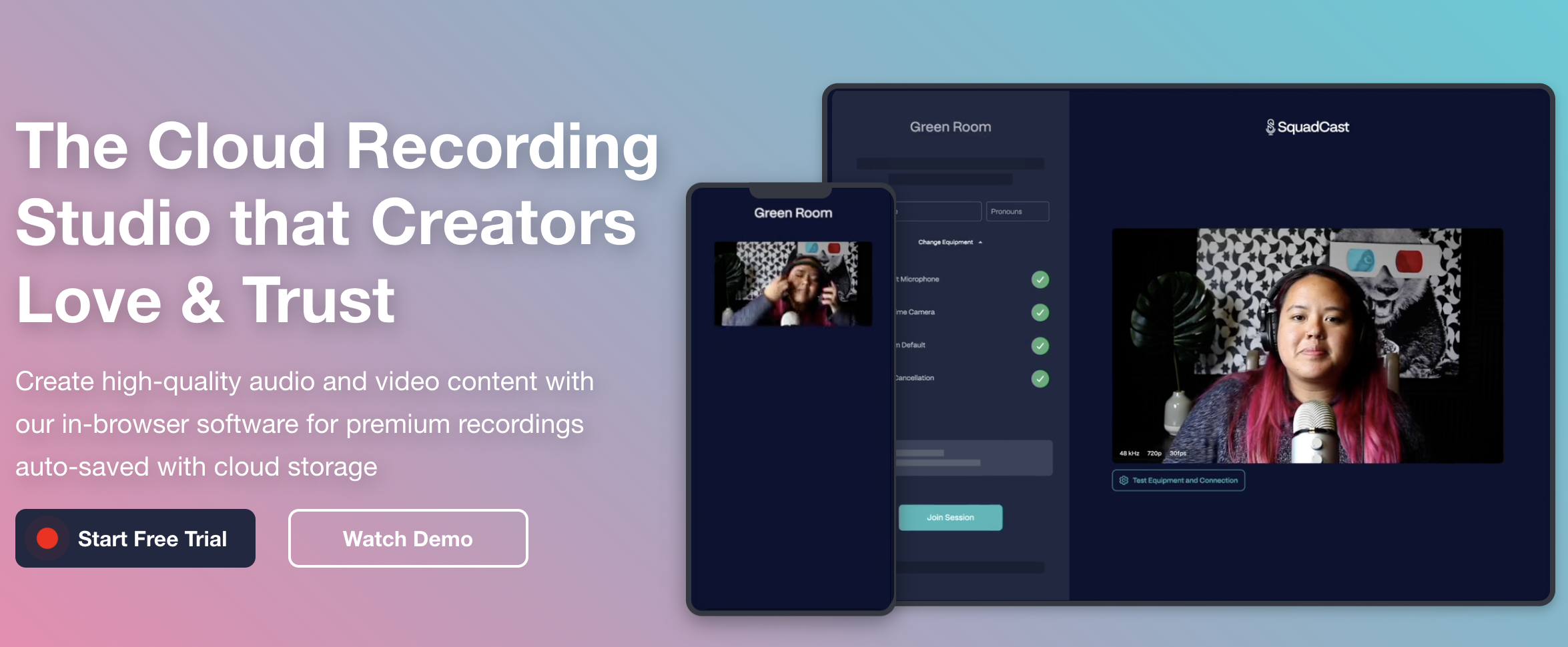
Squadcast: A green room for guest prep, device checks, and pre-session coordination.
-
Zencastr: AI editing tools that remove filler words, long pauses, and background noise automatically.
Pricing and Plans
Squadcast
Plans start at $20/month, covering local recording, progressive uploads, and cloud backups. Higher tiers provide more hours, advanced features, and dedicated support.
Click here to learn more about Squadcast pricing.
Zencastr
Plans also start at $20/month, but include unlimited hosting, AI-powered editing, and built-in distribution tools alongside high-quality recording.
Click here to learn more about Zencastr pricing.
Ease of Use
Both are browser-based and accessible without software downloads.
-
Squadcast: Extremely intuitive, with a minimal learning curve.
-
Zencastr: Slightly more complex due to its broader feature set, but supported by thorough documentation and strong customer support.
Video and Audio Quality
-
Squadcast: Records uncompressed WAV audio and up to 4K video, meeting professional standards.
-
Zencastr: Matches these specs, while adding Magic Audio, an AI feature that enhances clarity and removes background noise.
Guest Management
-
Squadcast: Supports up to 10 participants, with link-based invites and no account required for guests. The green room helps sessions start smoothly.
-
Zencastr: Allows up to 12 participants, plus a producer mode for behind-the-scenes management without appearing on camera.
Integrations
-
Squadcast: Works with Descript, Adobe Audition, Hindenburg, Zapier, and Dropbox.
-
Zencastr: Integrates with Adobe Premiere Pro, Final Cut Pro, Descript, and Zapier.
Customer Support
-
Squadcast: 24/7 live chat, knowledge base, and a community forum.
-
Zencastr: 24/7 live chat, help center, and community forum.
Who is it for?
-
Squadcast is best for:
-
Professional podcasters prioritizing flawless audio quality.
-
Media companies needing scalability and reliability.
-
Creators who want a straightforward recording-first solution.
-
-
Zencastr is best for:
-
Creators seeking an all-in-one platform for recording, editing, hosting, and distribution.
-
Podcasters who want to streamline workflows and minimize post-production time.
-
Anyone aiming to produce professional video podcasts with minimal effort.
-
Conclusion: The Final Verdict
Both Squadcast and Zencastr excel at what they do, but they cater to slightly different needs.
-
Choose Squadcast if you prioritize the absolute best audio fidelity and a streamlined recording experience.
-
Choose Zencastr if you prefer an integrated platform that handles everything from recording to publishing.
Both platforms offer free trials, so the best way to decide is to try them out and see which aligns with your creative process.
Squadcast vs. Riverside: The Ultimate Remote Recording Showdown
The short answer: Riverside is the better choice for most podcasters — it offers a more complete recording-to-publishing workflow, stronger AI editing tools, and a free plan worth actually using. Squadcast is the right pick if you’re already deep in the Descript ecosystem, since Descript now owns Squadcast and the two tools are sold together as a bundle.
That acquisition changes the comparison in ways most guides haven’t caught up to yet. This breakdown covers current pricing, what’s actually changed since Descript bought Squadcast, and how to decide which platform matches your production workflow.
What’s Changed: The Descript-Squadcast Acquisition
The most important thing to know about Squadcast in 2026 is that it’s no longer a standalone product. Descript acquired Squadcast, and the two platforms are now sold together — every SquadCast plan includes access to Descript’s transcription and editing tools. If you were comparing these platforms a couple of years ago based on old reviews, a lot of that information is out of date.
The practical implication: Squadcast’s old “integration with Descript” selling point is now just the base feature set. The question is whether that bundled Descript access is compelling enough to choose Squadcast over Riverside’s native built-in tooling.
Squadcast vs Riverside: Feature Comparison (2026)
| Feature | Squadcast (via Descript) | Riverside |
|---|---|---|
| Local Recording | Yes — up to 4K video, 48kHz WAV audio | Yes — up to 4K video, 48kHz WAV audio |
| Progressive Upload | Yes (patented technology) | Yes |
| Free Plan | Yes (limited hours) | Yes — 2 hours/month recording, 720p video |
| Paid Pricing (entry) | Bundled with Descript; check current Descript pricing | ~$19/month (Standard, billed annually ~$15/month) |
| Built-in Editing | Descript (text-based editor, screen recording, transcription) | Magic Editor, text-based video editor, AI clip generator |
| Transcription | Yes (Descript included on all plans) | Yes (automatic; hours vary by plan) |
| Participants | Up to 10 on mainstage + 10 backstage | Up to 8 participants |
| AI Audio Enhancement | Via Descript | Magic Audio (noise removal, clarity boost) |
| Pre-show Prep | Green Room (check audio/video before going live) | Producer Mode (off-camera session management) |
| Social Clip Creation | Via Descript | Built-in AI clip generator |
| Key Integrations | Native Descript; Adobe Audition, Hindenburg, Zapier, Dropbox | Adobe Premiere Pro, Final Cut Pro, Descript, Zapier |
Pricing: What Squadcast and Riverside Actually Cost in 2026
Riverside Pricing (2026)
Riverside offers four tiers. The Free plan provides 2 hours of recording per month at 720p video quality with basic editing tools. The Standard plan runs $19/month billed monthly (or $15/month billed annually) and unlocks unlimited recording, 1080p video, separate audio tracks, and up to 5 hours of AI transcription. The Pro plan at $29/month monthly ($24/month annually) bumps to 4K video, 15 hours of transcription per month, Magic Audio, and full editing tools. A Business plan with enterprise features is custom-priced.
Riverside’s pricing is per host seat — guests join your recording for free regardless of plan, which is a meaningful advantage over platforms that charge per participant.
Worth noting: exceeding your plan’s monthly recording hours triggers overage charges, typically around $5–$10 per additional hour depending on the tier. If you record long-form episodes or multiple shows, track your hours carefully on the Standard plan.
Squadcast Pricing (2026)
Since the Descript acquisition, Squadcast plans are bundled with Descript access — all tiers now include transcription, editing, and screen recording. Check the current SquadCast/Descript pricing page directly, as the bundle pricing has evolved since the acquisition and third-party listings vary significantly. Unused recording hours roll over automatically, capped at twice your monthly plan allocation.
For dedicated Squadcast pricing context, see our standalone page: Squadcast Pricing Plans Explained
Audio and Video Quality: Is There a Real Difference?
Both platforms use the same foundational approach: local recording on each participant’s device, with progressive upload to the cloud as the session runs. This means your audio quality isn’t limited by internet connection stability — the file being recorded is always local, so a brief network dropout doesn’t ruin a take.
At the spec level, both record uncompressed 48kHz WAV audio and up to 4K video on paid plans. The practical difference is in post-recording processing:
- Riverside’s Magic Audio applies AI noise reduction and clarity enhancement automatically after recording. For creators who don’t want to touch audio post-production settings, this is genuinely useful — you get cleaner audio with less manual work.
- Squadcast/Descript handles audio cleanup through Descript’s studio sound feature, which works similarly but requires you to be in the Descript editing environment.
If audio quality is your primary concern, the platform matters less than your recording environment and microphone. See: Podcast Microphone Setup Guide | Best Podcast Microphones
Editing Workflow: Built-In vs. Bundled
This is where the platforms diverge most meaningfully for day-to-day use.
Riverside keeps recording and editing inside one interface. After your session, you can move directly into the Magic Editor — which handles speaker-switching in the video, noise removal, and clip creation — without leaving the platform. The AI clip generator can automatically produce short social clips from a longer recording. For creators who want a fast path from raw recording to publishable content, this workflow is efficient.
Squadcast + Descript involves two products working together. Recording happens in Squadcast; editing happens in Descript. Descript’s text-based editor is genuinely powerful — editing audio and video by editing a text transcript is a workflow that’s hard to give up once you’re used to it — but you’re working across two tools rather than one. For anyone who already uses Descript, this is a net advantage, not a drawback. For someone new to both platforms, there’s a steeper learning curve.
Related: Best Podcast Editing Software | Podcast Editing Software for All Levels
Guest Management and Session Logistics
Both platforms are browser-based — guests don’t need to install any software to join a recording session, which dramatically reduces pre-show friction for interview podcasts.
Squadcast supports up to 10 participants on the main stage plus 10 more in the backstage area. The Green Room feature lets everyone test audio and video before the session goes live, which matters when you’re coordinating guests across time zones who may not be technically confident.
Riverside supports up to 8 participants and adds Producer Mode — someone can manage the session, monitor audio levels, and communicate with guests without appearing on camera. This is useful for shows that have a producer or engineer running the technical side while the host focuses on the conversation.
If you regularly record with large groups (panels, roundtables), Squadcast’s higher participant cap is a concrete advantage. For most podcast interviews with one or two guests, both platforms handle it identically well.
Related: Podcast Equipment for Co-Hosts and Groups | How to Record a Podcast Remotely
Who Should Choose Squadcast?
Squadcast makes the most sense if you’re already a Descript user and want remote recording that flows directly into your existing editing workflow. The bundled pricing means you’re essentially getting two tools for one subscription, which is good value if you’d be paying for Descript regardless.
It’s also worth considering if you need more than 8 participants in a single session — Squadcast’s 10 mainstage seats cover panel recordings and roundtable formats that Riverside can’t accommodate.
Who Should Choose Riverside?
Riverside is the better starting point for most creators who don’t already have a Descript workflow established. The native editing tools, Magic Audio, AI clip creation, and built-in transcription mean you can move from recording to a shareable clip without leaving the platform. The free plan is also genuinely usable — 2 hours per month is enough to record and test a few episodes before committing to a paid subscription.
Video podcasters in particular tend to find Riverside’s output quality and editing tools better matched to their needs. The Magic Editor’s automatic speaker-switching and social clip tools are designed for video-first workflows in a way that Squadcast’s recording-focused UI isn’t.
See also: Podcastle vs Riverside | Best Remote Podcast Recording Software | Remote Video Recording Software
How Squadcast and Riverside Compare to Other Remote Recording Tools
These two platforms don’t exist in isolation. Zencastr is the most direct alternative to both — it occupies a similar price range and offers comparable local recording quality. StreamYard is worth considering if live streaming is part of your production, though it approaches remote recording differently. See our full comparisons:
- Squadcast vs Zencastr
- Zencastr Pricing
- StreamYard vs Riverside
- StreamYard Pricing
- Full Remote Recording Platform Roundup
Frequently Asked Questions: Squadcast vs Riverside
Is Squadcast still a standalone product in 2026?
No. Descript acquired Squadcast, and the two products are now sold together. All Squadcast plans include Descript’s transcription and editing tools. If you’re evaluating Squadcast based on older reviews from before the acquisition, pricing and feature comparisons from that period are no longer accurate.
Which platform has better audio quality — Squadcast or Riverside?
Both platforms record uncompressed 48kHz WAV audio locally on each participant’s device, which is the same technical standard. The difference is in post-recording processing: Riverside’s Magic Audio applies AI-based noise reduction automatically, while Squadcast’s noise cleanup runs through Descript’s studio sound tools. For most podcasters, the recording environment and microphone quality will have more impact on the final result than the platform choice.
Does Riverside have a free plan?
Yes. Riverside’s free plan includes 2 hours of recording per month at 720p video quality with basic editing tools. It’s enough to test the platform thoroughly before committing to a paid subscription. Paid plans start at approximately $19/month billed monthly, or around $15/month billed annually on the Standard tier.
Can guests join Squadcast or Riverside sessions without installing anything?
Yes — both platforms are entirely browser-based. Guests receive a link, click it, and join the session in their browser. There’s no software to download on either side, which reduces technical friction significantly for interview-format podcasts where guests may not be technically confident.
How many people can record simultaneously on each platform?
Squadcast supports up to 10 participants on the main stage plus 10 more in a backstage area. Riverside supports up to 8 participants. For standard interview podcasts with 1–2 guests, both platforms work equally well. For panels or roundtable recordings, Squadcast’s higher participant cap is a meaningful advantage.
What is the difference between Squadcast’s Green Room and Riverside’s Producer Mode?
They solve different problems. Squadcast’s Green Room is a pre-session space where host and guests can check audio and video levels, chat, and get ready before recording starts — useful for making sure everything works before you’re actually on tape. Riverside’s Producer Mode lets a third person manage the session (monitor audio, communicate with guests, handle technical issues) without appearing on camera — useful for shows with a dedicated producer or engineer running the technical side.
Which platform is better for video podcasting?
Riverside is generally the stronger choice for video-first production. Its built-in Magic Editor handles speaker-switching, noise removal, and social clip creation natively, which matters when the video output is as important as the audio. Squadcast records excellent video locally, but post-production happens in Descript, which requires working across two tools. If you’re publishing to YouTube and creating short-form clips, Riverside’s workflow is more streamlined.
Do I need a separate editing tool if I use Riverside?
Not necessarily. Riverside includes a text-based video editor, automatic transcription, AI clip generation, and Magic Audio — enough for many creators to go from raw recording to a publishable episode without additional software. If you need more advanced post-production (multi-track audio mixing, complex video editing, color grading), you’ll likely still want a dedicated editor like Adobe Audition, Final Cut Pro, or Descript.
What happens to my recordings if I cancel either platform?
On Riverside, your recordings remain accessible for download during a grace period after cancellation, but always download your raw tracks immediately after recording regardless of plan — don’t rely on cloud storage as your only backup. On Squadcast, the same principle applies, and since the platform now integrates with Descript, project files in Descript are subject to Descript’s own data retention policies. Keep local copies of all original audio files as a baseline practice.
Is Squadcast or Riverside better for interviewing remote guests who aren’t tech-savvy?
Both are comparable for this use case since both are browser-based with no guest installation required. Squadcast’s Green Room gives guests a slightly more guided pre-session experience with audio/video checks before recording starts, which can reduce the chance of discovering problems mid-recording. Riverside’s interface is clean and simple, and its free plan lets you run test sessions with guests before committing. For most podcasters, the platform matters less than how well you prep your guests ahead of time.
Final Verdict: Squadcast vs Riverside
For most podcasters starting fresh or evaluating platforms in 2026, Riverside is the stronger all-around choice. The native editing tools, Magic Audio, free plan, and streamlined video workflow mean you can do more inside one platform without stitching together multiple subscriptions.
Squadcast makes more sense if you’re already using Descript and want remote recording that integrates directly with your existing workflow — or if you regularly need more than 8 participants in a session.
The most important thing to verify before you decide: check both platforms’ current pricing directly, since Squadcast’s post-acquisition bundle pricing in particular has shifted and continues to evolve.
Still Struggling to Turn Your Podcast Into Reels? Try This Genius Free Workflow
One of the most frustrating challenges podcasters face today? Turning long-form audio into short-form video that actually performs. It’s not just a nice-to-have anymore—social clips are expected. But the tools we’ve been using haven’t kept up.
Maybe you’ve tried automated tools like Opus. Maybe you’ve spent hours scrubbing through audio. And maybe you’re wondering: why is this still so hard?
This post tackles one of podcasting’s present problems head-on—and offers a smarter, AI-powered workflow that makes creating engaging, on-brand social clips easier than ever.
🚫 What’s Broken with Clip Tools Like Opus
The rise of short-form video has forced podcasters into unfamiliar territory—editing. And tools like Opus tried to fill the gap. But here’s the problem:
Most of these tools use shallow AI models that don’t understand tone, nuance, or context. They:
- Miss your best moments
- Chop up thoughts mid-sentence
- Create captions that feel generic or robotic
- Strip away your voice and vibe
You’re left with awkward clips that don’t convert.
✅ A Smarter Workflow for 2025 and Beyond
Instead of hoping a tool gets it right, build a simple system that combines your transcript, GPT, and your own creative direction.
Here’s the framework:
1. 🎙 Start With a Transcript
Use a tool like Descript, Riverside, or a free Whisper-based transcriber to convert your full episode into text.
2. 🧠 Use AI to Find the Gold
Feed your transcript into a GPT prompt designed to find:
- Tension or conflict
- Strong opinions
- Humor or surprise
- Quotable takeaways
Pro Tip: Use a prompt like “Pull 3–5 short moments ideal for Reels or TikTok. Include timestamps, catchy clip titles, and format tips.”
3. 📝 Get Back Structured Clip Ideas
You’ll receive:
- Timestamped segments
- Suggested hooks and titles
- Visual formatting recommendations (e.g., 9:16 with captions)
4. 🎨 Style With Templates
Use CapCut, Canva, or Veed to:
- Add branding
- Format for social
- Insert captions and motion elements
We even offer free templates if you need a head start.
⚙️ Want to Automate the Whole Thing?
Use this free n8n automation template that does all of this for you:
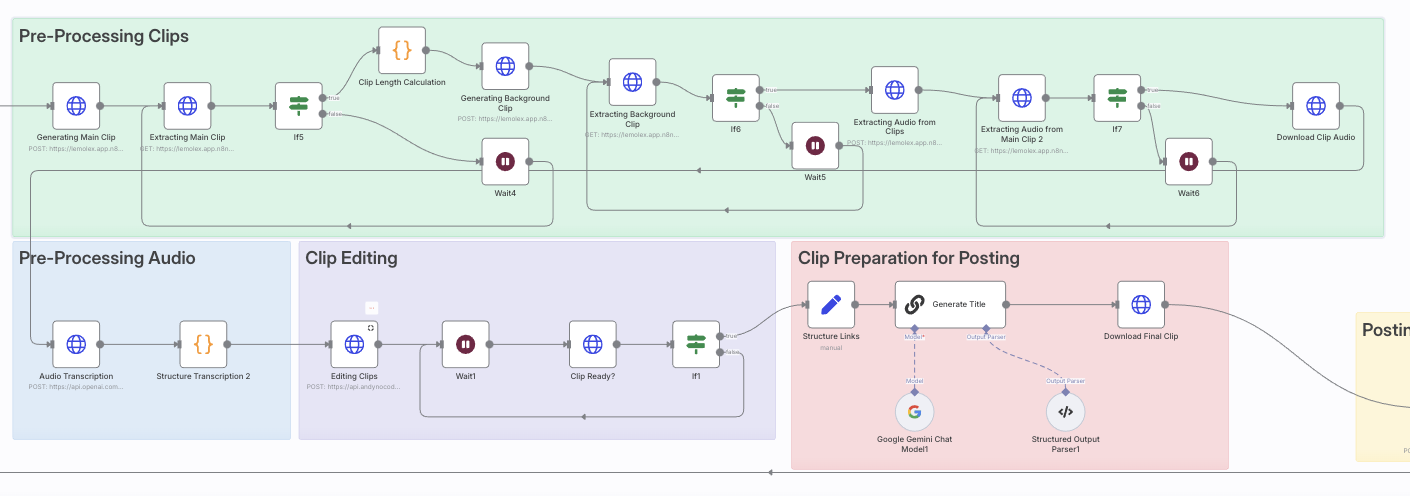
👉 Download the Free AI Clip Generator Template
You’ll also get:
- Setup instructions
- Bonus templates
- Support if you get stuck
💡 Final Thought: Podcasting’s Present Problem Is Visibility
If you’re making great episodes but struggling to be seen, short-form content isn’t optional anymore. It’s the new front door to your podcast.
This AI-powered workflow helps you consistently show up where your audience scrolls—without burning out.
Podcasting for Goodness’ Sake: How to Create Purpose-Driven Content That Helps, Inspires, and Grows
In a world saturated with content, it’s easy to feel like your voice might get lost. But when your podcast is driven by a genuine desire to help, uplift, or inform, it stands out in the best possible way.
It’s about podcasting with purpose. Whether you’re sharing stories that heal, offering actionable tips, or simply creating space for laughter in tough times, your voice has power.
This guide is for podcasters who want to make an impact—whether you’re just starting or feeling stuck.
🧬 Define What “Goodness” Means for You
Before you plan your next episode, ask yourself:
- Who do I want to help or serve?
- What transformation do I want my audience to experience?
- What values drive this show?
Create a “Goodness Statement.” For example:
“I help first-time moms navigate postpartum life with compassion, humor, and science-backed tools.”
Align every episode with that statement.
🎧 Craft a Mission-Driven Format & Voice
Your show doesn’t need to follow industry norms. Choose a format that reflects your strengths:
- Solo reflections for personal insights
- Interviews with everyday heroes or experts
- Stories that celebrate kindness, creativity, or resilience
Stay consistent with your voice. Speak how you write. Laugh. Share. Be you. The right listeners will connect.
Example: The “Kind World” podcast tells short stories about real acts of kindness. Simple. Powerful. Memorable.
📚 Content Ideas That Teach, Heal, or Entertain
Here are purpose-driven topic ideas you can adapt:
Educate
- “Budgeting for single parents”
- “How to talk to kids about grief”
- “Quick mental health resets for stressful days”
Inspire
- “Stories of second chances”
- “Interview with a burn survivor turned coach”
- “How I left my job and started a nonprofit”
Entertain
- “Wholesome prank stories”
- “Uplifting headlines of the week”
- “Things that restored my faith in humanity this month”
🤔 Frequently Asked Questions
What does “Podcasting for Goodness’ Sake” mean?
It means using your platform to make a positive impact—whether that’s through education, inspiration, humor, or storytelling.
I want to help people, but I don’t know where to start.
Start with who you want to help and how you want them to feel after listening. Clarity comes from service.
Can I still make money doing this?
Yes. Monetization can come from aligned sponsors, memberships, listener support, and digital products. Trust drives conversions.
I’m not an expert—can I still teach or inspire?
Yes. Share your journey, research insights, or bring others on. Your perspective matters.
What if I don’t have a big audience?
Serve the listeners you do have deeply. Word-of-mouth growth is powerful in mission-driven podcasting.
How do I stay consistent without burning out?
Batch episodes, allow imperfection, and protect your creative joy. You don’t need to be everywhere—just present.
💰 Monetize Without Selling Your Soul
You don’t need to choose between purpose and profit. Instead, use trust-based monetization:
- Invite ethical sponsors who align with your message.
- Offer a course or guide that extends your mission.
- Use listener support platforms like Patreon or Buy Me a Coffee.
Transparency, value, and mission alignment build income that feels good to earn.
📊 Growth Through Goodness
Marketing doesn’t have to feel spammy. Try this instead:
- Share impactful episode clips on social.
- Build a newsletter that adds value, not clutter.
- Partner with other creators on guest episodes.
- Create content people are proud to share.
Goodness spreads naturally—you just need to make it easy to share.
♻️ Stay Consistent Without Burning Out
Even mission-driven work can drain you. Here’s how to stay sustainable:
- Keep episodes short and batch when possible.
- Use templates for outlines and show notes.
- Take breaks and communicate with your audience honestly.
- Ask for help. Collaborate.
Your well-being is part of the mission.
Click Here To Learn More About Finding The Audience & Monetizing
From Podcast Listeners to Podcast Learners: What Every Podcaster Needs to Know
Podcasting isn’t just about being heard—it’s about being remembered. While most podcasters focus on downloads, the most successful ones focus on transformation. They don’t just collect listeners. They create learners—people who take action, apply insights, and keep coming back for more.
Whether you’re building your first show or refining your 200th episode, this guide will show you what it takes to turn passive listeners into engaged learners—and how to grow your podcast and business along the way.
🎧 Turning Listeners Into Learners
Most people hit “play” and never look back. But imagine if your audience…
-
Took notes from your episodes
-
Shared key takeaways on social media
-
Signed up for a freebie or joined your email list
-
Bought your course, booked a call, or supported your Patreon
That’s the difference between a listener and a learner. Here’s how to make it happen.
🧠 How to Design a Learnable Podcast
1. Add structure to your episodes.
Tell your audience what they’re going to learn, walk them through it, and recap at the end. Simple, but powerful.
2. Include actionable takeaways.
Wrap each episode with “3 Things to Do This Week” based on your topic.
3. Create companion resources.
Notion templates, checklists, and downloadable guides help your listeners go from theory to practice.
4. Start an email list.
Give listeners a place to continue learning off-platform—through your weekly newsletter, exclusive downloads, or member content.
5. Use tools that encourage active listening.
Recommend apps like Snipd or Airr that let people take timestamped notes and export highlights.
📈 What Podcasters Really Want (and Need) to Know
Here’s a full breakdown of what can help you grow, monetize, and systemize your podcast today:
🚀 Podcast Growth & Engagement
-
How to keep listeners engaged past the 5-minute mark
-
The best CTA formats to boost clicks and conversions
-
How to build and grow a podcast email list
-
Social media strategies for TikTok, Reels, and Shorts
-
Creating a lead magnet that ties directly to your episode content
-
Setting up a podcast website for SEO + lead capture
💸 Podcast Monetization
-
How to turn your content into a digital product (checklists, ebooks, templates)
-
Setting up premium/private podcast feeds with Supercast or Patreon
-
Making money through affiliate links (gear reviews, book recaps, tools)
-
Crafting a sponsorship pitch and pricing your ad slots
-
Launching a paid newsletter, course, or coaching offer from your podcast
🎓 Teaching Through Podcasting
-
How to design episodes that teach, not just talk
-
Creating series arcs that build skill over time
-
Adding worksheets or templates as “homework”
-
Running listener challenges and tracking results
-
Turning your podcast into a course or masterclass
🧰 Tools & Workflow
-
Best AI tools for editing (Descript, Adobe Enhance, Hindenburg)
-
Automating content distribution with Zapier or n8n
-
Building an episode database in Notion or Airtable
-
Setting up systems to repurpose episodes into blog posts, social clips, and emails
-
Using Riverside or SquadCast for studio-quality remote interviews
🧭 Strategy & Branding
-
Naming your podcast for SEO and brand identity
-
Designing scroll-stopping episode titles
-
Choosing the right niche and show format for your goals
-
Building a podcast that leads to paid opportunities
-
Making your show stand out in a crowded directory
🛠️ Want to Take the Next Step?
Turn your podcast into a money making machine people rave about.
✅ Download the free Podcast Monetization Toolkit
✅ Access revenue stream ideas + steps to implement
✅ Get my full workflow to repurpose episodes, grow your list, and monetize smarter
Final Thoughts
The world doesn’t need more passive content. It needs transformative content. By helping your listeners learn, not just listen, you create real value—and real momentum for your brand, business, or mission.
The future of podcasting isn’t just in audio—it’s in application.
Forget True Crime — The Real Opportunity for New Podcasters Is AI
Why automation, agents, and innovation are the niches worth jumping into now.
The Podcast Niche No One’s Dominating (Yet)
Let’s face it: true crime, comedy, and personal development are packed. Everyone has their version of a murder mystery, motivational Monday, or laugh-out-loud life story. While those niches can work, breaking through is tough without a massive budget or a celebrity name.
But here’s the secret: the most exciting niche for new podcasters isn’t found on the front page of Apple Podcasts—it’s buried inside GitHub repos, Discord chats, and quiet YouTube tutorials.
That niche? AI, automation, and the agent economy.
It’s exploding with new tech, new ideas, and almost zero saturation in the podcasting space. If you want to find a unique angle, grow fast, and monetize early, this is where your mic belongs.
Why AI Is the Perfect Niche for Aspiring Podcasters
AI and automation are evolving daily. That means you get:
- Unlimited content ideas from product updates, breakthroughs, and controversies
- Built-in virality thanks to buzzwords like “agentic AI,” “no-code automation,” and “autonomous systems”
- An underserved audience hungry for explainers, case studies, and human insight
Even better: you don’t have to be a technical expert. You just have to be curious and willing to explore.
Let These Podcasts & YouTube Channels Feed Your Idea Machine
Whether you want to learn the lingo or find a repeatable format, these podcasts and YouTube channels are your springboard.
📊 For Business & Monetization Inspiration
- Me, Myself and AI – Real-world case studies of how companies use AI to scale.
- AI in Business – Deep dives into AI strategy and ROI.
- Practical AI – Covers automation tools, agents, and ethical dilemmas in a relatable way.
🧠 For Cutting-Edge Insights & Thought Leadership
- The TWIML AI Podcast – Features OpenAI, LangChain, and agent system designers.
- The Cognitive Revolution – Multi-agent collaboration, agent economies, and interviews with AI thinkers.
- No Priors – Where tech meets economics, featuring AlphaEvolve, DeepMind, and more.
📺 For Builders & Visual Learners
- Krish Naik (YouTube) – End-to-end LangGraph + LangChain builds.
- Serverless Land (AWS) – Enterprise-ready AIOps and serverless agent setups.
- Cole Medin, Nate Herk (YouTube) – n8n tutorials and practical automation guides.
- I-X by Imperial College – Academic deep dives into LLMs, agentic behavior, and AGI.
10 AI Podcast Niche Ideas You Could Launch Tomorrow
Feeling inspired? Here are plug-and-play ideas based on what the pros are covering:
- Agent Dispatch – Weekly roundups of the best AI agents launched
- Behind the Bots – Interviews with indie developers building agentic systems
- Workflow Weekly – A show focused on creator and business automations
- Build Me a Bot – Live experiments with GPT agents, BabyAGI, etc.
- AI for Podcasters – Teaching podcasters to use AI to grow
- Prompt & Profit – How to monetize with prompt engineering
- Human in the Loop – Ethical and hybrid system discussions
- The Automation Edge – Use cases for automating operations
- No-Code Agents – n8n and Zapier automation builds
- The Agent Economy – How agents might earn, spend, and scale
How to Monetize a Podcast in the AI/Automation Space
Even with a small audience, here are proven ways to earn:
- Sell workflows & templates (Zapier, n8n, LangChain agents)
- Create and sell mini-courses or guides
- Offer consulting or launch a micro AI agency
- Use affiliate marketing for tools you talk about
- Open a Patreon or membership community
- Get freelance gigs from listeners who trust you
- Pitch early sponsors in the AI space (they’re hungry for niche creators)
You Don’t Need to Code. You Just Need Curiosity.
Seriously.
Most of the creators dominating this space aren’t academics or engineers. They’re curious learners who publish what they’re exploring. They react to the latest LangChain demo. They test a Zapier agent and talk about it. They turn tutorials into a content series.
That could be you.
Final Thoughts: Don’t Just Listen to the AI Boom. Document It.
If you’ve been stuck in niche paralysis, here’s your sign. The agent economy is forming now. AI is becoming a daily tool. Businesses are desperate to understand it.
And your voice could be the one that helps them.
So forget true crime. Forget following trends.
Be early. Be useful. Be the voice of what’s next.
This Exploding Niche Is Minting Podcast Listeners—Here’s How to Tap Into the Homebuyer Boom
If you’re a podcaster hunting for a high-intent audience, this is your sign to pay attention.
Homebuyers—especially first-timers—aren’t just scrolling Zillow. They’re bingeing podcasts and watching YouTube shows at record rates to make sense of a housing market that feels increasingly impossible. Between volatile mortgage rates, affordability anxiety, and information overload, buyers are turning to real voices they can trust.
And that, podcaster, is your in.
🎧 Why Homebuyers Are Turning to Podcasts
The housing market has become a rollercoaster. Rates go up, inventory lingers, prices stay stubborn, and new rules are constantly introduced at both federal and state levels.
Buyers are overwhelmed. They’re not just Googling “how to buy a house”—they’re looking for real people who’ve been through it, who can explain the process like a friend, not a loan officer. Podcasts are filling that gap by offering:
-
Long-form explanations they can absorb while driving or walking
-
Ongoing market updates that reflect what’s happening now
-
Emotionally supportive content that makes them feel less alone
This trend is quietly creating one of the most loyal, conversion-ready podcast audiences out there—and most creators haven’t noticed yet.
💥 Proof This Niche Is Booming (and Profitable)
If you need receipts, here are just a few shows killing it in the homebuying space:
-
NerdWallet’s Smart Money Podcast: Covers everything from credit scores to real estate trends with clarity and authority. A financial literacy powerhouse with major trust equity.
-
The Smart Homebuying Podcast (Laura Moreno): Deep dives into mistakes to avoid, negotiating, and emotional pitfalls. Simple, personal, and sticky.
-
The Mortgage Guy Podcast (Adam Rose): Weekly market updates, loan program changes, and policy insights—perfect for high-frequency listeners.
-
BiggerPockets Money Podcast: Not just for investors. They’ve built trust with new buyers through budgeting, FIRE, and rent-vs-buy decisions.
-
YouTube channels like Nicole Nark and Graham Stephan: Offering step-by-step walkthroughs, grant info, and affordability hacks with huge subscriber bases.
These creators aren’t just educating—they’re monetizing via books, affiliate links, sponsorships, and membership tools. And they’re proving that homebuying content isn’t just viable—it’s lucrative.
🛠️ What You Can Learn (and Borrow) as a Podcaster
You don’t need to be a realtor to get in on this. Here’s how to apply what’s working:
-
Create series-based content: E.g., “The 5 Things I Wish I Knew Before Buying a House” or “Mortgage Mondays.”
-
Capitalize on market updates: Share headlines, rate changes, or housing policies with your take.
-
Use your own story: Buying a home? Document it. Your audience will learn as you learn.
-
Q&A episodes: Let your listeners guide the show. Their confusion is your content pipeline.
-
Repurpose your episodes into guides: Create downloadable checklists, calculators, or episode recaps to grow your email list.
🧠 Niche Angles You Could Own
You don’t need a whole new podcast—just a segment, a mini-season, or a content pivot. Some angles:
-
Buying a Home as a Freelancer
-
How I Bought My First Home With Side Hustle Income
-
Podcasting From a Mortgage I’m Still Paying Off
-
Solo Homebuying as a Single Mom/Dad
-
Van Life to First Home: What Changed
These topics let you serve underserved micro-audiences—exactly what podcasting does best.
💸 Monetizing the Homebuyer Niche
Here’s where it gets good.
Homebuyers are researching $300K+ decisions—which makes them high-value leads for a range of products and services:
-
Mortgage lender affiliate programs
-
Credit score improvement tools (Credit Karma, Experian Boost)
-
Moving companies or storage apps
-
Budgeting tools (YNAB, Rocket Money)
-
Insurance (homeowners or life)
-
Down payment assistance programs (partner with local providers)
-
Local realtors and brokerages looking for exposure
You can monetize through:
-
Affiliate links in your show notes
-
Sponsored episodes
-
Bonus resources as lead magnets
-
Bundled content (e.g., “first-time homebuyer checklist pack”)
- Specialized tools like this mortgage calculator and home affordability calculator
Pair these with a solid email opt-in strategy, and you’ve got a recurring revenue channel built on trust.
🔍 Want to Research Further? Start Here:
Here are the shows and creators worth studying:
| Show/Channel | What to Steal |
|---|---|
| NerdWallet Smart Money | Concise, well-sourced advice that builds trust |
| Smart Homebuying Podcast (Laura Moreno) | Mistake-driven episodes and emotion-balanced advice |
| The Mortgage Guy Podcast (Adam Rose) | Weekly updates, policy clarity, and local expertise |
| Nicole Nark (YouTube) | Step-by-step evergreen content with SEO focus |
| Straight Arrow News | Economic storytelling and big-picture framing |
🎤 Final Thoughts: You Don’t Need to Be a Real Estate Guru
You just need to be helpful, honest, and curious.
Podcasting is about trust, voice, and value. First-time homebuyers are desperately looking for all three. If you can be a guide—or just a fellow traveler—on that journey, you can build a devoted listener base and a monetizable media brand.
Sounding Too Polished? Why Imperfection Might Be Your Secret Weapon
There’s nothing wrong with wanting to sound professional on your podcast.
But here’s the uncomfortable truth: trying to sound perfect might be the very thing holding your show back.
If you’re constantly editing out every pause, scripting every word, or faking a broadcast voice, your audience can feel it—even if they don’t know how to name it.
They just know something doesn’t feel real.
Let’s talk about how embracing imperfection can help you find (and connect with) your authentic podcasting voice.
The Problem With Being “Perfect”
The polished, overproduced sound may impress at first. But over time, it builds a wall between you and your listeners.
Why?
- It feels like a performance, not a conversation.
- It hides your quirks and personality—the things people actually relate to.
- It removes the emotional moments that create trust and loyalty.
Podcasting isn’t radio. It’s not the evening news. It’s a medium where humanity wins.
Your Mistakes Make You Magnetic
Ever hear a podcaster pause to think? Stumble over a word? Get emotional?
That’s not bad audio.
That’s intimacy.
We’re drawn to real people. People who let us in. People who talk like we do.
When you show up as yourself—flaws and all—you invite your listeners to do the same. That’s how trust gets built. That’s how movements start.
Questions Podcasters Often Ask Themselves
“But what if I sound unprofessional?”
If you’re adding value and staying true to your tone, people care more about what you’re saying than whether you fumble a sentence.
“Isn’t editing out mistakes a good thing?”
To a point. But too much editing sterilizes your delivery and removes the warmth that attracts loyal listeners.
“How do I balance being real with being listenable?”
Focus on clarity over perfection. Clean audio is helpful. Perfect delivery is optional.
Techniques to Help You Stay Authentic
- Try free-talking practice sessions. Record without scripting and listen back.
- Ask a friend to review your tone. Would they believe it’s you if they didn’t know it was your podcast?
- Limit takes. The first or second try usually has the most energy.
- Use guided outlines. Bullet points give you structure without sounding robotic.
- Record on your phone once in a while. It removes the pressure of studio perfection and reconnects you to the message.
Still Want to Improve? Don’t Worry—You Can Sound Natural and Strong
This isn’t about being sloppy. It’s about being strategically imperfect.
You can still:
- Tighten your pacing
- Fix audio levels
- Cut background noise
Just don’t cut the soul of your voice.
Final Thought: Let Them Hear You
If you’ve been trying to sound polished, professional, and poised—maybe it’s time to stop.
Let them hear the real you.
Because the most compelling voice on your podcast isn’t the one you rehearsed.
It’s the one you almost edited out.
Bonus: Imperfection Can Be Profitable
Authenticity builds trust. And trust is what leads to:
- Patreon support
- Affiliate conversions
- Course and product sales
- Direct sponsorship opportunities
Want help building a podcast that connects, converts, and stays true to you? Check out our Monetization Guide and Podcast SEO Toolkit to grow without selling your soul.
The Surprising Reason Podcasting Is Outperforming Television
Once upon a time, television ruled everything. The gatekeepers of culture, news, and entertainment sat behind massive cameras, glossy studios, and million-dollar budgets. If it didn’t air on TV, it didn’t matter.
But something has shifted.
While TV scrambles for relevance in a world of streaming and shrinking trust, podcasting has quietly surged ahead—not in budget or polish, but in connection, credibility, and creative freedom.
Here’s the surprising reason why podcasting is outperforming television: It’s more human. More real. And far more trusted.
Podcasting Is Raw, Real, and Unfiltered
Television is produced. Podcasting is personal.
On TV, everything passes through layers of producers, advertisers, and legal teams. The end product? Often sanitized, simplified, and designed not to offend. Podcasts, on the other hand, go deep. They allow disagreement. They explore nuance. They get messy.
Most importantly: podcasts aren’t censored by Big Pharma ads, political pressure, or corporate boards.
You can say what needs to be said.
TV Feels Scripted. Podcasts Feel Human.
The news anchor smiles into the camera, reads the teleprompter, and cuts to commercial.
Meanwhile, your favorite podcast host is walking their dog, voice cracking as they open up about their mental health. They get passionate. They stumble. They course-correct.
And that’s exactly why we trust them.
Podcasting lets us be flies on the wall for real conversations. It’s unscripted, unpredictable, and honest.
Studies show podcast listeners trust their favorite hosts more than they trust mainstream news outlets. That’s not a glitch. It’s a feature.
Diverse Voices Finally Have a Platform
Podcasting isn’t just for the famous. It’s for the fearless.
Historically, TV has been exclusive. You needed connections, money, and access. In podcasting? All you need is a mic and a message.
Now, anyone can be heard:
- BIPOC creators
- LGBTQ+ voices
- Disabled hosts
- Political outsiders
- Cultural critics
- Everyday people with powerful stories
And that accessibility is fueling an explosion of authenticity.
Want to start your own show? We put together a Podcast Equipment Guide so you can launch affordably and professionally.
Long-Form Content Is Thriving Again
TV keeps shrinking everything. Tighter edits. Shorter segments. Faster cuts.
But podcasting? Podcasting leans in.
You can have hour-long interviews. Deep dives into complex issues. Multi-part series that unfold like novels. And guess what? Listeners love it.
They’re craving context, depth, and meaning — things TV left behind long ago.
Bonus: Long-form episodes are also great for Podcast SEO. You’ll rank for more keywords, and attract more of the right listeners.
Podcasting Is a Creative Rebellion
It’s punk rock. It’s DIY. It’s the anti-Hollywood.
While traditional media begs for clicks, likes, and safe bets, podcasting gives creators total control. You don’t have to water down your message, pitch to execs, or sell your soul to get greenlit.
You just make it.
You upload it.
And the world listens.
You Don’t Need to Be Famous to Be Heard
Television rewards celebrity. Podcasting rewards value.
You can build a small, niche audience that loves you, trusts you, and buys from you—without ever going viral.
And yes, you can monetize that trust.
Need help? Download our free Podcast Monetization Guide and learn how small shows earn big.
Final Thought: TV Had Its Time. This Is Ours.
Television was once the center of culture. But today, podcasting is the center of connection.
It’s more democratic. More diverse. More honest. More trusted.
And most importantly, it’s more free.
So if you’re ready to stop chasing clout and start building something real?
Pick up the mic. Press record. And say what TV never could.
This is podcasting at its best.