Zencastr Pricing Explained: Which Plan Actually Fits Your Podcast?
 What Is Zencastr?
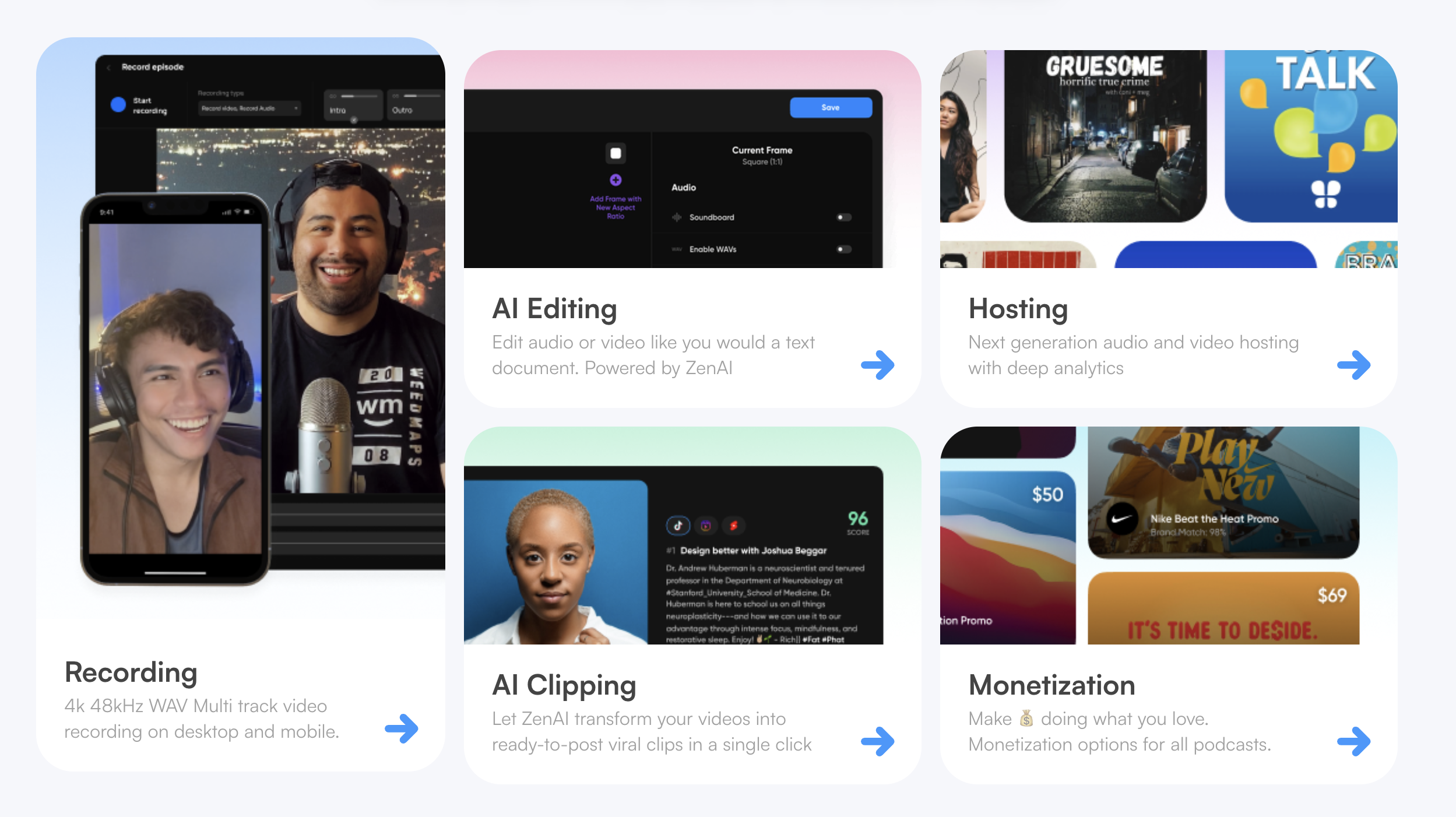
Zencastr is a browser-based, all-in-one podcasting platform that combines remote recording, AI-powered editing, podcast hosting, distribution, and monetization into a single dashboard. Guests join via a link — no downloads required — and each participant’s audio is recorded locally in lossless 16-bit 48kHz WAV quality, so your final product doesn’t depend on anyone’s internet connection.
Since launching in 2014, Zencastr has grown from a simple audio recording tool into a full production suite used by over 100,000 creators. The platform now supports video recording up to 4K, AI clipping for social media, text-based editing, and built-in monetization through its Creator Network.
The Four Plans at a Glance
Zencastr currently offers four paid tiers (monthly pricing shown below). All plans come with a 14-day free trial with no credit card required. Annual billing is available and typically saves 10–20%.
Standard — $20/mo (~$18/mo billed annually)
Best for: Solo creators getting started
The Standard plan covers all the essentials. You get unlimited recording hours, 1080p video, multitrack recording in high-quality WAV audio, the ZenAI editing suite, unlimited transcriptions, full podcast hosting and distribution, up to 1,000 video downloads per month, and a live soundboard. This plan supports 1 show and 1 user seat.
Grow — $30/mo (~$24/mo billed annually) ⭐ Most Popular
Best for: Creators building an audience
The Grow plan includes everything in Standard and adds 4K video recording, automatic filler-word removal across 20+ words, ZenAI social clips with captions, direct publishing to TikTok, Instagram Reels, and YouTube Shorts, and full-video publishing to YouTube. It still includes 1 show and 1 user seat.
Scale — $50/mo (~$40/mo billed annually)
Best for: Growing teams and multi-show operations
Scale includes everything in Grow and expands to 2 shows and 2 team seats. You also get 2,000 video downloads per month, dynamic ad insertion, advanced social scheduling, and publishing to Facebook, LinkedIn, and X.
Business — $100/mo (~$80/mo billed annually)
Best for: Podcast networks and content studios
The Business plan includes everything in Scale and extends to 5 shows and 4 team seats. You get 6,000 video downloads per month, unlimited ZenAI editing credits, priority customer support, and advanced monetization tools.
💡 Tip: Zencastr also offers custom Enterprise plans for large organizations. If you run a media company or large podcast network, contact their sales team for tailored pricing and features.
Feature-by-Feature Comparison
Here’s a detailed look at what’s included and excluded across every tier.
| Feature | Standard ($20/mo) | Grow ($30/mo) | Scale ($50/mo) | Business ($100/mo) |
|---|---|---|---|---|
| Annual Price (per mo) | ~$18 | ~$24 | ~$40 | ~$80 |
| Recording Hours | Unlimited | Unlimited | Unlimited | Unlimited |
| Audio Quality | 16-bit 48k WAV | 16-bit 48k WAV | 16-bit 48k WAV | 16-bit 48k WAV |
| Video Quality | 1080p | 4K | 4K | 4K |
| Multitrack Recording | ✅ | ✅ | ✅ | ✅ |
| Shows Included | 1 | 1 | 2 | 5 |
| Team Seats | 1 | 1 | 2 | 4 |
| Video Downloads / mo | 1,000 | 1,000 | 2,000 | 6,000 |
| ZenAI Editing Suite | ✅ | ✅ | ✅ | ✅ Unlimited |
| Transcriptions | Unlimited | Unlimited | Unlimited | Unlimited |
| Transcription-Based Editing | ✅ | ✅ | ✅ | ✅ |
| AI Filler Word Removal | ❌ | ✅ (20+ words) | ✅ (20+ words) | ✅ (20+ words) |
| ZenAI Social Clips | ❌ | ✅ | ✅ | ✅ |
| Publish to TikTok, IG, Shorts | ❌ | ✅ | ✅ | ✅ |
| Publish to FB, LinkedIn, X | ❌ | ❌ | ✅ | ✅ |
| Advanced Social Scheduling | ❌ | ❌ | ✅ | ✅ |
| YouTube Full-Video Publish | ❌ | ✅ | ✅ | ✅ |
| Dynamic Ad Insertion | ❌ | ❌ | ✅ | ✅ |
| Monetization Tools | ❌ | ❌ | ✅ | ✅ Advanced |
| Podcast Hosting | Unlimited | Unlimited | Unlimited | Unlimited |
| Distribution (Spotify, Apple, etc.) | ✅ | ✅ | ✅ | ✅ |
| Live Soundboard | ✅ | ✅ | ✅ | ✅ |
| Priority Support | ❌ | ❌ | ❌ | ✅ |
| Free Trial | 14 days | 14 days | 14 days | 14 days |
Pros and Cons of Zencastr
No platform is perfect. Here’s a balanced look at what Zencastr does well and where it falls short.
✅ Pros
- Studio-quality audio — 48kHz WAV recorded locally on each device, not dependent on internet quality
- Zero friction for guests — Participants join via a browser link with no downloads or account creation
- True all-in-one platform — Record, edit, host, distribute, and monetize from one dashboard
- AI-powered editing — Text-based editing, automatic filler-word removal, and noise reduction speed up post-production dramatically
- Unlimited hosting included — All paid plans include unlimited audio and video podcast hosting with distribution to Spotify, Apple Podcasts, YouTube, and more
- Multi-language transcriptions — Automatic transcriptions included on every tier at no extra cost
- Social content automation — ZenAI clips generate social-ready short-form content with captions automatically (Grow and above)
- No credit card trial — 14-day free trial on all plans with no payment info required upfront
- Built-in monetization — Programmatic ads, dynamic insertion, and Creator Network opportunities help you earn from your content
❌ Cons
- No free plan — The free tier was retired, leaving only paid options with a trial period
- Key features gated behind higher tiers — 4K video and AI filler-word removal require the Grow plan ($30/mo); team collaboration requires Scale ($50/mo) or above
- Internet-dependent — Requires a stable internet connection during recording with no offline recording mode available
- Recording storage limits — Recordings on lower tiers may be deleted after 30 days if not downloaded or backed up
- No live streaming — Zencastr is strictly a recording and production platform with no broadcast capabilities
- Mixed customer support reviews — Some users have reported slower response times and difficulty resolving issues, with priority support only available on the Business plan
- No refund policy — Zencastr does not offer refunds, making the trial period your only risk-free evaluation window
- Can be expensive for casual use — At $20+/month, the cost adds up for hobbyists or creators who only record occasionally
Who Should Pick Which Plan?
Standard ($20/mo) — The Solo Starter
The Standard plan gives you everything you need to launch and run a podcast: unlimited recording in high-quality audio and 1080p video, multitrack separation, basic ZenAI editing, transcriptions, and full hosting with distribution. It’s the right entry point if you’re a solo host producing one show and don’t yet need 4K video or social clipping tools. Since it bundles recording and hosting together, it can actually save money compared to paying for separate tools — most standalone podcast hosts charge $12–$15/month just for hosting.
Grow ($30/mo) — The Audience Builder
This is where Zencastr starts to shine for creators who are serious about growth. The jump from Standard gives you 4K video, automatic filler-word removal across 20+ words, AI-generated social clips with captions, and direct publishing to YouTube, TikTok, Instagram Reels, and YouTube Shorts. If you’re actively trying to grow your audience through short-form content and want a polished video product, the extra $10/month over Standard is well spent.
Scale ($50/mo) — The Multi-Show Team
Scale unlocks team collaboration with 2 seats and 2 shows, dynamic ad insertion for monetization, expanded social scheduling across Facebook, LinkedIn, and X, and doubles your video download cap to 2,000/month. This tier makes sense when your podcast operation involves another person — whether that’s a co-host, editor, or producer — or when you’re running more than one show and need to manage them from a single account.
Business ($100/mo) — The Network Operator
Built for content studios and podcast networks, the Business plan supports up to 5 shows and 4 team members, offers unlimited ZenAI editing credits, 6,000 video downloads per month, advanced monetization tools, and priority customer support. If you’re managing a portfolio of shows or running a media operation, this tier gives you the headroom and administrative control to scale without hitting walls.
The Bottom Line
Zencastr’s biggest strength is consolidation. Instead of paying separately for a recorder, editor, host, and distribution tool, you get everything under one roof. For most independent podcasters, the Grow plan at $24/month (billed annually) hits the sweet spot — it unlocks 4K video, AI filler removal, and social clipping tools that would otherwise require additional subscriptions elsewhere.
If you’re just starting out and want to test the waters, the Standard plan at $18/month (annual) is a perfectly capable launchpad. And if you’re running a team or network, the Scale and Business tiers offer meaningful collaboration and monetization features that justify the step-up in cost.
The 14-day free trial is genuinely useful — take advantage of it before committing, especially since Zencastr doesn’t offer refunds. Just remember to download your recordings promptly, as storage policies on lower tiers can catch you off guard.
Frequently Asked Questions
Does Zencastr still have a free plan?
Zencastr previously offered a free tier, but it has since been retired. All plans now require a paid subscription, though every tier includes a 14-day free trial with no credit card required.
Can I switch plans after signing up?
Yes. Zencastr allows you to upgrade or downgrade your plan at any time. Changes take effect on your next billing cycle.
What payment methods are accepted?
Zencastr accepts major credit cards and PayPal. Both monthly and annual billing cycles are available.
Is there a refund policy?
No. According to Zencastr’s terms of service, they do not offer refunds. This makes the 14-day trial especially important for evaluating whether the platform fits your needs before committing.
Does Zencastr have a mobile app?
Yes. Zencastr offers an iOS app that supports remote recording and session monitoring, making it easier to record on the go.
Always verify current details on zencastr.com/pricing. This page is not affiliated with Zencastr.
- StreamYard Business Plan Review: Is It Worth $299/Month for Teams?
- Synology DS1525+ for Podcasters: What You Need to Know Before You Buy
- StreamYard Pricing (2026): Full Comparison of Plans, Differences, Features & Discounts
- Podbean Pricing: The Best Podcast Hosting Platform for Getting Started?
- SquadCast Pricing Explained: Every Plan, Feature, and Trade-Off Worth Knowing