
Matt
How To Increase Podcast Subscriber Counts
In the evolving digital landscape, podcast creators face the challenge of growing their subscriber base amidst platform changes, such as Apple Podcasts’ transition from a “Subscribe” to a “Follow” button. This blog post aims to guide podcasters, especially those new to the scene, on effectively attracting and retaining subscribers.
1. Understanding Platform Changes
Recent updates to platforms like Apple Podcasts, which shifted terminology from “Subscribe” to “Follow,” reflect broader trends in how users engage with content. This change emphasizes the non-financial commitment of following a podcast, potentially impacting how creators encourage subscriptions. Understanding these platform nuances is crucial for podcasters to adapt their promotional strategies effectively.
2. Enhancing Discoverability
- SEO for Podcasts: Use relevant keywords in your podcast title, description, and episodes to improve visibility in search results. Tools like Google’s Keyword Planner can help identify terms your target audience is searching for.
- Leverage Social Media: Share engaging content related to your podcast on platforms like Twitter, Instagram, and Facebook. Use visuals, short audio clips, or quotes from your episodes to attract listeners.
- Collaborate with Other Podcasters: Guest appearances or shoutouts can introduce your podcast to new audiences. Consider partnerships that align with your podcast’s theme and audience interests.
3. Improving Content Quality
- Invest in Good Equipment: Clear audio quality can significantly enhance listener experience. Investing in a good microphone and editing software is essential.
- Engage Your Audience: Create content that speaks directly to your listeners’ interests. Encourage engagement by asking for comments, feedback or questions they’d like addressed in future episodes.
- Consistent Posting: Maintain a regular publishing schedule. Consistency helps build a loyal audience, as listeners look forward to new episodes.
4. Utilizing Feedback and Engagement
- Encourage Listener Interaction: Use your episodes, social media, and email to invite listener feedback. Interactive segments can make listeners feel like part of your podcast community.
- Implement Changes Based on Feedback: Show your audience that their opinions matter by making adjustments or addressing their suggestions in your podcast.
5. Marketing and Promotion Strategies
In addition to leveraging social media, collaborations, and traditional marketing tactics, a critical strategy for podcasters to increase subscriber numbers involves driving traffic back to a dedicated website. This approach serves multiple purposes: it centralizes your content, enhances listener engagement through additional resources, and significantly, it enables the growth of an email list for direct communication. Here’s how you can effectively implement these strategies:
Driving Traffic to Your Website
- Create a Compelling Landing Page: Your podcast’s website should have a clear, engaging landing page that highlights what your podcast is about and why it’s unique. Include a player for your latest episode, a brief description of your podcast, and clear calls to action (CTAs) encouraging visitors to subscribe via their preferred platform.
- Offer Exclusive Content: Encourage website visits by offering content that can’t be found elsewhere, such as behind-the-scenes insights, bonus episodes, or detailed blog posts that complement your podcast episodes.
- SEO Optimization: Ensure your website is optimized for search engines to increase visibility. Use keywords related to your podcast topics, and regularly update your site with fresh content to improve your search ranking.
Building and Utilizing an Email List
- Email Sign-Up Incentives: Offer incentives for listeners to sign up for your email list, such as exclusive content, early access to episodes, or entry into giveaways.
- Regular Newsletters: Send out regular emails to your list with updates about your podcast, including new episode announcements, sneak peeks of upcoming content, or special offers. This keeps your audience engaged and encourages regular visits to your website.
- Direct Engagement: Use your email list to solicit feedback, ask for topic suggestions, or conduct surveys. This direct line of communication builds a stronger connection with your audience and can provide valuable insights for improving your podcast.
Providing Helpful Resources and Links
- Complementary Content: Create content that adds value to your podcast episodes, such as detailed show notes, related articles, or resources that you mention in your episodes. This not only enhances your listeners’ experience but also improves your website’s SEO.
- Video Content: Consider including video versions of episodes, teasers, or related content on your website. Videos can increase engagement and provide another medium through which your audience can connect with your content.
Leveraging Your Website for Growth
- Analytics: Use website analytics to track visitor behavior, such as the most visited pages and the conversion rate of visitors to email subscribers. This data can help you refine your content and marketing strategies.
- Cross-Promotion: Promote your website and email list across your social media channels and within your podcast episodes. Make it easy for listeners to find your site by including the URL in your social media profiles and episode descriptions.
6. Leveraging Analytics
Utilizing analytics effectively can transform the way you approach podcasting, turning raw data into actionable insights that drive growth. Analytics can tell you not just who is listening but how, when, and why they engage with your content. Here’s how to make analytics work for you:
Understanding Podcast Analytics
- Get to Know Your Listeners: Analytics provide demographic information such as age, location, and device usage, helping you understand who your audience is. Tailoring your content to your audience’s preferences can lead to higher engagement rates.
- Episode Performance: Look at which episodes perform the best in terms of listens, shares, and engagement. This can guide you on what topics, formats, or guest types resonate most with your listeners.
Deep Dive into Engagement Metrics
- Listener Retention: Analytics tools often show how long people listen to an episode and at what point they drop off. Use this information to adjust the pacing, structure, or length of your episodes.
- Engagement Over Time: Tracking how engagement changes over time can help you identify trends, such as seasonal variations in listening habits or how promotional efforts impact listener growth.
Implementing Feedback Loops
- Solicit Listener Feedback: Use your insights from analytics as a basis to solicit targeted feedback from your audience, either through social media polls, email surveys, or direct listener calls-to-action within your episodes.
- A/B Testing: Experiment with different formats, release times, and marketing messages. Use analytics to measure the impact of these changes on your audience growth and engagement.
Optimizing Marketing Strategies
- Social Media and Website Traffic: Integrate your podcast analytics with website and social media metrics to see how your promotional efforts drive listeners to your episodes. Understanding the pathways your audience takes to reach your content can help you refine your marketing strategies.
- Conversion Tracking: Set up conversion goals to track how effectively you’re turning website visitors or social media followers into podcast subscribers or episode listeners.
Tools and Platforms for Podcast Analytics
- Choose the Right Tools: Many podcast hosting platforms offer built-in analytics. Additionally, third-party tools like Podtrac, Chartable, or Google Analytics (for website traffic) can offer deeper insights.
- Regular Reviews: Weekly or monthly check-ins can help you stay responsive to your audience’s preferences and adapt your content strategy accordingly.
Actionable Steps Based on Insights
- Content Strategy Adjustments: Use insights from your analytics to fine-tune your content strategy. This might mean focusing on certain topics, adjusting episode length, or changing your publishing frequency.
- Audience Engagement: Increase engagement by addressing listener interests and preferences identified through analytics. This could involve introducing new segments, Q&A sessions, or interactive content.
Conclusion
Adapting to changes in the podcasting industry and employing a diverse set of strategies is key to growing your subscriber base. Remember, building a subscriber base takes time and persistence, but with the right approach, your podcast can thrive in the competitive digital content market.
Bonus Episodes & Exclusive Content
One powerful strategy that distinguishes podcasting from traditional broadcasting is the use of exclusive content. This includes not only bonus episodes but also a range of other unique content types that can significantly enhance listener engagement and loyalty. This article aims to explore the strategic use of exclusive content to enrich the podcasting experience, foster a vibrant community, and unveil the monetization potential it holds.
The Value of Exclusive Content in Podcasting
Exclusive content is any material offered to a specific audience segment under certain conditions, such as membership tiers, Patreon pledges, or for a limited time. It goes beyond the regular podcast episodes to include bonus episodes, behind-the-scenes insights, early access to episodes, and even personalized interactions. This exclusivity adds value by making listeners feel special and appreciated, increasing their engagement and loyalty to the podcast. It turns passive listeners into active community members, who are more likely to support the podcast through word-of-mouth promotion and financial contributions.
The Patreon Model: Monetizing Exclusive Content
Patreon has emerged as a popular platform for podcasters to monetize their content by offering exclusive material to their patrons. This model allows fans to support their favorite creators financially, in exchange for access to content that’s not available to the general audience. The Patreon model creates a win-win situation: podcasters gain a steady income stream, enabling them to produce higher quality content and invest in their show’s growth, while listeners enjoy a more intimate connection with the creators and exclusive content tailored to their interests.
Case Studies: Success Stories with Exclusive Content
Several podcasts have leveraged exclusive content to great effect, significantly enhancing their community engagement and monetization efforts. Shows like “The Daily,” “Lore,” and “How I Built This” offer bonus episodes, AMA (Ask Me Anything) sessions, and early access to content for their Patreon supporters, resulting in increased listener loyalty and substantial revenue growth. These case studies demonstrate the potential of exclusive content to not only monetize a podcast effectively but also to build a deeply engaged and supportive listener base.
Creating Compelling Exclusive Content
Producing exclusive content that resonates with your audience requires understanding their interests and preferences. Here are a few tips for creating compelling exclusive material:
- Know Your Audience: Use listener surveys and social media interactions to gather insights into what your audience values.
- Be Creative: Offer a variety of content types, from bonus episodes and behind-the-scenes access to interactive Q&A sessions and personalized shout-outs.
- Maintain Quality: Ensure your exclusive content maintains the same high quality as your regular episodes to keep your audience engaged and satisfied.
Strategies for Building and Engaging Your Podcast Community
Exclusive content is a powerful tool for building a strong, engaged community around your podcast. Here are strategies to enhance community engagement:
- Exclusive Groups: Create private social media groups or forums for your supporters, fostering a sense of belonging.
- Live Events: Host live streams or meetups for your community, offering them a chance to interact with you and each other in real time.
- Listener Feedback: Actively solicit and incorporate listener feedback into your content, showing that you value their input and engagement.
Considerations Before Launching Exclusive Content
While exclusive content offers many benefits, there are important considerations to keep in mind:
- Balance: Find the right balance between free and exclusive content to ensure you don’t alienate your broader audience.
- Expectations: Clearly communicate what your audience can expect from their subscription or support, avoiding overpromising and underdelivering.
- Content Strategy: Plan your exclusive content strategy carefully to ensure it aligns with your podcast’s overall theme and goals.
Conclusion
Exclusive content holds tremendous potential for podcasters to deepen listener engagement, build a vibrant community, and explore new monetization avenues. By understanding your audience, creatively leveraging platforms like Patreon, and maintaining a commitment to quality and engagement, you can significantly enhance the value your podcast offers. Embrace the opportunity to experiment with different types of exclusive content and discover what resonates most with your listeners, setting your podcast up for continued growth and success.
Best Podcasts For Older Adults: Learning, Laughing, and Staying Inspired
For older adults, podcasts offer a unique blend of storytelling, learning, and leisure, making them a perfect companion for daily activities. This guide aims to help those searching for “best podcasts for older adults,” offering recommendations and tips on how to find podcasts that enrich the lives of senior listeners.
Why Podcasts Are Ideal for Older Adults
Here’s why podcasts are particularly appealing to the senior demographic:
- Diverse Content: Whether it’s history, health, finance, or fiction, there’s a podcast out there for every interest.
- Convenient Listening: Podcasts fit seamlessly into daily routines, whether during a morning walk, while gardening, or relaxing at home.
- Lifelong Learning: They provide an opportunity to explore new subjects or deepen knowledge in existing interests.
- Community Connection: Listening to podcasts can create a sense of connection with broader communities and ideas, bridging gaps between generations and cultures
How to Choose the Best Podcast for You
With thousands of podcasts available, how do you find the right one? Here’s a simple process to guide you:
1. Define Your Interests
Do you enjoy history, storytelling, or self-improvement? Or perhaps you’re interested in personal finance, entrepreneurship, or real estate investing? Choosing podcasts aligned with your goals makes them more valuable.
2. Find Experts Who Offer Real-World Experience
Many of the best podcasts are hosted by experts who provide insider knowledge. Whether it’s financial strategies, business-building, or passive income streams, listening to experienced voices can provide a roadmap for success.
3. Look for Podcasts That Offer Practical Value
Some podcasts share personal stories, while others provide step-by-step guidance on topics like starting a business, making investments, or generating additional income. If you’re looking for financial security or ways to improve your retirement lifestyle, podcasts that focus on money management can be particularly beneficial.
Recommended Podcasts for Older Adults
This American Life
This American Life stands as a beacon of storytelling, offering listeners an intimate look into the American condition through a tapestry of narratives. Each episode is meticulously crafted around a theme, weaving together stories that range from the profound to the profoundly ordinary. The show’s strength lies in its ability to find the extraordinary in the everyday, presenting a variety of stories—some heartwarming, others heartbreaking, but all deeply human. With its rich production values and empathetic storytelling, “This American Life” invites listeners of all ages into a deeper understanding of the world and the people who share it.
Better Health While Aging
Better Health While Aging is a vital resource for older adults and their caregivers, focusing on practical advice and information to manage health and wellness as we age. Dr. Leslie Kernisan and other medical experts share insights on common health concerns faced by seniors, from navigating chronic diseases to preventive measures for maintaining health. The podcast is grounded in evidence-based practices and offers actionable tips, making it an invaluable tool for those looking to enhance their health and quality of life in their later years.
Car Talk
Car Talk podcast, hosted by brothers Tom and Ray Magliozzi (also known as Click and Clack, the Tappet Brothers), provides a unique blend of automotive advice, insightful commentary, and unabashed humor. Despite the show ending its live run, the podcast continues to entertain with its timeless wisdom on car maintenance and repair, all delivered in the brothers’ distinctive, laughter-filled manner. It’s the perfect mix of practical advice for keeping your vehicle in top shape and lighthearted banter that can brighten anyone’s day.
How I Built This With Guy Raz
How I Built This offers an inspiring look at the journeys of entrepreneurs and innovators who have built some of the world’s most iconic companies. Host Guy Raz conducts in-depth interviews with founders, uncovering the determination, struggles, and breakthrough moments behind global brands. The podcast not only celebrates entrepreneurial spirit but also imparts valuable lessons on perseverance and creativity. It’s an engaging listen for anyone interested in the stories of challenge and success that define the business world.
Ear Hustle
Ear Hustle is a groundbreaking podcast produced inside San Quentin State Prison, offering a raw, unfiltered look at life behind bars. Co-hosts Earlonne Woods (a former inmate) and Nigel Poor delve into the everyday realities of prison life, sharing stories of the men living it. The podcast provides a platform for voices that are often overlooked, exploring themes of redemption, love, and the human spirit. “Ear Hustle” stands out for its authenticity and ability to bridge the gap between the inside and the outside world, making it a compelling listen for those interested in understanding the complexities of life in incarceration.
These podcasts each offer something special for older adults, whether it’s the pleasure of a well-told story, actionable health advice, a laugh over car troubles, entrepreneurial inspiration, or a deeper understanding of societal issues. By tuning into these shows, listeners can enrich their daily lives with a diverse range of perspectives and experiences.
Turning Podcasts into Action: From Listening to Learning to Doing
Podcasts are a fantastic source of information, inspiration, and entertainment, but their real value lies in what you do with that knowledge. Instead of just passively consuming content, why not use podcasts as a springboard for personal growth, financial improvement, and even new career opportunities? Whether you’re interested in investing, starting a business, or enhancing your lifestyle in retirement, taking action on what you learn can lead to meaningful changes in your life.
Here are three ways you can transform passive listening into real-world results:
1. Learn About Finance and Investing: From Awareness to Action
Many people listen to financial experts discuss wealth-building strategies, but few take the next step. Why? Because learning about finance and investing can sometimes feel overwhelming. The good news is that with the right approach, you don’t need a background in finance to start making smart money moves.
If you’ve ever considered:
✅ Investing in stocks but felt uncertain about risk and strategy
✅ Exploring real estate as a way to generate passive income
✅ Learning how to navigate market trends to make informed financial decisions
Then it’s time to go beyond just listening. Many successful investors started by gathering knowledge from books, mentors, and podcasts before making their first investment. The key is to move from passive consumption to active learning—applying principles in real-world scenarios.
How to Take Action:
- Start with small, low-risk investments to build confidence.
- Join financial communities where you can ask questions and learn from others.
- Find step-by-step resources designed for beginners to help you implement investment strategies.
2. Start a New Business or Side Hustle: Turn Ideas into Income
Many of today’s most successful entrepreneurs didn’t start with a business plan—they started with an idea. And for many, that idea was sparked by something they heard on a podcast.
Whether you’ve thought about launching a small business, becoming an independent consultant, or building a side hustle that brings in extra income, podcasts can be a valuable source of insights from people who have already done it.
Common podcast-inspired business ideas include:
✅ Starting a real estate investment portfolio
✅ Building an online brand through content creation
✅ Creating a consulting or coaching business based on your expertise
✅ Selling digital products or services
Podcasts give you access to experienced entrepreneurs who share their journeys, including their mistakes and triumphs. But listening alone won’t help you build wealth—taking action will.
How to Take Action:
- Identify a podcast that features successful entrepreneurs in a field that interests you.
- Take notes on recurring patterns—what strategies do they use? What pitfalls do they warn against?
- Break your goal into small, manageable steps and set a timeline for execution.
3. Improve Your Retirement Lifestyle: Financial Freedom Beyond the 9-5
Retirement doesn’t mean slowing down—it’s an opportunity to redesign your life. Whether you want to travel more, explore new hobbies, or increase your financial security, podcasts can provide inspiration and practical advice on how to make the most of your retirement years.
Many people assume retirement income is limited to pensions or savings, but what if you could:
✅ Generate passive income streams to enhance financial security?
✅ Use real estate or the stock market to grow wealth even in retirement?
✅ Start a business or side hustle to keep yourself engaged and financially independent?
Financial literacy in retirement isn’t just about cutting expenses—it’s about creating new opportunities. There are many different ways to maximize your financial freedom, but the first step is learning how to leverage the tools available to you.
How to Take Action:
- Look for podcasts that discuss financial strategies for retirement.
- Identify areas where you could increase your income or reduce financial risks.
- Take advantage of educational resources that simplify the process of managing wealth in retirement.
Final Thoughts: From Passive Learning to Active Growth
Podcasts are an incredible resource, but the most successful people use them as a launchpad for taking real action. Whether you want to improve your financial knowledge, start a new venture, or enhance your retirement lifestyle, applying what you learn is key.
If you’ve ever listened to an episode and thought, I should do something about this, now is the time. Take the insights you gain, apply them strategically, and start making progress toward your goals.
Wendy’s Started a Podcast & You Can Too. Corporate Podcast Ideas
Podcasts have become a powerful tool for brands to connect with their audience, share industry insights, and reinforce their brand identity. In this post, we will explore innovative corporate podcast ideas that can help companies stand out in a crowded market. We draw inspiration from Wendy’s unconventional approach to podcasting, which is characterized by its playful engagement with internet culture and willingness to break the mold. Wendy’s podcast serves as a prime example of how creativity and a deep understanding of one’s audience can redefine the possibilities of branded content in the evolving landscape of corporate communication.
Corporate Podcast Ideas
If you’re looking to start your own corporate podcast, use this table below to help figure out a good premise.
| Podcast Ideas | Description | Objective |
|---|---|---|
| Embrace Brand Personality | Infuse the podcast with your brand’s unique voice and traits, making content more relatable and engaging. | To enhance brand identity and create a deeper connection with the audience. |
| Leverage Memes and Trends | Incorporate current internet culture and memes to create relevant and shareable content. | To engage a digital-savvy audience and encourage content sharing. |
| Podcast as a Brand Flagpole | Use the podcast as a central element of brand identity that fans can rally around, showcasing brand values and stories. | To deepen brand engagement and loyalty among listeners. |
| Innovative Content Formats | Experiment with various podcast formats beyond the traditional interviews, such as narrative storytelling, interactive episodes, or gamified content. | To keep content fresh and engaging, encouraging listeners to return. |
| Community Engagement and Listener Involvement | Incorporate listener feedback, questions, and stories to foster a sense of community and make listeners feel valued and heard. | To build a loyal listener base and enrich podcast content through audience participation. |
| Partnerships and Collaborations | Collaborate with influencers, experts, or other brands to introduce new voices and perspectives, diversifying content. | To expand reach and introduce the podcast to new audiences while adding variety to the content. |
| Behind-the-Scenes Content | Share insights into the company’s processes, culture, and milestones, providing a transparent look at the brand’s inner workings. | To humanize the brand and build trust by showcasing transparency and company values. |
| Addressing Industry Topics | Discuss important industry issues, share insights, and forecast trends, establishing the brand as a knowledgeable authority in its field. | To position the company as a thought leader and reliable source of information within its industry. |
Embrace Brand Personality
One of the most striking aspects of Wendy’s podcast is its embodiment of the brand’s personality. The fast-food giant has long been known for its witty and sometimes sassy social media presence, and its podcast extends this voice into a new medium. For corporations looking to make their mark in the podcasting world, the key takeaway is clear: infuse your content with your brand’s unique traits. Whether your brand is known for its humor, expertise, or innovation, let these qualities shine through in your podcast. This authenticity resonates with listeners and can transform a corporate podcast from mere background noise to must-hear programming.
Leverage Memes and Trends
Wendy’s adept use of internet culture, particularly memes, highlights a valuable strategy for engaging a digital-savvy audience. By tapping into current trends and memes, companies can create content that feels relevant and relatable. This approach not only captivates listeners but also encourages them to share the content within their networks, amplifying the podcast’s reach. When incorporating memes and trends, it’s crucial to stay true to your brand’s voice and values, ensuring that your content enhances your brand identity rather than diluting it.
Podcast as a Brand Flagpole
Wendy’s podcast serves as a flagpole for the brand, a central element of its identity that fans can rally around. This concept can be particularly effective for companies looking to deepen their connection with their audience. By positioning your podcast as a cornerstone of your brand’s presence, you create a dedicated space for engaging with your audience, sharing your values, and telling your story. This approach requires a commitment to producing high-quality, consistent content that reflects your brand’s ethos and meets your audience’s expectations.
Innovative Content Formats
Breaking away from the conventional interview or discussion format, Wendy’s podcast embraces creativity in its structure and presentation. This willingness to experiment can serve as inspiration for companies exploring the podcasting space. Consider formats that align with your brand’s identity and audience preferences, such as narrative-driven episodes, interactive Q&As, or even podcast miniseries focusing on specific themes or events. The key is to keep your content fresh and engaging, encouraging listeners to return for more.
Community Engagement and Listener Involvement
A standout feature of Wendy’s podcast is its engagement with the fanbase. This involvement not only enriches the content but also builds a loyal listener base that feels valued and heard. Strategies for enhancing listener engagement include social media shoutouts, listener surveys, and interactive episodes that invite audience participation.
Partnerships and Collaborations
Wendy’s approach to collaborations, whether with influencers or other brands, underscores the potential of partnerships to diversify content and expand reach. Companies can leverage collaborations to introduce new voices and perspectives, making their podcast more dynamic and appealing. When selecting partners, look for alignment in values and audience demographics to ensure that the collaboration enhances your brand’s image and appeal.
Behind-the-Scenes Content
Sharing the inner workings of your company can humanize your brand and build trust with your audience. Wendy’s podcast gives listeners a peek behind the curtain, showcasing the brand’s culture and values. Companies can adopt this strategy by creating episodes that highlight their processes, team members, and company milestones. This transparency not only demystifies the brand but also creates a narrative that listeners can follow and invest in.
Addressing Industry Topics
Finally, Wendy’s podcast positions the brand within broader industry conversations, establishing its relevance and authority. Companies can use their podcasts to weigh in on important industry issues, share insights, and forecast trends. This thought leadership not only enriches the content but also positions the company as a knowledgeable and reliable source within its field.
In conclusion, Wendy’s podcast demonstrates that with creativity, a deep understanding of the audience, and a willingness to experiment, corporate podcasts can become a powerful tool for brand engagement. By embracing these innovative corporate podcast ideas, companies can create compelling content that resonates with listeners, reinforces their brand identity, and sets them apart in the competitive podcasting landscape.
The Ultimate Guide to Starting a Podcast on Buzzsprout
In the digital era, podcasting has become a compelling medium for storytellers, educators, and enthusiasts to share their voices with the world. Buzzsprout has solidified its position as a frontrunner in the podcast hosting space thanks to its intuitive platform, extensive distribution network, and powerful audio optimization features. This guide dives deeper into how to leverage Buzzsprout’s offerings to launch and grow your podcast successfully.
Why Buzzsprout Stands Out
Buzzsprout’s appeal lies in its balance of simplicity and power, making it accessible to beginners while robust enough for seasoned podcasters. The platform’s commitment to user satisfaction is evident in its easy-to-navigate interface, comprehensive distribution capabilities, and innovative features such as Magic Mastering. With over 120,000 podcasters onboard, Buzzsprout’s reliability and efficiency are well-documented.
Key Features at a Glance
- Extensive Distribution: Buzzsprout ensures your podcast reaches audiences across platforms like Apple Podcasts, Spotify, and Google Podcasts.
- User-Friendly Interface: The platform simplifies the podcasting process, from upload to analytics, ensuring a seamless user experience.
- High-Quality Audio: Magic Mastering adjusts your audio files to industry standards, ensuring your podcast sounds professional.
- Growth and Monetization Tools: Detailed analytics and an affiliate marketplace empower podcasters to track their growth and generate revenue.
Buzzsprout Pricing & Plan Features
Click here to get $20 in Buzzsprout Credit
Buzzsprout has pricing tiers that start at free, $12 per month, $18 per month, and $24 per month depending on the features that you need such as upload length of your podcast episodes.

Buzzsprout Pricing Plans In Detail
Click here to get $20 in Buzzsprout Credit
Buzzsprout offers a free plan and three paid tiers – let’s analyze them:
1. Free Plan
- Cost: Free
- Upload Hours: 2 hours per month
- Episodes Hosted: 90 days
- Features: Basic podcast hosting, advanced stats, unlimited team members.
- Best for: Experimenting with podcasting and testing the waters before committing to a paid plan.
2. $12/month Plan
- Cost: $12 per month
- Upload Hours: 3 hours per month
- Episodes Hosted: Indefinitely
- Features: Everything in the free plan, unlimited storage, imported podcasts, a hosted website, and access to Buzzsprout Subscriptions.
- Best for: Established podcasters with regular publishing schedules who want the security of unlimited hosting.
3. $18/month Plan
- Cost: $18 per month
- Upload Hours: 6 hours per month
- Features: Everything in the $12 plan.
- It is best for growing podcasts with larger audiences that need more regular uploads or longer episodes.
4. $24/month Plan
- Cost: $24 per month
- Upload Hours: 12 hours per month
- Features: Everything in the $18 plan.
- Best for: Seasoned podcasters with frequent uploads, sizeable audiences, and shows often exceeding an hour.
Buzzsprout’s Add-ons
- Magic Mastering: Buzzsprout’s audio optimization tool that improves audio quality automatically. Available for an additional cost on paid plans.
- Cohost AI: This add-on provides an AI-powered cohost and helps generate episode ideas and transcripts.
Which Plan Should I Choose?
Here’s a quick guide:
- Starting or unsure: Begin with the free plan to gain experience.
- Publishing consistently: Opt for the $12/month plan for unlimited hosting and essential features.
- Scaling your podcast: Upgrade to $18 or $24 plans for more upload hours.
- Wanting to monetize through subscriptions: The $12/month plan and up offer subscription features.
- Audio perfectionist: Consider adding Magic Mastering for polished sound quality.
A Growth Plan for Your Podcast on Buzzsprout
Choosing the right Buzzsprout plan needs to align with your podcast’s goals. Here’s a sample growth strategy using their pricing:
Phase 1: Experimentation (First 1-3 months)
- Buzzsprout Plan: Free
- Focus: Finding your voice, testing equipment, and developing a content flow.
- Goals: Publish a few episodes to get comfortable with the recording and editing process.
- Test audience response on social media or with friends/family for feedback.
Phase 2: Consistency (Months 4-9)
- Buzzsprout Plan: $12/month Plan
- Focus: Regular publishing schedule (weekly or bi-weekly) and basic promotion.
- GoalsBuild a dedicated, core audience.
- Start exploring guest interviews to expand reach.
- Consider the hosted website for audience engagement.
Phase 3: Expansion (Month 10 onwards)
- Buzzsprout Plan: $18/month or $24/month, depending on your growth.
- Focus: Increased content output, potential monetization, improved audio quality
- Goals: Increase episode length or frequency if needed.
- Explore subscription options to offer premium content or bonuses to members.
- Add Magic Mastering to enhance the listening experience.
Important Notes:
- Flexibility is Key: Be bold and upgrade or downgrade your plan based on your podcast’s growth.
- Community Matters: Focus on building genuine relationships with your listeners. Buzzsprout’s stats will help you understand them better.
- Marketing Counts: Consistently promote your podcast on social media, websites, etc., to attract new listeners.
Your Step-by-Step Guide to Podcasting with Buzzsprout
Embarking on your podcasting journey with Buzzsprout involves a few key steps, each designed to optimize your podcast’s quality and reach.
- The Foundation: Planning Your Podcast
Before recording, solidify your podcast’s concept, target audience, and format. This crucial first step ensures your content resonates with listeners and meets your goals.
- Gear Up: Choosing the Right Equipment
Your podcast’s audio quality significantly impacts listener retention. Selecting the right microphone, headphones, and recording environment can make all the difference. A simple USB microphone and over-ear headphones might suffice for beginners, but more complex setups may require additional equipment like mixers and multiple microphones. We have a great post on picking the right equipment for podcasting.
- Recording: Capturing Your First Episode
Effective preparation, including scripting and environment setup, can enhance your recording quality. Ensure your recording space is quiet and acoustically treated to minimize echo.
- Post-Production: Editing for Clarity and Engagement
Utilize editing software to refine your recording, removing errors and adding music or sound effects. Buzzsprout’s Magic Mastering feature can polish your audio, ensuring it meets professional standards.
- Launch and Promote: Making Your Podcast Heard
Once your episode is ready, upload it to Buzzsprout, fill in the necessary details, and publish. Utilize social media, SEO, and community engagement to promote your podcast and build your audience.
Leveraging Buzzsprout’s Resources
Buzzsprout offers a plethora of resources to guide podcasters through each step of the process:
- Buzzsprout School: This free online course covers the A-Z of podcasting, from naming your podcast to recording, editing, and launching.
- Podcasting Series by Buzzsprout: The “How to Start a Podcast” series offers insights and practical tips across various podcasting topicsfor hands-on learning.
Get $20 in Buzzsprout Credit When You Sign Up Here
Final Thoughts
Launching a podcast can be rewarding, offering a unique platform to share your insights, stories, and passions. With Buzzsprout’s comprehensive tools and resources, podcasters have everything they need to start, grow, and monetize their podcasts effectively. By focusing on quality content, strategic promotion, and engaging with your audience, your podcast can thrive in the bustling digital landscape.
Embrace the journey of podcasting with Buzzsprout and join the ranks of creators making an impact through this dynamic medium.
How to Set Up Podcast Equipment
Welcome to the era of remote podcasting, where your voice can reach millions from the comfort of your home. Creating a podcast studio in your living space is not just an exciting venture; it’s a practical step towards producing quality content that resonates with your audience. Whether you’re a seasoned podcaster looking to upgrade your setup or a newcomer eager to dip your toes in the podcasting world, this guide will walk you through every step of the process. With technology more accessible and affordable than ever, setting up a podcast studio at home is within reach for everyone. Let’s embark on this journey together, and if you need the basics to get rolling make sure you check out our no-bs podcast equipment recommendations.
Setting Up Your Podcasting Equipment: A Step-by-Step Guide for Beginners
This guide is designed for beginners, assuming you have all the equipment mentioned earlier. We’ll cover a basic setup using either a USB or XLR microphone.
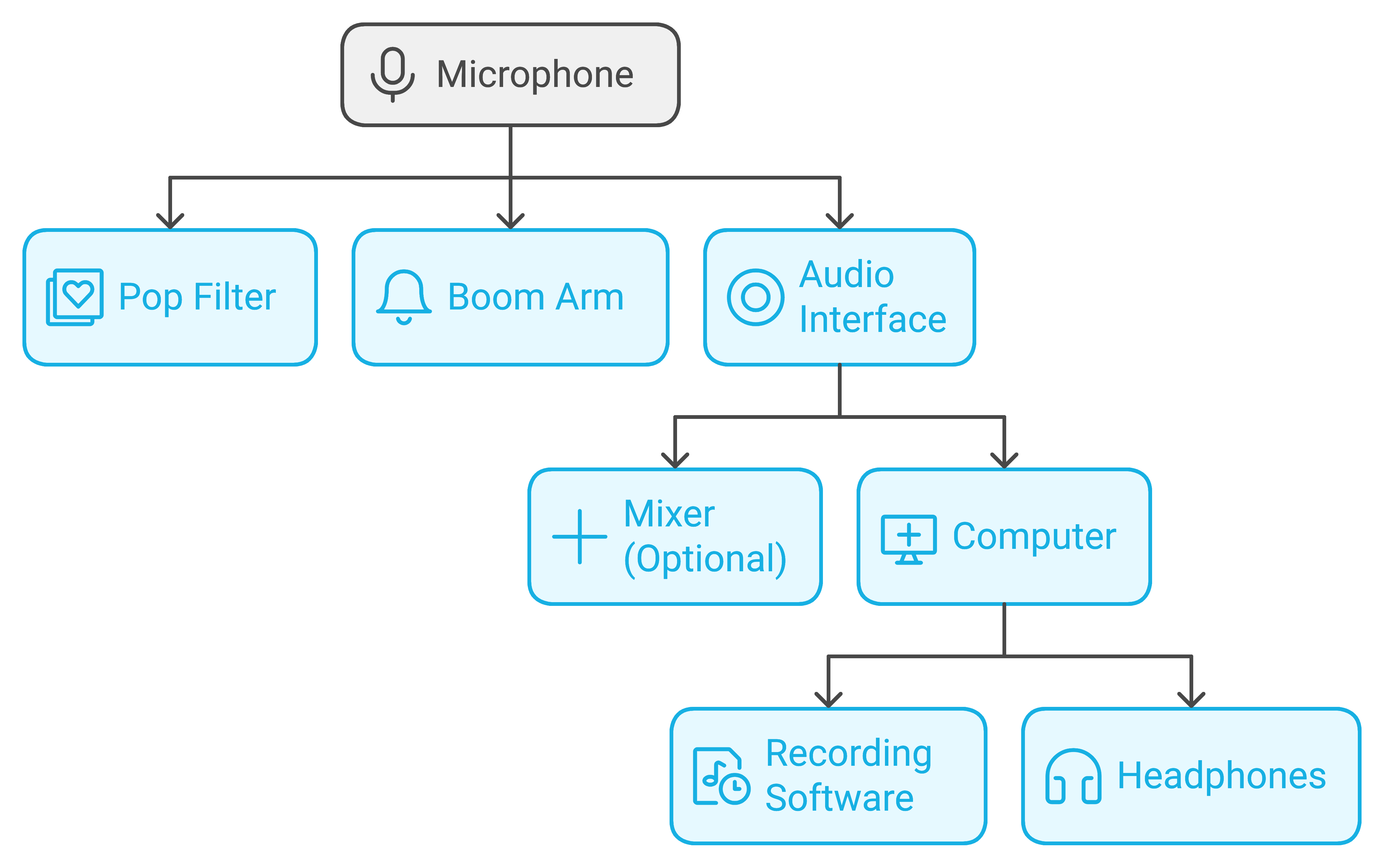
Prepare Your Space:
- Choose a quiet location: Minimize background noise and echoes. Consider using a closet or a room with soft furnishings to dampen sound.
- Gather your equipment: Have your microphone, headphones, cables, computer, and audio interface (if using XLR mics) within easy reach.
- Refer to manuals: Consult the user manuals for your specific equipment if you need guidance.
Connect Your Microphone:
Click here for my favorite podcast setup
- USB Microphone: Plug the USB cable from the microphone into an available USB port on your computer.
- Your computer should automatically recognize the microphone.
- XLR Microphone: Connect the XLR cable from the microphone to the XLR input on your audio interface.
- Connect the audio interface to your computer via USB.

Adjust Input Settings:
- USB Microphone: Open your recording software (e.g., Audacity).
- Go to the software’s preferences or settings.
- Select your USB microphone as the input device.
- Adjust the input level so the sound isn’t too loud or quiet.
- XLR Microphone: Follow the steps above, but select your audio interface as the input device.
- Adjust the gain (input level) on the audio interface if necessary.
Connect Your Headphones:
-
- Plug your headphones into the headphone jack on your audio interface (if using XLR mics) or directly into your computer (using a USB mic).
Test Your Setup:
-
- Record a test track: Speak into the microphone at your usual speaking volume and listen to the recording.
- Check for sound quality: Make sure there are no pops, clicks, or excessive background noise.
- Adjust as needed: If the sound is too quiet or too loud, adjust the input levels accordingly.
Test & Verify The Equipment By Publishing to Your Podcasting Platform
Click here for my favorite podcasting platform with a free trial
- Create a Test Episode: Record a short test episode, keeping it under 10 minutes. This can be as simple as introducing yourself and the concept of your podcast. Ensure the audio quality is good, as this will be representative of your future episodes.
- Upload the Test Episode: Use the platform’s uploading tools to add your test episode. Pay attention to the uploading speed, file size limitations, and any formatting requirements (e.g., MP3 format).
- Check for Errors: After the upload is complete, carefully review the episode on the platform’s dashboard for any errors in the title, description, artwork, or audio playback.
- Generate the RSS Feed: Most podcasting platforms automatically generate an RSS feed for your show. Locate this feed URL and validate it using an online RSS feed validator (e.g., https://validator.w3.org/feed/). This ensures the feed is correctly formatted and compatible with podcast directories.
- Submit to a Directory (Optional): If the platform doesn’t automatically distribute to directories, manually submit your RSS feed to a test podcast directory like Podcast Index ([invalid URL removed]) to verify that your episode appears correctly.
- Test on Different Devices and Apps: Listen to your test episode on various devices (e.g., computer, smartphone, tablet) and podcast apps (e.g., Apple Podcasts, Spotify, Overcast). This ensures compatibility and consistent playback across different platforms.
- Analyze Analytics (If Available): If the platform offers analytics, monitor the data for your test episode. Check for download numbers, listener demographics, and listening patterns. Although the data might be limited, it can give you a feel for the platform’s analytics capabilities.
- Test Additional Features: Explore any additional features the platform offers, such as episode scheduling, private podcasting options, or monetization tools. Test all features to ensure they function as expected and align with your needs.
- Review Pricing and Plans: If you’re using a free trial, carefully review the pricing plans and features associated with each tier. Consider your future needs and budget to determine if the platform’s pricing structure is sustainable for you.
- Seek Feedback: Share the link to your test episode with friends, family, or fellow podcasters and ask for feedback on the audio quality, platform usability, and overall listening experience.
Additional Tips For Good Podcasting Audio:
- Use a pop filter: Place a pop filter between the microphone and your mouth to reduce plosive sounds (like “p” and “b”) that can cause unwanted pops in your recording. Aim the pop filter at the microphone, with a gap of about 4-6 inches between it and the microphone.
- Position your microphone correctly: The ideal distance between your mouth and the microphone depends on the microphone type. For condenser microphones (most USB mics), a good starting point is 6-12 inches away. Experiment to find the distance that gives you the best sound quality. Here are some additional tips for microphone placement:
- Avoid pointing the microphone directly at your mouth, as this can cause boomy audio. Instead, aim it slightly off to the side.
- If you’re using multiple microphones in a group setting, position them at an equal distance from each speaker.
- Consider using a microphone stand or boom arm to hold your microphone in place and give you more flexibility in positioning.
- Speak clearly and confidently: Project your voice and articulate your words clearly. Enunciate properly to avoid muffled-sounding audio. If you tend to speak softly, practice projecting your voice without yelling.
- Experiment with microphone placement: The best microphone position can vary depending on your voice, the room acoustics, and your microphone type. Take some time to experiment with different placements to find the sweet spot where your voice sounds best. Record yourself from different distances and angles, and listen back to compare the sound quality.
For XLR Microphones and Mixers:
If you’re using a mixer with multiple microphone inputs, follow the mixer’s instructions to connect the microphones and adjust the individual levels. Then, connect the mixer’s output to your audio interface or computer. You can learn more about the best mixers for podcasting here.

Zoom PodTrak P4 Portable Multitrack Podcast Recorder
Setting Up Your Podcast Studio: Essential Tips
How to setup your home studio.
- Embrace Simplicity: A sophisticated studio doesn’t necessarily mean a complicated setup. Start with the essentials and gradually build up as you identify your needs. This approach not only keeps initial costs down but also makes it easier to manage and adapt your space.
- Budget Wisely: The market is flooded with options ranging from budget-friendly to high-end. However, a higher price tag doesn’t always guarantee better quality. Focus on finding equipment that offers the best balance between cost and performance, tailored to your specific needs.
- Quality Over Quantity: Invest in durable equipment that delivers clear, crisp audio. Even if the difference in sound quality might seem minimal at first, superior audio can significantly enhance the listening experience and set your podcast apart.
- Research is Key: Spend time understanding the features and functionalities of different pieces of equipment. Reading reviews, watching tutorials, and consulting with fellow podcasters can provide valuable insights and help you make informed decisions.
- Trust Your Instincts: Ultimately, your podcast studio is a personal space that should reflect your style and comfort. If a piece of equipment or a particular setup feels right, it’s likely a good fit for you. Remember, the goal is to create an environment where you can be your most creative and authentic self.
Choosing the Right Room
The first step in establishing a podcast studio is selecting an appropriate room. The ideal space minimizes external noise interference and optimizes sound quality. Here are criteria to guide your choice:
- Quietness: Choose a room with minimal noise from both inside and outside the house. Avoid areas near busy streets or communal spaces.
- Size and Shape: Small to medium-sized rooms are preferable. They’re easier to soundproof and treat acoustically. Avoid large, empty spaces that can produce echo.
- External Walls: Rooms without shared walls with neighbors or busy streets reduce the risk of noise intrusion.
- Windows: Fewer windows mean fewer opportunities for external noise to enter and less sound leakage.
- Flooring: Carpeted floors help absorb sound. Hard surfaces reflect sound, contributing to reverb and echo.
- Furnishings: Soft furnishings like sofas, curtains, and bookshelves can naturally dampen sound and improve acoustics.
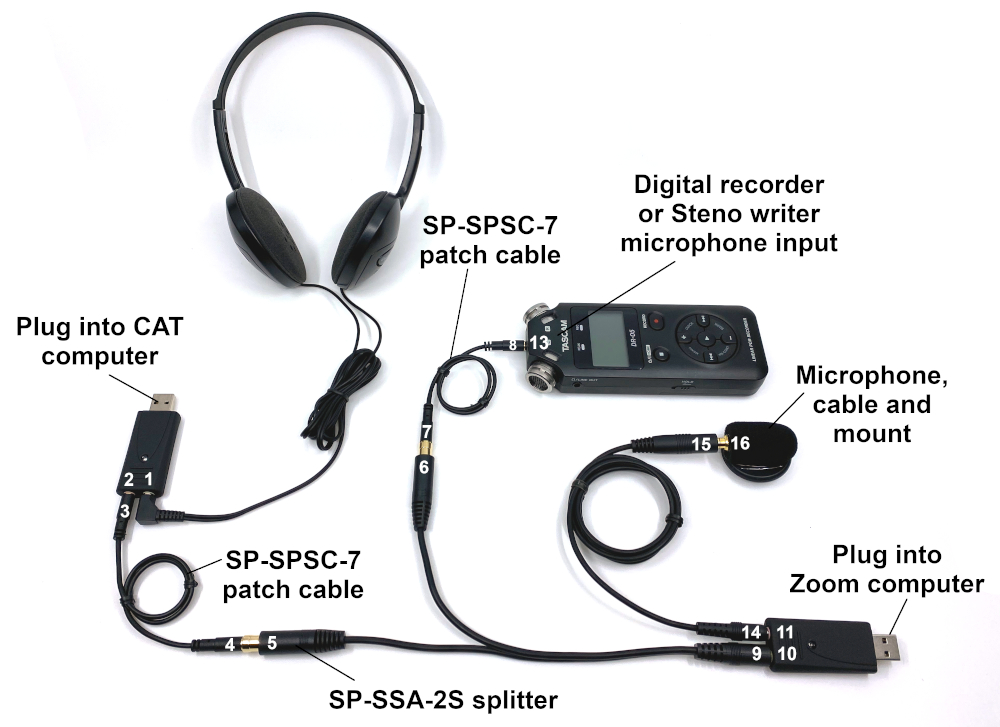
Credit: Sound Professionals
Equipment Needed for a Podcast Setup
Click here for my favorite podcasting starter kit
If you don’t yet have your podcast equipment, we’ve got an article that goes into detail. We also have a great post specific to home podcast setups here.

Microphone Selection
- Dynamic Microphones: Best for noisy environments as they pick up less background noise. Ideal for live recordings and interviews.
- Condenser Microphones: Capture a wider range of frequencies, offering studio-quality sound. Best in controlled, quiet environments.
Pop Filters and Shock Mounts
- Pop Filters: Attach to your mic stand and sit between you and the microphone to reduce plosives (hard “P” and “B” sounds).
- Shock Mounts: Prevent vibrations from reaching the mic, reducing unwanted noise.
Audio Interface
- Purpose: Converts analog signals from your microphone into digital signals that your computer can process.
- Selection: Choose based on the number of microphones you plan to use. Ensure it has enough inputs and supports the necessary power requirements (e.g., phantom power for condenser mics).
Mixer
- Use: Allows you to adjust levels, balance, and tone of multiple audio inputs before it hits your computer.
- Selection: Consider if you need a mixer based on the complexity of your podcast. Solo or dual hosts may not need one, but multi-microphone setups will benefit.
Computer and Digital Audio Workstation (DAW)
- Computer: Should have sufficient processing power and storage to handle large audio files without lag.
- DAW: Software used for recording, editing, and mixing your podcast. Options range from beginner-friendly (e.g., GarageBand, Audacity) to professional-grade (e.g., Adobe Audition, Logic Pro X).
Headphones
- Closed-back Headphones: Recommended for monitoring while recording to prevent mic pickup of playback.
- Quality: Essential for accurate audio editing and mixing. Look for comfort and clear sound reproduction.
Cables and Stands
- XLR Cables: Needed for connecting mics to audio interfaces or mixers. Ensure they are of good quality to prevent signal loss.
- Mic Stands or Boom Arms: Secure your microphone in place and can be adjusted for comfort and optimal sound capture.
Acoustic Treatment
- Purpose: Improves sound quality by controlling reverb and echo in your recording space.
- Implementation: Use acoustic panels, bass traps, and diffusers to treat your room. Even simple solutions like heavy curtains or bookshelves filled with books can significantly improve room acoustics.
Conclusion
Creating a podcast studio at home has never been more accessible. With the right equipment and setup, you can produce high-quality content that rivals professional studios. From selecting the perfect microphone to soundproofing your space, each step is crucial in crafting a listening experience your audience will love. Remember, the journey to great audio is both personal and technical; trust your instincts and invest in equipment that meets your specific needs. Now, armed with knowledge and passion, you’re ready to start podcasting and share your voice with the world.
A Podcast’s Power To Change People… And The Podcaster
In a world inundated with endless streams of content, podcasts stand out as powerful mediums capable of inspiring change. This change isn’t just limited to the listener; the creator is transformed in the process too. But beyond the entertainment and information, lies a deeper responsibility—the pursuit of truth and the embrace of change, no matter the consequences.
Body:
The Unintended Influence of Podcasts:
Podcasts across genres, from comedy to self-help, wield an unexpected power to shape thoughts, beliefs, and actions. They offer new perspectives, challenge preconceived notions, and sometimes, even redirect the course of a listener’s life. But the impact of a podcast isn’t just a testament to its content; it’s a reflection of the authenticity and truthfulness the creator brings to the table.
The Podcaster’s Evolution:
For podcasters, the act of creating is not just about sharing what they know; it’s about growing alongside their audience. Embracing change, pursuing truth, and staying flexible in thought and approach are essential. This evolution is personal and profound, leading to content that not only engages but also enlightens. The journey towards truth is fraught with challenges, yet it is this very journey that ensures the content remains relevant, impactful, and above all, genuine.
Personal Reflections on Podcasting and Change:
Drawing from personal experience, the significance of being open to change and committed to truth in podcasting cannot be overstated. This commitment influences not just the content produced but also the very essence of who we become as creators. It’s a path that demands courage, for truth can lead us into uncharted territories, but it is also the path that leads to the most meaningful outcomes—for ourselves, our listeners, and the broader community.
Embracing the Pursuit of Truth in Podcasting:
In the vast landscape of information and opinion, the line between what is considered mainstream truth and what is labeled as misinformation can sometimes blur. For podcasters, navigating this terrain is less about accepting information at face value and more about a dedicated pursuit of truth, regardless of prevailing narratives. It’s important to recognize that information, especially when it diverges from widely accepted views, isn’t inherently misinformation or bad. Instead, it represents an opportunity to course correct, engage with diverse perspectives, challenge an established narrative, and challenge our listeners to think critically.
The Value of Diverse Perspectives:
The essence of responsible podcasting lies in the willingness to explore a wide range of viewpoints, especially those that differ from our own or mainstream interpretations. This openness is crucial, as it acknowledges that truth is often multifaceted and complex. By presenting a spectrum of ideas and information, podcasters can encourage their audiences to engage in critical thinking, fostering an environment where understanding and insight can flourish beyond the constraints of conventional wisdom.
Critical Thinking and Open Dialogue:
The pursuit of truth demands more than just a passive reception of information; it requires active engagement, questioning, and dialogue. Podcasters play a pivotal role in this process by creating content that not only informs but also invites listeners to critically evaluate the information presented. This approach empowers listeners to form their own informed opinions rather than accepting any narrative—mainstream or alternative—as unequivocal truth. Always look at the data.
Challenging the Notion of Misinformation:
In the quest for truth, it’s essential to question the quick dismissal of unconventional ideas as misinformation. Such dismissals can stifle discussion and limit the potential for understanding. Instead, podcasters should strive to approach controversial or alternative information with curiosity and a rigorous commitment to uncovering the truth. This means applying the same critical analysis to all information, regardless of its source or alignment with popular belief.
The Responsibility to Seek Truth:
Podcasters, as influencers in the digital age, hold a significant responsibility to not only seek the truth but to do so with integrity and openness. This involves a balanced approach to content creation, where the goal is not to advocate for a particular perspective but to illuminate the truth through careful consideration of all available evidence. It’s about using the platform of podcasting to elevate the discourse, encourage intellectual exploration, and contribute to a more informed and thoughtful society.
A Call to Action for Podcasters:
The article culminates in a rallying cry for podcasters to wield their platforms with intentionality and integrity. Recognizing the influence we have, the responsibility to pursue truth, and the impact of our words, we are urged to approach podcasting as a form of stewardship. It’s about more than just creating content; it’s about creating a legacy of truth, authenticity, and positive change.
Conclusion:
The power of podcasting to change lives is immense, but with great power comes great responsibility. As podcasters, we are not just creators but curators of truth and change. By embracing the fluidity of ideas, committing to the pursuit of truth, and acknowledging the transformative impact our podcasts have on ourselves and others, we can ensure that this power is harnessed for the greater good. Let’s not just make podcasts; let’s make a difference.
Make Your Niche Podcast More Attractive To Advertisers
In the burgeoning world of podcasting, distinguishing your show is crucial for attracting a loyal listener base and drawing in advertisers. This comprehensive guide offers actionable insights and strategies to make your niche podcast irresistible to both demographics, focusing on creating valuable content, fostering community engagement, and leveraging marketing techniques to amplify your reach and appeal.
Deep Understanding of Your Audience
A deep dive into your audience’s preferences and behaviors is foundational. Tailoring your podcast to meet their interests boosts listener engagement and makes your show more attractive to advertisers targeting specific demographics.
- Utilize Analytics: Platforms like Spotify and Apple Podcasts provide insights into listener demographics and behavior. Analyze these data points to understand who your audience is and what content they prefer.
- Engage Directly: Use social media, listener surveys, and email newsletters as tools to ask your audience what topics or features they want more of. Engagement shows you care about their preferences, encouraging loyalty and word-of-mouth promotion.
- Listener Personas: Based on collected data, create detailed listener personas. These fictional representations of your ideal listeners help craft episodes that resonate deeply with your target audience.
Commitment to Quality
Quality is a magnet for both listeners and advertisers. It speaks volumes about your professionalism and dedication to your craft.
- Professional Audio Quality: A good microphone and learn basic sound editing skills to produce precise, pleasant audio. Consider acoustic treatment for your recording space to reduce echo.
- Content Planning: Develop a strong content strategy that aligns with your audience’s interests and calendar events relevant to your niche. Planning helps maintain a consistent release schedule, which is critical to building a reliable listener base.
- Continuous Improvement: Solicit feedback through listener surveys and social media. Use this feedback to refine your content and presentation style. Showing that you’re responsive to listener input can significantly enhance audience satisfaction and retention.
Crafting a Compelling Brand Story
Your podcast’s brand story is a narrative that encapsulates its essence, mission, and what sets it apart. A compelling brand story connects emotionally with your audience and provides a solid pitch to potential advertisers.
- Define Your Mission: Clearly articulate why your podcast exists and the unique value it provides. This mission should resonate with your target audience’s values and interests.
- Consistency Across Channels: Ensure your brand story is consistent across all platforms, from podcast episodes to website and social media profiles. Consistency reinforces your brand identity and aids in building trust.
- Leverage Success Stories: Share testimonials from listeners and success stories from past advertising collaborations. These stories can validate your podcast’s impact and serve as powerful testimonials to attract new sponsors.

Proactive Outreach to Advertisers
Attracting advertisers doesn’t happen passively; it requires targeted effort and a strong pitch highlighting the unique benefits of sponsoring your podcast.
- Develop a Media Kit: A professional media kit should include your podcast statistics, audience demographics, engagement rates, and testimonials. It’s a crucial tool for illustrating your podcast’s value to potential advertisers.
- Identify Ideal Sponsors: Research companies and brands that share your audience’s interests or values. Tailored pitches to these potential sponsors are more likely to result in successful partnerships.
- Networking: Attend industry events, participate in online forums, and join podcasting groups. Networking can uncover opportunities for sponsorships that you might not find through cold outreach alone.
Expanding Your Listener Base
A broader audience means more potential listeners and a wider appeal to advertisers.
- Social Media Engagement: Use platforms like Instagram, Twitter, and Facebook to share engaging content related to your podcast. Polls, teasers, and interactive posts can attract new listeners and encourage existing ones to share your podcast.
- SEO Optimization: Optimize your podcast’s title, description, and website for search engines. Include relevant keywords that potential listeners might use to discover content in your niche.
- Collaborations and Guest Appearances: Collaborating with other podcasters or inviting guests with their following can introduce your podcast to new audiences. It’s a mutually beneficial strategy that can significantly boost your visibility.
Being a Resource in Your Niche
Click here to learn about expanding your income base outside of advertising
Positioning your podcast as a go-to resource within your niche establishes authority, builds trust, and fosters a community of engaged listeners.
- Address Real Problems: Focus your content on solving problems or answering questions common within your niche. Listeners highly value practical, actionable advice.
- Expert Insights: Regularly feature guests with expertise in your niche. Their insights can add depth to your content and give your audience valuable perspectives.
- Provide Exclusive Content: Offer additional resources such as downloadable guides, bonus episodes, or access to exclusive online communities. These extras can enhance listener engagement and loyalty.
Conclusion
Elevating your niche podcast’s appeal is a multifaceted endeavor. It requires understanding and engaging with your audience, delivering consistently high-quality content, telling a compelling brand story, actively seeking out advertisers, and continually striving to expand your listener base. Implementing these strategies can transform your podcast into a sought-after platform for listeners and advertisers, ensuring its growth and sustainability in the competitive podcasting landscape.
A Podcaster’s Guide To A Podcast Purge
In the realm of podcasting, where the landscape is constantly evolving and expanding, it’s easy for creators and listeners alike to become overwhelmed. Between a burgeoning list of subscriptions, an ever-widening network of peers, and the ceaseless innovation in podcasting techniques, there comes a time when every podcaster faces the need for a purge. This isn’t about mindlessly slashing your podcast list or cutting off connections on a whim; it’s a thoughtful process aimed at refreshing your approach and reinvigorating your passion for the medium. Let’s delve into why a podcast purge can be beneficial and how you can effectively conduct one.
Why Consider a Podcast Purge?
Just as decluttering your living space can usher in a sense of calm and renewal, purging aspects of your podcasting life can help clear mental clutter, sharpen your focus, and reignite your enthusiasm for creating and consuming content. It’s about making room for growth, embracing quality over quantity, and aligning your podcasting activities with your current goals and interests.
How to Conduct a Podcast Purge
- Your Listening List
Start with your podcast subscriptions. If your playlist feels like a source of stress rather than inspiration, it’s time to reassess. Which podcasts do you eagerly anticipate each week? Which ones have you been skipping over? Unsubscribe from shows that no longer pique your interest or align with your aspirations. This not only simplifies your listening experience but also ensures that you’re filling your time with content that truly enriches you.
- The Communities You Belong To
Podcasting is as much about community as it is about content. Whether it’s online forums, social media groups, or collaborative networks, the communities you’re part of should offer value, whether in the form of support, inspiration, or information. Take a moment to consider which communities genuinely contribute to your podcasting journey and which might be draining your energy or time. It might be tough, but stepping back from communities that no longer serve your needs can open up space for more meaningful engagement elsewhere.
- The Social Connections You’ve Made
Networking is crucial in the podcasting world, but not all connections foster genuine collaboration or growth. Reflect on the relationships you’ve built. Are there connections that have become one-sided or no longer contribute positively to your podcasting experience? While it’s important to network, it’s equally important to curate your social circle to include individuals and groups that offer mutual support and enrichment.
- Your Entire “Process” of Podcasting
Finally, examine your podcasting process. This encompasses everything from content creation and editing to promotion and engagement with your audience. Are there aspects of your process that feel cumbersome or outdated? Are there new tools, techniques, or strategies you’ve been meaning to try? Streamlining your workflow and experimenting with new ideas can not only improve the quality of your podcast but also rekindle your enthusiasm for the craft.
Conclusion
Embarking on a podcast purge is about making intentional choices to enhance your podcasting journey. It’s a chance to refocus on what truly matters to you as a creator and a listener, ensuring that your efforts and energy are invested in areas that bring you joy, fulfillment, and growth. Remember, the goal isn’t to diminish your podcasting world but to enrich it by fostering connections, content, and practices that align with your evolving interests and goals. As you sift through your podcasting life, keep in mind that some elements are essential — staples like Podcast Pontifications, with their insightful and inspiring content, are always worth keeping on your list.
A Glimpse of Podcasting’s Voice-Only Future
In today’s digital age, podcasts have become a powerful tool for businesses to connect with their audience, share their expertise, and reinforce their brand identity. However, creating a podcast that truly reflects your brand’s values and message requires more than just great content; it demands a strategic alignment with your brand’s core values and message. Here are three valuable tips to help you ensure that your podcast not only reaches your target audience but also perfectly embodies your business’s brand.
Become a Listener of Your Own Podcast and Others in Your Niche
The first step towards aligning your podcast with your brand is to become an avid listener, not just of your own content but also of other podcasts in your niche. By doing so, you gain critical insights into what appeals to your audience, what sets your podcast apart, and how you can further refine your content to better reflect your brand’s identity. Listening to your own podcast through the ears of your audience helps you catch inconsistencies, gauge the quality of your content, and ensure your brand’s voice is consistently represented. Additionally, understanding the landscape of your niche through other podcasts can inspire you to innovate and stay ahead of trends, making your podcast a true extension of your brand.
Give Your Team Time to Make Great Content
Quality content that is helpful is the cornerstone of a successful podcast that enhances your brand. Rushing through the production process can lead to subpar episodes that detract from your brand’s reputation. It’s crucial to give your team the time and resources they need to create well-researched, engaging, and polished content. Allowing ample time for content creation helps maintain a high standard of quality in each episode, ensuring that your podcast serves as a positive reflection of your brand. Remember, a podcast that consistently delivers value to its listeners strengthens your brand’s credibility and fosters a loyal audience.
Partner with an Expert
Podcasting is an ever-evolving medium, with new trends and technologies emerging regularly. To ensure your podcast remains relevant and continues to effectively represent your brand, consider partnering with an expert. A podcasting expert or agency can offer valuable insights into the latest trends, provide access to advanced production tools, and help refine your content strategy to keep your podcast aligned with your brand’s goals. Choosing the right partner, one that understands and resonates with your brand’s vision, can elevate your podcast from just another show to a key component of your brand’s identity.
Conclusion
A podcast can be a potent tool in your brand’s marketing arsenal, but only if it accurately reflects and enhances your brand’s identity. By becoming a critical listener, prioritizing quality content, and partnering with experts, you can ensure your podcast not only reaches your target audience but does so in a way that strengthens your brand. These steps will help you create a podcast that not only informs and entertains but also builds deeper connections with your audience, reinforcing your brand’s values and mission. If you’re looking to elevate your business podcast or need guidance on aligning it more closely with your brand, don’t hesitate to get in touch.
- The Ultimate Guide to Choosing Cameras and Lenses for Podcasting
- StreamYard Business Plan Review: Is It Worth $299/Month for Teams?
- Synology DS1525+ for Podcasters: What You Need to Know Before You Buy
- StreamYard Pricing (2026): Full Comparison of Plans, Differences, Features & Discounts
- Podbean Pricing: The Best Podcast Hosting Platform for Getting Started?