episode
How to Increase Podcast Ratings and Rank on Spotify
Last Updated: June 2026
The Spotify podcast charts are daily-updated rankings of the most popular shows on Spotify, broken into Top Podcasts (the top 200 per country by weekly unique audience), Trending Podcasts (the fastest-growing shows), and Top Podcasts by category. You can view the live charts below. Placement is earned through real listening and engagement, not bought — so the reliable way onto them is followers who actually listen.
Below you’ll find the live Spotify charts, how the rankings actually work, how to climb them, and an honest answer to whether chasing a top spot is worth it.
Live Spotify Podcast Charts
Live data from Spotify, updated daily. If the embed doesn’t load, view the charts directly at podcastcharts.byspotify.com.
What Are the Spotify Podcast Charts?
The Spotify podcast charts are Spotify’s official rankings of the top shows on its platform, refreshed every day. They exist so listeners can discover what’s popular and so creators can benchmark their growth. There are three distinct charts:
- Top Podcasts: The top 200 shows in each country, ranked by weekly unique audience.
- Trending Podcasts: The top 200 shows gaining popularity fastest, based on a combination of growth signals.
- Top Podcasts by Category: The top 50 shows in each category, available in select countries.
The charts are country-specific, so a show can rank highly in one market and not appear in another. At the time of writing, The Joe Rogan Experience sits at #1 on the US Top Podcasts chart, which gives you a sense of the scale required to reach the very top.
How Are the Spotify Podcast Charts Ranked?
Spotify ranks the charts on listening behaviour and engagement, not raw download counts. That means follows, actual plays, and how much of your episodes people listen to all feed the ranking. This is a meaningful difference from older download-based charts: you can’t inflate your way up with empty downloads, because Spotify is measuring genuine on-platform listening.
Two practical consequences follow. First, Spotify’s own advice is direct: remind your fans to follow and listen to you on Spotify, because that engagement is what the chart rewards. Second, which category chart you can appear on is decided by the first category listed in your RSS feed — so if you’re charting in the wrong category, fix the category order in your feed (your Spotify for Creators settings and your host control this).
How Do You Get Your Podcast on the Spotify Charts?
Getting on the charts comes down to concentrating real listening and engagement on Spotify, in the right category, over a short window. There’s no shortcut that beats genuine audience, but a few things measurably help.
- Be properly distributed on Spotify. Make sure your show is live on Spotify with correct categories and metadata. If you’re not there yet, see how to upload your podcast to Spotify.
- Drive follows and listens, on Spotify specifically. Because the chart is engagement-based, a direct call to action to follow and listen on Spotify moves the needle more than generic “subscribe everywhere” asks.
- Set the right primary category. The first category in your RSS feed determines your category chart, where it’s far easier to crack the top 50 than the overall top 200.
- Concentrate a launch or big episode. Since Top Podcasts uses weekly unique audience and Trending rewards fast growth, rallying your audience around a single release window helps.
- Stay consistent. A reliable schedule keeps weekly listeners returning, which is exactly what the ranking measures. Lower churn means a stronger, stickier weekly audience.
Underneath all of it, you need the audience in the first place. Our guides to growing your podcast audience, increasing listeners, and promoting on social media cover the work that actually fills the chart-eligible audience. A host that distributes cleanly to Spotify and gives you reliable analytics makes this easier — Buzzsprout handles both.
Is a Top Placement in Spotify’s Podcast Charts Worth the Price?
A genuinely earned chart placement is valuable; a bought one usually isn’t worth it. Because Spotify’s charts run on real listening and engagement rather than downloads, the old playbook of buying bulk downloads to fake a chart debut doesn’t work the way it once did on download-based charts — and paid download schemes risk violating platform terms.
That doesn’t mean promotion is pointless. Spending on legitimate audience growth (ads that drive real Spotify follows, cross-promotion, guesting) can absolutely help you chart, because it produces the genuine engagement the algorithm measures. The distinction is simple: paying to reach real new listeners is an investment; paying for hollow numbers to game a ranking is a waste, and increasingly a futile one. Chase the audience, and the chart placement follows.
How Do You Track Your Chart Performance?
Track your standing with a mix of Spotify’s own data and platform-independent analytics. Spotify for Creators shows your follows, plays, and engagement on the platform that the charts are based on, so it’s your primary dashboard for chart progress.
For a fuller picture across every app, layer in independent analytics. Our OP3 analytics walkthrough and roundup of podcast analytics tools cover the options, and our piece on what social stats can and can’t tell you explains why engagement, not vanity metrics, is the signal that maps to chart movement. If charting is part of a monetization plan, see Spotify podcast monetization.
The Bottom Line on the Spotify Podcast Charts
The Spotify charts are a daily, engagement-based scoreboard of the most-listened and fastest-growing shows. You can’t buy your way to a lasting spot, but you can earn one by driving real follows and listens on Spotify, picking the right primary category, and keeping a consistent release schedule that holds your weekly audience. Use the live charts above to watch your category, then focus on the genuine growth that actually moves you up it.
Frequently Asked Questions About the Spotify Podcast Charts
What are the Spotify podcast charts?
They are Spotify’s official daily rankings of its most popular shows. There are three: Top Podcasts (top 200 per country by weekly unique audience), Trending Podcasts (fastest-growing shows), and Top Podcasts by category (top 50 in select countries). They help listeners discover shows and let creators benchmark growth.
How often do the Spotify podcast charts update?
The Spotify podcast charts update daily. Rankings are based on recent listening behaviour and engagement, so your position can move from day to day as follows, plays, and listen-through shift. This is why a concentrated push of real engagement over a short window can lift a show onto the charts.
How are the Spotify charts calculated?
Spotify ranks shows on listening behaviour and engagement on its platform, not raw downloads. Follows, actual plays, and how much of each episode people listen to all count. The Top Podcasts chart specifically uses weekly unique audience, while Trending rewards fast growth across several signals.
How do I get my podcast on the Spotify charts?
Be live on Spotify with the correct primary category, then drive genuine follows and listens on the platform, ideally concentrated around a launch or key episode. Charting in your category’s top 50 is far more achievable than the overall top 200, and consistency keeps the weekly audience the chart measures.
Can you buy your way onto the Spotify podcast charts?
Not reliably, and you shouldn’t try. Because the charts run on real listening and engagement rather than downloads, buying bulk downloads doesn’t work the way it did on older charts, and paid download schemes can violate platform terms. Spending on legitimate growth that earns real Spotify follows is the only worthwhile approach.
Why isn’t my podcast showing in the right category chart?
Spotify uses the first category listed in your RSS feed to decide which category chart your show can appear on. If you’re charting in the wrong category, reorder your podcast’s categories in your RSS feed so the correct one is first. Your podcast host’s settings control this.
What is the difference between Top and Trending podcasts on Spotify?
Top Podcasts ranks the 200 biggest shows per country by weekly unique audience, so it favours established shows. Trending Podcasts ranks the 200 shows gaining popularity fastest, based on growth signals, so newer or surging shows can appear there even before they reach the Top chart.
Is being on the Spotify podcast charts worth it?
An earned placement is valuable for visibility and credibility; a bought one is not. The charts reward genuine engagement, so the worthwhile investment is in real audience growth that produces follows and listens, not in hollow numbers meant to game a ranking. Chase the audience and the placement follows.
How do I track my Spotify chart performance?
Use Spotify for Creators for follows, plays, and engagement on the platform the charts are based on, then layer in independent analytics like OP3 for a cross-app view. Watch engagement metrics rather than vanity numbers, since engagement is what actually maps to chart movement.
Do downloads affect Spotify chart ranking?
Not in the way they affect download-based charts elsewhere. Spotify’s charts are built on on-platform listening and engagement, so follows and genuine plays matter far more than a download count. This makes the charts harder to manipulate and more reflective of an actively listening audience.
Royalty-Free Music for Podcasts: Music Rights & Licensing for Beginners
Last Updated: June 2026
No — you can’t legally play just any music you want on a podcast. Most commercial songs require expensive licensing (often thousands of dollars for a few seconds), so the practical, affordable path is royalty-free or purpose-licensed podcast music. Below is exactly what you can and can’t use, what each license type actually means, whether fair use applies, and where to get music that won’t get your show hit with a copyright claim or takedown.
If you just want the short version, we also keep a quick music-rights cheat sheet. Otherwise, read on for the full picture.
Can You Play Copyrighted Music on a Podcast?
No, not without permission. Playing a copyrighted song on your podcast without a license is copyright infringement, even if you only use a few seconds and even if you credit the artist. Podcast feeds are distributed publicly across platforms like Spotify, Apple Podcasts, and YouTube, which is exactly the kind of public use that requires the rights holder’s permission.
The consequences are real: episodes get pulled, you can face Content ID claims that demonetize or block your show, and in serious cases, fines or legal action. The cost of licensing a popular track is also steep — securing rights to a well-known song can run into thousands of dollars, which is why almost no independent podcast uses commercial music. For the related question of whether your own show is protected, see are podcasts protected by copyright.
What Music Can You Legally Use on a Podcast?
You have five legal options for podcast music: royalty-free music, music you’ve licensed directly, public domain works, Creative Commons tracks, and original music you create or commission. Royalty-free is by far the most popular because it’s affordable, pre-cleared, and easy.
- Royalty-free music: Pay once (or subscribe) and use tracks without per-play royalties. Pre-cleared for podcasts, so no copyright worries. The easiest and cheapest route for most shows.
- Directly licensed music: Negotiate rights with the artist, label, or publisher. Thorough but slow and often expensive.
- Public domain music: Works whose copyright has expired are free to use with no restrictions, though recordings of them may still be protected.
- Creative Commons music: Some artists release tracks under Creative Commons licenses that allow use with conditions like attribution or non-commercial-only. Check the specific license carefully.
- Original music: Compose it yourself or commission a musician for a unique, fully owned sound.
For ready-to-use options, see our free podcast music roundup, free intro music, and free sound effects.
What Are the Music License Types?
If you do license a specific song, you may need more than one type of license depending on how you use it. These are the ones that matter for podcasting:
- Public performance license: Grants the right to play a musical work publicly, which includes broadcasting it to your podcast audience.
- Synchronization (sync) license: Required when you pair music with other content, such as syncing a track under your podcast audio or video.
- Mechanical license: Needed to reproduce and distribute a copyrighted composition, which is effectively what publishing an episode does.
- Master use license: Required to use a specific recording of a song (the actual master), obtained from whoever owns that recording, usually the label.
The takeaway: licensing a single commercial song properly can mean clearing several rights with several parties. That complexity is exactly why royalty-free music exists.
Does Fair Use Cover Music in a Podcast?
Rarely, and you shouldn’t rely on it. Fair use is a legal defense, not a permission slip, and courts decide it case by case using four factors: the purpose of the use, the nature of the work, the amount used, and the effect on the work’s market value. There is no “safe” number of seconds — even a short clip of an iconic song can be ruled infringing.
Fair use can apply to genuine criticism, commentary, or education, but the analysis is genuinely uncertain and the downside (a lawsuit) is large. For music specifically, the reliable move is to skip the fair-use gamble entirely and use royalty-free or licensed tracks with clear terms. If you’re building a show around commentary on copyrighted audio, that’s a conversation for an intellectual-property attorney, not a blog post.
What Is the Best Royalty-Free Music for Podcasts?
Royalty-free libraries are the easiest and cheapest way to add legal music to a podcast. They offer thousands of pre-cleared tracks across genres for a one-time fee or subscription, so you can score intros, transitions, and ad breaks without copyright risk. Here are the main providers and what each costs in 2026.

| Provider | Model | Starting Price (2026) | Best For |
|---|---|---|---|
| PremiumBeat | Subscription or per-track | $9.99/mo (Creator, billed annually); single tracks also available | Curated, studio-quality tracks from the Shutterstock catalog |
| Epidemic Sound | Subscription | ~$9.99–$15/mo (Personal) | Podcasters wanting an all-rights-included catalog with no Content ID claims |
| Artlist | Subscription | $14.99/mo (Social, billed yearly) | Creators wanting music plus SFX, footage, and templates |
| Soundstripe | Subscription | $19.99/mo (Creator) | Workflow features and bundled sound effects |
| Bensound | Free w/ attribution or paid | Free, or ~$9.99/mo | Hobbyists and tight budgets |
| YouTube Audio Library | Free | $0 | Brand-new podcasters who need zero-cost tracks |
One honest caveat worth knowing: “royalty-free” doesn’t always mean zero further obligations. Some libraries still work with performing-rights organizations, so read each license for how it handles monetization and the number of shows or channels you can cover. For podcasting, the per-show economics usually favor a subscription you can use across every episode.
For curated, broadcast-quality tracks, PremiumBeat is the option we point most podcasters to first; our full PremiumBeat for podcasters breakdown covers the plans in detail.
How Do You License a Specific Song for a Podcast?
If you’re set on a particular copyrighted track, licensing it is a four-step process. Be realistic that for a popular song, this is often slow and costly enough that royalty-free becomes the obvious choice.
- Identify the rights holder. Find who owns both the composition and the recording, which may be the artist, a publisher, and a label.
- Choose the right license(s). Based on how you’ll use it, you may need sync, mechanical, master use, or performance rights.
- Negotiate terms and fees. Agree on cost, duration, territory, and any conditions with the rights holder.
- Document everything. Keep written records of every agreement, including scope and duration, as proof of compliance.
How Should You Use Music in Your Episodes?
Once you have legal tracks, music does the most work in a few specific places: a branded intro, a consistent outro, transitions between segments, and bumpers around ads or guest introductions. Used well, these create a recognizable sonic identity and smooth pacing.
A few principles keep it professional: match the music’s energy to your content, keep background beds low enough that they never compete with the dialogue, and reuse consistent themes so listeners start to recognize your show by sound. Instrumental tracks usually work best under speech, since lyrics fight your voice for attention.
The Bottom Line on Using Music in Your Podcast
You can’t legally drop a commercial hit into your show, but you don’t need to. Royalty-free music gets you broadcast-quality intros, outros, and beds with clear terms and no fear of takedowns, usually for less than the price of a coffee per month. Skip the fair-use gamble, pick a library that fits your budget and how many shows you run, and put your energy into the content instead of copyright worry.
Browse podcast-ready royalty-free tracks on PremiumBeat →
Frequently Asked Questions
Can you play copyrighted music on a podcast?
No, not without a license. Using a copyrighted song without permission is infringement, even if you use only a few seconds or credit the artist. Podcasts are distributed publicly, which requires the rights holder’s permission. The practical alternative is royalty-free or purpose-licensed music made for podcasts.
Can you use a few seconds of a song under fair use?
There is no safe number of seconds. Fair use is a case-by-case legal defense, not a permission slip, and even a short clip of an iconic song can be ruled infringing. For music, it’s far safer to use royalty-free or licensed tracks than to rely on a fair-use argument.
What music can I legally use on my podcast?
Five options: royalty-free music, directly licensed tracks, public domain works, Creative Commons music (subject to its conditions), and original music you create or commission. Royalty-free is the most popular because it’s affordable, pre-cleared for podcasts, and removes copyright risk entirely.
What is royalty-free music?
Royalty-free music is licensed for a one-time fee or subscription, letting you use tracks without paying per-play royalties. Libraries pre-clear the music for uses like podcasts, so you avoid copyright claims. It’s the easiest and cheapest legal way to add music to a show.
What is the best royalty-free music site for podcasts?
For curated, broadcast-quality tracks, PremiumBeat is a strong first choice, with subscriptions from about $9.99/month billed annually. Epidemic Sound and Artlist are excellent alternatives, and YouTube Audio Library is a solid free option. The best pick depends on your budget and how many shows you run.
Do I need a license to play music on my podcast?
Yes, unless the music is royalty-free, public domain, or your own. Licensing a specific commercial song can require several licenses (sync, mechanical, master use, and performance), often from multiple parties. That complexity is why most podcasters use royalty-free libraries instead.
What happens if you use copyrighted music without permission?
Your episode can be removed, flagged by Content ID systems that block or demonetize it, and you can face fines or legal action. Platforms like Spotify and Apple Podcasts enforce this strictly, and repeated violations can damage your show’s standing and reach.
Is music in the public domain free to use?
The composition is free once its copyright expires, but a specific recording of it may still be protected. To be safe, use a public domain composition performed in a recording you also have the rights to, or choose a royalty-free version cleared for commercial use.
Can I use Creative Commons music on a podcast?
Often yes, but only within the specific license’s conditions. Some Creative Commons tracks require attribution, some prohibit commercial use, and some prohibit modification. Always read the exact license and follow its terms; a monetized podcast may not qualify under a non-commercial license.
How much does podcast music cost?
Royalty-free subscriptions typically run about $10 to $25 per month, with free options like the YouTube Audio Library available. Licensing a popular commercial song, by contrast, can cost thousands of dollars and require clearing multiple rights, which is why royalty-free is the standard choice for podcasters.
How to Monetize a Podcast on Buzzsprout
Last Updated: June 2026
Buzzsprout is one of the most popular podcast hosting platforms, and beyond hosting it bundles in built-in ways to make money: Buzzsprout Ads (automatic ad revenue you share in), Listener Support and Premium Content subscriptions, and a curated Affiliate Marketplace. Paid plans start at $19/month. Here’s exactly how Buzzsprout helps you grow and monetize your show, what it costs in 2026, and where it fits.
What Is Buzzsprout?
Buzzsprout is a podcast host trusted by over 120,000 podcasters that handles storage, distribution to every major listening app, a built-in podcast website, IAB-certified analytics, and a set of monetization tools in one interface. Its appeal is that everything just works: you upload audio, it cleans up and distributes the episode, and you can promote and monetize it without stitching together separate services.
Pricing is based on monthly upload hours rather than file size, which suits regular weekly shows. If you’re weighing it against other hosts, see our Podbean vs Buzzsprout, Buzzsprout vs Libsyn, and Buzzsprout vs Captivate comparisons.
How Does Buzzsprout Help You Make Money?
Buzzsprout offers four built-in revenue streams, and a key advantage is that none of them are exclusive: you can run them alongside your own sponsorships and other platforms. It covers the monetization basics independent podcasters need to start earning, rather than acting as a full programmatic ad network.
| Tool | What It Does |
|---|---|
| Buzzsprout Ads | Automatically inserts ads into your episodes and pays you a share of the revenue. Available to shows that meet eligibility criteria (around 1,000 downloads in 30 days). |
| Listener Support | Lets your audience make recurring contributions to support the show, deposited into your Buzzsprout Wallet. |
| Premium Content | Offer paid subscribers exclusive or bonus episodes through a private RSS feed they can use in their favorite app. |
| Affiliate Marketplace | A curated, pre-vetted marketplace of podcast-relevant products you can promote for cash commissions, with no minimum audience size. |
| Dynamic Content | Insert or swap your own sponsor and affiliate reads across your entire back catalog, so older episodes keep earning. |
For how these stack up against other hosts’ monetization, see the best podcast platforms for monetization and our roundup of top-paying podcasting platforms.
Start your podcast on Buzzsprout →
What Is Buzzsprout Ads, and Who Qualifies?
Buzzsprout Ads is Buzzsprout’s automatic, revenue-share advertising program. Once your show is eligible, ads are inserted into your episodes for you and you earn a share of the revenue, with no need to find your own sponsors. It’s a genuine set-it-and-go option for podcasters who don’t yet have direct ad deals.
The catch is eligibility: Buzzsprout Ads is only open to shows that meet a download threshold, commonly cited as about 1,000 downloads in 30 days. Below that, the practical monetization path is Listener Support, Premium Content subscriptions, the Affiliate Marketplace, and inserting your own affiliate reads through Dynamic Content, none of which have an audience minimum.
How Much Does Buzzsprout Cost?
Buzzsprout’s paid plans cost $19, $39, or $79 per month, based on monthly upload hours (4, 15, or 35 respectively). Annual billing runs $199, $399, or $799 per year, saving roughly 15–19%. There’s a free 90-day trial rather than a permanent free plan: episodes are removed after 90 days unless you upgrade. Note that Buzzsprout raised prices from the older $12/$18/$24 structure, so older guides you’ll find elsewhere are out of date.
| Plan | Monthly | Annual | Upload Hours/Month |
|---|---|---|---|
| Free trial | $0 | — | Test the platform; episodes removed after 90 days |
| 4 hours | $19 | $199 | Best for a weekly one-hour show |
| 15 hours | $39 | $399 | Longer interviews or multiple shows |
| 35 hours | $79 | $799 | Indie networks and high-volume creators |
All paid tiers include unlimited storage, advanced analytics, the podcast website, directory distribution, and the monetization tools above. Optional add-ons (Magic Mastering for audio cleanup and Cohost AI for titles, descriptions, and transcripts) run roughly $5–$10 each per month. For the full breakdown including overage fees, see our Buzzsprout pricing guide.
What Platforms Does Buzzsprout Publish To?
Buzzsprout submits your show to every major podcast directory and listening app in a single setup, including:
- Apple Podcasts
- Spotify
- YouTube Music
- Amazon Music
- iHeartRadio
- Pandora
- TuneIn
- Overcast
- Pocket Casts
- Castro
- Podchaser
- Podcast Addict
If you’re setting up on Spotify specifically, our guide to uploading your podcast to Spotify walks through it, and our guide to starting a podcast on Buzzsprout covers the whole setup.
Is Buzzsprout Worth It for Monetization?
For beginner and intermediate podcasters who want hosting and monetization in one easy package, yes. Buzzsprout’s strength is the overall experience: smooth onboarding, a quality podcast website, reliable IAB analytics, and built-in earning tools that don’t lock you into exclusivity.
Be realistic about the ceiling, though. Buzzsprout isn’t a full ad network or a programmatic dynamic-ad-insertion suite with geo-targeting and campaign scheduling. Shows that have outgrown the basics and want a larger ad marketplace may look at hosts built around that. For the bigger monetization picture, see can you make money from a podcast.
The Bottom Line on Buzzsprout for Growth and Monetization
Buzzsprout pairs genuinely easy hosting with a practical, non-exclusive set of monetization tools: automatic Buzzsprout Ads once you qualify, plus Listener Support, Premium Content, and an Affiliate Marketplace that work from day one. At $19/month to start, it’s a strong all-in-one home for podcasters who want to grow and earn without managing a stack of separate services.
Try Buzzsprout and start monetizing your show →
Buzzsprout Podcast FAQ
How does Buzzsprout help you make money?
Buzzsprout offers four built-in revenue streams: Buzzsprout Ads (automatic revenue-share advertising for eligible shows), Listener Support (recurring contributions), Premium Content (paid subscriber-only episodes), and an Affiliate Marketplace of pre-vetted products you promote for commission. You can also insert your own sponsor reads across your catalog with Dynamic Content.
What is Buzzsprout Ads?
Buzzsprout Ads is an automatic advertising program that inserts ads into your episodes and pays you a share of the revenue, without you sourcing sponsors. It’s available to shows meeting an eligibility threshold, commonly cited as around 1,000 downloads in 30 days. Smaller shows can still use Buzzsprout’s other monetization tools.
How much does Buzzsprout cost in 2026?
Buzzsprout’s paid plans are $19/month (4 upload hours), $39/month (15 hours), and $79/month (35 hours), with annual billing at $199, $399, and $799. There’s a free 90-day trial rather than a permanent free plan. The older $12/$18/$24 pricing has been retired.
Does Buzzsprout have a free plan?
Buzzsprout offers a free 90-day trial rather than a permanent free plan. You can upload episodes, use basic analytics, and test the publishing workflow without a credit card, but episodes are removed after 90 days unless you upgrade to a paid plan. Add-ons aren’t included in the trial.
What is the Buzzsprout Affiliate Marketplace?
It’s a curated marketplace of podcast-relevant products and services that Buzzsprout pre-vets for quality and reputation. You earn cash commissions on sales from your unique affiliate link, and there’s no minimum audience size, so even brand-new podcasters can participate alongside their other monetization.
Can you monetize old episodes on Buzzsprout?
Yes. Buzzsprout’s Dynamic Content lets you insert or swap sponsor and affiliate reads across your entire back catalog, so older episodes keep earning. If you qualify for Buzzsprout Ads, ads can also be served across eligible episodes, not just new releases.
Is Buzzsprout’s monetization exclusive?
No. Buzzsprout takes a non-exclusive approach, so you can use its built-in tools while also running your own direct sponsorships, affiliate deals, and other revenue streams. This flexibility lets you combine multiple income sources rather than being locked into a single platform’s program.
What platforms does Buzzsprout publish to?
Buzzsprout distributes to all major apps in one setup, including Apple Podcasts, Spotify, YouTube Music, Amazon Music, iHeartRadio, Pandora, TuneIn, Overcast, Pocket Casts, Castro, Podchaser, and Podcast Addict. You submit once and Buzzsprout handles getting your feed listed across the directories.
Does Buzzsprout support video podcasts?
Buzzsprout is audio-first. You can upload a video file and Buzzsprout will extract the audio for a standard audio podcast and host the video for embedding or linking, but it isn’t a native video-podcast host. If video is central to your show, a video-focused platform is a better fit.
Is Buzzsprout good for beginners?
Yes. Buzzsprout is widely recommended for beginners because of its simple onboarding, clear interface, quality podcast website, and built-in monetization tools that work without an audience minimum. The upload-hour pricing model and all-in-one design make it easy to launch and grow without juggling separate services.
15 Corporate Podcast Ideas That Actually Drive Brand Growth
The best corporate podcast ideas share three traits: they reflect a clear brand personality, they serve a defined audience (customers, employees, or industry peers), and they exist for reasons beyond “we should have a podcast.” Below are 15 proven formats — drawn from real branded shows like Wendy’s, Shopify Masters, McKinsey’s The McKinsey Podcast, Sephora’s #LipStories, GE’s The Message, BCG’s The So What, Trader Joe’s Inside Trader Joe’s, and Google’s Search Off the Record — that you can adapt to your own company, plus the strategic questions to answer before you press record.
If you’re brand-new to the medium, start with our guide to starting a successful podcast and our podcast business plan template before you choose a format.
Corporate Podcast Ideas at a Glance
| Format | Best For | Real-World Example |
|---|---|---|
| Brand-personality show | Consumer brands with a distinct voice | Wendy’s The Other Side of the Menu |
| Customer-education podcast | SaaS, e-commerce, marketplaces | Shopify Shopify Masters |
| Thought-leadership interview | B2B, consulting, professional services | BCG The So What |
| Narrative / scripted series | Brands with budget and a story to tell | GE The Message, LifeAfter |
| Behind-the-scenes documentary | Retailers, manufacturers, food brands | Trader Joe’s Inside Trader Joe’s |
| Product-launch limited series | Consumer products, beauty, lifestyle | Sephora #LipStories |
| Internal employee podcast | Companies with 500+ distributed staff | American Airlines Tell Me Why |
| Industry-news roundup | Trade media, B2B publications | Google Search Off the Record |
| Founder / executive interview | VC, recruiting, leadership firms | Russell Reynolds Redefiners |
| How-to / tutorial series | Tools, software, productivity brands | HubSpot Academy podcasts |
| Customer-story podcast | Service businesses, B2B SaaS | Salesforce Leading Through Change |
| Adjacent-passion show | Brands targeting an executive lifestyle | Goldman Sachs Exchanges |
| Research-report companion | Consultancies, analyst firms, research orgs | McKinsey The McKinsey Podcast |
| Daily micro-podcast | News brands, media companies | NYT The Daily, WSJ What’s News |
| Culture & wellbeing show | HR tech, benefits, mental-health brands | Headspace Radio Headspace |
1. Lean Into Your Brand Personality (The Wendy’s Approach)
If your brand has a recognizable voice on social media, the podcast version is the most natural starting point. Wendy’s built its podcast around the same sassy, irreverent tone its X account became famous for — and that’s exactly why it works. A bank wouldn’t sound right doing this. A QSR brand does.
The pattern to copy: identify the two or three personality traits your brand is already known for, then commit to those traits across every episode. Don’t invent a new voice for the podcast — extend the one customers already recognize. For more on tone-finding, see our piece on correcting your authentic podcasting voice.
2. Educate Your Customers (The Shopify Masters Model)
Customer-education podcasts work because they create a free, on-demand training resource that lowers churn and increases account expansion. Shopify Masters interviews successful Shopify store owners — every episode is implicitly a case study for staying on Shopify and using more of its features. It’s marketing disguised as genuine help, which is exactly why listeners tolerate the brand association.
This format works best when your product has a learning curve and your customers self-identify with a community (sellers, developers, marketers, traders). Pair it with strong show notes so episodes double as searchable knowledge-base content.
3. Build Thought Leadership (The BCG “So What” Model)
For B2B brands — consultancies, law firms, enterprise software, financial services — a thought-leadership interview podcast is the highest-ROI format. BCG’s The So What uses a journalist host to interview BCG’s own consultants on big-picture business questions. That structure does three things at once: it positions BCG experts publicly, gives sales teams a calling card, and produces source material for blog posts, LinkedIn content, and conference talks.
The execution lesson here is to hire an outside professional host. Internal SMEs are rarely also strong interviewers. For more on this, see our breakdown of why your first business podcast episode can’t suck.
4. Tell a Scripted Story (The GE “Message” Model)
GE’s The Message — an eight-part sci-fi audio drama that hit #1 on iTunes in 2015 — is still the gold-standard branded narrative podcast. The brand barely appears in the show itself. GE’s logic was that listeners would associate the prestige and craft of the show with the company, even without a sales pitch.
This format is expensive (think $30K–$100K+ per episode for full sound design, voice acting, and original score) and only makes sense for brands with serious content-marketing budgets. But when it works, it generates earned media, awards-circuit attention, and brand affinity that no banner ad can buy.
5. Show the Inside of the Business (The Trader Joe’s Model)
Inside Trader Joe’s takes listeners behind the scenes of a grocery store — how products get chosen, where they’re sourced, why the parking lots are tiny. It works because Trader Joe’s customers are already curious about the brand’s quirks, and the podcast scratches that itch in a long-form way social media can’t.
Behind-the-scenes podcasts work for any company customers feel emotionally attached to: retailers, restaurants, manufacturers, fashion brands, sports teams. The key is to focus on process and people, not products. Nobody wants a 30-minute commercial.
6. Launch a Product With a Limited Series (The Sephora “#LipStories” Model)
Sephora’s #LipStories ran alongside the launch of a new lipstick collection. Each episode featured a different woman telling a personal story about confidence and identity — with the product implicitly woven into the narrative. The limited-series format is critical here: 6–10 episodes, then done. No bloat, no commitment to producing forever.
This works for any product launch where the product itself maps to an emotional theme. Beauty, fitness, wellness, food, and lifestyle brands have the easiest time pulling it off. B2B brands can adapt the format for major platform releases — think a 6-episode series timed to an annual conference.
7. Run an Internal Employee Podcast (The American Airlines Model)
American Airlines’ internal podcast Tell Me Why publishes five-to-ten-minute episodes for its ~122,000 employees, explaining policy changes, uniform decisions, and operational updates. The format solves a real problem: nobody reads internal email blasts, but employees will listen during a commute or break.
Internal podcasts work for any company with 500+ distributed employees, especially in industries with frontline workers (retail, hospitality, healthcare, logistics). They require a private podcast platform with authentication, not a public RSS feed. See our guide on how to make a private podcast for free for budget-friendly options, or our full breakdown of enterprise podcast solutions if you need SSO and analytics.
8. Cover Your Own Industry (The Google “Search Off the Record” Model)
Google’s Search Off the Record humanizes the company’s search engineers, demystifies SEO, and indirectly shapes the discourse around how Google works. It’s a masterclass in using a podcast to control your own narrative on technical topics — instead of letting third parties speculate, Google’s own team explains things directly.
This works for any company whose product is widely discussed but poorly understood. Software platforms, financial-services firms, scientific brands, and infrastructure companies all have an audience hungry for “from the source” content.
9. Interview Executives and Founders (The Russell Reynolds Model)
Russell Reynolds’ Redefiners interviews CEOs and senior executives about leadership in a changing world. The podcast doesn’t sell the firm’s services — it demonstrates the firm’s access. If Russell Reynolds can get those guests on the phone, they can probably get them on your shortlist too.
This model is built for recruiting firms, VC funds, professional-services firms, and any business where access and relationships are the product. Production quality matters here — sloppy audio undermines the access signal.
10. Build a Tutorial Library (The HubSpot Model)
How-to podcasts work when your product has enough surface area to support hundreds of mini-tutorials. Each episode tackles one specific question or workflow, runs 8–15 minutes, and slots into a learning library on your site. Done well, it doubles as SEO real estate — short, focused episodes with clear titles tend to rank well in podcast search and increasingly in AI search results too.
Pair tutorial podcasts with strong transcripts. AI search engines (ChatGPT, Perplexity, Claude) cite text far more readily than audio, so the transcript is what actually gets indexed.
11. Feature Customer Success Stories
Customer-story podcasts are interview shows where the guests are your customers, talking about their work — not necessarily about your product. Salesforce, HubSpot, and dozens of other B2B brands use this format because it accomplishes three things: it makes customers feel celebrated, it produces case-study content sales teams can use, and it gives prospects a chance to hear from peers without a sales pitch.
The trick is restraint. If every episode ends with the guest saying “and we couldn’t have done it without [your product],” listeners check out. Let the customer talk about their actual work; the brand association takes care of itself.
12. Tap an Adjacent Passion (The Goldman Sachs “Exchanges” Model)
This format targets your ideal customer’s off-hours interests. A wealth-management firm might run a podcast about the business of professional golf. A B2B software vendor might host a show about high-performance running. The connection to your product is oblique — the goal is to be the show your prospect listens to on a Saturday morning, building brand familiarity before any sales conversation.
This requires a real commitment to the adjacent topic. Listeners spot a thinly-veiled marketing show in two episodes. If your team isn’t genuinely passionate about the adjacent space, pick a different format.
13. Build a Research-Report Companion (The McKinsey Model)
If your firm publishes research, white papers, or industry reports, a companion podcast lets you extend the shelf life of that content by 10x. McKinsey’s podcast routinely turns long-form reports into 25-minute conversations with the authors. Same insights, new format, new audience.
This format is low-effort to produce (the research already exists) and high-value because each episode points back to a downloadable report — a perfect top-of-funnel lead magnet.
14. Run a Daily News Micro-Podcast
News-oriented brands (publishers, financial firms, industry analysts) can build huge audiences with 8–15 minute daily shows. The Daily from the New York Times is the obvious template. The format is brutal — you have to publish every weekday, no exceptions — but the audience-building potential is unmatched because daily shows hook into commute routines.
Only consider this format if you have dedicated editorial staff and a real news beat. A weekly version is far more realistic for most companies.
15. Build a Wellbeing or Culture Show (The Headspace Model)
Headspace’s Radio Headspace is a daily 3–5 minute show about mindfulness — produced in-house, and a perfect extension of the app’s core value proposition. The format works for HR tech, benefits providers, mental health brands, fitness apps, and any company whose product is rooted in a wellbeing theme.
The short length is intentional. A meditation app doesn’t need to compete with Joe Rogan for two-hour blocks — it needs to be the thing you listen to between meetings.
How to Choose the Right Format for Your Company
Most companies start a podcast without answering the strategic questions first, then wonder why it dies after eight episodes. Run through these before you commit to a format:
- Who is the listener? Customers, prospects, employees, or industry peers? Each audience needs a different format.
- What does success look like in 12 months? Pipeline generation, brand awareness, employee engagement, or recruiting? Define this before you record episode one.
- Who hosts? An internal expert with charisma, an outside professional, or a rotating cast? Hosting talent is the single biggest predictor of show survival.
- What’s the publishing cadence? Weekly is the default; biweekly is more sustainable for most teams; monthly is acceptable only for narrative or research-heavy shows.
- How will you distribute it? A public RSS feed for marketing podcasts; a private platform for internal shows. See our podcast hosting guide for the full breakdown.
- What’s the budget? Internal shows can run on $500/month. Narrative branded podcasts can run $30K+ per episode. Match format to budget honestly.
Equipment and Software for Corporate Podcasts
Production quality matters more for corporate podcasts than for indie shows. A consumer listener might forgive bad audio on a niche hobbyist show; a CMO evaluating your brand won’t. The baseline corporate setup:
- Microphones: A pair of broadcast-quality dynamic mics for in-studio recording. Our best podcast microphones guide covers the field.
- Remote recording: Most corporate interviews happen remotely, so you’ll want a tool like Riverside, SquadCast, or Zencastr. See our SquadCast vs. Riverside comparison and Zencastr pricing breakdown.
- Hosting: For public marketing podcasts, our hosting platform comparison is the right starting point. For internal corporate shows, see enterprise podcast solutions.
- Editing: Outsource if you can. The brands with the most sustainable shows almost never edit in-house.
Marketing and Distribution
The hardest part of corporate podcasting isn’t recording — it’s getting people to listen. Most corporate shows die not because the content is bad, but because the company treats publishing as the finish line instead of the starting line. A few non-negotiables:
- Build a dedicated podcast website with full transcripts on every episode page
- Repurpose every episode into LinkedIn posts, short video clips, and email newsletter content
- Use the promotion strategies that actually work for B2B audiences (newsletter swaps, LinkedIn shares, internal email signatures)
- Ask every guest to share their episode — and make it easy for them with pre-written copy and graphics
Frequently Asked Questions
What is a corporate podcast?
A corporate podcast is a branded audio show produced by a company to advance a specific business goal — marketing, employee engagement, customer education, recruiting, or thought leadership. Unlike independent podcasts, corporate podcasts are owned by the brand rather than the host and exist to serve company strategy. Examples range from Shopify Masters (customer education) to Wendy’s The Other Side of the Menu (brand personality) to American Airlines’ Tell Me Why (internal communications).
How much does a corporate podcast cost to produce?
Corporate podcast costs range from roughly $500 per month for a basic in-house show to $30,000+ per episode for high-production narrative series. A mid-tier B2B interview podcast — outside host, professional editing, decent cover art, hosting platform — typically runs $2,000–$5,000 per episode when fully loaded. The biggest cost variable is whether you produce in-house or hire an agency.
What’s the difference between a corporate podcast and a branded podcast?
The terms are often used interchangeably, but there’s a useful distinction: a “corporate podcast” usually refers to any audio content produced by a company, including internal employee shows, while a “branded podcast” specifically refers to a marketing-focused show aimed at an external audience. All branded podcasts are corporate podcasts, but not all corporate podcasts are branded podcasts.
Do corporate podcasts actually generate ROI?
Measured purely on ad revenue, no — most corporate podcasts don’t sell ads. They generate ROI through indirect channels: pipeline influence, brand awareness lift, employee engagement scores, recruiting funnel improvements, and content repurposing efficiency. The right metrics depend on the format. A thought-leadership show should be measured on pipeline; an internal podcast should be measured on engagement and message recall.
How long should a corporate podcast episode be?
Most successful corporate podcasts fall into one of three length buckets: 5–10 minutes for internal employee shows and daily news micro-podcasts, 20–35 minutes for thought-leadership and interview shows, or 45–60 minutes for narrative and deep-dive formats. Avoid landing between these buckets — a 15-minute interview feels rushed, and a 75-minute thought-leadership show loses listeners by minute 40.
How often should a corporate podcast publish?
Weekly is the default expectation for marketing-focused shows, biweekly is more sustainable for most internal teams, and monthly is acceptable only for high-production narrative or research-heavy formats. Daily shows demand dedicated editorial staff. The most damaging cadence is inconsistent publishing — listeners forgive a known schedule, but they unsubscribe from shows that disappear for weeks.
Who should host a corporate podcast?
The best corporate podcast hosts are either professional broadcasters or charismatic internal experts with strong interviewing skills. The trap most companies fall into is assuming the CEO should host. CEOs rarely have the time or the interviewing range to sustain a weekly show. A better pattern is to have the CEO appear as a recurring guest while a dedicated host runs the show day-to-day.
Should a corporate podcast be video or audio only?
Video is increasingly the default — YouTube has become a major podcast distribution channel, and short clips fuel social distribution — but audio-first remains a valid choice for internal podcasts, narrative shows, and content where guests are camera-shy. The pragmatic answer for most corporate podcasts in 2026: record video, distribute both, and prioritize whichever format your audience prefers.
What’s the biggest mistake companies make with corporate podcasts?
The single biggest mistake is starting without a clear audience definition and a defined success metric. Companies launch podcasts because “everyone else has one,” choose a generic interview format, publish twelve episodes, then quietly stop. The fix is mechanical: define the listener, define the metric, choose a format that maps to both, and commit to at least 25 episodes before reassessing.
How do I know if my company should start a podcast at all?
Ask three questions. First, do you have a defined audience who would actively choose to listen to long-form audio about a topic adjacent to your brand? Second, do you have at least one strong potential host on the team or in your budget? Third, can you sustain at least 25 episodes? If any answer is “no,” skip the podcast and invest the budget in better-fit content channels.
Who Owns iHeartRadio: Unraveling the Secrets Within
iHeartRadio is owned by iHeartMedia, Inc. (Nasdaq: IHRT), a publicly traded media company headquartered in San Antonio, Texas. There is no single majority owner. As of 2025–2026, the largest shareholders are institutional investors — led by PIMCO at approximately 16%, with Franklin Resources (Franklin Templeton) at 10–12% and major index funds including Vanguard, BlackRock, and Fidelity collectively holding over 25% of the public float. Bob Pittman serves as Chairman and CEO.
iHeartMedia is not a subsidiary of any other company. It emerged from bankruptcy in 2019, at which point its former private equity owners (Bain Capital and Thomas H. Lee Partners) were wiped out and control shifted to creditors-turned-shareholders — primarily institutional debt holders who converted their positions to equity. That ownership structure is what defines the company today.
[youtube-embed]
iHeartMedia Ownership at a Glance (2025–2026)
| Shareholder | Approximate Stake | Role |
|---|---|---|
| PIMCO (Pacific Investment Management) | ~16% | Largest single institutional shareholder as of late 2025 |
| Franklin Resources (Franklin Templeton) | ~10–12% | Major institutional holder; has held position since post-bankruptcy restructuring |
| Global Media & Entertainment Investments (GMEI) | Up to 14.9% pursued | Foreign investor; stake subject to FCC regulatory review due to broadcast license ownership rules |
| Vanguard, BlackRock, Fidelity (combined) | >25% of public float | Standard index fund and institutional positions |
| Individual / Retail Investors | Varied | Public float shares on Nasdaq (ticker: IHRT) |
No single entity holds a controlling majority stake. Governance is managed by a reconstituted board chaired by Scott R. Mills (independent Chair), with Bob Pittman holding Chairman and CEO responsibilities.
What Is iHeartMedia, Inc.?
iHeartMedia is the largest radio broadcasting company in the United States by station count, and one of the largest podcast publishers in the world. It operates through three business segments: the Multiplatform Group (broadcast radio, live events, sponsorships), the Digital Audio Group (iHeartRadio app, streaming, podcasting), and Audio & Media Services Group (analytics, syndication).
The company was founded in 1972 as Clear Channel Communications. It rebranded as iHeartMedia in 2014 to reflect a shift toward digital audio. In 2018 it filed for Chapter 11 bankruptcy, completing its restructuring in 2019 — a process that erased the prior private equity ownership and transferred control to institutional creditors.
iHeartRadio, the consumer-facing app and platform, is the digital distribution layer sitting on top of that broadcast infrastructure. It offers live radio, on-demand music, podcasts, and curated playlists across 250+ platforms and thousands of connected devices.
Who Runs iHeartMedia?
Day-to-day leadership is divided across several executives:
- Bob Pittman — Chairman and CEO. Pittman has led the company since 2011 and is the co-founder and original programmer of MTV. He’s the most publicly visible figure associated with iHeartMedia.
- Rich Bressler — President, COO, and CFO. Oversees operations and financial strategy.
- Conal Byrne — CEO of the Digital Audio Group. Leads iHeartRadio and the company’s podcasting business, which is one of its fastest-growing divisions.
- Ann Marie Licata — President, Markets Group and Sales Operations (promoted September 2025). Manages the local broadcast radio portfolio.
- Scott R. Mills — Independent Board Chair.
The Bankruptcy That Reshaped iHeartMedia’s Ownership
Understanding who owns iHeartMedia today requires knowing what happened in 2018–2019. The company’s current ownership structure is a direct result of its bankruptcy restructuring, not its original founding or the 2008 leveraged buyout.
In 2008, Clear Channel (not yet rebranded as iHeartMedia) was taken private in a $24 billion leveraged buyout led by Bain Capital and Thomas H. Lee Partners. The LBO loaded the company with debt at the worst possible time — just before the 2008 financial crisis gutted advertising revenue. The company spent the next decade struggling under that debt load.
In March 2018, iHeartMedia filed for Chapter 11 bankruptcy. When it emerged in May 2019, the restructuring eliminated Bain Capital and Thomas H. Lee Partners’ equity entirely. Senior creditors — mostly institutional debt holders — received equity stakes in exchange for their debt positions. That converted-creditor class became the dominant shareholder group, which is why you see names like PIMCO and Franklin Templeton at the top of the ownership table today rather than private equity firms.
Does Anyone Majority-Control iHeartMedia?
No. As of 2025–2026 filings, no single entity holds more than 50% of voting shares. The Class A stock (the primary publicly traded class) carries one vote per share, and there is no founder dual-class control structure. The board and management operate under institutional oversight, with governance designed to balance FCC foreign-ownership broadcast rules alongside standard public company accountability.
The GMEI situation illustrates this clearly: Global Media & Entertainment Investments (linked to investor Michael Tabor) pursued a stake of up to 14.9%, but that acquisition triggered FCC review because broadcast licenses carry foreign ownership restrictions. The regulatory friction around even a sub-15% stake shows how constrained large ownership positions in iHeartMedia actually are.
iHeartMedia’s Role in the Podcast Industry
For podcasters, the most relevant part of iHeartMedia’s business is its podcast network — one of the largest in the world by download volume. The company hosts and distributes hundreds of shows across news, entertainment, sports, and true crime categories through the iHeartPodcast Network.
Key acquisitions that built that position include Stuff Media (the producers of “Stuff You Should Know” and related shows), which iHeartMedia acquired in 2018. The company has continued expanding through original production and exclusive distribution deals.
If you’re a podcaster thinking about podcast networks or distribution, the iHeart network is one option — but it’s primarily oriented toward larger shows and branded content. For independent podcasters, understanding the broader landscape matters more. See who owns who in podcasting for a full map of which companies control which platforms. For network-specific decisions, read 5 things to check before joining a podcast network and whether you should join or form a podcast network.
iHeartMedia is also one of the largest podcast advertising buyers in the industry, which affects the broader ad market that independent podcasters compete in. See podcast advertising platforms and how much podcasts make from ads for context on where iHeart fits in the ad ecosystem.
How iHeartMedia Makes Money
iHeartMedia generates revenue through three primary channels:
Broadcast advertising: Traditional radio spot ads across its 850+ AM/FM stations. This is still the largest revenue segment by dollar volume, though it’s been declining as listening shifts to digital.
Digital audio and podcast advertising: Programmatic and host-read ads across iHeartRadio and its podcast network. This segment has been growing and is the strategic priority for the company’s future. Dynamic ad insertion across the podcast catalog allows iHeart to monetize catalog content at scale — the same technology framework independent podcasters can access through platforms like Acast.
Live events and sponsorships: iHeartMedia produces large-scale music and awards events (iHeartRadio Music Awards, iHeartRadio Music Festival) that generate sponsorship revenue and reinforce broadcast relationships with labels and artists.
Understanding how iHeart monetizes also reveals why the company matters to independent podcasters: it’s one of the dominant forces shaping podcast CPM rates and advertiser expectations industry-wide. See top-paying podcasting platforms and monetizing your podcast for how this affects your own show’s economics.
iHeartMedia vs. Other Major Podcast Players
| Company | Key Podcast Assets | Business Model |
|---|---|---|
| iHeartMedia | iHeartPodcast Network, Stuff Media | Advertising-first; broadcast + digital hybrid |
| Spotify | Spotify for Podcasters, Megaphone, The Ringer | Subscription + advertising; platform-first |
| Amazon/Wondery | Wondery premium network | Premium subscription + ad-supported |
| SiriusXM/Pandora | Stitcher (wound down 2023), SXM Media | Subscription-primary |
For a deeper look at the consolidation shaping the industry, see who owns who in podcasting and the Amazon/Wondery effect on podcast dominance.
Frequently Asked Questions
Who owns iHeartRadio?
iHeartRadio is owned by iHeartMedia, Inc. (Nasdaq: IHRT), a publicly traded company with no single majority owner. The largest institutional shareholders as of 2025–2026 include PIMCO (~16%), Franklin Resources (~10–12%), and a collective position of over 25% held by Vanguard, BlackRock, and Fidelity. Bob Pittman serves as Chairman and CEO.
Is iHeartRadio owned by Clear Channel?
Not anymore. Clear Channel Communications was the predecessor company. It rebranded as iHeartMedia in 2014. The original Clear Channel investors were largely wiped out during the 2018–2019 bankruptcy restructuring, which transferred ownership to institutional creditors. The Clear Channel brand still exists separately as Clear Channel Outdoor Holdings, which runs billboard and out-of-home advertising — a different company.
Did Bain Capital own iHeartMedia?
Bain Capital and Thomas H. Lee Partners jointly led the 2008 leveraged buyout of Clear Channel for $24 billion. Both private equity firms held controlling stakes until the 2019 bankruptcy eliminated their equity. Neither firm has a significant ownership position in iHeartMedia today.
Is iHeartMedia publicly traded?
Yes. iHeartMedia trades on the Nasdaq under the ticker symbol IHRT. It went public as part of its emergence from Chapter 11 bankruptcy in 2019. The Class A shares carry standard one-vote-per-share governance with no founder dual-class control.
What is the difference between iHeartRadio and iHeartMedia?
iHeartMedia is the parent company — a publicly traded media conglomerate operating 850+ radio stations, a podcast network, live events, and the digital audio platform. iHeartRadio is the consumer-facing app and brand within iHeartMedia’s digital audio division. iHeartRadio is the product; iHeartMedia is the company that owns it.
Who is the CEO of iHeartMedia?
Bob Pittman is the Chairman and CEO of iHeartMedia. He has held the CEO role since 2011. Pittman is notable for co-founding and programming MTV in the early 1980s. Rich Bressler serves as President, COO, and CFO, while Conal Byrne leads the Digital Audio Group — the division responsible for iHeartRadio and podcasting.
Does iHeartMedia own podcast networks?
Yes. iHeartMedia operates the iHeartPodcast Network, one of the largest podcast publishers in the world by download volume. Key properties include content from Stuff Media (acquired 2018), which produces “Stuff You Should Know,” “Stuff You Missed in History Class,” and related shows. The company also produces original content and holds distribution deals with major creators and brands.
How did iHeartMedia’s bankruptcy change its ownership?
When iHeartMedia emerged from Chapter 11 in 2019, its prior private equity owners (Bain Capital and Thomas H. Lee Partners) lost their equity entirely. Institutional creditors — primarily bond and debt holders — converted their debt positions into equity stakes. This is why the current ownership table is dominated by institutional investors like PIMCO and Franklin Templeton rather than private equity or a founding family.
Is iHeartRadio good for independent podcasters?
iHeartRadio distributes podcasts through its platform, and most podcast hosting services submit your show to iHeart’s directory automatically. However, the iHeartPodcast Network itself is oriented toward larger, advertiser-ready shows rather than indie creators. For independent podcasters, the more relevant question is how iHeart’s dominance in podcast advertising affects CPM rates across the industry. See podcast advertising platforms for more detail.
What happened to iHeartMedia stock (IHRT)?
IHRT has faced significant pressure since its 2019 post-bankruptcy public listing, reflecting broader challenges in the traditional radio industry as audiences shift to digital-first platforms. The company has focused on debt reduction, podcast growth, and ad-tech investment as its path to improved valuation. For current stock information, check Nasdaq or your preferred financial data source — stock prices change daily and are outside this guide’s scope.
Final Verdict
iHeartRadio is owned by iHeartMedia, Inc. — a publicly traded company with no controlling majority shareholder. The dominant owners today are institutional investors, primarily creditors who took equity stakes during the 2019 bankruptcy emergence. Bob Pittman has led the company as CEO since 2011.
For podcasters, iHeartMedia matters less as a hosting option and more as a structural force shaping podcast advertising economics and industry consolidation. If you’re making decisions about where to host, monetize, or distribute your podcast, start with podcast hosting options, free podcast hosting, and who owns who in podcasting — the full ownership map of every major platform.
Best Cameras for Podcasting in 2026: Expert Picks for Every Budget
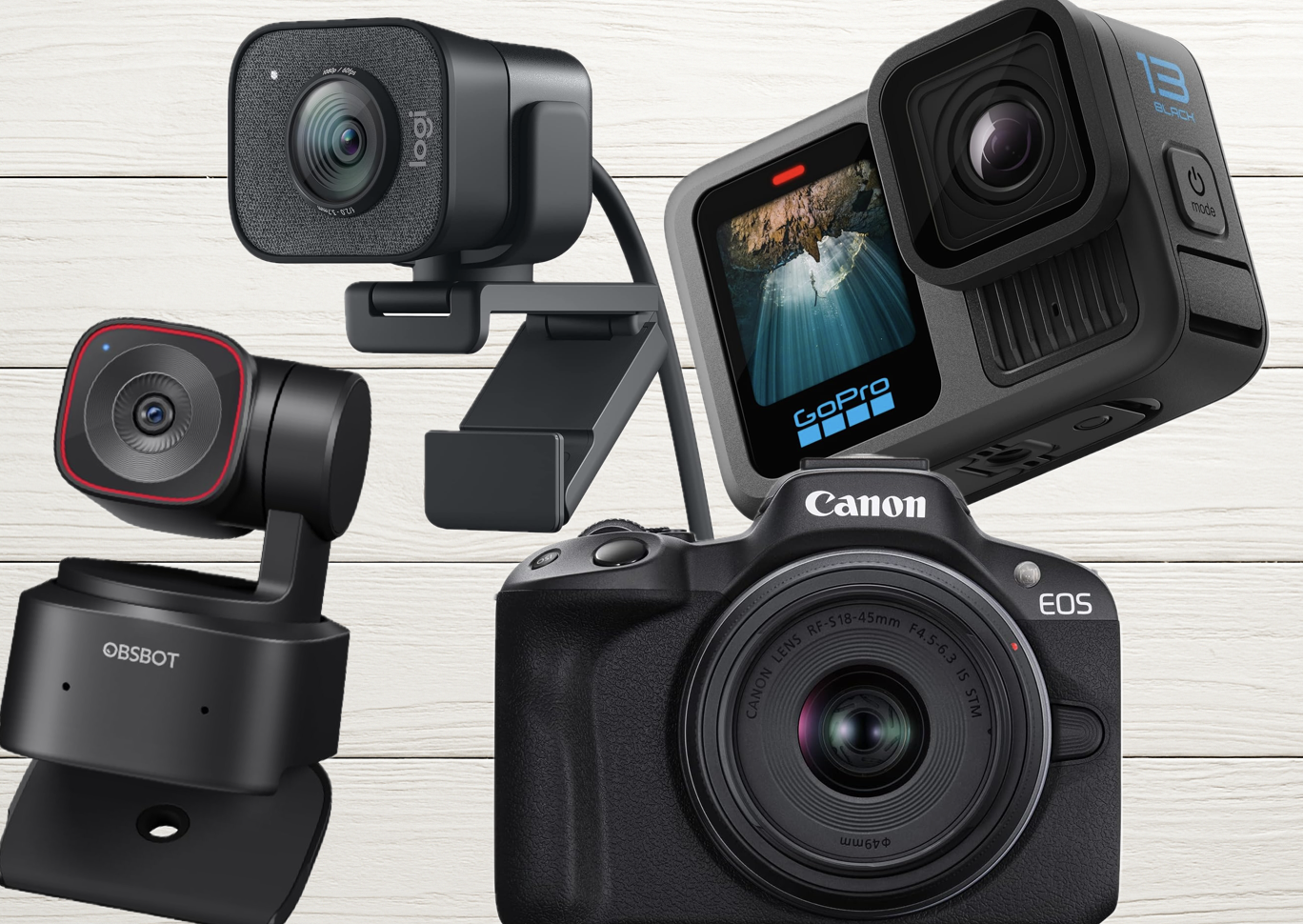
The best camera for most video podcasters in 2026 is the Sony ZV-E10 II — it delivers 10-bit 4K/60p, excellent autofocus, and creator-focused features at $999 body-only. If you want plug-and-play simplicity with AI tracking, the OBSBOT Tiny 3 is the best webcam you can buy. Budget creators should start with the Logitech Brio 4K.
Video podcasts aren’t optional anymore — they’re the standard. Over 53% of U.S. podcast listeners now actively watch video versions of their favorite shows, and platforms like YouTube, Spotify Video, and TikTok reward creators who show up on camera. This guide breaks down the best podcast cameras in 2026 by type, budget, and use case — based on hands-on testing, not spec sheets.
See our top camera pick on Amazon
Quick Picks: Best Podcast Cameras by Category
| Category | Best Pick | Price Range |
|---|---|---|
| Best overall mirrorless | Sony ZV-E10 II | ~$999 body-only |
| Best AI webcam (solo creators) | OBSBOT Tiny 3 | ~$349 |
| Best plug-and-play 4K webcam | Elgato Facecam 4K | ~$199 |
| Best budget under $100 | Logitech C920x | ~$70 |
| Best for long/live recording | Canon Vixia HF G70 | ~$1,399 |
| Best high-end studio camera | Canon EOS R5 Mark II | $3,299+ |
Why Camera Choice Matters for Podcast Video Quality
A high-quality video setup enhances audience engagement, boosts your brand’s professionalism, and opens doors to podcast monetization. But here’s the honest truth most guides skip: lighting matters more than your camera. Even a $100 webcam can look professional under soft, balanced lighting. Invest in lights before upgrading your camera body — and check out our podcast lighting setups guide before spending on new glass.
That said, once your lighting is dialed in, the right camera will take your production to the next level. In 2026, the main decision is between AI-powered webcams (plug-and-play simplicity), mirrorless cameras (cinematic quality), DSLRs (proven quality, older tech), and camcorders (unlimited recording). Here’s what you need to know about each.
Best Podcast Cameras by Type
1. AI-Powered PTZ Webcams — Best for Solo Creators
PTZ (pan-tilt-zoom) webcams use artificial intelligence to track your face, auto-frame the shot, and follow you around the room without a camera operator. In 2026, this category has become the go-to for solo podcasters who want dynamic, professional-looking video with zero crew.
The standout is the OBSBOT Tiny 3. It packs a 1/1.28″ CMOS sensor — massive for a webcam — with AI Tracking 2.0, voice locator technology, a triple-mic spatial audio system, and 4K/30fps or 1080p/120fps recording, all in a 63-gram body. Twice the ISO sensitivity of its predecessor, 37% larger sensor. At $349, it overlaps with entry-level mirrorless pricing, but the zero-setup workflow justifies every dollar for solo creators.
The budget AI option is the OBSBOT Tiny 2, which often goes on sale now that the Tiny 3 is available. Still excellent for auto-tracking at a lower price point.
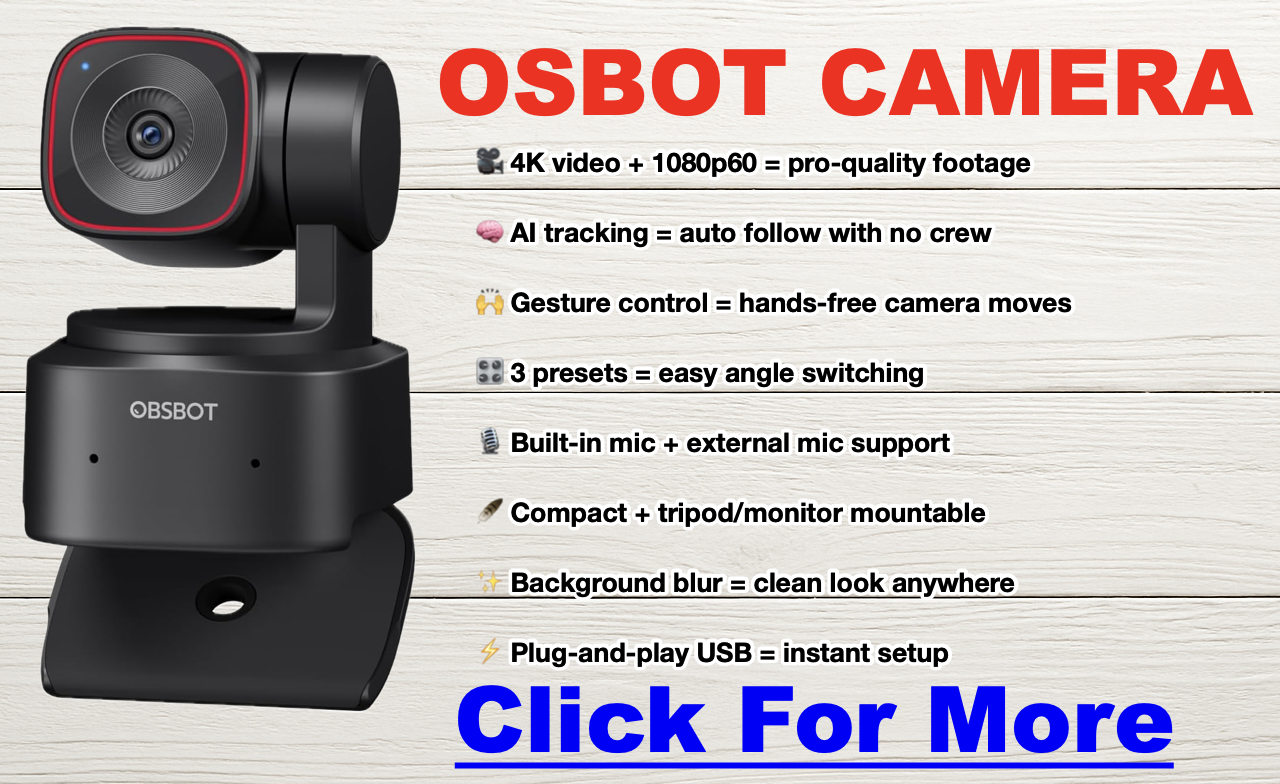
- Pros: No camera operator needed, auto-framing, plug-and-play USB, voice and gesture control.
- Cons: $349 approaches mirrorless territory; fixed lens limits creative control.
- Ideal for: Solo podcasters, standing desk setups, anyone who wants dynamic framing without a crew.
2. Traditional Webcams — Best Budget Option
Traditional fixed webcams are the easiest entry point. The Elgato Facecam 4K delivers uncompressed 4K/60fps with HDR and onboard storage for $199 — a strong choice for streamers and studio setups. The Logitech Brio 4K is the reliable workhorse: adjustable 65/78/90° field of view, auto light correction, and a built-in mic. For the tightest budget, the Logitech C920x delivers solid 1080p for around $70.
If you go the webcam route, also look into a capture card — it offloads video processing from your CPU and significantly improves recording quality. The Elgato HD60X is a great starting point.
- Pros: Affordable, plug-and-play, minimal setup, USB connection.
- Cons: Fixed lens, less low-light performance than mirrorless, no depth of field control.
- Ideal for: Beginners, remote interviews, streamers, budget-conscious podcasters.
3. Mirrorless Cameras — Best for Cinematic Quality
Mirrorless cameras are the dominant choice for serious video podcasters in 2026. They combine large sensors, cinema-grade autofocus, and interchangeable lenses in compact, studio-friendly bodies — and most 2026 models have solved the overheating problem that plagued earlier generations.
The top pick for creator-focused video podcasting is the Sony ZV-E10 II (~$999 body-only). It uses the same proven 26MP sensor as the a6700 and FX30, shoots 10-bit 4K/60p with S-Cinetone color, has a 759-point autofocus system with real-time eye tracking, and its NP-FZ100 battery delivers up to 195 minutes of recording per charge. It’s a massive step up from the original ZV-E10 in every way that matters for podcasters.
For a detailed spec comparison of Sony’s lineup, see our full Canon EOS R5 Mark II vs R5 breakdown. For the entry-level mirrorless option, the Canon EOS R50 offers Dual Pixel CMOS AF II and clean HDMI output at a lower price — a natural step up for anyone upgrading from a webcam. At the high end, the Canon EOS R5 Mark II delivers cinematic 4K and 8K video for professional studio productions.
Pair any mirrorless camera with a dummy battery and external power for indefinite studio recording. Most body-only purchases will need a lens — see our lens section below for recommendations.
- Pros: Cinematic image quality, interchangeable lenses, silent operation, eye-tracking AF, direct USB streaming on most 2026 models.
- Cons: Higher upfront cost, may need capture card or clean HDMI setup, lens adds to budget.
- Ideal for: Intermediate to advanced podcasters, studio setups, anyone targeting YouTube growth or sponsorship.
4. DSLR Cameras — Proven Quality, Older Architecture
DSLRs offer superior image quality over webcams — larger sensors, low-light performance, and the full Canon/Nikon lens ecosystem. The Canon 5D Mark IV remains one of the finest cameras ever made for 4K video, though its ~30-minute recording limit is a real constraint for long podcast sessions. The Canon EOS M50 Mark II is a friendlier entry point with a flip-out screen and solid autofocus.
In 2026, most podcasters choosing between DSLR and mirrorless should go mirrorless — the overheating issues are largely solved, autofocus is better, and the bodies are smaller. DSLRs still make sense if you already own Canon or Nikon glass and want to put it to work.
- Pros: Excellent image quality, vast lens ecosystem, proven reliability.
- Cons: Recording limits (~30 min), bulkier than mirrorless, slower live-view autofocus on older models.
- Ideal for: Podcasters with existing Canon/Nikon glass, professional interview setups.
5. Camcorders — Best for Long-Form and Live Recording
If your podcast runs long or records continuously, camcorders have one decisive advantage: no recording time limit and no overheating. The Canon Vixia HF G70 is the podcaster’s camcorder of choice — crisp 4K, long battery life, and it can run all day without complaint. It’s a favorite for studio panel shows, live event recordings, and marathon recording sessions. The Canon Vixia HF G50 covers the budget end of the camcorder category.
- Pros: Unlimited recording time, no overheating, built-in zoom, reliable for multi-hour sessions.
- Cons: Lacks the cinematic depth of field of mirrorless, less creative flexibility.
- Ideal for: Live podcast events, panel shows, long-form recording.
6. Action Cameras and Smartphones — For On-Location and Budget Creators
Action cameras (GoPro Hero 13 Black, DJI Osmo Action 3) are built for durability and dynamic shots, but generally underperform webcams in a studio setting — especially in low light. They work best for outdoor podcasts and adventure-based content.
Smartphones are the overlooked powerhouse. Modern iPhones and Samsung Galaxy flagships record 4K/60fps and pair beautifully with OBS for streaming. I use an iPhone 15 Pro for a significant portion of my shoots — it’s versatile, punches way above its price point, and the depth of field on the Pro models is genuinely impressive. Limitations are real (flat look compared to mirrorless, battery drain), but for a starter setup it’s hard to argue with free.
- Pros (smartphones): Free if you already own one, 4K capable, mobile-friendly for repurposing.
- Cons: Fixed lens, shorter battery life during recording, flatter look than mirrorless.
- Ideal for: Budget-conscious creators and beginners testing video podcasting.
Full Camera Comparison Table: Best Podcast Cameras 2026
Click here for my favorite all-around podcast camera
| Camera Type | Model | Resolution | Best For | Notes |
|---|---|---|---|---|
| AI Webcam | OBSBOT Tiny 3 | 4K/30fps · 1080p/120fps | Solo creators, dynamic recording | 1/1.28″ sensor, AI Tracking 2.0, triple-mic spatial audio, voice control. The 2026 webcam to beat. |
| OBSBOT Tiny 2 | 4K/30fps | Budget AI tracking | Excellent value now that Tiny 3 is out. Often discounted significantly. | |
| Webcam | Elgato Facecam 4K | 4K/60fps | Streamers, studio setups | Uncompressed 4K, HDR, onboard storage, no mic (pair with external). ~$199. |
| Logitech Brio 4K | 4K/30fps | Plug-and-play 4K | Adjustable FOV (65/78/90°), auto light correction, built-in mic. Reliable workhorse. | |
| Logitech C920x HD Pro | 1080p | Beginners, live-streaming | Best entry-level option. Affordable, plug-and-play simplicity. | |
| Mirrorless | Sony ZV-E10 II | 4K/60fps (10-bit) | Creator-focused, best all-rounder | 26MP sensor (same as a6700), 759-pt AF, S-Cinetone, 195-min battery. ~$999 body. Top pick. |
| Canon EOS R50 | 4K/30fps | Entry mirrorless, clean HDMI | Affordable RF-mount entry. Dual Pixel CMOS AF II. Great webcam-to-mirrorless upgrade path. | |
| Canon EOS R5 Mark II | 4K/8K | High-end studio production | Cinematic full-frame quality. Pro autofocus. The luxury pick. See our R5 vs R5 Mark II comparison. | |
| Sony ZV-E10 (original) | 4K (cropped at 30fps) | Budget creator mirrorless | Still a top seller at lower prices. Good if ZV-E10 II is over budget. | |
| Panasonic Lumix GH5 | 4K/60fps | Multi-cam setups, advanced users | Exceptional video quality. A workhorse for multi-camera podcast studios. | |
| Fujifilm X-T4 | 4K/60fps | Color-rich, smooth footage | In-body stabilization, legendary Fuji color science. | |
| DSLR | Canon 5D Mark IV | 4K/30fps | Pro-level quality, existing Canon glass | Legendary Canon color, massive lens ecosystem. ~30-min recording limit. |
| Canon EOS M50 Mark II | 4K (cropped) | Entry-level DSLR podcasting | Great autofocus, flip-out screen. Beginner-friendly. | |
| Camcorder | Canon Vixia HF G70 | 4K | Long sessions, studio reliability | No recording limit, no overheating. The podcaster’s camcorder of choice. |
| Canon Vixia HF G50 | 4K | Budget camcorder | Easy to use for beginners. Reliable option for long-form shows. | |
| Action Camera | GoPro Hero 13 Black | 5.3K/60fps | On-location, outdoor podcasts | Durable and versatile. Best for on-location recording, not studio setups. |
| Smartphone | iPhone 16 Pro Max | 4K/60fps | Budget-friendly setups | Cinematic mode, ProRes recording, excellent stabilization. My personal daily driver. |
| Samsung Galaxy S24 Ultra | 8K/30fps | High-end detail and versatility | Outstanding video quality. 200MP sensor for stills. |

Best Camera by Budget and Use Case
| Use Case | Best Pick |
|---|---|
| Budget under $100 | Logitech C920x HD Pro |
| Budget $100–$250 | Elgato Facecam 4K, Logitech Brio 4K |
| Best AI webcam (solo creator) | OBSBOT Tiny 3 (~$349) |
| Best mirrorless for podcasting | Sony ZV-E10 II (~$999) |
| Best for remote interviews | OBSBOT Tiny 3, Elgato Facecam 4K |
| Best for multi-cam studio | Sony ZV-E10 II, Panasonic Lumix GH5 |
| Best for long/live recording | Canon Vixia HF G70 |
| Best high-end studio camera | Canon EOS R5 Mark II |
| Best on a smartphone budget | iPhone 16 Pro Max, Samsung Galaxy S24 Ultra |
Best Lenses for Podcast Studios
The lens you pair with your mirrorless or DSLR camera affects depth of field, low-light performance, and how the background looks behind you. Here’s what to know.
Prime Lenses (Fixed Focal Length)
Prime lenses (35mm, 50mm, 85mm) offer the best image sharpness and widest apertures (f/1.4, f/1.8) — which gives you that cinematic background blur podcasters love. The tradeoff is you can’t zoom; you reposition the camera instead. Best picks for podcast studios:
- Sony FE 50mm f/1.8 — Versatile, affordable, great for portrait-style head-and-shoulder framing.
- Canon RF 85mm f/2 Macro — Stunning close-up clarity for interview formats.
Zoom Lenses (Variable Focal Length)
Zoom lenses (24-70mm, 70-200mm) give you framing flexibility without moving the camera — essential for multi-camera setups or if your composition changes between episodes. Best picks:
- Sigma 24-70mm f/2.8 DG DN — Excellent image quality, highly versatile for various studio configurations.
- Tamron 28-75mm f/2.8 — Cost-effective, sharp optics, outstanding value.
Wide-Angle Lenses
Wide-angle lenses (16mm, 24mm) capture broader scenes — ideal for group podcast setups or showing off a podcast studio. Best picks:
- Sony FE 20mm f/1.8 G — Outstanding optical quality, minimal distortion.
- Canon RF 16mm f/2.8 — Compact and affordable for small studio spaces.
| Lens Type | Focal Length | Best For |
|---|---|---|
| Prime | 35mm f/1.8 | Medium-wide, small rooms |
| 50mm f/1.8 | Head-and-shoulder shots, classic framing | |
| 85mm f/1.8 | Close-ups with blurred backgrounds | |
| Zoom | 24-70mm f/2.8 | Versatile for varied studio setups |
| 18-55mm f/3.5-5.6 | Budget multi-use | |
| Wide-Angle | 24mm f/2.8 | Group shots, tight rooms |
| 16-20mm f/1.8-2.8 | Multi-host setups, full studio views |
How to Set Up Multiple Cameras for Your Podcast
Switching between camera angles keeps your audience engaged and adds production value that’s hard to replicate with a single camera. If you’re looking to build a multi-camera setup, check out our guides on solo podcast recording equipment and equipment for co-hosts and groups.
| Equipment | Purpose |
|---|---|
| Cameras | Matching models ensure consistent quality and color across angles. |
| Capture Cards | Connect cameras to your computer (e.g., Elgato Cam Link 4K, HD60X). |
| Video Switchers | Live switching between feeds (e.g., ATEM Mini, Rodecaster Video). |
| Lighting | Consistent exposure across all angles. Lighting matters more than camera specs. |
| Tripods / Mounts | Stability at the right angles for each camera position. |
| Audio Recorder | Dedicated audio capture (e.g., Zoom H6, Rodecaster Pro II). |
| Monitors | Color grading and monitoring feeds during recording. |
Frequently Asked Questions
What is the best camera for a video podcast in 2026?
The best camera for most podcasters in 2026 is the Sony ZV-E10 II (~$999 body-only). It delivers 10-bit 4K/60p, a 759-point autofocus system with real-time eye tracking, and up to 195 minutes of battery life per charge — all in a creator-focused body. For plug-and-play simplicity with AI tracking, the OBSBOT Tiny 3 ($349) is the best webcam available. Budget creators should look at the Logitech Brio 4K or Elgato Facecam 4K.
Is 1080p enough for a podcast?
Yes, 1080p is the standard for Spotify Video and YouTube Podcasts, and most viewers won’t notice a difference. However, shooting in 4K gives you the ability to crop and reframe in post — essential for creating Reels, Shorts, and TikTok clips from full episodes without losing sharpness.
What’s more important for video podcasting: camera or lighting?
Lighting is more important than camera quality. A $100 webcam under soft, balanced key lighting will outperform a $1,500 mirrorless camera in a poorly lit room. Always invest in lighting before upgrading your camera body.
Do I need a capture card for podcasting?
Only if your camera doesn’t support USB streaming or clean HDMI output. Webcams like the OBSBOT Tiny 3 and Logitech Brio connect directly via USB. DSLRs and mirrorless cameras typically need a capture card like the Elgato Cam Link 4K or HD60X to connect to your computer for live streaming or recording via software like OBS.
What is an AI PTZ webcam and do I need one?
PTZ stands for pan-tilt-zoom. AI PTZ webcams like the OBSBOT Tiny 3 physically move and track your face, automatically zoom and reframe to keep you centered, and support voice commands and gesture control. They’re ideal for solo podcasters who move around, stand at a whiteboard, or want dynamic framing without a camera operator. If you record seated at a fixed desk, a traditional webcam may be a better value.
How do I stop my camera from shutting off during a long recording?
Disable the auto-off/sleep settings in your camera menu and power the camera via a dummy battery or AC adapter instead of relying on internal batteries. Most mirrorless and DSLR cameras can run indefinitely in a studio setting with external power and clean HDMI output to a capture card.
Can I use my iPhone as a podcast camera?
Yes. Modern iPhones (15 Pro and later) record 4K/60fps with Cinematic Mode and ProRes. Pair your phone with a tripod and use OBS to capture the feed on your computer. Limitations include faster battery drain and a flatter look compared to mirrorless, but for a starter video podcast setup it’s an excellent free option.
What camera does Joe Rogan use?
The Joe Rogan Experience uses a professional multi-camera studio setup with high-end cinema cameras — gear that costs tens of thousands of dollars. Most successful podcasters start with a single mirrorless camera or a quality webcam paired with good lighting and get excellent results.
How much does a podcast camera setup cost?
You can start a video podcast for under $100 with a webcam like the Logitech C920x. Mid-range setups with a mirrorless camera, lens, and basic lighting run $1,000–$2,000. High-end studio builds can exceed $5,000. For a full breakdown of what to expect to spend, see our podcast startup cost guide.
Should I get a mirrorless or a DSLR for podcasting?
In 2026, mirrorless cameras are the better choice for most podcasters. They offer equivalent or better image quality in smaller bodies, superior live-view autofocus (including AI eye-tracking), and most 2026 models can record indefinitely in a studio with external power. DSLRs still make sense if you already own a set of Canon or Nikon lenses and want to put them to work without buying into a new system.
Final Verdict: Which Podcast Camera Should You Buy?
For most podcasters in 2026, the path is clear: start with the Logitech Brio 4K if you’re on a tight budget, upgrade to the OBSBOT Tiny 3 if you want AI tracking, and invest in the Sony ZV-E10 II when you’re ready for cinematic quality. Whatever you choose, pair it with proper podcast lighting and a great microphone — those two elements will do more for your production quality than any camera upgrade.
For everything else you need to build your studio from scratch, check out our complete podcast equipment guide, our equipment bundles roundup, and our best budget microphones guide. You can also use our podcast equipment picker tool to get a personalized recommendation based on your budget and setup type.
See the OBSBOT Tiny 3 on Amazon →
🚀 Want to Turn Your Podcast Into a Money-Making Machine?
Most podcasters never figure out how to make real money from their show. Don’t be one of them. Click here to learn why your podcast needs a website immediately.
📈 Steal the exact playbook top podcasters use to turn listeners into cash.
🎥 FREE video training reveals the monetization secrets nobody is telling you.
📩 Stop guessing. Start making. Drop your email & get the guide for free.
What Is Streamyard, This Weird Tool That Helps You Run a Professional Live Show
What Is StreamYard?
StreamYard is a browser-based tool for live streaming and recording video where you can bring on guests, add branding (logos, banners, lower-thirds), and broadcast to platforms like YouTube, Facebook, LinkedIn, and more—without installing software.
In simple terms: StreamYard helps you run a professional-looking live show (or recorded interview) from your web browser, with a studio-style control panel that’s designed to be easy to use.
What StreamYard Does (In Plain English)
- Go live on major platforms (or record content without going live).
- Invite guests with a link—no complicated setup for them.
- Show comments on-screen and manage chat while streaming.
- Add branding like overlays, tickers, intros, and name tags.
- Record your stream so you can repurpose it into clips later.
Who StreamYard Is Best For
StreamYard is popular with creators and businesses who want a clean, reliable way to look professional on camera without learning complex software.
- Podcasters who want video interviews and live episodes remotely (click to see how)
- YouTubers doing live Q&A, interviews, or panels
- Coaches & consultants hosting webinars and live trainings
- Small businesses running live demos or community streams
- Teams producing internal or public video updates
See StreamYard Pricing & Plans
Key StreamYard Features
1) Guest-Friendly Interview Setup
You can invite guests by sending a link. They join from their browser, so it’s beginner-friendly compared to many streaming tools.
2) On-Screen Branding
Add your logo, lower-thirds (name tags), banners, and overlays so your stream looks like a real show—not a basic video call.
3) Multistreaming
Stream to multiple platforms at once (depending on your plan), which helps you reach more people without doing separate live sessions.
4) Comment & Chat Overlays
Pull viewer comments onto the screen during your stream—great for Q&A and community engagement.
5) Recording for Repurposing
Record your show so you can cut clips for TikTok/Shorts/Reels, turn episodes into podcasts, or reuse content in ads.
StreamYard Pros and Cons
Pros
- Very easy to use (works in a web browser)
- Guests can join quickly with minimal tech friction
- Strong live-show tools (branding, layouts, on-screen comments)
- Good for consistency and speed
Cons
- Not a full video editor (you’ll still want editing tools for heavy post-production)
- Advanced “broadcast” automation is limited compared to OBS
- Recording quality depends on your internet/browser/device
StreamYard vs Zoom vs OBS (Quick Comparison)
- StreamYard: Best for live shows, branding, guest interviews, and simplicity.
- Zoom: Best for meetings; okay for webinars; not designed for “show-style” streaming.
- OBS Studio: Best for advanced production control; harder to learn and manage live.
Is StreamYard Free?
StreamYard typically offers a free plan with limits (such as StreamYard branding or feature restrictions), and paid plans that unlock more destinations, branding options, and higher-quality tools.
If you’re streaming professionally or using your live videos for marketing, you’ll usually want a paid plan for full branding control.
FAQ
Do I need to download StreamYard?
No. StreamYard runs in your browser (Chrome is the most common choice).
Can StreamYard record without going live?
Yes—many creators use it to record interviews and then upload the finished video later.
Can I use StreamYard for a podcast?
Yes. It’s commonly used for video podcasts, remote interviews, and live podcast episodes.
What’s the biggest reason people choose StreamYard?
It’s simple and reliable for live streaming, especially when you want guests and on-screen branding without complicated setup.
Bottom Line
If you want an easy way to go live, record interviews, bring on guests, and look professional without learning complex broadcasting software, StreamYard is one of the most straightforward tools to start with.
See StreamYard Pricing & Plans
StreamYard vs. Riverside: Which Remote Recording Platform Is Right for You?
The short answer: Riverside is the better choice for most podcasters — it offers a more complete recording-to-publishing workflow, stronger AI editing tools, and a free plan worth actually using. Squadcast is the right pick if you’re already deep in the Descript ecosystem, since Descript now owns Squadcast and the two tools are sold together as a bundle.
That acquisition changes the comparison in ways most guides haven’t caught up to yet. This breakdown covers current pricing, what’s actually changed since Descript bought Squadcast, and how to decide which platform matches your production workflow.
What’s Changed: The Descript-Squadcast Acquisition
The most important thing to know about Squadcast in 2026 is that it’s no longer a standalone product. Descript acquired Squadcast, and the two platforms are now sold together — every SquadCast plan includes access to Descript’s transcription and editing tools. If you were comparing these platforms a couple of years ago based on old reviews, a lot of that information is out of date.
The practical implication: Squadcast’s old “integration with Descript” selling point is now just the base feature set. The question is whether that bundled Descript access is compelling enough to choose Squadcast over Riverside’s native built-in tooling.
Squadcast vs Riverside: Feature Comparison
| Feature | Squadcast (via Descript) | Riverside |
|---|---|---|
| Local Recording | Yes — up to 4K video, 48kHz WAV audio | Yes — up to 4K video, 48kHz WAV audio |
| Progressive Upload | Yes (patented technology) | Yes |
| Free Plan | Yes (limited hours) | Yes — 2 hours/month recording, 720p video |
| Paid Pricing (entry) | Bundled with Descript; check current Descript pricing | ~$19/month (Standard, billed annually ~$15/month) |
| Built-in Editing | Descript (text-based editor, screen recording, transcription) | Magic Editor, text-based video editor, AI clip generator |
| Transcription | Yes (Descript included on all plans) | Yes (automatic; hours vary by plan) |
| Participants | Up to 10 on mainstage + 10 backstage | Up to 8 participants |
| AI Audio Enhancement | Via Descript | Magic Audio (noise removal, clarity boost) |
| Pre-show Prep | Green Room (check audio/video before going live) | Producer Mode (off-camera session management) |
| Social Clip Creation | Via Descript | Built-in AI clip generator |
| Key Integrations | Native Descript; Adobe Audition, Hindenburg, Zapier, Dropbox | Adobe Premiere Pro, Final Cut Pro, Descript, Zapier |
Pricing: What Squadcast and Riverside Actually Cost
Riverside Pricing
Riverside offers four tiers. The Free plan provides 2 hours of recording per month at 720p video quality with basic editing tools. The Standard plan runs $19/month billed monthly (or $15/month billed annually) and unlocks unlimited recording, 1080p video, separate audio tracks, and up to 5 hours of AI transcription. The Pro plan at $29/month monthly ($24/month annually) bumps to 4K video, 15 hours of transcription per month, Magic Audio, and full editing tools. A Business plan with enterprise features is custom-priced.
Riverside’s pricing is per host seat — guests join your recording for free regardless of plan, which is a meaningful advantage over platforms that charge per participant.
Worth noting: exceeding your plan’s monthly recording hours triggers overage charges, typically around $5–$10 per additional hour depending on the tier. If you record long-form episodes or multiple shows, track your hours carefully on the Standard plan.
Squadcast Pricing
Since the Descript acquisition, Squadcast plans are bundled with Descript access — all tiers now include transcription, editing, and screen recording. Check the current SquadCast/Descript pricing page directly, as the bundle pricing has evolved since the acquisition and third-party listings vary significantly. Unused recording hours roll over automatically, capped at twice your monthly plan allocation.
For dedicated Squadcast pricing context, see our standalone page: Squadcast Pricing Plans Explained
Audio and Video Quality: Is There a Real Difference?
Both platforms use the same foundational approach: local recording on each participant’s device, with progressive upload to the cloud as the session runs. This means your audio quality isn’t limited by internet connection stability — the file being recorded is always local, so a brief network dropout doesn’t ruin a take.
At the spec level, both record uncompressed 48kHz WAV audio and up to 4K video on paid plans. The practical difference is in post-recording processing:
- Riverside’s Magic Audio applies AI noise reduction and clarity enhancement automatically after recording. For creators who don’t want to touch audio post-production settings, this is genuinely useful — you get cleaner audio with less manual work.
- Squadcast/Descript handles audio cleanup through Descript’s studio sound feature, which works similarly but requires you to be in the Descript editing environment.
If audio quality is your primary concern, the platform matters less than your recording environment and microphone. See: Podcast Microphone Setup Guide | Best Podcast Microphones
Editing Workflow: Built-In vs. Bundled
This is where the platforms diverge most meaningfully for day-to-day use.
Riverside keeps recording and editing inside one interface. After your session, you can move directly into the Magic Editor — which handles speaker-switching in the video, noise removal, and clip creation — without leaving the platform. The AI clip generator can automatically produce short social clips from a longer recording. For creators who want a fast path from raw recording to publishable content, this workflow is efficient.
Squadcast + Descript involves two products working together. Recording happens in Squadcast; editing happens in Descript. Descript’s text-based editor is genuinely powerful — editing audio and video by editing a text transcript is a workflow that’s hard to give up once you’re used to it — but you’re working across two tools rather than one. For anyone who already uses Descript, this is a net advantage, not a drawback. For someone new to both platforms, there’s a steeper learning curve.
Related: Best Podcast Editing Software | Podcast Editing Software for All Levels
Guest Management and Session Logistics
Both platforms are browser-based — guests don’t need to install any software to join a recording session, which dramatically reduces pre-show friction for interview podcasts.
Squadcast supports up to 10 participants on the main stage plus 10 more in the backstage area. The Green Room feature lets everyone test audio and video before the session goes live, which matters when you’re coordinating guests across time zones who may not be technically confident.
Riverside supports up to 8 participants and adds Producer Mode — someone can manage the session, monitor audio levels, and communicate with guests without appearing on camera. This is useful for shows that have a producer or engineer running the technical side while the host focuses on the conversation.
If you regularly record with large groups (panels, roundtables), Squadcast’s higher participant cap is a concrete advantage. For most podcast interviews with one or two guests, both platforms handle it identically well.
Related: Podcast Equipment for Co-Hosts and Groups | How to Record a Podcast Remotely
Who Should Choose Squadcast?
Squadcast makes the most sense if you’re already a Descript user and want remote recording that flows directly into your existing editing workflow. The bundled pricing means you’re essentially getting two tools for one subscription, which is good value if you’d be paying for Descript regardless.
It’s also worth considering if you need more than 8 participants in a single session — Squadcast’s 10 mainstage seats cover panel recordings and roundtable formats that Riverside can’t accommodate.
Who Should Choose Riverside?
Riverside is the better starting point for most creators who don’t already have a Descript workflow established. The native editing tools, Magic Audio, AI clip creation, and built-in transcription mean you can move from recording to a shareable clip without leaving the platform. The free plan is also genuinely usable — 2 hours per month is enough to record and test a few episodes before committing to a paid subscription.
Video podcasters in particular tend to find Riverside’s output quality and editing tools better matched to their needs. The Magic Editor’s automatic speaker-switching and social clip tools are designed for video-first workflows in a way that Squadcast’s recording-focused UI isn’t.
See also: Podcastle vs Riverside | Best Remote Podcast Recording Software | Remote Video Recording Software
How Squadcast and Riverside Compare to Other Remote Recording Tools
These two platforms don’t exist in isolation. Zencastr is the most direct alternative to both — it occupies a similar price range and offers comparable local recording quality. StreamYard is worth considering if live streaming is part of your production, though it approaches remote recording differently. See our full comparisons:
- Squadcast vs Zencastr
- Zencastr Pricing
- StreamYard vs Riverside
- StreamYard Pricing
- Full Remote Recording Platform Roundup
Frequently Asked Questions: Squadcast vs Riverside
Is Squadcast still a standalone product in 2026?
No. Descript acquired Squadcast, and the two products are now sold together. All Squadcast plans include Descript’s transcription and editing tools. If you’re evaluating Squadcast based on older reviews from before the acquisition, pricing and feature comparisons from that period are no longer accurate.
Which platform has better audio quality — Squadcast or Riverside?
Both platforms record uncompressed 48kHz WAV audio locally on each participant’s device, which is the same technical standard. The difference is in post-recording processing: Riverside’s Magic Audio applies AI-based noise reduction automatically, while Squadcast’s noise cleanup runs through Descript’s studio sound tools. For most podcasters, the recording environment and microphone quality will have more impact on the final result than the platform choice.
Does Riverside have a free plan?
Yes. Riverside’s free plan includes 2 hours of recording per month at 720p video quality with basic editing tools. It’s enough to test the platform thoroughly before committing to a paid subscription. Paid plans start at approximately $19/month billed monthly, or around $15/month billed annually on the Standard tier.
Can guests join Squadcast or Riverside sessions without installing anything?
Yes — both platforms are entirely browser-based. Guests receive a link, click it, and join the session in their browser. There’s no software to download on either side, which reduces technical friction significantly for interview-format podcasts where guests may not be technically confident.
How many people can record simultaneously on each platform?
Squadcast supports up to 10 participants on the main stage plus 10 more in a backstage area. Riverside supports up to 8 participants. For standard interview podcasts with 1–2 guests, both platforms work equally well. For panels or roundtable recordings, Squadcast’s higher participant cap is a meaningful advantage.
What is the difference between Squadcast’s Green Room and Riverside’s Producer Mode?
They solve different problems. Squadcast’s Green Room is a pre-session space where host and guests can check audio and video levels, chat, and get ready before recording starts — useful for making sure everything works before you’re actually on tape. Riverside’s Producer Mode lets a third person manage the session (monitor audio, communicate with guests, handle technical issues) without appearing on camera — useful for shows with a dedicated producer or engineer running the technical side.
Which platform is better for video podcasting?
Riverside is generally the stronger choice for video-first production. Its built-in Magic Editor handles speaker-switching, noise removal, and social clip creation natively, which matters when the video output is as important as the audio. Squadcast records excellent video locally, but post-production happens in Descript, which requires working across two tools. If you’re publishing to YouTube and creating short-form clips, Riverside’s workflow is more streamlined.
Do I need a separate editing tool if I use Riverside?
Not necessarily. Riverside includes a text-based video editor, automatic transcription, AI clip generation, and Magic Audio — enough for many creators to go from raw recording to a publishable episode without additional software. If you need more advanced post-production (multi-track audio mixing, complex video editing, color grading), you’ll likely still want a dedicated editor like Adobe Audition, Final Cut Pro, or Descript.
What happens to my recordings if I cancel either platform?
On Riverside, your recordings remain accessible for download during a grace period after cancellation, but always download your raw tracks immediately after recording regardless of plan — don’t rely on cloud storage as your only backup. On Squadcast, the same principle applies, and since the platform now integrates with Descript, project files in Descript are subject to Descript’s own data retention policies. Keep local copies of all original audio files as a baseline practice.
Is Squadcast or Riverside better for interviewing remote guests who aren’t tech-savvy?
Both are comparable for this use case since both are browser-based with no guest installation required. Squadcast’s Green Room gives guests a slightly more guided pre-session experience with audio/video checks before recording starts, which can reduce the chance of discovering problems mid-recording. Riverside’s interface is clean and simple, and its free plan lets you run test sessions with guests before committing. For most podcasters, the platform matters less than how well you prep your guests ahead of time.
Final Verdict: Squadcast vs Riverside
For most podcasters starting fresh or evaluating platforms in 2026, Riverside is the stronger all-around choice. The native editing tools, Magic Audio, free plan, and streamlined video workflow mean you can do more inside one platform without stitching together multiple subscriptions.
Squadcast makes more sense if you’re already using Descript and want remote recording that integrates directly with your existing workflow — or if you regularly need more than 8 participants in a session.
The most important thing to verify before you decide: check both platforms’ current pricing directly, since Squadcast’s post-acquisition bundle pricing in particular has shifted and continues to evolve.
StreamYard vs Streamlabs: One Is Overrated, The Other Is a Game-Changer
In the competitive world of live streaming, creators need platforms that are powerful yet accessible. Two of the most popular options—StreamYard and Streamlabs—make it easier than ever to go live, engage your audience, and build a brand.
But which one is the right fit for you? In this guide, we’ll break down their features, pricing, ease of use, and unique strengths so you can make an informed decision.
An Overview of StreamYard and Streamlabs
StreamYard: The Master of Simplicity
StreamYard is a browser-based live streaming studio designed for ease of use. With features like custom branding, overlays, guest interviews, and multistreaming, anyone can produce professional broadcasts without complex setup. It’s a favorite for YouTubers, podcasters, and businesses that want to connect live with minimal hassle.
Streamlabs: The All-in-One Creator Platform
Streamlabs has grown into a full ecosystem for creators. While it offers a browser-based studio, it also provides a desktop app and tools for monetization, audience engagement, and growth. From tipping and donations to an integrated merch store and app marketplace, Streamlabs is built for creators who want to go beyond streaming and build a career.
Feature Comparison
| Feature | StreamYard | Streamlabs |
|---|---|---|
| Platform | Browser-based | Browser + desktop app |
| Ease of Use | Extremely easy | Easy, but more complex |
| Guest Management | Up to 10 guests | Up to 12 guests |
| Multistreaming | Built-in | Built-in |
| Branding | Logos, overlays, backgrounds | Custom themes, overlays, logos |
| Monetization | Relies on platform tools | Yes (tipping, donations, merch) |
| App Store | No | Yes (hundreds of extensions) |
| Video Quality | Up to 1080p | Up to 1080p with dynamic bitrate |
| Pricing | Free & paid plans | Free & Streamlabs Ultra ($19/mo) |
Core Strengths
-
StreamYard: Simple, user-friendly, and reliable for professional-looking live events.
-
Streamlabs: Feature-packed with advanced monetization and customization options.
Unique Features
-
StreamYard: A backstage area to prep with guests before going live.
-
Streamlabs: A massive app store and “Collab Cam,” which lets guests join as a second camera source from their phone.
Pricing
-
StreamYard: Free plan (20 hrs/month with branding). Paid plans start at $20/month, unlocking custom branding, higher limits, and multistreaming.
-
Streamlabs: Free plan with limited features. Streamlabs Ultra is $19/month, adding unlimited multistreaming, monetization tools, premium themes, and full app store access.
Ease of Use
-
StreamYard: Beginner-friendly; no downloads required. Up and running in minutes.
-
Streamlabs: Still accessible, but its advanced features and desktop app can overwhelm beginners. Best suited for those ready to dive deeper.
Video & Audio Quality
-
StreamYard: Up to 1080p, reliant on your internet connection.
-
Streamlabs: Up to 1080p with dynamic bitrate to maintain stability if your connection fluctuates.
Guest Management
-
StreamYard: Up to 10 participants; guests join via link—no account required.
-
Streamlabs: Up to 12 participants; Collab Cam adds extra flexibility for mobile guests.
Integrations
-
StreamYard: Works with major platforms like YouTube, Facebook, LinkedIn, Twitch, plus services like Restream and Ecamm Live.
-
Streamlabs: Integrates through its app store—covering chat moderation, analytics, sound effects, and more.
Customer Support
-
StreamYard: 24/7 live chat, community forum, and extensive help docs.
-
Streamlabs: 24/7 live chat, help center, and a large creator community.
Who Should Use Each?
-
StreamYard is best for:
-
Beginners who want the fastest path to polished live streams.
-
Businesses running webinars, events, and interviews.
-
Creators who value simplicity over complexity.
-
-
Streamlabs is best for:
-
Streamers who want to monetize via donations, tips, or merch.
-
Power users who love customization and apps.
-
Brands building a professional, revenue-driven channel.
-
Conclusion: The Final Verdict
Both StreamYard and Streamlabs are excellent—but they serve different goals:
-
Choose StreamYard if you want a straightforward, professional studio for live streaming.
-
Choose Streamlabs if you want monetization tools, deep customization, and long-term growth potential.
Since both have free plans, the best way to know which is right for you is to test them yourself.
StreamYard vs OBS: Why Most Creators Pick the Wrong One
In the dynamic world of live streaming, creators face a crucial decision: which broadcasting software is the right fit? The choice often comes down to a trade-off between simplicity and power.
On one side, there’s StreamYard—a browser-based studio celebrated for ease of use. On the other, OBS (Open Broadcaster Software)—a free, open-source powerhouse offering unmatched customization.
In this guide, we’ll break down features, pricing, and strengths of both StreamYard and OBS so you can choose the platform that best fits your streaming goals.
An Overview of StreamYard and OBS
StreamYard: The Epitome of Simplicity
StreamYard makes it easy for anyone to stream professional-looking shows. From custom branding to guest interviews and multistreaming, everything is built right into the browser. No technical expertise required—making it ideal for YouTubers, podcasters, and businesses.
OBS: The Powerhouse of Customization
OBS is an open-source favorite among pros. It allows complete control over scenes, layouts, and sources, making it perfect for gamers and power users. With plugins and limitless flexibility, OBS is the tool of choice for streamers who want full creative control.
Feature Comparison
| Feature | StreamYard | OBS |
|---|---|---|
| Platform | Browser-based | Desktop app (Windows, macOS, Linux) |
| Ease of Use | Extremely easy | Steeper learning curve |
| Customization | Limited (branding, overlays) | Full (scenes, plugins, sources) |
| Guest Management | Yes (up to 10 guests) | No (requires third-party tools) |
| Multistreaming | Built-in | Requires plugins/services |
| Video Quality | Up to 1080p | 4K+ (depends on hardware) |
| Audio Quality | Good | Excellent (with tuning) |
| Resource Usage | Low | High (hardware intensive) |
| Pricing | Free & paid plans | 100% free, open-source |
Core Differences
-
StreamYard focuses on ease of use with features like guest management and multistreaming baked in.
-
OBS is all about control, letting you fine-tune resolution, bitrate, and effects for pro-level production.
Pricing
-
StreamYard: Free plan (20 hrs/month with branding). Paid plans start at $20/month, unlocking multistreaming, branding, and higher limits.
-
OBS: Completely free. No tiers, no limits.
Ease of Use
-
StreamYard: Beginner-friendly, intuitive interface, live in minutes.
-
OBS: Powerful but technical—setup requires time, knowledge, and configuration.
Video & Audio Quality
-
StreamYard: Streams at up to 1080p. Internet stability impacts quality.
-
OBS: Supports 4K+, full control over encoding, resolution, and bitrate. Audio can be tuned for professional results.
Guest Management
-
StreamYard: Up to 10 guests with simple link invites + backstage prep area.
-
OBS: No built-in guest tools—requires Discord, Zoom, or similar integrations.
Integrations
-
StreamYard: Connects with YouTube, Facebook, LinkedIn, Twitch, Restream, and more.
-
OBS: Vast plugin ecosystem—everything from chat overlays to advanced audio processing.
Support
-
StreamYard: 24/7 live chat, knowledge base, and forums.
-
OBS: No official support, but a strong community via forums, Discord, and Reddit.
Who Should Use Each?
-
StreamYard is best for:
-
Beginners who value simplicity.
-
Creators hosting interviews or business live events.
-
Those who want multistreaming with minimal setup.
-
-
OBS is best for:
-
Professional streamers who want complete customization.
-
Gamers and creators with strong technical setups.
-
Budget-conscious streamers (since it’s free).
-
Conclusion: The Final Verdict
Both platforms are excellent but serve different audiences:
-
Choose StreamYard if you want the easiest, most beginner-friendly way to host polished streams with guests.
-
Choose OBS if you need maximum power and flexibility, and don’t mind a learning curve.
Since both have free options, the best move is to test them and see which matches your workflow.