StreamYard Business Plan Review: Is It Worth $299/Month for Teams?
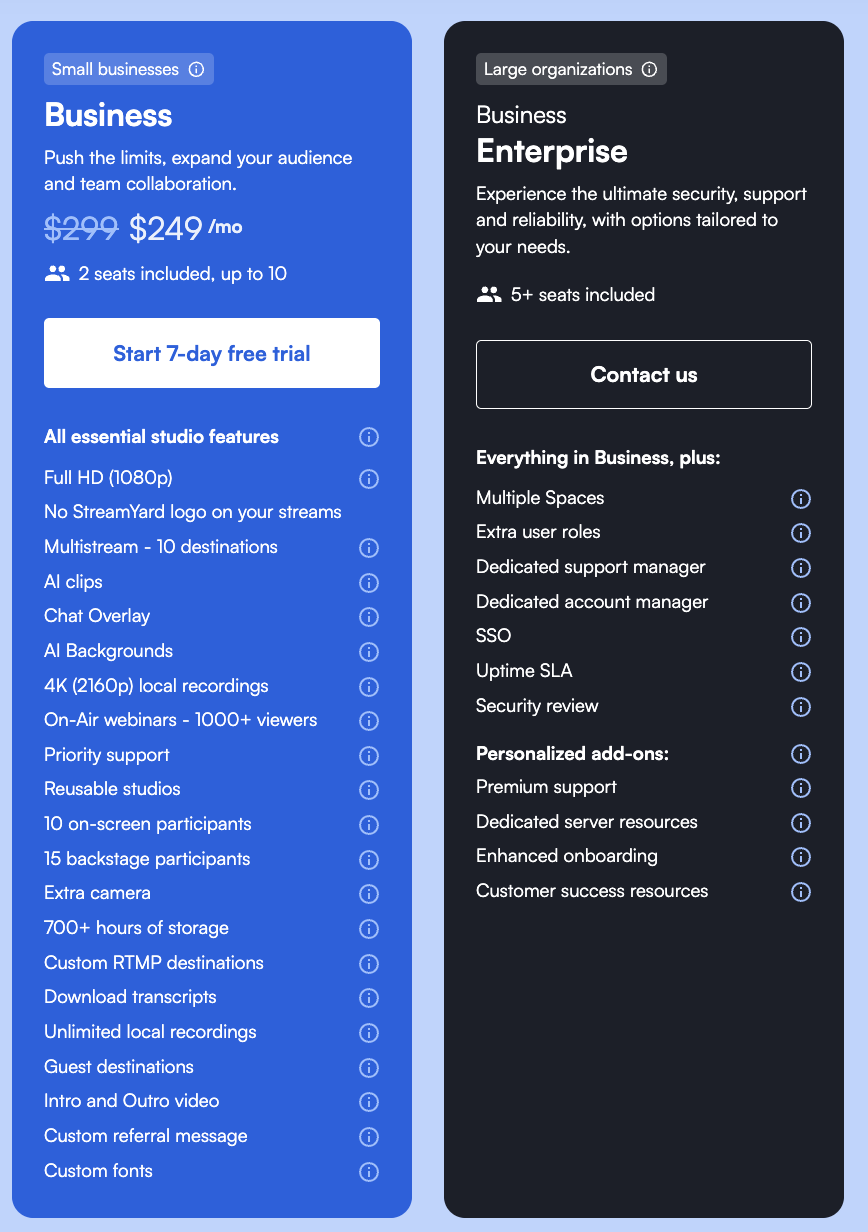
StreamYard’s Business plan costs $299/month ($249/month billed annually) and targets teams, agencies, and organizations that have outgrown individual creator plans. If you are already familiar with StreamYard’s pricing tiers, you know the Free, Core, and Advanced plans cover most solo creators and small operations. The Business plan is a different animal — built for multi-show operations, team collaboration, and enterprise-grade production at scale.
This page breaks down what makes the Business plan different, who actually needs it, and whether the price tag is justified for your operation. If you want a side-by-side of all four StreamYard tiers, head to our full StreamYard pricing comparison.
Click here to try StreamYard Business →
Who Is the StreamYard Business Plan For?
The Business plan is not for solo podcasters or hobbyists. It is designed for organizations running multiple shows with multiple people involved in production. That includes podcast networks managing several feeds, marketing agencies producing live streams for clients, companies using live video for all-hands meetings and video podcasts, and media teams that need centralized billing, role-based access, and priority support.
If you are a solo creator wondering whether to jump from Advanced to Business, the answer is almost certainly no. The Advanced plan at $88.99/month already gives you 4K recording, 8 destinations, and backstage support. The Business plan’s value is in team management and organizational control — features that only matter once you have multiple people producing content under one roof.
Click here to try StreamYard Business →
StreamYard Business Plan Features That Matter
Every Business plan feature also includes everything in the Advanced tier. The features below are what you are paying the premium for — the capabilities that do not exist on any lower plan.
Spaces and Team Organization
Spaces let you organize content by show, client, or department. If your agency produces a business podcast for one client and a live stream series for another, each one gets its own Space with separate branding, recordings, and team members. This is the feature that separates the Business plan from everything below it — no other tier lets you silo content and permissions this cleanly.
Role-Based Access Control
The Business plan introduces three distinct user roles: Admin, Creator, and Cohost. Admins manage billing, team settings, and Spaces. Creators can build and run shows within their assigned Spaces. Cohosts can join studios but cannot manage settings or access other teams’ content. For agencies and podcast networks, this is essential — you want producers to have full creative control without giving them access to billing or other clients’ assets.
Up to 10 Seats
The Business plan supports 2 to 10 seats, meaning up to 10 team members can have their own login and role within the account. Compare this to the Advanced plan, which offers only 2 seats. If you have a multi-person production team — hosts, producers, editors, social media managers — you need those seats. The per-seat model means everyone works from the same account rather than juggling multiple individual subscriptions, which also simplifies your podcasting cost structure.
Priority Support
Business plan users get priority email support, which means faster response times when something goes wrong. For organizations running live events or scheduled client broadcasts, a 48-hour support turnaround is not acceptable. Priority support does not guarantee instant resolution, but it moves you to the front of the queue.
SSO (Single Sign-On)
If your organization uses an identity provider like Okta, Azure AD, or Google Workspace for centralized authentication, the Business plan integrates with SSO. This matters for IT departments that need to enforce security policies, manage onboarding and offboarding, and ensure that departing employees lose access immediately. Solo creators will never need this; enterprise podcast operations absolutely do.
Centralized Invoicing and Uptime SLA
Business plan customers get a single annual invoice — useful for procurement departments that need a PO-based purchasing flow rather than monthly credit card charges. The plan also includes an uptime SLA (Service Level Agreement), which guarantees a minimum level of platform availability. This is a standard enterprise requirement and gives you contractual recourse if the platform experiences extended downtime during a critical broadcast.
On-Air Webinars (1,000+ Viewers)
StreamYard’s webinar feature lets you broadcast to a large audience directly through the platform, rather than relying solely on third-party destinations like YouTube or Facebook. The Business plan supports 1,000+ concurrent webinar viewers, compared to 100+ on the Advanced plan. If you are using StreamYard for webinars, client presentations, or company all-hands, this capacity matters.
10 Simultaneous Destinations
The Business plan allows streaming to up to 10 destinations at once — YouTube, Facebook, LinkedIn, Twitch, custom RTMP, and more. The Advanced plan caps at 8. For most creators, 8 is plenty. But if you are a media operation broadcasting across multiple brand channels, regional pages, or client accounts, those two extra destinations can make the difference between covering your full distribution footprint or leaving gaps. For a broader look at livestreaming platforms and how StreamYard compares, we have a dedicated guide.
700+ Hours of Cloud Storage
StreamYard’s Business plan includes over 700 hours of permanent cloud storage for recordings. That is a significant step up from the Advanced plan’s storage allotment and means your team can maintain a deep archive of past broadcasts without constantly downloading and clearing space. If you are producing multiple shows per week, this storage buffer becomes critical — especially when you need to repurpose content weeks or months after the original broadcast.
Greenroom for Guest Management
The Greenroom is a backstage holding area where up to 25 guests can wait, test their equipment, and have private video calls with hosts before going live. While the Greenroom is available on Advanced as well, the Business plan’s higher participant capacity and team roles make it more practical for large-scale events. Hosts can message guests directly, verify audio and video quality, and move people into the studio when ready — all without interrupting the live broadcast. If you regularly manage guests for interviews or panel discussions, our guide on recording podcasts remotely covers best practices for making that process smooth.
Custom Branding Per Space
The Business plan lets you upload custom fonts and apply unique branding — overlays, logos, backgrounds, lower thirds — for each Space independently. An agency running three different client shows can maintain completely separate visual identities without swapping assets between broadcasts. This is a workflow improvement over the Advanced plan, where branding is tied to the account rather than segmented by project.
StreamYard Business Plan Pricing Breakdown
Here is what the Business plan costs compared to the tier most people upgrade from:
| Feature | Advanced | Business |
|---|---|---|
| Monthly price | $88.99 | $299 |
| Annual price (per month) | $68.99 | $249 |
| Seats | 2 | 2–10 |
| Destinations | 8 | 10 |
| Webinar viewers | 100+ | 1,000+ |
| Spaces | No | Yes |
| SSO | No | Yes |
| Role-based access | Limited | Admin / Creator / Cohost |
| Priority support | No | Yes |
| Uptime SLA | No | Yes |
| Centralized invoicing | No | Yes |
| Cloud storage | Included | 700+ hours |
The jump from $68.99 to $249/month (annual) is steep — roughly 3.6x the cost. But if you are comparing the Business plan against buying multiple individual Advanced subscriptions for your team, the math changes. Three separate Advanced accounts would cost $206.97/month (annual), and you would lose Spaces, SSO, centralized billing, and role-based access. At that point, the Business plan’s per-seat cost actually makes more sense.
For a complete breakdown of all four StreamYard plans including the Free and Core tiers, see our full StreamYard pricing guide.
Use Cases: When the Business Plan Pays for Itself
Podcast Networks Running Multiple Shows
If you manage a podcast network with several active shows, each with its own host, branding, and production schedule, Spaces and role-based access keep everything organized. Each show gets its own environment. Hosts can access their studio without seeing other shows’ recordings or settings. This is the same organizational logic behind how larger networks structure their podcasting operations.
Marketing Agencies Producing Client Content
Agencies producing video podcasts or live streams for multiple clients need clean separation between accounts. The Business plan’s per-Space branding means you never accidentally go live with the wrong client’s logo. Centralized invoicing means one bill for your entire streaming operation rather than chasing individual subscriptions across team members.
Companies Using StreamYard for Internal Communications
Some companies use StreamYard for internal all-hands meetings, training broadcasts, and company-wide updates. The 1,000+ viewer webinar capacity, SSO integration, and uptime SLA make it viable for this purpose. If your company already has a podcast or content strategy, adding internal broadcasting under the same platform reduces tool sprawl.
High-Volume Live Streamers
If you broadcast daily or multiple times per week across many platforms, the 10-destination limit and 700+ hours of storage become practical necessities rather than nice-to-haves. Combine that with the ability to delegate production tasks across team members using role-based access, and you have a production workflow that scales without bottlenecking on a single account holder.
StreamYard Business vs. Alternatives
The Business plan does not exist in a vacuum. Here is how it stacks up against alternatives that teams often evaluate:
StreamYard Business vs. Restream: Restream supports 30+ destinations but focuses more on distribution than production. StreamYard’s strength is its in-browser studio with layouts, overlays, guest management, and branding — Restream is better thought of as a multistreaming relay. If production quality and team management matter more than destination count, StreamYard Business wins.
StreamYard Business vs. Riverside: Riverside focuses on local recording quality rather than live streaming. If your primary use case is recording high-fidelity remote podcast interviews for post-production, Riverside may be the better fit. If you need live broadcasting with team features, StreamYard Business is the stronger choice.
StreamYard Business vs. OBS + Restream: Power users sometimes combine OBS with a cloud relay for maximum control. That setup gives you unlimited customization but zero team management, no browser-based access for remote team members, and a much steeper learning curve. The Business plan trades some flexibility for dramatically simpler team workflows.
StreamYard Business vs. Zoom Webinars: Zoom is purpose-built for meetings and webinars but lacks StreamYard’s multistreaming, branding, and production features. If your webinars also need to go out live on YouTube, LinkedIn, and Facebook simultaneously, StreamYard Business handles that natively.
What the Business Plan Does Not Include
A few things worth noting that the Business plan does not solve:
There is no built-in analytics dashboard. You still need to check performance metrics on each individual platform (YouTube Studio, Facebook Insights, etc.) or use separate podcast analytics tools.
There is no native monetization or ticket sales for webinars. If you want to charge attendees, you need a third-party tool like Eventbrite or a payment processor, then stream through StreamYard. For broader monetization strategies, our guide on podcast monetization covers the landscape.
Password-protected or private streams are handled at the platform level (unlisted YouTube links, private Facebook groups), not within StreamYard itself. If you need a private podcast platform, that is a separate tool.
StreamYard is browser-based, which means it works on any device without software installation — but it also means you are dependent on browser performance and internet stability. For a team spread across different locations, this is usually an advantage. For a single studio setup where you want maximum hardware control, a dedicated recording setup might complement StreamYard rather than replace it.
Is the StreamYard Business Plan Worth It?
The StreamYard Business plan is worth the cost if you meet at least two of the following criteria: you have three or more people involved in content production, you manage multiple shows or clients under one operation, you need SSO or centralized billing for organizational compliance, or you run webinars that regularly exceed 100 concurrent viewers.
If you are a solo creator or a two-person team, the Advanced plan gives you 4K, 8 destinations, backstage, and two seats — that is more than enough for most independent podcasters. Save the $180/month difference and put it toward better equipment, lighting, or cameras.
But if you are running a content operation at scale — and especially if you are currently managing multiple individual StreamYard accounts to work around team limitations — the Business plan consolidates everything into a single, manageable system. The organizational features alone (Spaces, roles, SSO, SLA) justify the price for the right team.
Click here to try StreamYard Business →
StreamYard Business Plan FAQs
How many seats does the StreamYard Business plan include? The Business plan supports 2 to 10 seats. Each seat is a separate login with its own assigned role (Admin, Creator, or Cohost).
Can I try the Business plan before committing? StreamYard offers a 7-day money-back guarantee on your first charge. You can also start with a lower tier and upgrade when your team needs scale. Check current Business plan availability here.
What is the difference between Spaces and branding kits? Spaces are separate environments within your Business account — each with its own recordings, team members, and settings. Branding (overlays, logos, custom fonts) is applied per Space, so each show or client gets a completely independent visual identity.
Do I need the Business plan if I only have two team members? Probably not. The Advanced plan includes 2 seats and covers 4K, 8 destinations, and backstage. The Business plan’s value kicks in when you need more seats, Spaces, SSO, or priority support.
Does StreamYard Business include local recording? Yes, unlimited local recording is included, same as the Advanced plan. Recordings are available in up to 4K resolution.
Can I use StreamYard Business for private or internal company broadcasts? StreamYard itself does not have built-in access controls for private viewing. You would use platform-level privacy settings (unlisted YouTube, private Facebook groups) or the webinar feature with registration for controlled access.
Is there a StreamYard Enterprise plan beyond Business? Yes, StreamYard offers custom Enterprise pricing for organizations needing custom SLAs, dedicated account management, and additional compliance features. Contact StreamYard for Enterprise details.
How does StreamYard Business compare to buying multiple Advanced accounts? Three separate Advanced accounts at $68.99/month each ($206.97 total) give you less than one Business account at $249/month — you lose Spaces, SSO, centralized invoicing, role-based permissions, and priority support. The Business plan is almost always the better value once you have 3+ producers.
What is the annual cost of the StreamYard Business plan? Billed annually, the Business plan costs $249/month ($2,988/year). Monthly billing is $299/month ($3,588/year). Annual billing saves $600/year. For a full comparison of all StreamYard plans and their annual discounts, see our StreamYard pricing breakdown.
Where can I find the most current StreamYard Business pricing? Click here for the official StreamYard pricing page with the latest Business plan details.
Related Resources
- StreamYard Pricing (2026): Full Plan Comparison
- What Is StreamYard?
- StreamYard vs. OBS
- StreamYard vs. Riverside
- StreamYard vs. Streamlabs
- StreamYard vs. Zoom
- Restream vs. StreamYard
- Livestreaming Platforms for Podcasters
- Best Remote Podcast Recording Software
- How to Record a Podcast Remotely
- Best Video Podcast Platforms
- Are Video Podcasts Back?
- Live Podcast Streaming
- Live Streaming Equipment
- Podcast Lighting Setups
- Best Cameras for Podcasting
- Podcast Equipment Guide
- Podcast Equipment for Co-Hosts and Groups
- Podcast Networks for Small Podcasts
- Who Owns Who in Podcasting
- Podcast Branding
- Podcast Analytics Tools
- Monetizing Your Podcast
- Podcast Business Plan
- How Much Does It Cost to Start a Podcast?
- Enterprise Podcast Solutions
- Best Private Podcast Platforms
- Best Podcast Recording Software
- Free Podcasting Tools
- How to Repurpose Podcast Content
- Podcasts for Small Business Owners
- Aligning Your Podcast and Business Brand
- Content Strategies for Your Podcast’s 3 Different Audiences
- Content Strategy
- Focus Collaboration for Focused Audience Growth
- Should You Join or Form a Podcast Network?
- Podcast Segment Ideas
- Best Podcast Platform for Monetization
- How to Present Information Clearly on Your Podcast
- Live Podcasting Is Not Dead Simple
- Mevo Live Event Camera
- Best Audio Interfaces for Podcasting
- RØDECaster Video Production Console
- Podcast Recording Equipment for Solo Podcasters
- SEO for Podcasters
- Podcast SEO: Is It Worth the Effort?
- How to Promote a Podcast
- How to Promote a Podcast on Social Media
- Best Podcast Editing Software
- SquadCast vs. Riverside
- SquadCast vs. Zencastr
- Zencastr Pricing
- SquadCast Pricing
- Podbean Pricing
- Buzzsprout Pricing
- Async (Podcastle) Pricing
- Acast Pricing
- Transistor Pricing
- Castmagic Pricing
- Castos Pricing
- Podcast Hosting
- Free Podcast Hosting
- OBS Encoding Overloaded Fix
- OBS High CPU Usage