Behringer Xenyx Q802USB Review: The Budget Podcast Mixer That Still Delivers
The Behringer Xenyx Q802USB has been a staple in budget podcasting setups for years, and for good reason. This compact 8-input analog mixer packs XENYX mic preamps, a built-in USB audio interface, one-knob compression, and classic British EQ into a package that typically sells for under $90. Whether you are launching your first show or need a reliable backup mixer for remote recordings, the Q802USB remains one of the best values in podcasting gear.
In this hands-on review, we will break down exactly what this mixer can and cannot do for podcasters, compare it against popular alternatives like the Behringer Xenyx 802S and the Zoom PodTrak P4, and help you decide whether it belongs in your setup.
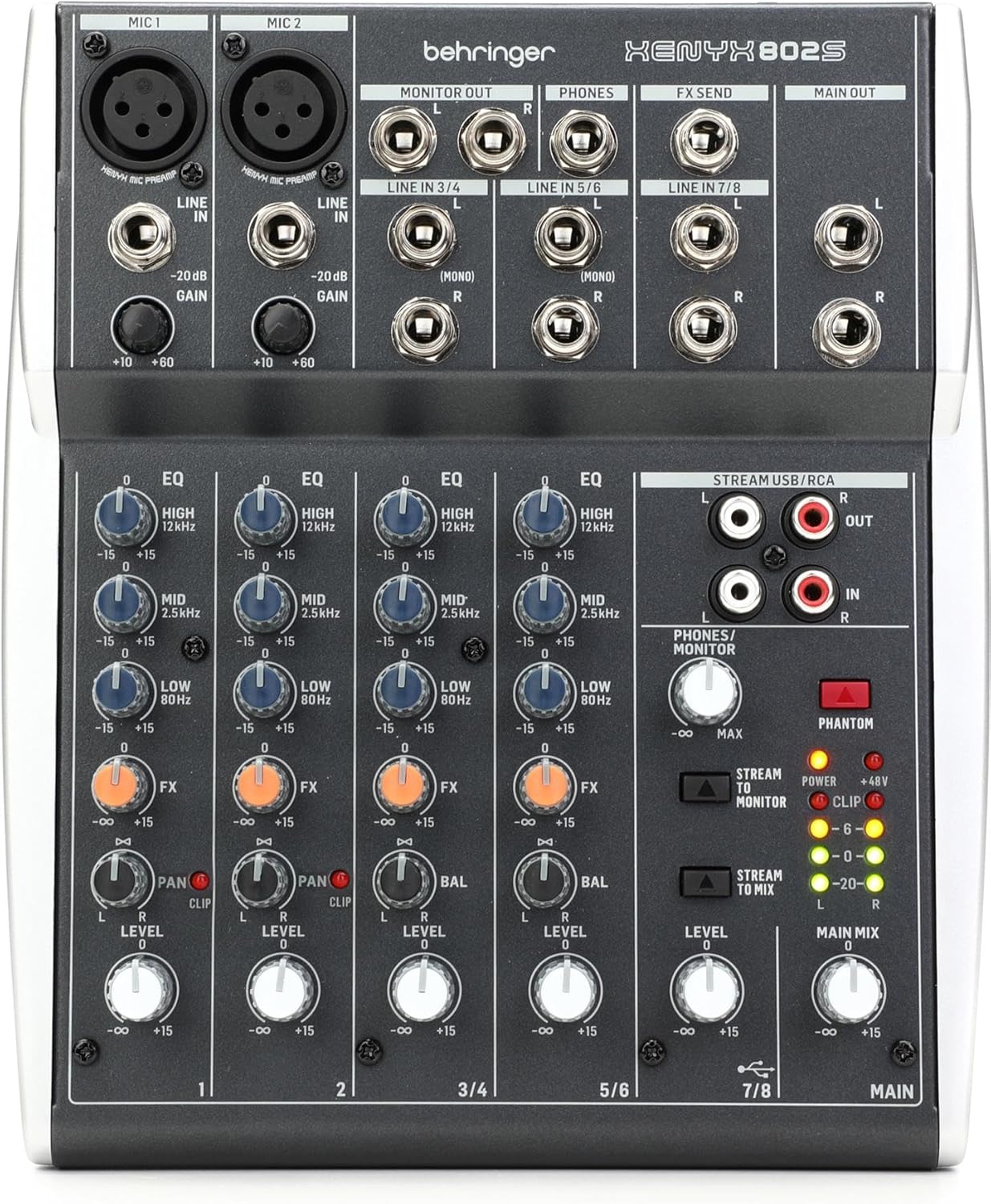
Check the latest price on the Behringer Xenyx Q802USB on Amazon
Who Is the Behringer Xenyx Q802USB For?
The Q802USB sits in a sweet spot for podcasters who want more control over their audio than a simple USB microphone provides but do not need the feature set of a full production console like the RODECaster Pro or the RODECaster Video. It is best suited for solo podcasters or two-person shows that want hands-on EQ and compression without a steep learning curve.
If you are building a home podcast setup on a tight budget, or you need a compact mixer you can throw in a bag for field recordings, this is the mixer that keeps coming up in recommendations for good reason.
Key Features for Podcasters
The Behringer Xenyx Q802USB is an 8-input, 2-bus analog mixer with a built-in stereo USB audio interface. Here is what matters most for podcast production:
XENYX Mic Preamps
The two XENYX mic preamps offer up to +60 dB of gain with a dynamic range of 130 dB. That is enough gain to comfortably drive most dynamic microphones, including popular podcast mics like the Shure SM58 and Audio-Technica AT2005. For condenser microphones, the mixer provides 48V phantom power, so you can use studio-grade condensers like the Audio-Technica AT2020 without needing an external power supply.
If you want to understand how preamps affect your signal chain, our guide on what a preamp is and why it matters breaks it down in plain language.
Built-in USB Audio Interface
The USB interface is plug-and-play on both Mac and Windows. It sends a stereo mix directly to your computer over a single USB cable, so you can record into any podcast recording software or DAW without additional hardware. No drivers are required on Mac, and it is class-compliant on Windows as well, though using ASIO4All can reduce latency if you need real-time monitoring.
This dual role as both a mixer and an audio interface is what separates the Q802USB from the non-USB Xenyx 802. If you are comparing standalone audio interfaces for podcasting, keep in mind that the Q802USB gives you analog mixing controls that a pure interface does not.
One-Knob Compression
Each mono channel has a one-knob compressor that lets you tame dynamic range without needing to understand attack, release, and ratio settings. For podcasters, this means more consistent vocal levels during recording. Turn it up slightly and your loud moments get pulled down while your quieter passages remain audible. It is not a replacement for post-production compression, but it gives you a better raw recording to work with.
British 3-Band EQ
The three-band EQ on each channel is modeled after classic British console designs. You get control over lows, mids (centered at 2.5 kHz), and highs. The mono channels also include a low-cut filter (also called a high-pass filter), which is essential for removing rumble from air conditioning, foot traffic, or desk vibrations. For podcasters who want to learn more about shaping their voice at the source, our microphone techniques guide covers the fundamentals.
Full Technical Specifications
| Specification | Details |
|---|---|
| Input Configuration | 2 mono channels (XLR + 1/4″ TRS), 2 stereo channels (1/4″ TRS) |
| Total Inputs | 8 |
| Buses | 2 |
| Mic Preamps | 2x XENYX preamps, +60 dB gain, 130 dB dynamic range |
| Phantom Power | 48V (global switch, applies to both XLR inputs) |
| EQ | 3-band British EQ on all channels; low-cut filter on mono channels |
| Compression | One-knob compressor on mono channels with LED indicator |
| USB Interface | 2-in / 2-out stereo, class-compliant (no drivers needed) |
| Outputs | Main mix (1/4″ TRS), control room (1/4″ TRS), headphones (1/4″ TRS), 2-Track (RCA) |
| FX Send | 1 post-fader FX send per channel; 1 stereo aux return |
| Dimensions | 14 x 8 x 5 inches (35.6 x 20.3 x 12.7 cm) |
| Weight | 2.4 lbs (1.1 kg) |
| Power | External power supply (included) |
| Street Price | Approximately $75–$90 USD (2026) |
Setting Up the Q802USB for Podcast Recording
Getting the Q802USB ready for podcast recording takes just a few minutes. Here is the basic signal chain:
Step 1: Connect your XLR microphone to Channel 1 (or Channel 2 for a second host). If you are using a condenser mic, press the 48V phantom power button on the back of the mixer. If you are using a dynamic mic, leave phantom power off. For help choosing, see our guide on XLR vs USB microphones.
Step 2: Connect the USB cable from the mixer to your computer. Your operating system should recognize it as an audio input device automatically.
Step 3: Open your recording software and select the Q802USB as your input device. Popular free options include Audacity (which Behringer bundles with the mixer) and GarageBand on Mac.
Step 4: Set your gain by speaking at your normal podcast volume and adjusting the gain knob until the signal peaks in the green range on the LED meter, occasionally touching yellow. Staying out of the red prevents clipping.
Step 5: Use the EQ to shape your voice. A slight cut in the lows using the low-cut filter removes room rumble, a small boost in the mids can add presence to your voice, and a gentle high-end lift adds clarity and air.
Step 6: Dial in a small amount of compression on the mono channel to even out your dynamics. Start with the compressor knob at about 25% and adjust from there.
Connect your podcast headphones to the 1/4″ headphone jack on the front for real-time monitoring. If your headphones use a 3.5mm plug, you will need a 3.5mm-to-1/4″ adapter.
Behringer Xenyx Q802USB vs Popular Alternatives
The Q802USB does not exist in a vacuum. Here is how it stacks up against the mixers and interfaces podcasters most often compare it to:
| Feature | Behringer Xenyx Q802USB | Behringer Xenyx 802S | Zoom PodTrak P4 | Focusrite Scarlett 2i2 |
|---|---|---|---|---|
| Type | Analog mixer + USB interface | Analog mixer + USB interface | Dedicated podcast recorder | USB audio interface |
| XLR Mic Inputs | 2 | 2 | 4 | 2 |
| Built-in Compressor | Yes (one-knob) | No | No | No |
| EQ | 3-band British + low-cut | 3-band + low-cut | No hardware EQ | No hardware EQ |
| Sound Pads | No | No | Yes (4 pads) | No |
| Multitrack Recording | No (stereo mix only) | No (stereo mix only) | Yes (4 tracks) | Yes (2 tracks) |
| SD Card Recording | No | No | Yes | No |
| Phantom Power | 48V (global) | 48V (global) | No | 48V (per channel) |
| Street Price (2026) | ~$75–$90 | ~$60–$75 | ~$200 | ~$170 |
Q802USB vs Behringer Xenyx 802S
The 802S is Behringer’s newer streaming-focused refresh of the 802 line. It keeps the same basic layout and XENYX preamps but drops the one-knob compressor and adds RCA stereo inputs. If you primarily need a simple mixer for live podcast streaming and do not need compression at the hardware level, the 802S saves you a few dollars. But for podcast recording where you want to tame dynamics before they hit your DAW, the Q802USB’s built-in compressor is genuinely useful and worth the small price premium.
Q802USB vs Zoom PodTrak P4
The Zoom PodTrak P4 is a completely different tool. It is a dedicated podcast recorder with four XLR inputs, multitrack recording to SD card, and sound pads for intros, outros, and effects. It costs roughly double the Q802USB but eliminates the need for a computer during recording. If you record in the field, interview multiple guests in person, or want each voice on its own track for post-production, the P4 is the better choice. But if you are a solo podcaster or two-person show recording to a computer, the Q802USB gives you analog tone-shaping tools the P4 lacks.
Q802USB vs Focusrite Scarlett 2i2
The Scarlett 2i2 is a pure audio interface with excellent preamps and true multitrack recording (each input records to its own track in your DAW). The trade-off is that you lose the hardware EQ and compression the Q802USB provides. If clean, uncolored signal is your priority and you prefer to do all your processing in software, the Scarlett is the better interface. If you want to shape your sound in real time with physical knobs, the Q802USB is more hands-on and about half the price.
What Real Users Say: Strengths and Weaknesses
What Podcasters Love
Exceptional value. At its price point, the Q802USB consistently surprises podcasters with how much it offers. Two quality preamps, a USB interface, compression, and British EQ for under $90 is hard to beat.
Clean audio from the XENYX preamps. The preamps deliver clear recordings with minimal self-noise. Users report that even at high gain settings needed for dynamic microphones, the noise floor stays acceptably low for podcast work.
Plug-and-play simplicity. No driver installation is required on Mac or most modern Windows systems. Connect the USB cable, select the mixer as your input device, and you are recording. For podcasters who want to focus on content rather than troubleshooting technical configurations, this is a significant advantage.
Compact and portable. At just 2.4 pounds and roughly the size of a hardcover book, the Q802USB travels well. Podcasters who record at events, conferences, or co-working spaces appreciate how little desk space it requires.
What Podcasters Wish Were Better
No power switch. This is the most common complaint across user reviews. The Q802USB has no on/off button. You power it down by unplugging the external power supply, which is mildly annoying in daily use. A power strip with a switch is the practical workaround.
Stereo mix only over USB. The USB interface sends a combined stereo mix to your computer, not individual tracks. If you are recording two hosts and want each voice on a separate track for independent editing, you cannot do that with this mixer alone. You would need to pan one host hard left and the other hard right, then split the stereo file in post, which works but is not ideal. For true multitrack recording, look at the Zoom LiveTrak L-8 or a dedicated audio interface.
Build quality is functional, not premium. The knobs and faders feel lighter than what you would find on a $200+ mixer. For a home studio where the mixer sits on a desk, this is rarely a problem. For road use where it gets tossed in bags regularly, you may want a protective case.
Global phantom power. The 48V phantom power switch applies to both XLR inputs simultaneously. If you are running one condenser mic and one dynamic mic, the dynamic mic will receive phantom power it does not need. Most modern dynamic microphones handle phantom power without issue, but it is worth knowing.
FX send level can be weak. Some users report that the FX send output runs at a lower level than expected, which can be problematic if you are trying to use it for a mix-minus setup with remote recording software. Test your specific routing before committing to a workflow that depends on the FX send.
How to Set Up a Mix-Minus for Remote Interviews
One of the most common reasons podcasters buy a mixer like the Q802USB is to create a mix-minus setup for recording remote interviews over Zoom, Skype, or dedicated remote recording platforms. A mix-minus sends your local audio to the remote guest while keeping the remote guest’s audio out of the return signal, preventing echo.
On the Q802USB, the basic approach is to route your microphone signal to the FX send, which feeds your voice to the computer and then to your remote guest. The remote guest’s audio comes back from the computer through the USB return and plays through your headphones and main mix, but does not loop back through the FX send. This prevents the echo loop.
Be aware that the FX send on this mixer can run at a lower level than some users expect. You may need to boost the FX send knob higher than you would on other mixers. If the signal is too low for your remote recording software to work with, this mixer may not be the right choice for mix-minus workflows. In that case, the Zoom PodTrak P4 or Zoom LiveTrak L-8 handle mix-minus natively with dedicated routing options.
Can You Use the Q802USB for Live Streaming?
Yes. The USB interface makes the Q802USB a viable option for live streaming platforms like OBS, StreamYard, and similar tools. Your computer will see the mixer as a USB audio input, and you can select it in your streaming software just like you would select any microphone.
The advantage over a standalone USB microphone is that you can blend multiple audio sources in real time. Play intro music from a phone connected to one of the stereo line inputs, speak into your XLR microphone on Channel 1, and the mixer sends it all as a single combined audio feed to your stream. You can adjust levels on the fly with physical faders instead of hunting through software menus.
If you are serious about live streaming, you may also want to explore how the Q802USB compares to software-based solutions in our breakdown of StreamYard vs OBS.
Pairing the Q802USB with the Right Microphone
The mixer is only as good as what you plug into it. Here are some proven microphone pairings that work well with the Q802USB’s preamps:
For solo podcasters on a budget: The Audio-Technica ATR2100x-USB in XLR mode pairs beautifully with the XENYX preamps. It is a dynamic mic that does not need phantom power and handles the Q802USB’s gain range well.
For vocal warmth and richness: A large-diaphragm condenser like the Audio-Technica AT2020 (with 48V phantom power engaged) delivers studio-quality sound through this mixer. Just be mindful that condensers pick up more room noise, so your recording environment matters. Check out our advice on fixing echo on your mic if room acoustics are a concern.
For two-person shows: Two Rode PodMic or Shure MV7 microphones work well in the two XLR inputs. Both are dynamic mics designed specifically for podcast vocals and have enough output to work comfortably within the Q802USB’s gain range.
For a broader look at microphone options, our podcast microphone setup guide and USB podcast microphone guide cover the full range of choices for every budget.
Where the Q802USB Fits in Your Overall Podcast Setup
A mixer is just one piece of the puzzle. Here is how the Q802USB fits into a complete podcast production chain:
Recording: Microphone → Q802USB (gain, EQ, compression) → USB to computer → recording software
Editing: Raw recording → editing software → export final audio file
Publishing: Final file → podcast hosting platform → distributed to Apple Podcasts, Spotify, and other directories
If you are just starting out, our podcast equipment setup guide walks through the full chain step by step. And our guide to podcast startup costs helps you budget for everything from microphones to hosting.
Frequently Asked Questions
How many microphones can I connect to the Behringer Xenyx Q802USB?
You can connect up to two microphones using the XLR inputs on Channels 1 and 2. Each XLR input has its own dedicated XENYX preamp with independent gain, EQ, and compression controls. If you need more than two XLR inputs for group recordings, consider the Zoom LiveTrak L-8 or a larger mixer from the Yamaha MGX series.
Is the Behringer Xenyx Q802USB compatible with Mac and Windows?
Yes. The built-in USB interface is class-compliant, meaning it works with Mac and Windows computers without installing additional drivers. On Mac, it is recognized immediately. On Windows, it typically works through the default audio drivers, though installing ASIO4All can provide lower latency for real-time monitoring.
Can I record each microphone to a separate track with the Q802USB?
Not directly. The USB interface sends a stereo mix of all inputs combined. However, you can work around this by panning one microphone hard left and the other hard right, then splitting the left and right channels into separate mono tracks in your editing software. For true multitrack recording, a dedicated audio interface like the Focusrite Scarlett 2i2 or a recorder like the Zoom PodTrak P4 is a better fit.
Do I need phantom power for my podcast microphone?
Only if you are using a condenser microphone. Dynamic microphones like the Shure SM58 or Rode PodMic do not require phantom power. The Q802USB’s 48V phantom power switch applies to both XLR inputs at once. Most modern dynamic mics tolerate phantom power safely, but check your microphone’s documentation to be sure. Our guide on preamps and phantom power explains the differences in detail.
Is the Behringer Xenyx Q802USB good enough for a professional podcast?
For audio quality, yes. The XENYX preamps, British EQ, and one-knob compression produce recordings that are clean enough for professional podcast distribution when paired with a decent microphone and reasonable recording environment. The limitations are in workflow rather than sound quality. If you need multitrack recording, advanced routing, or more than two XLR inputs, you will outgrow this mixer. But the audio quality itself is solid for the price.
What is the difference between the Q802USB and the Behringer Xenyx 802S?
The 802S is a newer, streaming-focused update with a refreshed design and RCA stereo inputs. The Q802USB includes a one-knob compressor on each mono channel and an FX send, both of which the 802S lacks. For podcast recording where you want hardware compression, the Q802USB is the better choice. For simple streaming or DJ use where compression is handled in software, the 802S works well and costs slightly less.
Can I use the Q802USB for live streaming on Twitch or YouTube?
Yes. The USB output works as an audio input in any live streaming software, including OBS, Streamlabs, and StreamYard. You get real-time mixing of your microphone and any line-level sources (music players, sound effects) through the stereo inputs.
Does the Q802USB have an on/off switch?
No, and this is a common point of frustration among users. You power it on and off by plugging and unplugging the external power supply. The simplest solution is to connect the power supply to a power strip with its own switch.
What recording software works with the Behringer Xenyx Q802USB?
Any recording software that accepts a USB audio input will work, including Audacity (free), GarageBand (free on Mac), Adobe Audition, Hindenburg Journalist, Reaper, and Logic Pro. Behringer also includes free downloads of Audacity and various plugins at behringer.com. For a full breakdown of your options, see our roundup of podcast editing software for every level.
Is the Behringer Xenyx Q802USB still worth buying in 2026?
If your needs match its strengths — one or two XLR microphones, hardware EQ and compression, USB recording to a computer, and a budget under $100 — then yes, it remains one of the best values in podcast mixers. Newer options like the RODECaster Duo and Zoom PodTrak P4 offer more features but at significantly higher price points. The Q802USB has not been updated in years, but its analog design means it does not become obsolete the way software-dependent products can.
Check the latest price on the Behringer Xenyx Q802USB on Amazon
Final Verdict
The Behringer Xenyx Q802USB is not the flashiest mixer on the market, and it will not compete with modern podcast production consoles on features. But it was never meant to. What it does is give podcasters a reliable, affordable path to better audio with real hardware controls for EQ and compression that most budget interfaces and USB microphones simply do not offer.
For solo shows and two-person podcasts where you are recording to a computer and want hands-on tone shaping without spending $200 or more, the Q802USB remains a smart buy. Its biggest limitations — stereo-only USB output and no power switch — are well-known trade-offs that most podcasters at this budget level can live with.
If you are building your first studio or upgrading from a USB microphone, pair the Q802USB with a solid dynamic mic, a pair of closed-back headphones, and good recording software, and you have a podcast setup that can produce professional results on a beginner’s budget.
More Podcast Gear Resources
- Complete Podcast Equipment Guide
- Best Audio Mixers for Podcasting
- Best Podcast Microphones
- Podcast Equipment for Solo Podcasters
- Podcast Equipment for Co-Hosts and Groups
- Podcast Equipment Bundles
- Podcast Setup for Two People
- What Equipment Is Needed for a Podcast?
- Understanding Microphone Polar Patterns
- Podcast Bitrate: What Settings to Use