
Matt
How Much Does It Cost to Start a Podcast? (And What You Can Skip)
Studio microphones. Cameras. Lights. Software stacks. Monthly subscriptions.The truth is far simpler: you can start a podcast for almost nothing,
then grow into it only if you enjoy the process.
This guide breaks down the real costs of starting a podcast — what you actually
need, what you definitely don’t, and when spending money starts to make sense.
The Short Answer: What Most Podcasts Actually Cost
- $0–$50 → Testing the idea
- $100–$300 → Committed beginner
- $500+ → Intentional investment (optional)
Most people overspend because they assume podcasting is a gear problem.
It isn’t. It’s a consistency problem.
What You Actually Need to Start a Podcast
Audio-Only (The Simplest and Most Common Path)
If you can make a phone call, you can record a podcast.
- A phone or computer
- A quiet room
- A free recording app
- Free podcast hosting
Audio-only podcasts are still the default for most listeners.
As explored in this look at podcasting’s voice-only future,
listeners care more about clarity and substance than production spectacle.
Video Podcasting (Optional, Not Required)
Video adds complexity, not credibility.
- Built-in webcam or phone camera
- Natural window light
- Free tools like Zoom, OBS, or Riverside’s free tier
Video can help with distribution later, but starting audio-first keeps friction low.
If you’re curious about platform tradeoffs, see
whether YouTube is really a podcast platform.
Podcast Gear You Don’t Need (At Least Not Yet)
This is where most beginners waste money.
- XLR microphones
- Audio interfaces
- Mixers
- Studio headphones
- Paid editing software
- Music licenses
- Cameras and lighting kits
None of these make your podcast successful.
They only make it more expensive.
As argued in podcasting like a pro without sounding like one,
improvement comes from repetition — not hardware.
Free vs Paid Platforms: What Beginners Worry About
Can You Start on Free Platforms?
Yes — and many people should.
- YouTube
- Spotify for Podcasters
- Podbean’s free tier
Free platforms are excellent for testing ideas.
They fall short when control, analytics, or long-term ownership matter.
If you want a deeper breakdown, see
this guide to free podcast hosting.
When Paid Hosting Makes Sense
Paid hosting isn’t about sounding more legitimate.
It’s about control.
This becomes relevant once you care about:
- Reliable analytics
- Feed ownership
- Monetization flexibility
- Platform independence
If you’re weighing options, comparisons like
Podbean vs Buzzsprout
or Buzzsprout pricing
help clarify tradeoffs without pressure.
Is It Scary to Start With Zero Audience?
It feels scary — but it isn’t risky.
Zero audience means:
- No expectations
- No pressure
- No consequences
Early episodes are private practice.
Nobody is judging. Nobody is ranking you.
As explained in
starting a podcast with no audience,
most shows fail not because they were bad — but because they stopped.
Ongoing Costs to Expect (So Nothing Sneaks Up on You)
- Podcast hosting (optional at first)
- Editing tools (optional)
- Website costs (optional)
- Marketing (completely optional)
Most podcasts never exceed a modest monthly spend.
Growth costs are elective — not mandatory.
Start Cheap, Then Grow (The Smart Path)
Phase 1: Try It
Record with what you have.
Publish a few episodes.
See if you enjoy it.
Phase 2: Improve It
Upgrade when friction becomes annoying.
Not before.
Phase 3: Invest in It
Spend money only when the podcast supports a larger goal —
a business, a brand, or a long-term project.
As noted in
incremental vs overhaul upgrades,
gradual improvement beats dramatic reinvention.
Final Takeaway: Start With What You Have
If you wait until your setup is perfect, you’ll never start.
If you start with what you have, you’ll discover what’s actually worth upgrading.
Podcasting isn’t expensive.
Quitting before you begin is.
Zoom Livetrak L-8 for Podcasting
If you’re a podcaster, musician, or live performer looking for a portable, do-it-all mixer and recorder, the Zoom LiveTrak L-8 might be on your shortlist. But is it worth it in 2025? We compiled real user reviews and technical comparisons to help you decide if it’s the right fit for your workflow.
What Is the Zoom LiveTrak L-8?
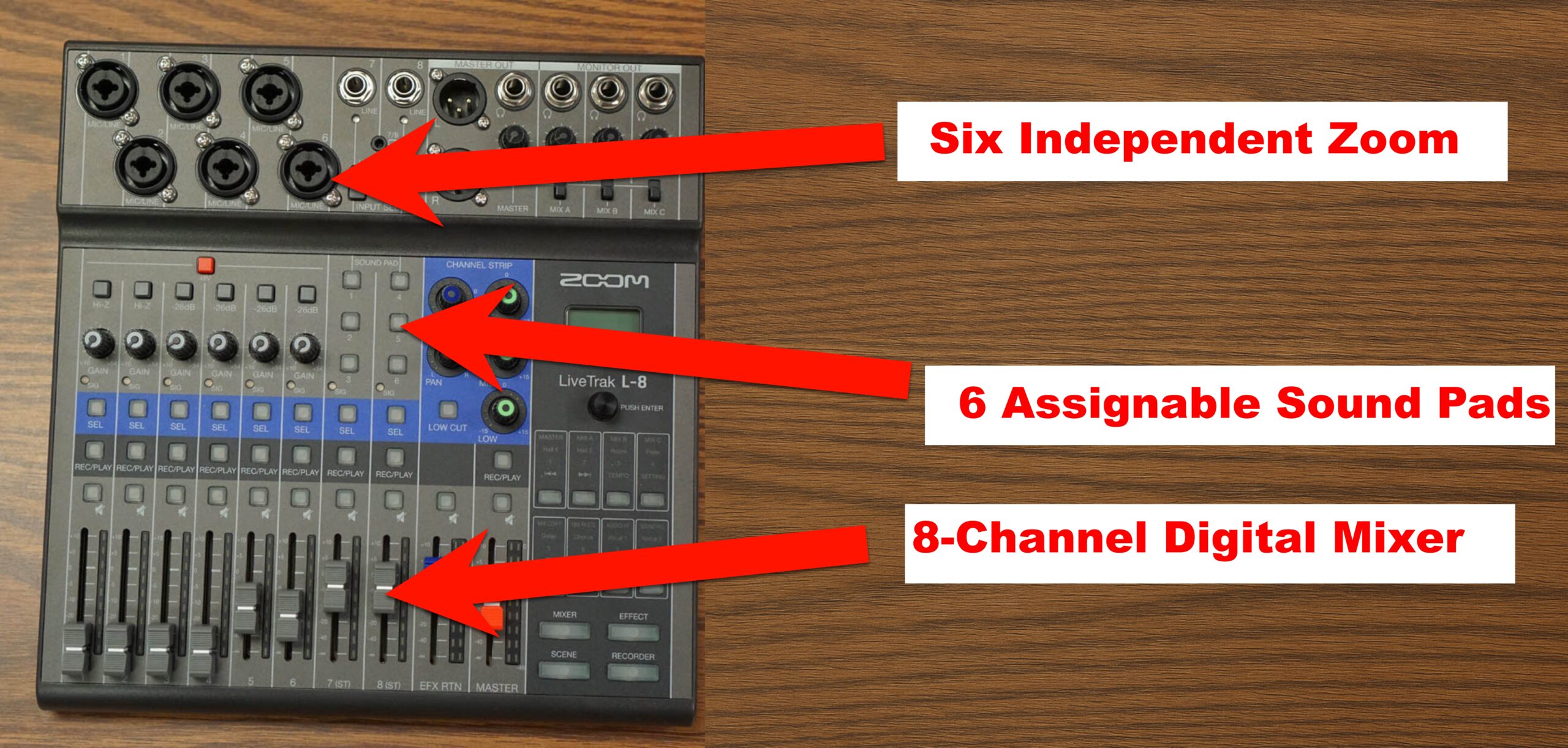
The L-8 is an 8-channel digital mixer and multitrack recorder tailored for podcasters, musicians, and creators on the move. It delivers pro-level recording quality with minimal setup, powered by batteries or USB, making it ideal for both studio and field use.
Key Specifications
- Channels: 8
- Inputs: 6 x XLR-1/4″ combo, 2 x 1/4″ TS, 1 x 1/8″ TRRS
- Outputs: 2 x XLR main, 4 x 1/4″ TRS headphones
- Recording: 12-track simultaneous, 10-track playback
- Resolution: 24-bit/96kHz
- Dimensions: 10.55″ x 11.1″ x 2.91″
- Weight: 3.4 lbs
Who Should Consider the L-8?
This mixer is a favorite among:
- Podcasters needing mix-minus, multiple headphone outputs, and portability
- Musicians recording jam sessions or live gigs
- Streamers and content creators using iOS devices or OBS setups
Firmware and Software Compatibility
Firmware Updates: Zoom continues to release updates to improve DAW compatibility and recording stability. Always download the latest firmware from Zoom’s official site.
DAW and Streaming Software: Works with GarageBand, Ableton, Pro Tools, and OBS. For iOS use, grab an Apple Lightning to USB Camera Adapter.
iOS Integration: Acts as a 12-in/4-out interface when used with an iPad or iPhone — ideal for mobile setups and podcasting on the go.
Key Features That Stand Out
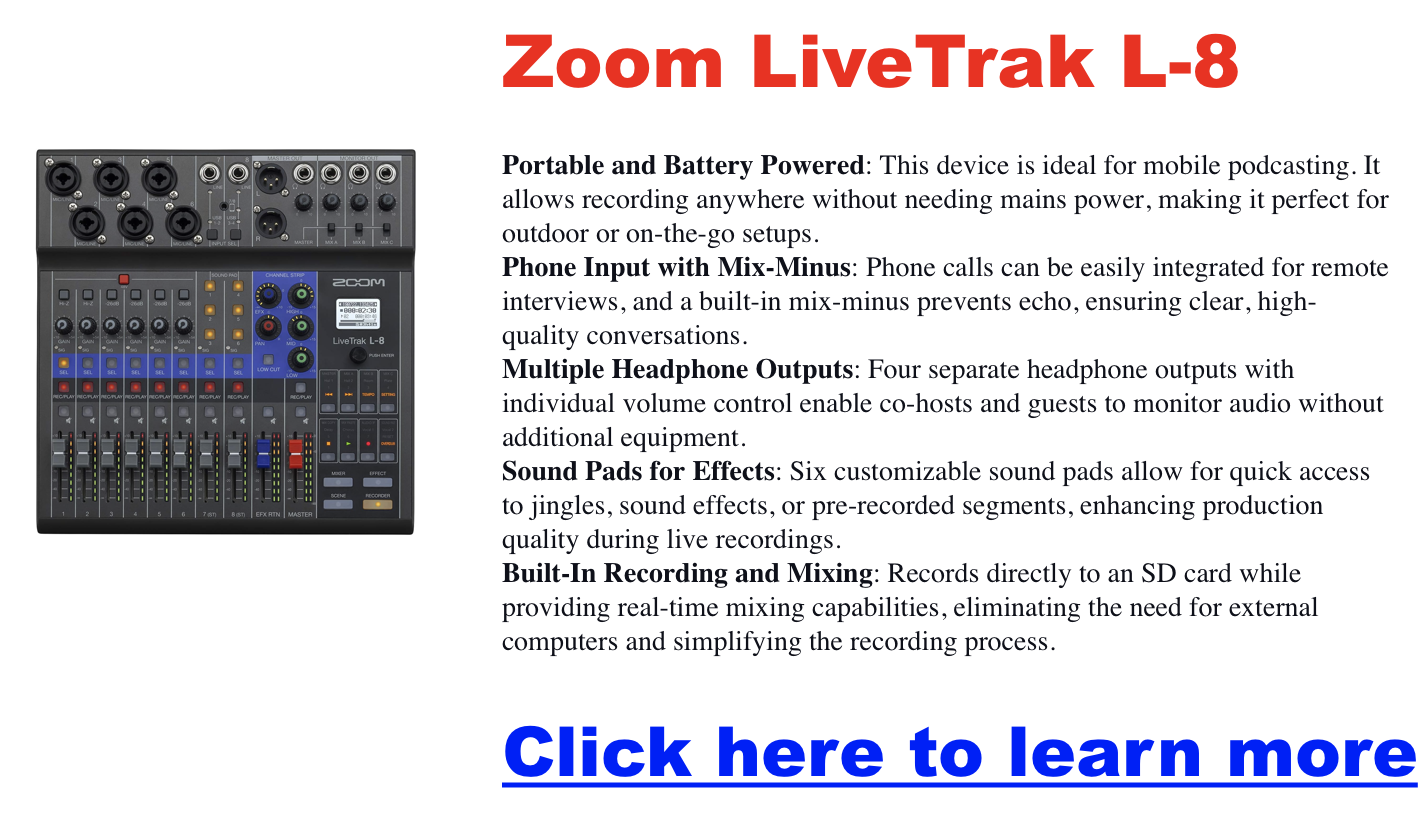
Portability: Battery-powered, compact, and travel-friendly. Great for remote interviews, church setups, or mobile musicians.
Multitrack Recording: Simultaneously record all inputs to an SD card. Mix on the device or export to your DAW later.
Sound Quality: Includes 6 low-noise mic preamps and onboard effects like reverb and chorus. 3-band EQ + high-pass filter per channel.
User-Friendly Interface: Touch-friendly knobs, intuitive layout, and 6 sound pads for triggering audio clips or stingers during a live show.
Zoom L-8 vs Other Mixers
Zoom L-8 vs. L-12
- Phantom Power: L-8 has group phantom on/off; L-12 allows split (ch. 1–4 and 5–8)
- Size: L-8 is lighter, battery-powered
- Best For: L-8 for mobility, L-12 for bigger setups with varied mics
L-8 vs. Rodecaster Pro
- Processing: Rodecaster has advanced DSP; L-8 offers EQ control instead
- Connectivity: Rodecaster uses USB-C; L-8 uses micro-USB
- Price: L-8 is more budget-friendly
Real Use Case Highlights
Podcasting: Mix-minus works seamlessly for phone interviews. Multiple headphone outs let everyone monitor the session.
Music Recording: Capture high-res multitracks without a laptop. Built-in FX save post-processing time.
Live Sound: Great for performers and public speakers. Easily record live sets or mix stage monitors in real-time.
Pros and Cons
Pros
- Battery-powered, great for remote use
- Multitrack recording and playback
- Solid preamps and onboard effects
- Easy mix-minus for podcasters
Cons
- Group-only phantom power toggle
- Micro-USB instead of USB-C
- Limited onboard effect routing
Frequently Asked Questions
Is it good for beginners? Yes — intuitive interface and sound pads make it beginner-friendly with room to grow.
Can I use it for remote interviews? Absolutely. The built-in mix-minus prevents call feedback — just plug in your phone via TRRS.
Does it run without an outlet? Yes, via 4 AA batteries or USB power bank.
L-8 or L-12? Choose L-8 for mobile use. Go with L-12 for more channels and individual phantom power zones.
Where can I buy it? Amazon, Sweetwater, and B&H all carry the L-8 with occasional discounts and bundles.
Rodecaster Pro: All-in-One Podcast Production Studio
Looking for the best podcast production setup in 2025? The Rode RØDECaster Pro II is a standout solution for creators who want professional-quality sound without the headache of complicated gear. Whether you’re launching your first show or upgrading your studio, this guide breaks down everything you need to know—from features and benefits to expert tips and upgrade advice.
RØDECaster Pro II Overview: What It Does Best
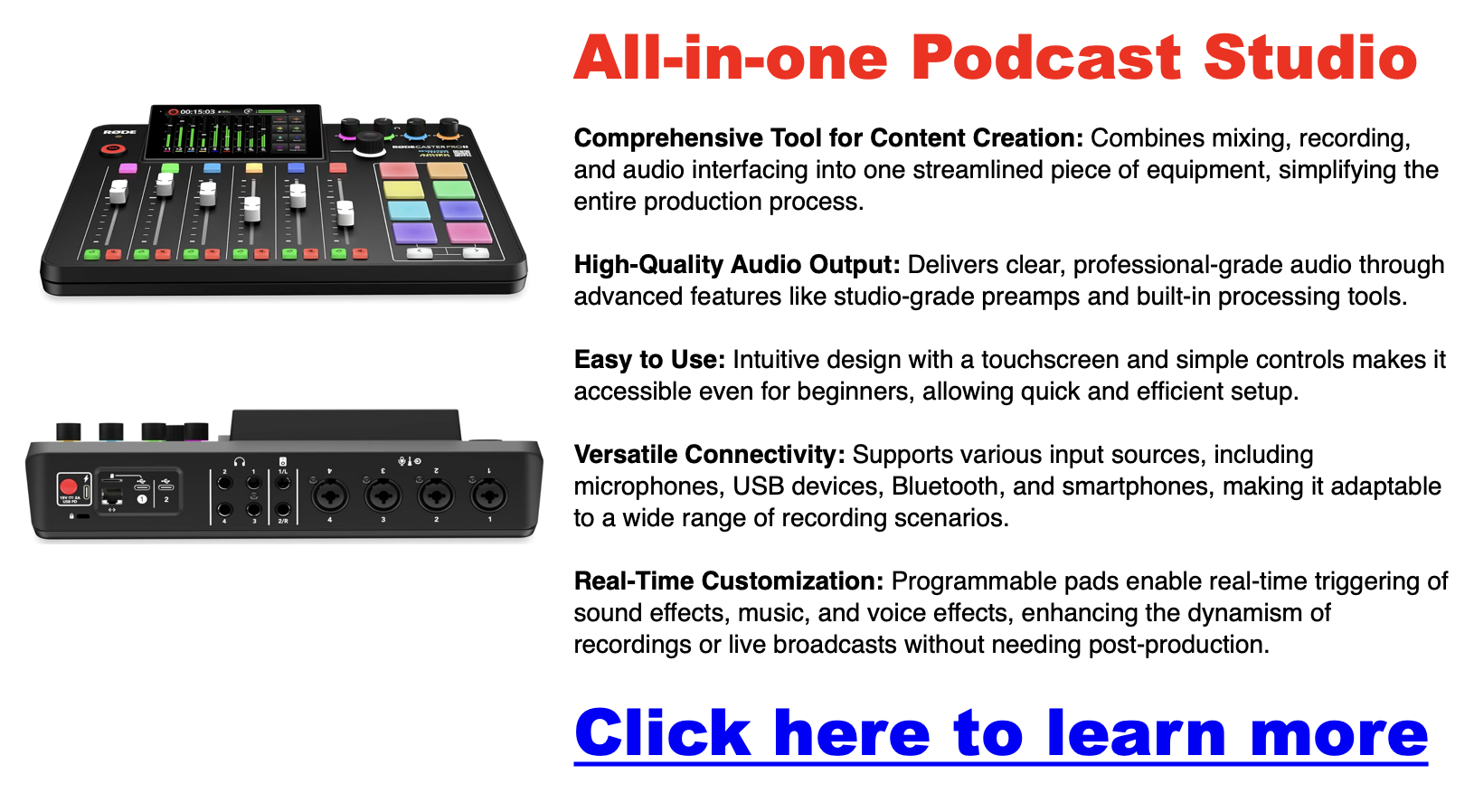
The RØDECaster Pro II is a feature-packed audio production console built for podcasters, streamers, musicians, and content creators. It blends studio-quality preamps, onboard audio processing, customizable SMART pads, and multi-track capabilities—all in one sleek unit.
Key Features:
-
Four high-quality mic inputs with studio-grade preamps
-
SMART Pads to trigger sound effects, voice FX, or MIDI commands
-
APHEX audio processing for pro-level clarity and tone
-
Multi-track recording for post-production flexibility
-
Built-in mixer with faders and multiple input types (USB, Bluetooth, TRRS)
Why Creators Choose the RØDECaster Pro II
High-Quality Audio, No Hassle
With up to 76dB of gain and ultra-low noise, this console eliminates the need for mic boosters—even for gain-hungry mics like the Shure SM7B. It works beautifully with both dynamic and condenser mics.
Beginner-Friendly Design
Despite its power, the RØDECaster Pro II is incredibly easy to use. The large touchscreen interface and intuitive layout mean even first-time users can produce professional-grade sound with minimal setup.
Versatile for All Content Types
This unit isn’t just for podcasts. It’s perfect for livestreams, remote interviews, music production, and video content creation. You can connect smartphones via Bluetooth, plug in USB-C devices, or use traditional XLR mics.

What’s New vs the Original RØDECaster Pro?
The Pro II adds major upgrades:
-
Improved preamps with higher gain and lower noise
-
Dual USB-C ports to connect two devices at once
-
Enhanced Bluetooth for clearer remote interviews
These improvements make it a great step up—especially if you’re managing multi-source audio or want cleaner results without extra gear.

Programmable SMART Pads
The RØDECaster Pro’s SMART pads are more than just sound effect triggers. These eight pads are fully customizable, allowing you to load them with your audio files, music beds, or voice effects. Additionally, you can use these pads for advanced functions like pitch shifting, reverb, and even MIDI commands, giving you full control over your audio environment.
Highlights:
- Customization: Load your audio files and effects.
- Advanced Functions: Includes pitch shifting, reverb, and MIDI commands.
- Dynamic Control: Easily add layers to your content with a single tap.
Advanced Audio Processing
The RØDECaster Pro II is equipped with APHEX audio processing tools, including the Aural Exciter, Big Bottom, and Compellor. These tools are designed to enhance the quality of your audio, whether by adding warmth and depth to voices or compressing dynamic range for a more consistent output. Additionally, the built-in noise gate and compressor help reduce background noise and maintain balanced levels throughout your recording.
Highlights:
- APHEX Processing: Enhances audio clarity and richness.
- Noise Gate and Compressor: Keeps background noise at bay and balances levels.
- Professional Sound: Achieve broadcast-quality audio with ease.
Multi-Track Recording
One of the standout features of the RØDECaster Pro II is its multi-track recording capability. This feature lets you record each input channel separately, which is incredibly useful during post-production. Whether you need to edit out a mistake or apply effects to individual tracks, multi-track recording gives you the flexibility to refine your content to perfection.
Highlights:
- Separate Track Recording: Each input can be recorded individually.
- Post-Production Flexibility: Easier to edit and apply effects.
- DAW Integration: Seamless export to Digital Audio Workstations for further editing.

The RØDECaster Pro II: What’s New?
Key Upgrades
The RØDECaster Pro II takes everything great about the original and enhances it with several key upgrades. The most notable improvements include even better preamps with higher gain and lower noise, dual USB-C interfaces that allow you to connect multiple devices simultaneously, and enhanced Bluetooth connectivity for superior audio quality during remote interviews or call-ins.
Highlights:
- Enhanced Preamps: Higher gain, lower noise.
- Dual USB-C Interfaces: Connect multiple devices simultaneously.
- Improved Bluetooth: Better audio quality for remote connections.
Who Should Upgrade?
If you already own the original RØDECaster Pro, the decision to upgrade will depend on your specific needs. If you frequently work with multiple devices, require even higher audio fidelity, or engage in many remote interviews, the RØDECaster Pro II could be a worthwhile investment.
Considerations:
- Multiple Device Connections: Ideal for complex setups.
- Higher Audio Fidelity: Best for professional-grade projects.
- Remote Interviews: Enhanced Bluetooth for clearer calls.
User Testimonials and Reviews
What Users Love
Many users rave about the RØDECaster Pro’s ease of use, high-quality audio output, and versatility of the SMART pads. It’s often praised for simplifying the production process without compromising on the quality of the final product.
Common Praise:
- Ease of Use: Intuitive and user-friendly.
- Audio Quality: Consistently high across various setups.
- Versatility: Adapts to different content creation needs.
Common Complaints
While the RØDECaster Pro is generally well-received, some users have noted the steep learning curve associated with its more advanced features. The price point can also be a barrier for hobbyists or those new to content creation.
Common Issues:
- Learning Curve: Advanced features may be challenging for beginners.
- Price: Considered expensive by some users, especially beginners.
How to Optimize Your Use of the RØDECaster Pro
Best Practices for Audio Quality
Pay attention to microphone placement and level settings to get the best possible audio from your RØDECaster Pro. Use the built-in noise gate and compressor to maintain clean, balanced audio, and use the APHEX processing to add warmth and depth to your recordings.
Tips:
- Microphone Placement: Keep it consistent and at the right distance.
- Use Audio Processing: Leverage the noise gate and compressor for balanced levels.
- Adjust Levels: Ensure levels are set correctly to avoid distortion or clipping.
Customizing Your Workflow
The RØDECaster Pro is highly customizable, allowing you to tailor its settings to fit your specific needs. Spend some time setting up the SMART pads with your most-used effects and sounds, and adjust the input levels to match your recording environment.
Tips:
- Customize SMART Pads: Load frequently used effects and sounds.
- Adjust Inputs: Set levels that suit your recording space.
- Streamline Workflow: Tailor settings to your production style for efficiency.
Troubleshooting Common Issues
If you encounter issues with the RØDECaster Pro, such as connectivity problems or audio glitches, you can take a few steps. First, ensure that all firmware is up to date. If problems persist, consult the user manual or Rode’s support resources for further guidance.
Tips:
- Update Firmware: Ensure the latest updates are installed.
- Check Connections: Verify that all cables and devices are properly connected.
- Consult Resources: Use Rode’s support and forums for troubleshooting.
FAQs About the RØDECaster Pro
Common Questions
Many users wonder if the RØDECaster Pro can handle multiple simultaneous inputs or what software is compatible with the device. The good news is that the RØDECaster Pro is designed to be highly versatile and works seamlessly with most recording software.
Common FAQs:
- Multiple Inputs: Yes, it can handle up to four simultaneous inputs.
- Software Compatibility: Compatible with most DAWs and recording software.
- Live Streaming: Yes, it’s ideal for live-streaming setups.
Expert Tips
If you’re looking to get the most out of your RØDECaster Pro, here are a few expert tips:
Insider Tips:
- Backup Recordings: Always create a backup of your recordings directly to the microSD card to avoid losing data.
- Firmware Updates: Regularly check for updates to benefit from the latest features and improvements.
Podcast Setup for Two People (2026): Best Equipment for Co-Hosted Shows
The best podcast setup for two people in 2026 is two dynamic XLR microphones (Samson Q2U or RODE PodMic) plugged into a Zoom PodTrak P4 or Focusrite Scarlett 2i2, with closed-back headphones for each host. That combination gives you independent audio tracks, clean isolation, and room to grow — without overspending on gear you don’t need yet.
Below you’ll find gear picks organized by budget, a quick-start wiring guide, and answers to the questions co-hosts ask most.
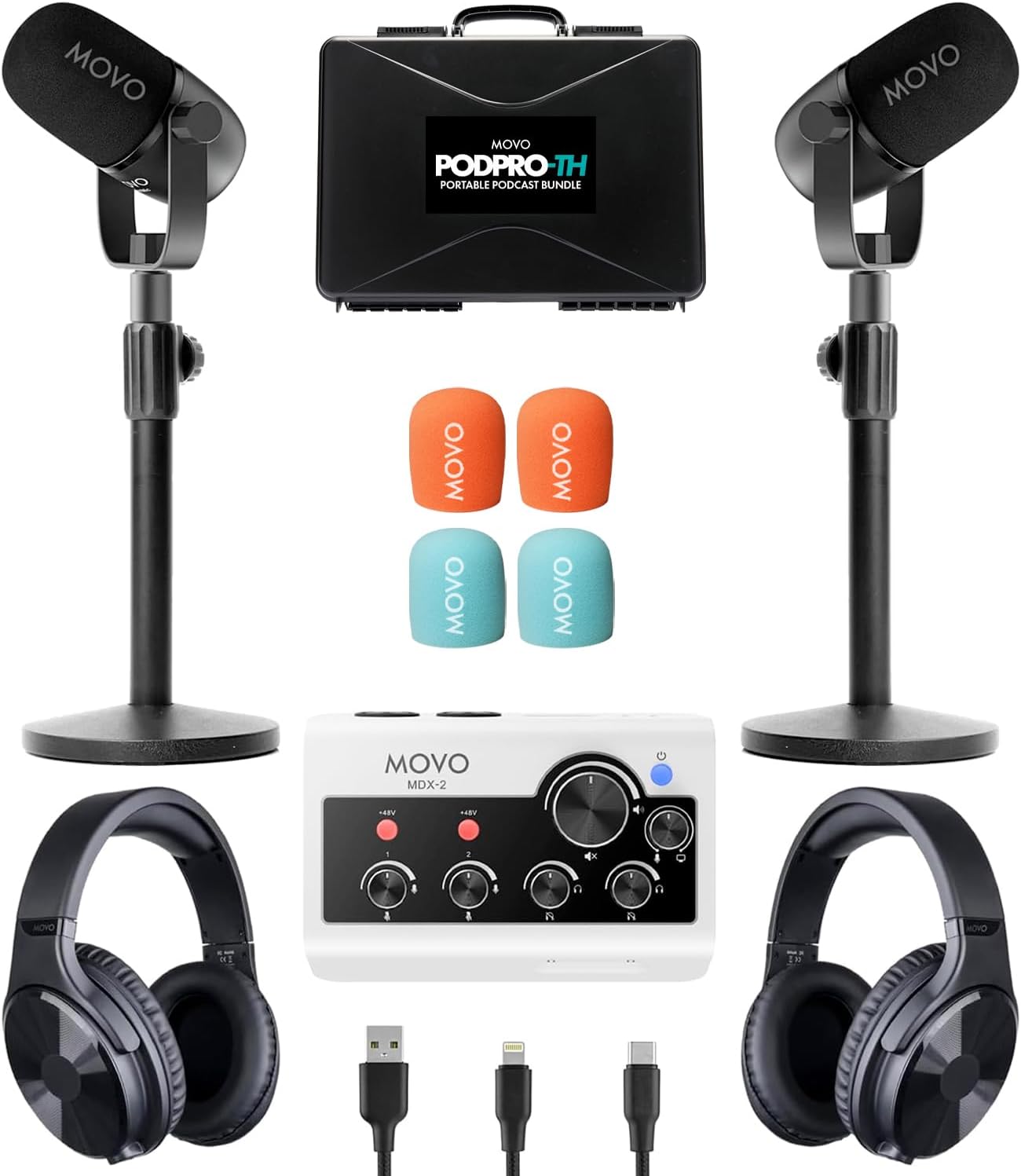
→ Browse two-person podcast equipment on Amazon
What Makes a Two-Person Setup Different From Solo Podcasting?
Recording two hosts in the same room introduces three problems a solo setup never faces: crosstalk between microphones, uneven volume between hosts, and a mixer or interface that can handle two separate inputs at once. Get those three things right and everything else is refinement.
The equipment categories are the same — microphones, interface/mixer, headphones, cables, software — but every category now needs to be multiplied or upgraded to handle two channels. That’s the core framing for the gear guide below.
Two-Person Podcast Equipment: Budget Tiers
Budget Setup (~$150–$250 total): Two USB Mics, No Interface Needed
The cheapest viable two-person setup uses two USB microphones plugged directly into a laptop. The tradeoff: most DAWs can only use one USB audio device at a time, so you’ll need a workaround (Aggregate Device on Mac, Voicemeeter on Windows) or a platform like Riverside.fm that records each host locally.
- Samson Q2U (~$60 each) — hybrid USB/XLR dynamic mic; our top recommendation for beginners. You can start USB and later switch to XLR with an interface. Check current price →
- Blue Yeti (~$90–$110) — popular USB condenser with a cardioid mode. Works, but the Q2U beats it on value and upgrade flexibility. See our Blue Yeti boom arm guide if you already own one.
Bottom line: Two Samson Q2Us at ~$120 total is the most financially responsible starting point for a co-hosted show.
Mid-Range Setup (~$400–$650): XLR Mics + Interface or Dedicated Podcast Recorder
This is the sweet spot for most two-person podcasts. You get independent multitrack recording, proper gain control per host, and a setup that won’t embarrass you two years from now.
Option A — Focusrite Scarlett 2i2 (4th Gen) + two XLR mics (~$430–$500 total)
The Scarlett 2i2 (~$200) is the most popular two-channel interface in podcasting. The 4th Gen added Auto Gain (sets your levels automatically) and Clip Safe (prevents distortion if you get loud). Two RODE PodMic (~$100 each) or Samson Q2U XLR inputs round out the rig. One limitation: only one headphone output, so you’ll need a headphone splitter or a small headphone amp for both hosts to monitor simultaneously.
Option B — Zoom PodTrak P4 + two XLR mics (~$400–$450 total)
The Zoom PodTrak P4 (~$150–$199) is podcast-specific, which makes it smarter for co-hosted shows than the Scarlett 2i2. It has four XLR inputs (room to add guests), four individual headphone outputs with independent volume controls, mix-minus for remote callers, and records directly to a microSD card without a computer. The 2i2 wins on audio fidelity; the P4 wins on podcasting utility.
| Feature | Focusrite Scarlett 2i2 (4th Gen) | Zoom PodTrak P4 |
|---|---|---|
| Price (approx.) | ~$200 | ~$150–$199 |
| XLR Inputs | 2 | 4 |
| Headphone Outputs | 1 | 4 (individual volume) |
| Records Without Computer | No | Yes (microSD) |
| Mix-Minus for Remote Guests | No | Yes |
| Best For | Home studio, music crossover | Podcast-only, field recording |
Microphone picks for this tier:
- Samson Q2U (~$60) — dynamic, USB/XLR hybrid; best beginner XLR mic
- RODE PodMic (~$100) — dynamic, broadcast-tuned, built-in pop filter; step up in warmth
- Shure SM7B (~$400) — the studio standard, but needs high-gain preamps; skip it until your show is established. See our RODE PodMic vs Shure MV7 comparison.
Dynamic mics like the Q2U and PodMic reject room noise better than condensers, which matters when two people are talking in the same room. Read our microphone polar patterns guide to understand why pickup pattern choice is critical for in-room co-hosting. For a full overview of XLR vs USB microphone tradeoffs, we cover that separately.
Pro Setup (~$900–$1,500+): RODECaster Pro II or Equivalent
The RODECaster Pro II (~$699) is the all-in-one benchmark for serious co-hosted shows. It handles four XLR inputs, built-in sound pads, Bluetooth for phone calls, and advanced per-channel processing (EQ, compression, de-essing) without any external software. Pair it with two RODE PodMic 2s and two NTH-100 headphones and you have a broadcast-ready rig out of the box. The RODECaster Video is the video-forward variant if you’re building a video podcast studio simultaneously.
At this price tier, also consider whether a Yamaha MGX series mixer fits your workflow if you have a more complex routing setup.
Headphones for a Two-Person Podcast
Both hosts need headphones to monitor audio during recording — catching clipping, background noise, or mic distance issues in real time rather than discovering them in the edit. Closed-back headphones are non-negotiable for in-room recording; open-back designs bleed sound into your microphones.
Top picks:
- Sony MDR-7506 (~$113) — industry standard for decades; flat response means you hear what’s actually there
- Audio-Technica ATH-M50x (~$150) — slightly more comfortable for long sessions
- Beyerdynamic DT 770 Pro (~$150) — excellent isolation, great for rooms with ambient noise
Our full best podcast headphones guide breaks down monitoring options across all price points.
Accessories You Actually Need (and Ones to Skip)
Need:
- Boom arms (one per mic) — keeps mics at consistent distance, reduces desk vibration. A basic $20 arm works fine at the budget tier.
- XLR cables — one per mic. A 6-foot cable per host is usually enough for across-a-table setups.
- Pop filters or windscreens — reduces plosive sounds (“p” and “b” sounds) that distort even good mics.
Skip (for now):
- Acoustic foam panels — treat your room first by recording in a smaller space with soft furnishings (rugs, curtains, bookshelves). Foam panels help, but they don’t replace a fundamentally bad room.
- Cloudlifter — only needed for low-output dynamic mics like the SM7B. The Q2U, PodMic, and most starter mics don’t need it.
- Shock mounts — nice to have, but boom arms with proper cable routing solve most vibration problems.
See our full podcast equipment bundles guide if you’d rather buy a matched kit than piece together individual components.
How to Wire a Two-Person In-Room Podcast Setup
- Mount each microphone on a boom arm, positioned 6–8 inches from the host’s mouth at a slight downward angle.
- Run an XLR cable from each mic to a separate input on your interface or recorder (Ch 1 and Ch 2).
- Connect both sets of headphones. On the Scarlett 2i2, use a headphone splitter from the single output. On the PodTrak P4, plug each pair into its own dedicated jack.
- Connect the interface to your computer via USB. Select it as the input device in your recording software.
- Set input levels: speak at recording volume and adjust gain until the signal peaks around -12 to -6 dBFS. Do this for each host independently.
- Enable multitrack recording in your software so each mic records to its own separate track.
See our podcast microphone setup guide for detailed positioning photos and level-setting screenshots. For software choices, our best podcast editing software roundup covers every major DAW option from Audacity to Adobe Audition.
Recording a Two-Person Podcast Remotely
If your co-host is in a different location, skip consumer video calls. Zoom compresses audio significantly and doesn’t give you separate tracks per host. Use a dedicated remote recording platform instead.
| Platform | Separate Tracks | Video | Free Tier | Best For |
|---|---|---|---|---|
| Riverside.fm | Yes | Yes (4K) | Limited | Video-first shows |
| Squadcast | Yes | Yes | No | Audio-focused pros |
| Zencastr | Yes | Yes | Yes | Budget remote setup |
| Podcastle | Yes | Yes | Yes | Beginners + AI editing |
Each host records locally in their own environment, and the platform stitches the tracks together. See our full remote podcast recording guide for a complete platform-by-platform breakdown, including our Squadcast vs Zencastr comparison.
Room Setup Tips for Two Hosts
Two voices in a room amplify every acoustic problem. These are the changes with the highest return on zero budget:
- Choose a smaller room with soft surfaces. Carpet, curtains, bookshelves, and upholstered furniture absorb reflections. A walk-in closet full of clothes is genuinely the best free recording booth.
- Sit close to the mics, not close to each other. 6–8 inches from each mic is the target. Two hosts sitting too far apart and too close together both create problems: too far causes thin, distant sound; too close causes bleed between microphones.
- Face each other across a table, not side by side. A face-to-face seating arrangement makes conversation feel natural and keeps each mic pointed away from the other host’s mouth.
- Record a 30-second test and listen back before every session. Catching a cable issue, a high-noise floor, or clipping before you record 45 minutes is the most valuable habit in co-hosted podcasting.
For lighting considerations if you’re building a video podcast, see our podcast lighting setups guide and our best cameras for podcasting recommendations.
What’s the Total Cost of a Two-Person Podcast Setup?
Here’s how the real numbers shake out in 2026:
| Tier | Equipment | Approx. Cost |
|---|---|---|
| Budget | 2x Samson Q2U (USB) + free software | ~$120 |
| Mid-Range A | 2x Samson Q2U + Focusrite 2i2 4th Gen + 2x Sony MDR-7506 | ~$430 |
| Mid-Range B | 2x RODE PodMic + Zoom PodTrak P4 + 2x ATH-M50x | ~$600 |
| Pro | 2x RODE PodMic 2 + RODECaster Pro II + 2x NTH-100 | ~$1,300 |
Our complete podcast startup cost guide covers hosting, software, and distribution costs on top of gear. If budget is tight, our best cheap podcast microphones page identifies the best-performing mics under $75.
Once your gear is sorted, you’ll need a podcast host to distribute your show. See our free podcast hosting guide and the full podcast hosting comparison for distribution options.
Frequently Asked Questions: Two-Person Podcast Setup
What is the best microphone setup for a two-person podcast?
The best two-person microphone setup is two dynamic XLR microphones — one per host — connected to a multi-channel interface or podcast recorder. The Samson Q2U (~$60 each) is the top budget pick; the RODE PodMic (~$100 each) is the mid-range upgrade. Dynamic mics reject more background noise than condensers, which is critical when two people share a room.
Do you need an audio interface for a two-person podcast?
Yes, if you’re using XLR microphones. An audio interface converts the analog XLR signal to digital and connects to your computer via USB. The Focusrite Scarlett 2i2 (~$200) and Zoom PodTrak P4 (~$150–$199) are the two most popular choices for two-person setups. If you use USB mics, you can skip the interface, but you’ll need workarounds to record two USB devices simultaneously.
What is the cheapest two-person podcast setup that actually works?
Two Samson Q2U microphones (~$60 each) plugged into a laptop via USB, recorded with free software like Audacity or GarageBand, is the cheapest functional two-person setup at roughly $120 total. You’ll need to solve the dual-USB-device problem on your operating system, but it’s doable and the audio quality is genuinely good.
Can two people use one microphone for a podcast?
Technically yes — an omnidirectional or bidirectional microphone placed between two hosts can capture both voices. In practice, this creates problems: uneven levels, bleed when one host is speaking, and no ability to independently adjust or edit each voice in post. Two mics is always the better answer, even at the budget tier.
What is the Zoom PodTrak P4 and is it good for two people?
The Zoom PodTrak P4 is a podcast-specific digital recorder and USB audio interface with four XLR inputs and four independent headphone outputs — making it one of the best purpose-built solutions for two-person (or even four-person) podcast recording. At ~$150–$199, it’s also more affordable than many comparable options. See our full Zoom PodTrak P4 review.
What software do you need for a two-person podcast?
For in-room recording, any DAW with multitrack capability works: Audacity (free), GarageBand (free, Mac), Adobe Audition (paid), or Hindenburg Journalist (paid). The critical setting is enabling separate tracks per input so you can independently edit each host’s audio. For remote co-hosting, platforms like Riverside.fm, Squadcast, or Zencastr handle the separate-track recording for you. See our best podcast editing software guide for a full comparison.
How do you prevent microphone bleed in a two-person podcast?
Use dynamic (not condenser) microphones, position each mic 6–8 inches from the host’s mouth, point mics away from the other host, and record in a room with soft surfaces to minimize reflections. Cardioid polar patterns reject sound from the rear and sides, which helps significantly. See our microphone polar patterns guide for a deeper explanation.
Is a two-person podcast setup different for video podcasts?
The audio setup is identical. For video, you’ll add cameras (one per host or a wide-angle shared shot), proper lighting, and potentially a more capable interface for routing audio to a streaming platform. See our best cameras for podcasting guide and our podcast lighting setups page for the video-specific additions.
What’s the difference between a podcast mixer and an audio interface for a co-hosted show?
An audio interface converts microphone signals to digital and sends them to your computer for recording. A mixer does the same but also lets you blend signals, apply EQ, and control levels in hardware before they hit the computer. For most two-person podcasts, an interface (Scarlett 2i2) or a purpose-built podcast recorder (PodTrak P4, RODECaster Pro II) is more practical than a traditional mixer. See our audio mixer for podcast guide if you’re specifically evaluating mixers.
Do both podcast hosts need headphones?
Yes. Both hosts should monitor audio in real time during recording to catch problems immediately — clipping, cable noise, mic distance drift, or one host’s mic cutting out. Closed-back headphones are required; open-back headphones bleed audio back into the microphones. See our best podcast headphones guide for current picks.
Related Resources
- Podcast equipment for co-hosts and groups
- Solo podcaster equipment guide
- Complete podcast equipment guide
- Podcast microphone setup walkthrough
- What equipment is needed for a podcast?
- Best podcast microphones (all budgets)
- Best audio interfaces for podcasting
- Portable podcast microphones
- Home podcast setup guide
- Podcast setup for two (this page)
- Best podcast editing software for all levels
- Podcast editing software: free and paid options
- How to record a podcast remotely
- Best remote podcast recording platforms
- Behringer Xenyx Q802USB review
- Free podcast hosting options
- How much does it cost to start a podcast?
How to Start a Podcast on Youtube
In the ever-evolving world of digital content creation, podcasters constantly seek ways to expand their reach and connect with new audiences. One increasingly popular strategy is repurposing podcast content for YouTube, the world’s second-largest search engine and a hub for video consumption. But is this the right move for you? Let’s dive in and explore the potential benefits and challenges of launching a YouTube channel for your podcast.
Is YouTube Right for Your Podcast?
Before you jump headfirst into video production, take a moment to assess whether YouTube aligns with your podcast format and target audience.
- Podcast Format: Some formats naturally lend themselves to video. Interview-style podcasts, where viewers can see the dynamic between host and guest, often thrive on YouTube. Similarly, storytelling or educational podcasts can benefit from visual aids and demonstrations. However, the transition to video may be more challenging if your podcast is highly niche or relies heavily on audio elements like sound effects or music.
- Target Audience: Do your listeners engage with video content? Analyze your audience demographics and preferences. Are they active on YouTube? Do similar podcasts in your niche have successful YouTube channels? Understanding your audience’s viewing habits will help you gauge the potential for growth on the platform.
Weighing the Pros and Cons of Starting a YouTube Channel
Starting a YouTube channel for your podcast offers several exciting possibilities but also comes with its own set of challenges. Let’s weigh the pros and cons.
Pros:
- Expanded Reach: YouTube boasts a massive audience, allowing you to tap into new listeners who might not have discovered your podcast otherwise.
- Monetization Opportunities: YouTube offers various monetization options, including advertising revenue, sponsorships, and merchandise sales, which could potentially create new income streams for your podcast.
- Increased Engagement: YouTube’s comment section and live chat features facilitate real-time interaction with your audience, fostering a stronger sense of community.
- Discoverability: Optimizing your videos for YouTube’s search and recommendation algorithms can boost your visibility and attract organic viewers — MORE ON THIS BELOW! THIS IS HUGE!
Cons:
- Time and Resources: Producing high-quality videos requires time, effort, and often additional equipment and software.
- Technical Skills: Video editing and production may involve a learning curve if you’re new to the medium.
- Audience Fragmentation: Juggling multiple platforms can be demanding, and you risk dividing your audience’s attention.
- Algorithm Dependency: YouTube’s algorithm can be unpredictable, making it challenging to maintain consistent viewership.
YouTube, Google, and the Power of Search
Having a presence that shows on Google & Youtube is a massive advantage because YouTube videos themselves can rank not only in YouTube’s search engine (example: how to videos – how to tie a tie has 60 million views), but YouTube videos also rank in Google (and other search engines too) for a given keyword as well.
Here take a look. This is the search result in YouTube for how to tie a tie… Take a look at the age of the video and the view count. It is a piece of content that has become an asset…. it was created once, and it has been popular for 9-14 years for these top results…. and they earn money on this!

Now lets take a look at the Google result as well…

Check out that thumbnail, the #2 result on YouTube is also the #1 result on Google. Safe to say that it gets a ton of traffic!
I use a keyword tool for Google and a different keyword tool for YouTube — let’s see how popular the search term is, and we’ll get back to why this is important.


I hope you’re following along, because the phrase “how to tie a tie” is searched for over 650 THOUSAND TIMES per month on YouTube itself.
How to Tie a Tie is also searched for over 300,000 times a month on Google itself.
That is close to a million searches a month! And it explains how they got so many views… And you can do this too with your podcast!
Relating It Back to Your Podcast…
I’m trying to show that if you’re strategic with the content you make with your podcast that you could very easily show up in the search results for something somebody is looking for.
That means if you have a podcast episode about something specific like “The Best Strategies for Winning in Dungeon and Dragons” you have a good chance of showing up both in YouTube and Google.
This also means you’ll attract a flood of new listeners to your channel if there is search volume for the topic.
New listeners means more subscribers, more visits to your podcast’s website, more clicks on the offers that get you paid — and a show that is growing exponentially!
If you have a website and a call to action in the podcast and description, you funnel those new listeners to your website and use that to make money (more on that below!).
Key Considerations Before You Launch
If you’re ready to take the plunge, here are some essential factors to consider:
- Content Strategy: Will you simply repurpose existing episodes or create unique video content? Experiment with formats like shorter clips or highlight reels to cater to YouTube’s shorter attention spans. Craft compelling titles and thumbnails to entice viewers to click.
- Technical Setup: Invest in a decent camera, microphone, and video editing software. Plenty of affordable options are available, and numerous free tutorials online can help you master the basics of video editing.
- Promotion and Growth: Cross-promote your YouTube channel on your podcast, website, and social media platforms. Utilize relevant keywords and tags to improve discoverability. Actively engage with your viewers through comments and community features.
Get a Webhost & Leverage Your Show’s Site
Click here to learn how to sign up for web hosting
If you have a website for your podcast, your YouTube channel can become a powerful tool to funnel viewers back to your site. This opens up a world of monetization opportunities beyond YouTube’s built-in features.
-
- Create Engaging Content for Each Episode
- Blog Post: Publish a blog post for each episode, summarizing key points, providing additional context, or offering behind-the-scenes insights.
- Transcript: Include a full or partial transcript of the episode, making your content accessible to a wider audience and improving SEO.
- Resources and Downloads: Provide free downloadable resources related to the episode’s topic, such as worksheets, checklists, or templates.
- Calls to Action: Encourage viewers to visit the website for further information, to join your email list, or to purchase related products or services.
- Create Engaging Content for Each Episode
Creating valuable (aka helpful) and engaging content on your website gives your audience a reason to visit and interact with your brand beyond just listening to your podcast or watching your videos. This fosters a deeper connection, builds trust, and ultimately increases conversion rates for your monetization efforts.
- Monetization Strategies:
- Sell merchandise: Offer branded t-shirts, mugs, or other products related to your podcast.
- Offer premium content: Create exclusive content or early access for paying subscribers on your website.
- Affiliate marketing: Promote products or services relevant to your audience and earn a commission on sales.
- Offer online courses or workshops: Share your expertise and generate income through educational content.
- Secure sponsorships or brand deals: Attract sponsors who want to reach your engaged audience.
- Protect Your Brand: Before launching your channel, ensure your podcast’s name is available as a .com and register it as a trademark to prevent others from using it. This safeguards your brand identity and future growth potential.
Can You Make Money From a Podcast?
Podcasting’s popularity is undeniable, and the potential to monetize these captivating audio creations is growing. If you’re wondering if you can actually make money from a podcast, the answer is a resounding YES! With dedication and strategic planning, podcasting presents numerous income-generating opportunities. Let’s explore some ways you can make money with your podcast.
Direct Monetization Strategies
Click here for a free money-making guide with tons of info
Direct monetization for podcasts primarily revolves around brand partnerships and audience engagement. Partnering with businesses for sponsorships or ad placements within episodes can generate substantial revenue, particularly for podcasts with large and engaged audiences. Additionally, affiliate marketing allows podcasters to earn commissions by promoting relevant products through unique links. Offering premium content or exclusive access via platforms like Patreon for dedicated fans fosters loyalty and creates a sustainable income stream. Finally, accepting donations through platforms or a “tip jar” enables listeners to directly support the show and contribute to its growth.
- Advertising and Sponsorships:
- Partner with brands for pre-, mid-, or post-roll ads within your episodes.
- Consider dedicated sponsored segments or even integrated brand mentions.
- Ad rates depend on audience size, demographics, and niche relevance.
- Successful podcast sponsorships showcase substantial revenue potential.
- Affiliate Marketing:
- Promote relevant products or services with unique affiliate links and earn commissions on sales.
- Choose products that align with your brand and maintain audience trust.
- Popular affiliate networks offer a variety of products to promote.
- Integrate affiliate links in show notes or on your website.
- Premium or Exclusive Content:
- Offer bonus episodes, behind-the-scenes access, or early releases to paying subscribers.
- Use platforms like Patreon for managing memberships and gated content.
- Consider tiered membership levels with varying perks and pricing.
- Donations and Listener Support:
- Invite your audience to contribute financially through donations.
- Platforms like Patreon, Ko-fi, or simple “tip jars” empower listeners to support you directly.
- Express gratitude and offer incentives for generous contributions.
Indirect Monetization Strategies
Beyond direct monetization, podcasts offer indirect revenue streams through merchandise, live events, and content repurposing. Creating branded merchandise like t-shirts or mugs fosters audience engagement and generates additional income. Hosting live shows or workshops, in-person or virtually, offers another lucrative revenue stream through ticket sales and potential sponsorships. Additionally, repurposing podcast content into ebooks, online courses, or consulting services allows podcasters to monetize their expertise while providing further value to their audience. Expanding reach through platforms like YouTube can also open up additional monetization avenues.
- Merchandise Sales:
- Create and sell branded merchandise like t-shirts, mugs, or stickers.
- Tap into inside jokes or memorable moments to design appealing items.
- Leverage social media to promote your merchandise and boost sales.
- Live Events and Workshops:
- Host live shows, meet-ups, or workshops related to your podcast’s theme.
- Charge for admission or offer premium experiences.
- Leverage online platforms for virtual events to reach a broader audience.
- Partner with sponsors or businesses to enhance profitability.
- Repurposing Content:
- Transform podcast episodes into e-books, guides, online courses, or consulting services.
- Monetize your knowledge and skills while providing additional value to your audience.
- Syndicate episodes or create video content for platforms like YouTube.
The Power of Owning a Podcast Website
A dedicated website is absolutely crucial for podcasters looking to maximize their monetization potential and overall success. It serves as the central hub for your show, providing a user-friendly platform to access episodes, show notes, and other valuable resources. A well-designed website with straightforward navigation, mobile optimization, and visually appealing elements creates a positive user experience, encouraging deeper listener engagement and fostering community.
Furthermore, your website is a powerful monetization amplifier, seamlessly integrating with various revenue-generating strategies. You can showcase potential sponsors, prominently display affiliate links, promote premium content subscriptions, and even host your own merchandise store directly on the site. Strategically placed calls to action and banners guide visitors toward desired outcomes, maximizing conversion rates and driving revenue.
Beyond monetization, a professional website is critical in brand building and audience growth. It reinforces your podcast’s unique identity, establishes credibility, and conveys professionalism.
- Central Hub:
- Provides a user-friendly platform for listeners to access episodes and resources.
- Features clear navigation, mobile optimization, and visually appealing design.
- Monetization Amplifier:
- Integrates with various monetization strategies (sponsorships, affiliate links, premium content, etc.).
- Showcases effective calls to action and strategically placed banners.
- Brand Building & Audience Growth:
- Reinforces brand identity and establishes credibility.
- Optimized for search engines to attract new listeners and boost reach.
Conclusion
Podcasting presents a wealth of opportunities for generating income, both directly and indirectly. The possibilities are vast, from advertising to merchandise and repurposed content. This variety of strategies opens up a world of potential for your podcast.
A well-designed, simple, website is a crucial tool for monetization, brand building, and audience growth. By establishing a central hub and leveraging the diverse strategies outlined in this post, you can unlock the full potential of your podcast and turn your passion into a sustainable business.
So, if you’ve been wondering if you can make money from a podcast, the answer is a resounding YES! Embrace the opportunities, experiment, and watch your podcast thrive creatively and financially. With the right strategies and dedication, your podcast can indeed become a source of income.
Buzzsprout vs Anchor
Choosing the right podcast hosting platform is crucial for any podcaster, whether you’re just starting or looking to take your show to the next level. Two popular options that often come up in discussions are Buzzsprout and Anchor.
Overview of Buzzsprout and Anchor
Buzzsprout:
- Key features: Unlimited storage, advanced statistics, multiple team members, customizable website, and excellent customer support
- Pricing structure: Paid plans start at $12/month with a free plan offering limited features.
- Target audience: Podcasters of all levels, particularly those seeking professional features and growth potential
Anchor:
- Key features include free hosting, built-in recording and editing tools, easy distribution to major podcast directories, and monetization options.
- Pricing structure: Completely free
- Target audience: Beginners and podcasters on a tight budget.
| Feature | Buzzsprout | Anchor (now Spotify for Podcasters) |
|---|---|---|
| Hosting | Cloud-based hosting | Free unlimited hosting with a 250MB file size limit |
| Distribution | Automatic distribution to major platforms | Automatic distribution to major platforms |
| Audio Quality | High-quality with Magic Mastering option | Maintains original audio quality, including 256 kbps |
| Creation Tools | Built-in editing and Magic Mastering | Built-in recording, drag-and-drop editing, Spotify music integration |
| Monetization | Buzzsprout Ads, Dynamic Content | Ads by Anchor program |
| Analytics | IAB certified, advanced analytics | Basic analytics, not IAB certified |
| Website | Free podcast website with SEO optimization | No dedicated website feature |
| Pricing | Free (2 hrs/month for 90 days); Paid plans from $12/month | Completely free |
| Pros | User-friendly, excellent support, advanced features | Free, user-friendly, easy for beginners |
| Cons | Limited upload time, no rollover, limited website customization | Limited advanced features, basic analytics, potential platform lock-in |
| Verdict | Great for beginners and intermediates, but limited for long/frequent episodes | Ideal for beginners or hobbyists, but lacks advanced capabilities |
Feature Comparison
- Hosting & Storage: Buzzsprout offers unlimited storage, whereas Anchor has limits depending on your plan. Buzzsprout also supports various audio file types, while Anchor has more restrictions.
- Distribution: Both platforms make it easy to distribute your podcast to significant directories like Apple Podcasts and Spotify.
- Analytics & Statistics: Buzzsprout provides detailed analytics, including listener demographics and engagement metrics. Anchor’s analytics are more basic.
- Monetization: Anchor offers built-in monetization options like ads and listener support. Buzzsprout allows you to integrate with third-party monetization platforms.
- Ease of Use: Anchor is known for its user-friendly interface, making it ideal for beginners. Buzzsprout’s interface is also intuitive but may have a slight learning curve.
- Additional Features: Buzzsprout offers features like Magic Mastering (audio enhancement) and podcast transcriptions. Anchor has built-in recording and editing tools.
Pros and Cons
Buzzsprout
- Pros: Powerful features, reliable hosting, excellent customer support, and growth potential.
- Cons: Paid plans and limited features on the free plan.
Anchor
- Pros: Free hosting, beginner-friendly, built-in tools for recording and editing.
- Cons: Limited features, less control over monetization, potential limitations as your podcast grows
Choosing the Right Platform
- Consider your budget: Anchor’s free plan is attractive if you’re on a tight budget. But if you can invest in your podcast, Buzzsprout’s paid plans offer more value in the long run.
- Consider your experience level: Anchor is perfect for beginners, while Buzzsprout is suitable for those who want more control and advanced features.
- Consider your goals: Anchor’s built-in options might be appealing if monetization is a priority. If you’re focused on growth and need in-depth analytics, Buzzsprout is the better choice
Conclusion
Both Buzzsprout and Anchor have their strengths and weaknesses. The best platform for you depends on your individual needs and goals. Anchor is a great starting point if you’re a beginner or on a budget. But if you’re serious about podcasting and want to invest in professional tools and features, Buzzsprout is worth considering.
Free Podcast Music Providers
In the dynamic world of podcasting, captivating your audience requires more than just compelling content. Imagine setting the perfect mood, enhancing transitions, and leaving a lasting impression on your listeners – all with the power of music. But finding high-quality, copyright-free music can feel like searching for a hidden gem. Fear not, fellow podcasters, for we’re here to guide you through this musical journey!
Free Podcast Music Providers
| Criteria | Pixabay | YouTube Audio | FMA | Podcast.co | Tunetank |
|---|---|---|---|---|---|
| Track Count | 24,000+ | 1,500+ | 100,000+ | 23 | 192 |
| Attribution Needed | No | Sometimes | Yes | No | Yes |
| Commercial Use | Yes | Varies | Limited | Yes | Yes |
| Genre Diversity | High | Medium | Very High | Low | High |
| Download Formats | MP3 | MP3, WAV | MP3, FLAC | MP3 | MP3 |
| Update Frequency | Daily | Weekly | Monthly | Annual | Monthly |
Key Considerations for Free Podcast Music
Before we embark on our exploration of music providers, let’s lay a solid foundation by understanding the essential factors to consider when selecting free podcast music:
- Licensing and Copyright: The legal landscape of music can be tricky. Pay close attention to the licensing terms of each provider. Some may require attribution, while others might have restrictions on commercial use.
- Variety and Genres: Your podcast is unique, and so should be its soundtrack. Seek out platforms that offer a diverse range of music genres to match the tone, theme, and mood of your podcast.
- Ease of Use and Navigation: Nobody wants to get lost in a maze of music. Choose a platform with a user-friendly interface that allows you to search, browse, and download music effortlessly.
- Quality of Music: Your podcast deserves the best. Prioritize providers that offer high-quality audio recordings to ensure a professional and polished sound.
Closer Look At Free Podcast Music Providers
Now, let’s dive into the heart of the matter and explore some of the most exceptional resources for free podcast music:
Pixabay: A Vast Library of Free Sounds
- Overview: Pixabay is a haven for creators, offering a vast library of free stock content, including an impressive collection of music and sound effects.
- Pros: Extensive collection, user-friendly interface, high-quality audio.
- Cons: The sheer volume of content can be overwhelming at times.
- Notable Features: Advanced search filters, curated playlists, and a clear attribution requirement.
- Genres: From ambient and cinematic to electronic, rock, and pop, Pixabay has something for every podcast.
Free Music Archive: Curated Gems for Discerning Ears
- Overview: FMA is a haven for audiophiles, offering a curated collection of free music hand-picked by passionate audio curators.
- Pros: High-quality music, diverse genres, and transparent licensing information.
- Cons: The collection might be smaller compared to other platforms.
- Notable Features: Creative Commons licensing, curated collections, and genre-specific browsing for easy discovery.
- Genres: Indie, folk, electronic, hip-hop, jazz, and a delightful mix of other genres await your exploration.
Incompetech: Royalty-Free Music with a Personal Touch
- Overview: Incompetech is the brainchild of composer Kevin MacLeod, offering a vast collection of royalty-free music.
- Pros: A large and diverse collection, categorized by mood and genre, with easy navigation.
- Cons: The music might have a distinct style that may not suit all podcasts.
- Notable Features: Simple licensing terms with attribution required.
- Genres: From classical and electronic to rock and world music, Incompetech has you covered.
ccMixter: Unleash Your Creativity with Community-Driven Music
- Overview: ccMixter is a vibrant community music platform where artists share their music under Creative Commons licenses, fostering a culture of remixes and collaborations.
- Pros: Discover unique and creative music, embrace the remix culture, and connect with a supportive community.
- Cons: Finding the perfect track might require some extra digging.
- Notable Features: Creative Commons licensing, a plethora of remixes and collaborations, and a community-driven platform.
- Genres: Experimental, electronic, hip-hop, ambient, and a world of sonic exploration await.
Musopen: A Classical Symphony for Your Podcast
- Overview: Musopen is a haven for classical music enthusiasts, offering a vast collection of free classical music recordings and sheet music.
- Pros: Extensive collection of classical music, high-quality recordings, and a valuable resource for educational purposes.
- Cons: Limited to classical music.
- Notable Features: Public domain recordings, sheet music available, and a wealth of educational resources.
- Genres: Immerse your podcast in the timeless beauty of classical music from various periods and composers.
Mastering the Art of Podcast Music Integration
Now that you’ve discovered a wealth of free music resources let’s explore some tips to integrate music seamlessly into your podcast:
- Choose Music that Reflects Your Brand: Select music that complements the tone, theme, and message of your podcast. Let your soundtrack become an extension of your brand identity.
- Strategic Placement is Key: Use music strategically for intros, outros, transitions, and background ambiance. Create a captivating audio experience that keeps your listeners engaged.
- Attribution and Credit: Always follow the licensing terms and give credit to the talented artists who share their music. It’s a small gesture that goes a long way in supporting the creative community.
- Technical Finesse: Ensure the music levels are balanced with your voice recordings for a harmonious listening experience. Experiment with fades and crossfades to create smooth transitions.
Free podcast music providers offer a world of possibilities to enhance your podcast without straining your budget. Remember to explore different platforms, experiment with various genres, and most importantly, respect copyright and give credit to the artists who share their creations.
Do Podcast Download Numbers Actually Matter?
In the bustling world of podcasting, getting caught up in the numbers game is easy. Downloads, views, likes, and comments become the yardsticks by which we measure our success. But what happens when those numbers don’t meet our expectations? Or worse, what if we achieve them but still feel empty and unfulfilled?
The truth is that chasing vanity metrics without a clear purpose can lead to burnout and disillusionment. The most successful podcasts aren’t built on downloads alone but on a foundation of passion, authenticity, and a deep understanding of their “why.”
In this blog post, we’ll define your podcast’s purpose and align your goals with your values. We’ll also explore how to measure what truly matters and monetize your podcast with integrity.

Unmasking Your “Why”
The first step in finding your podcast’s purpose is to ask yourself: Why did you start this podcast in the first place? What motivated you to put your voice out into the world?
For some, the answer might be simple: to share knowledge and expertise on a particular topic. For others, it might be to build a community around a shared interest or passion. Still, others might be driven by the desire for creative expression or to positively impact the world.
There’s no right or wrong answer, but it’s crucial to identify your core motivation. This will serve as your guiding star, helping you make decisions about content, format, and promotion that align with your values and resonate with your ideal audience.
Some common motivations for starting a podcast include:
- Sharing knowledge and expertise: Educating and informing listeners on a particular topic.
- Building a community around a shared interest: Creating a space for like-minded individuals to connect and discuss a common passion
- Creative expression and storytelling: Providing an outlet for personal expression and sharing stories that matter
- Making a positive impact on the world: Inspiring change, raising awareness, or promoting a cause you believe in
- Building a personal brand or business: Establishing your podcast as an authority in your niche and generating income through your podcast.
Once you’ve identified your “why,” it’s time to start measuring what matters.
Measuring What Matters
If your goal is to build a community, your metrics of success might include:
- Engagement on social media or in a dedicated online forum
- Testimonials and feedback from listeners about their sense of belonging
- Growth in your email list or Patreon community
If your goal is education, you might track:
- Questions and comments from listeners demonstrating learning
- Positive reviews that highlight the educational value of your podcast
- Opportunities to share your knowledge through guest appearances or speaking engagements
If your goal is creative expression, success might be more subjective and personal, based on:
- The joy and fulfillment you derive from creating the podcast
- Feedback from trusted individuals who understand your artistic vision
- Personal milestones and creative achievements
If your goal is to make an impact, you might measure:
- Specific actions or changes you hope to inspire in your listeners
- Stories of how your podcast has made a difference in people’s lives
- Your reach and influence within your target community
If your goal is business or brand building, downloads and audience growth remain important but focus on the right audience. You might also track:
- Leads generated, partnerships formed, and revenue earned from your podcast
- Your brand awareness and authority in your niche
By aligning your metrics with your goals, you’ll be able to track your progress more meaningfully and make adjustments as needed to stay on course.
Monetizing with Purpose
Once you clearly understand your podcast’s purpose and how to measure success, you can start exploring monetization strategies that align with your values and serve your audience.
Some popular options include:
- Affiliate marketing: Recommend products or services relevant to the podcast’s niche that earns a commission on each action made through your unique affiliate link. It might be on purchase of a product, it might be an email submission, etc.
- Email list: Build a loyal community of subscribers and promote relevant offers or products through your newsletter.
- Premium content: Offer exclusive content, bonus episodes, or behind-the-scenes access to paying subscribers.
- Merchandise: Sell branded merchandise like t-shirts, mugs, or stickers to generate additional income and promote your podcast.
- Sponsorships: Partner with brands that resonate with your audience and message to secure sponsorships or advertising deals.
The point is to choose monetization strategies that feel authentic to you and provide value to your listeners. Avoid promoting products or services you don’t believe in or that aren’t relevant to your audience.
Conclusion
Downloads are just one piece of the puzzle. By defining your purpose, measuring the right metrics, and monetizing with integrity, you can create a podcast that not only achieves numerical success but also fulfills your deepest aspirations and makes a meaningful impact on the world.
Remember, the most successful podcasts are built on passion, authenticity, and a clear sense of mission.
Zoom PodTrak P4 – The Podcast Recorder’s Dream Device
Podcasting is a fantastic way to share your voice with the world, but setting up a professional-sounding recording can be daunting. Juggling multiple devices, cables, and software can quickly turn a creative endeavor into a technical headache. That’s where the Zoom PodTrak P4 comes in. This compact yet powerful audio interface / recorder is specifically designed to streamline podcasting workflows and deliver exceptional sound quality all in one convenient package.
Who is the Zoom PodTrak P4 Ideal For?
The Zoom PodTrak P4 is a versatile tool that caters to a variety of podcasters:
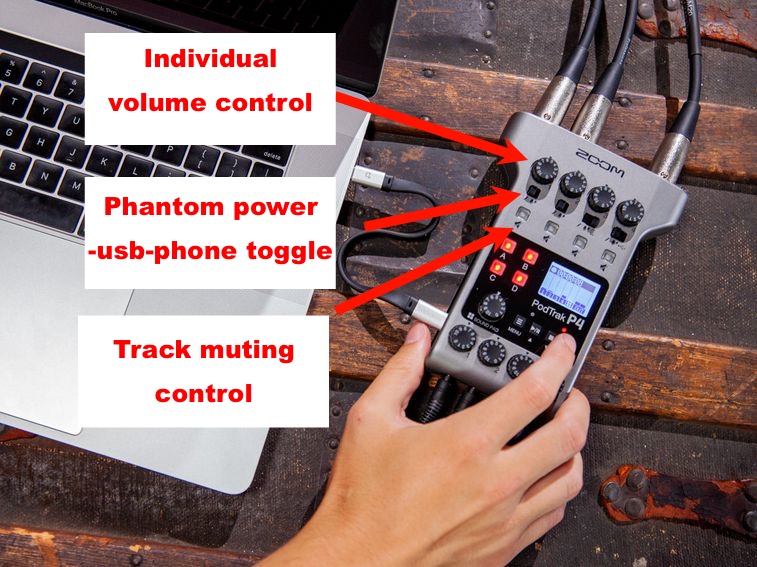
- Beginner Podcasters: The user-friendly interface and streamlined workflow make it easy to get started, even if you have no experience with audio mixing.
- Podcasters on the Go: Its compact size and battery power option offer unparalleled portability, allowing you to record anywhere, anytime.
- Interview-Style Podcasts: The dedicated phone input and mix-minus feature make it ideal for easily conducting remote interviews.
- Multi-Host Podcasts: You can comfortably accommodate multiple hosts and guests with four microphone inputs.
- Podcasters Seeking Simplicity: The P4 is a convenient device that combines everything you need for recording, mixing, and basic editing, simplifying your setup and workflow.
Key Features & Benefits of the Zoom PodTrak P4
Click here to see my favorite podcast recording device
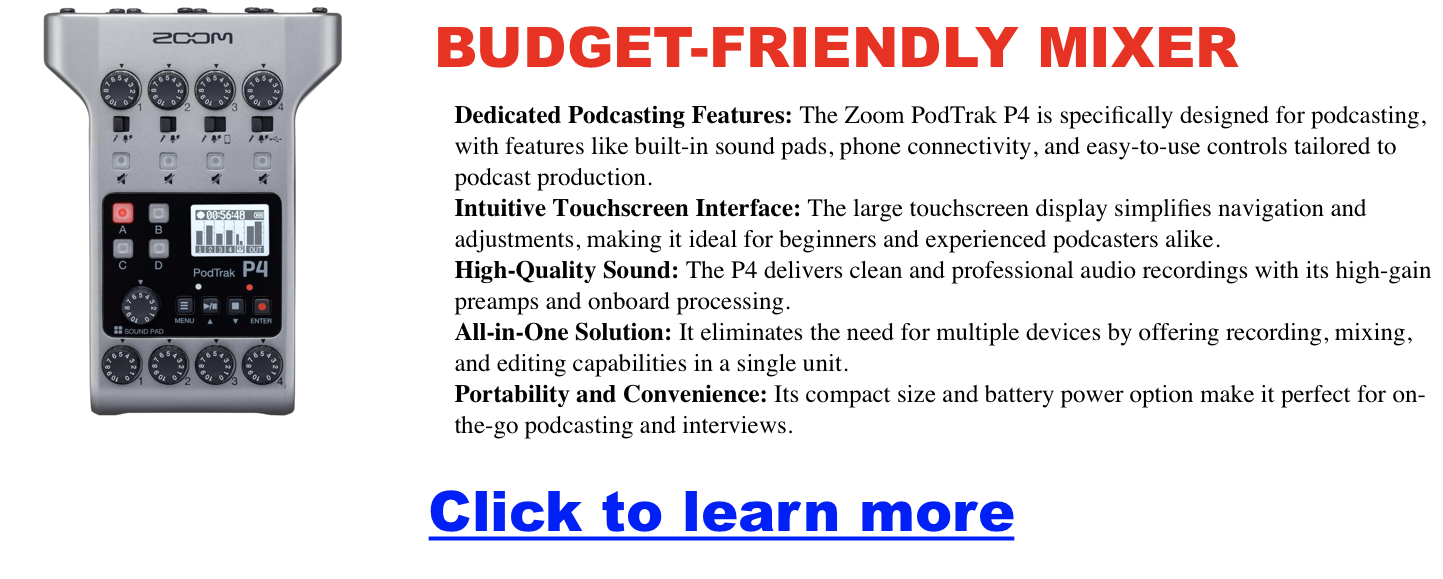
Intuitive Touchscreen Interface
The P4’s large, full-color touchscreen makes navigation and adjustments a breeze. Whether you’re a seasoned podcaster or just starting, you’ll appreciate the ability to easily access menus, change settings, and trigger sound effects with simple touch gestures. No more fumbling with confusing knobs and dials – the Zoom P4 puts everything at your fingertips.
Four High-Quality Microphone Inputs
The P4 boasts four XLR microphone inputs, each equipped with high-gain preamps to ensure clean and professional-sounding recordings. You can comfortably host multi-host podcasts or interviews, and the P4 even supports both dynamic and condenser microphones, giving you flexibility in your microphone choices.
Built-in Sound Pads
Say goodbye to clunky external soundboards! The P4 features six customizable sound pads that let you trigger sound effects, jingles, and intro/outro music with a single touch. You can choose from the pre-loaded sounds or upload your custom creations, adding a touch of personality and professionalism to your podcast.
Phone Connectivity & Mix-Minus
Remote interviews are a breeze with the P4’s dedicated phone input and mix-minus feature. Connect your phone via TRRS cable or Bluetooth and effortlessly bring in remote guests with crystal-clear audio. The mix-minus function prevents echo and feedback, ensuring a smooth and professional interview experience.
Onboard Recording & Editing
The P4 eliminates the need for external recording devices by offering direct recording to SD cards or your computer via USB. You can also perform basic editing tasks like trimming and splitting tracks directly on the device, saving you time and streamlining your workflow.
Battery-Powered Option
Take your podcasting on the road! The P4 can be powered by AA batteries for up to 4 hours, allowing you to record outdoors, on location, or wherever inspiration strikes.
Addressing Potential Concerns
While the Zoom PodTrak P44 offers a wealth of features and benefits, it’s important to consider its limitations:
- Limited Advanced Features: If you require complex audio processing or multitrack recording, the P4 might not be the best fit. Consider a more advanced mixer or digital audio workstation.
- No Built-in Effects: While the P4 offers basic EQ and compression, it doesn’t have built-in effects like reverb or delay. You may need additional software or hardware for advanced effects processing.
Comparison with Other Podcast Mixers
The Zoom PodTrak P4 stands out in the crowded market of podcast mixers. Here’s a quick comparison with two other popular options:
- Rode RODECaster Pro: The Rodecaster Pro offers features similar to the P4, focusing on professional sound quality and touch-screen controls. It’s a great choice for podcasters who prioritize audio fidelity and are willing to invest more.
- Tascam Mixcast 4: The Tascam Mixcast 4 is another dedicated podcasting solution with built-in sound effects and voice changers. It offers a fun and engaging experience but might not be as intuitive for beginners as the Zoom P4.
Conclusion
The Zoom PodTrak P4 is a powerful, versatile audio mixer that simplifies podcast production and delivers exceptional sound quality. Whether you’re a seasoned podcaster or just starting, the P4’s intuitive interface, dedicated features, and portability make it a valuable addition to your toolkit. Consider your specific needs and budget when making a decision. Still, if you’re looking for an all-in-one solution that empowers you to easily create professional-sounding podcasts, the Zoom PodTrak P4 is an excellent choice. If for whatever reason you feel you need a bit more real-estate to play with, then you might want to look at the Zoom LiveTrak L-8, which we dive into here.