
Matt
This Exploding Niche Is Minting Podcast Listeners—Here’s How to Tap Into the Homebuyer Boom
If you’re a podcaster hunting for a high-intent audience, this is your sign to pay attention.
Homebuyers—especially first-timers—aren’t just scrolling Zillow. They’re bingeing podcasts and watching YouTube shows at record rates to make sense of a housing market that feels increasingly impossible. Between volatile mortgage rates, affordability anxiety, and information overload, buyers are turning to real voices they can trust.
And that, podcaster, is your in.
🎧 Why Homebuyers Are Turning to Podcasts
The housing market has become a rollercoaster. Rates go up, inventory lingers, prices stay stubborn, and new rules are constantly introduced at both federal and state levels.
Buyers are overwhelmed. They’re not just Googling “how to buy a house”—they’re looking for real people who’ve been through it, who can explain the process like a friend, not a loan officer. Podcasts are filling that gap by offering:
-
Long-form explanations they can absorb while driving or walking
-
Ongoing market updates that reflect what’s happening now
-
Emotionally supportive content that makes them feel less alone
This trend is quietly creating one of the most loyal, conversion-ready podcast audiences out there—and most creators haven’t noticed yet.
💥 Proof This Niche Is Booming (and Profitable)
If you need receipts, here are just a few shows killing it in the homebuying space:
-
NerdWallet’s Smart Money Podcast: Covers everything from credit scores to real estate trends with clarity and authority. A financial literacy powerhouse with major trust equity.
-
The Smart Homebuying Podcast (Laura Moreno): Deep dives into mistakes to avoid, negotiating, and emotional pitfalls. Simple, personal, and sticky.
-
The Mortgage Guy Podcast (Adam Rose): Weekly market updates, loan program changes, and policy insights—perfect for high-frequency listeners.
-
BiggerPockets Money Podcast: Not just for investors. They’ve built trust with new buyers through budgeting, FIRE, and rent-vs-buy decisions.
-
YouTube channels like Nicole Nark and Graham Stephan: Offering step-by-step walkthroughs, grant info, and affordability hacks with huge subscriber bases.
These creators aren’t just educating—they’re monetizing via books, affiliate links, sponsorships, and membership tools. And they’re proving that homebuying content isn’t just viable—it’s lucrative.
🛠️ What You Can Learn (and Borrow) as a Podcaster
You don’t need to be a realtor to get in on this. Here’s how to apply what’s working:
-
Create series-based content: E.g., “The 5 Things I Wish I Knew Before Buying a House” or “Mortgage Mondays.”
-
Capitalize on market updates: Share headlines, rate changes, or housing policies with your take.
-
Use your own story: Buying a home? Document it. Your audience will learn as you learn.
-
Q&A episodes: Let your listeners guide the show. Their confusion is your content pipeline.
-
Repurpose your episodes into guides: Create downloadable checklists, calculators, or episode recaps to grow your email list.
🧠 Niche Angles You Could Own
You don’t need a whole new podcast—just a segment, a mini-season, or a content pivot. Some angles:
-
Buying a Home as a Freelancer
-
How I Bought My First Home With Side Hustle Income
-
Podcasting From a Mortgage I’m Still Paying Off
-
Solo Homebuying as a Single Mom/Dad
-
Van Life to First Home: What Changed
These topics let you serve underserved micro-audiences—exactly what podcasting does best.
💸 Monetizing the Homebuyer Niche
Here’s where it gets good.
Homebuyers are researching $300K+ decisions—which makes them high-value leads for a range of products and services:
-
Mortgage lender affiliate programs
-
Credit score improvement tools (Credit Karma, Experian Boost)
-
Moving companies or storage apps
-
Budgeting tools (YNAB, Rocket Money)
-
Insurance (homeowners or life)
-
Down payment assistance programs (partner with local providers)
-
Local realtors and brokerages looking for exposure
You can monetize through:
-
Affiliate links in your show notes
-
Sponsored episodes
-
Bonus resources as lead magnets
-
Bundled content (e.g., “first-time homebuyer checklist pack”)
- Specialized tools like this mortgage calculator and home affordability calculator
Pair these with a solid email opt-in strategy, and you’ve got a recurring revenue channel built on trust.
🔍 Want to Research Further? Start Here:
Here are the shows and creators worth studying:
| Show/Channel | What to Steal |
|---|---|
| NerdWallet Smart Money | Concise, well-sourced advice that builds trust |
| Smart Homebuying Podcast (Laura Moreno) | Mistake-driven episodes and emotion-balanced advice |
| The Mortgage Guy Podcast (Adam Rose) | Weekly updates, policy clarity, and local expertise |
| Nicole Nark (YouTube) | Step-by-step evergreen content with SEO focus |
| Straight Arrow News | Economic storytelling and big-picture framing |
🎤 Final Thoughts: You Don’t Need to Be a Real Estate Guru
You just need to be helpful, honest, and curious.
Podcasting is about trust, voice, and value. First-time homebuyers are desperately looking for all three. If you can be a guide—or just a fellow traveler—on that journey, you can build a devoted listener base and a monetizable media brand.
Sounding Too Polished? Why Imperfection Might Be Your Secret Weapon
There’s nothing wrong with wanting to sound professional on your podcast.
But here’s the uncomfortable truth: trying to sound perfect might be the very thing holding your show back.
If you’re constantly editing out every pause, scripting every word, or faking a broadcast voice, your audience can feel it—even if they don’t know how to name it.
They just know something doesn’t feel real.
Let’s talk about how embracing imperfection can help you find (and connect with) your authentic podcasting voice.
The Problem With Being “Perfect”
The polished, overproduced sound may impress at first. But over time, it builds a wall between you and your listeners.
Why?
- It feels like a performance, not a conversation.
- It hides your quirks and personality—the things people actually relate to.
- It removes the emotional moments that create trust and loyalty.
Podcasting isn’t radio. It’s not the evening news. It’s a medium where humanity wins.
Your Mistakes Make You Magnetic
Ever hear a podcaster pause to think? Stumble over a word? Get emotional?
That’s not bad audio.
That’s intimacy.
We’re drawn to real people. People who let us in. People who talk like we do.
When you show up as yourself—flaws and all—you invite your listeners to do the same. That’s how trust gets built. That’s how movements start.
Questions Podcasters Often Ask Themselves
“But what if I sound unprofessional?”
If you’re adding value and staying true to your tone, people care more about what you’re saying than whether you fumble a sentence.
“Isn’t editing out mistakes a good thing?”
To a point. But too much editing sterilizes your delivery and removes the warmth that attracts loyal listeners.
“How do I balance being real with being listenable?”
Focus on clarity over perfection. Clean audio is helpful. Perfect delivery is optional.
Techniques to Help You Stay Authentic
- Try free-talking practice sessions. Record without scripting and listen back.
- Ask a friend to review your tone. Would they believe it’s you if they didn’t know it was your podcast?
- Limit takes. The first or second try usually has the most energy.
- Use guided outlines. Bullet points give you structure without sounding robotic.
- Record on your phone once in a while. It removes the pressure of studio perfection and reconnects you to the message.
Still Want to Improve? Don’t Worry—You Can Sound Natural and Strong
This isn’t about being sloppy. It’s about being strategically imperfect.
You can still:
- Tighten your pacing
- Fix audio levels
- Cut background noise
Just don’t cut the soul of your voice.
Final Thought: Let Them Hear You
If you’ve been trying to sound polished, professional, and poised—maybe it’s time to stop.
Let them hear the real you.
Because the most compelling voice on your podcast isn’t the one you rehearsed.
It’s the one you almost edited out.
Bonus: Imperfection Can Be Profitable
Authenticity builds trust. And trust is what leads to:
- Patreon support
- Affiliate conversions
- Course and product sales
- Direct sponsorship opportunities
Want help building a podcast that connects, converts, and stays true to you? Check out our Monetization Guide and Podcast SEO Toolkit to grow without selling your soul.
The Surprising Reason Podcasting Is Outperforming Television
Once upon a time, television ruled everything. The gatekeepers of culture, news, and entertainment sat behind massive cameras, glossy studios, and million-dollar budgets. If it didn’t air on TV, it didn’t matter.
But something has shifted.
While TV scrambles for relevance in a world of streaming and shrinking trust, podcasting has quietly surged ahead—not in budget or polish, but in connection, credibility, and creative freedom.
Here’s the surprising reason why podcasting is outperforming television: It’s more human. More real. And far more trusted.
Podcasting Is Raw, Real, and Unfiltered
Television is produced. Podcasting is personal.
On TV, everything passes through layers of producers, advertisers, and legal teams. The end product? Often sanitized, simplified, and designed not to offend. Podcasts, on the other hand, go deep. They allow disagreement. They explore nuance. They get messy.
Most importantly: podcasts aren’t censored by Big Pharma ads, political pressure, or corporate boards.
You can say what needs to be said.
TV Feels Scripted. Podcasts Feel Human.
The news anchor smiles into the camera, reads the teleprompter, and cuts to commercial.
Meanwhile, your favorite podcast host is walking their dog, voice cracking as they open up about their mental health. They get passionate. They stumble. They course-correct.
And that’s exactly why we trust them.
Podcasting lets us be flies on the wall for real conversations. It’s unscripted, unpredictable, and honest.
Studies show podcast listeners trust their favorite hosts more than they trust mainstream news outlets. That’s not a glitch. It’s a feature.
Diverse Voices Finally Have a Platform
Podcasting isn’t just for the famous. It’s for the fearless.
Historically, TV has been exclusive. You needed connections, money, and access. In podcasting? All you need is a mic and a message.
Now, anyone can be heard:
- BIPOC creators
- LGBTQ+ voices
- Disabled hosts
- Political outsiders
- Cultural critics
- Everyday people with powerful stories
And that accessibility is fueling an explosion of authenticity.
Want to start your own show? We put together a Podcast Equipment Guide so you can launch affordably and professionally.
Long-Form Content Is Thriving Again
TV keeps shrinking everything. Tighter edits. Shorter segments. Faster cuts.
But podcasting? Podcasting leans in.
You can have hour-long interviews. Deep dives into complex issues. Multi-part series that unfold like novels. And guess what? Listeners love it.
They’re craving context, depth, and meaning — things TV left behind long ago.
Bonus: Long-form episodes are also great for Podcast SEO. You’ll rank for more keywords, and attract more of the right listeners.
Podcasting Is a Creative Rebellion
It’s punk rock. It’s DIY. It’s the anti-Hollywood.
While traditional media begs for clicks, likes, and safe bets, podcasting gives creators total control. You don’t have to water down your message, pitch to execs, or sell your soul to get greenlit.
You just make it.
You upload it.
And the world listens.
You Don’t Need to Be Famous to Be Heard
Television rewards celebrity. Podcasting rewards value.
You can build a small, niche audience that loves you, trusts you, and buys from you—without ever going viral.
And yes, you can monetize that trust.
Need help? Download our free Podcast Monetization Guide and learn how small shows earn big.
Final Thought: TV Had Its Time. This Is Ours.
Television was once the center of culture. But today, podcasting is the center of connection.
It’s more democratic. More diverse. More honest. More trusted.
And most importantly, it’s more free.
So if you’re ready to stop chasing clout and start building something real?
Pick up the mic. Press record. And say what TV never could.
This is podcasting at its best.
Podcasting at Its Best Is Give & Take
Podcasting isn’t just about talking into a mic and hoping someone listens. At its core, podcasting is a relationship. It’s a rhythm. A cycle. A balance of what you give and what you receive in return. The most successful podcasters understand this. They don’t just broadcast — they connect.
The “Give” — What You Offer Your Audience
Podcasting is a generous act. Every time you hit record, you’re giving something to your listeners:
- Knowledge or Entertainment: Whether you’re educating, inspiring, or making people laugh, you’re providing value.
- Authenticity: People come for the content but stay for the personality. Sharing your voice, stories, and imperfections creates loyalty.
- Extras & Resources: Show notes, downloadable guides, links, and transcripts make it easier for your audience to take action.
- Consistency: Showing up week after week builds trust. Even if you don’t see immediate feedback, you’re laying the groundwork for loyalty.
Ask yourself: What am I giving my audience in every episode?
The “Take” — How You Listen and Learn
Your audience might not have a mic, but they’re talking to you — through actions and reactions:
- Feedback Loops: Reviews, emails, social media replies, and voicemails let you know what’s resonating.
- Analytics: Listen-through rates, episode downloads, and drop-off points are their own kind of feedback.
- Topic Requests & Polls: Ask your audience what they want next. It’s a win-win.
- Listener Involvement: Add their questions or comments into your episodes to deepen the connection.
Pro Tip: Use tools like SpeakPipe for voice messages or Podkite for global chart tracking.
Turning Give & Take into Growth
When you give consistently and listen actively, your audience becomes more than listeners. They become collaborators, promoters, superfans.
- Community Building: Create spaces (Discord, Circle, Facebook Groups) where your audience talks to each other.
- Listener-Led Ideas: Some of your best episodes will come from your audience’s questions, struggles, or suggestions.
- Guest Referrals: Listeners often know who you should talk to next.
Think of your audience as co-creators, not just consumers.
Monetization That Feels Earned
Podcasting is a long game. But if you nurture give & take, monetization becomes a natural outcome.
- Listener Support: Platforms like Patreon or Buy Me a Coffee thrive when you’ve built trust.
- Merch & Premium Offers: T-shirts, courses, exclusive episodes — especially when tied to listener in-jokes or requests — drive sales.
- Affiliate Offers: Recommend tools you actually use and explain why.
Looking for more ways to monetize your podcast without feeling pushy? Check out our free guide: Podcast Monetization: 10 Smart Ways to Turn Listeners Into Income
Remember: monetization is easier when you’re solving real problems your audience told you they have.
Keep the Cycle Alive
The relationship between you and your audience can deepen over time — if you let it evolve.
- Audit Regularly: Are you still giving value? Are you hearing what they’re saying?
- Ask More Questions: Use your episodes to invite feedback, participation, and conversation.
- Avoid Burnout: Let your audience help shape content so the pressure isn’t only on you.
Final Thoughts
Podcasting at its best is not a performance. It’s a connection. The balance between what you give and what you take sets the tone for everything else: growth, trust, monetization, and impact.
Start thinking of your podcast as a shared space. Ask more. Listen better. Give generously.
Want to help shape the next episode? Send your thoughts, questions, or stories my way. Let’s keep the conversation going.
Frequently Asked Questions
What makes a good podcast in 2025?
A podcast that connects with its audience, delivers consistent value, and creates space for listener interaction is more likely to thrive.
How can I get my podcast audience more involved?
Invite voice messages, run polls, ask questions on social, and reference listener input during episodes.
Can I monetize a podcast with a small audience?
Yes. Even small, engaged audiences can support you through direct donations, niche affiliate offers, or premium content.
What are some tools to help manage feedback and engagement?
Use tools like SpeakPipe, Typeform, ConvertKit, and Podkite to gather, analyze, and act on listener feedback.
Where can I learn more about monetizing my podcast?
Grab our in-depth guide here: Podcast Monetization: 10 Smart Ways to Turn Listeners Into Income
Behringer Xenyx Q802USB Review: The Budget Podcast Mixer That Still Delivers
The Behringer Xenyx Q802USB has been a staple in budget podcasting setups for years, and for good reason. This compact 8-input analog mixer packs XENYX mic preamps, a built-in USB audio interface, one-knob compression, and classic British EQ into a package that typically sells for under $90. Whether you are launching your first show or need a reliable backup mixer for remote recordings, the Q802USB remains one of the best values in podcasting gear.
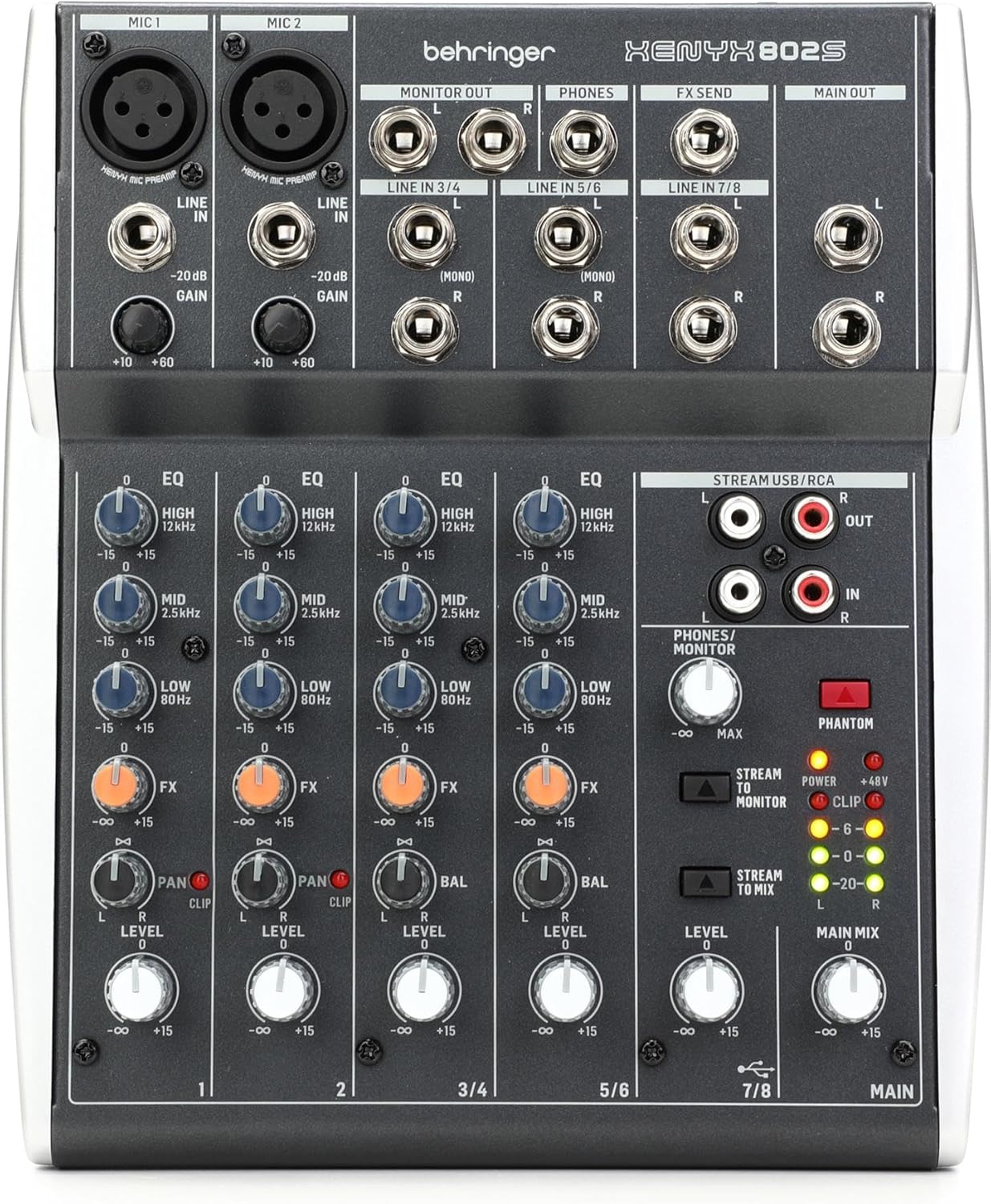
In this hands-on review, we will break down exactly what this mixer can and cannot do for podcasters, compare it against popular alternatives like the Behringer Xenyx 802S and the Zoom PodTrak P4, and help you decide whether it belongs in your setup.
Check the latest price on the Behringer Xenyx Q802USB on Amazon
Who Is the Behringer Xenyx Q802USB For?
The Q802USB sits in a sweet spot for podcasters who want more control over their audio than a simple USB microphone provides but do not need the feature set of a full production console like the RODECaster Pro or the RODECaster Video. It is best suited for solo podcasters or two-person shows that want hands-on EQ and compression without a steep learning curve.
If you are building a home podcast setup on a tight budget, or you need a compact mixer you can throw in a bag for field recordings, this is the mixer that keeps coming up in recommendations for good reason.
Key Features for Podcasters
The Behringer Xenyx Q802USB is an 8-input, 2-bus analog mixer with a built-in stereo USB audio interface. Here is what matters most for podcast production:
XENYX Mic Preamps
The two XENYX mic preamps offer up to +60 dB of gain with a dynamic range of 130 dB. That is enough gain to comfortably drive most dynamic microphones, including popular podcast mics like the Shure SM58 and Audio-Technica AT2005. For condenser microphones, the mixer provides 48V phantom power, so you can use studio-grade condensers like the Audio-Technica AT2020 without needing an external power supply.
If you want to understand how preamps affect your signal chain, our guide on what a preamp is and why it matters breaks it down in plain language.
Built-in USB Audio Interface
The USB interface is plug-and-play on both Mac and Windows. It sends a stereo mix directly to your computer over a single USB cable, so you can record into any podcast recording software or DAW without additional hardware. No drivers are required on Mac, and it is class-compliant on Windows as well, though using ASIO4All can reduce latency if you need real-time monitoring.
This dual role as both a mixer and an audio interface is what separates the Q802USB from the non-USB Xenyx 802. If you are comparing standalone audio interfaces for podcasting, keep in mind that the Q802USB gives you analog mixing controls that a pure interface does not.
One-Knob Compression
Each mono channel has a one-knob compressor that lets you tame dynamic range without needing to understand attack, release, and ratio settings. For podcasters, this means more consistent vocal levels during recording. Turn it up slightly and your loud moments get pulled down while your quieter passages remain audible. It is not a replacement for post-production compression, but it gives you a better raw recording to work with.
British 3-Band EQ
The three-band EQ on each channel is modeled after classic British console designs. You get control over lows, mids (centered at 2.5 kHz), and highs. The mono channels also include a low-cut filter (also called a high-pass filter), which is essential for removing rumble from air conditioning, foot traffic, or desk vibrations. For podcasters who want to learn more about shaping their voice at the source, our microphone techniques guide covers the fundamentals.
Full Technical Specifications
| Specification | Details |
|---|---|
| Input Configuration | 2 mono channels (XLR + 1/4″ TRS), 2 stereo channels (1/4″ TRS) |
| Total Inputs | 8 |
| Buses | 2 |
| Mic Preamps | 2x XENYX preamps, +60 dB gain, 130 dB dynamic range |
| Phantom Power | 48V (global switch, applies to both XLR inputs) |
| EQ | 3-band British EQ on all channels; low-cut filter on mono channels |
| Compression | One-knob compressor on mono channels with LED indicator |
| USB Interface | 2-in / 2-out stereo, class-compliant (no drivers needed) |
| Outputs | Main mix (1/4″ TRS), control room (1/4″ TRS), headphones (1/4″ TRS), 2-Track (RCA) |
| FX Send | 1 post-fader FX send per channel; 1 stereo aux return |
| Dimensions | 14 x 8 x 5 inches (35.6 x 20.3 x 12.7 cm) |
| Weight | 2.4 lbs (1.1 kg) |
| Power | External power supply (included) |
| Street Price | Approximately $75–$90 USD (2026) |
Setting Up the Q802USB for Podcast Recording
Getting the Q802USB ready for podcast recording takes just a few minutes. Here is the basic signal chain:
Step 1: Connect your XLR microphone to Channel 1 (or Channel 2 for a second host). If you are using a condenser mic, press the 48V phantom power button on the back of the mixer. If you are using a dynamic mic, leave phantom power off. For help choosing, see our guide on XLR vs USB microphones.
Step 2: Connect the USB cable from the mixer to your computer. Your operating system should recognize it as an audio input device automatically.
Step 3: Open your recording software and select the Q802USB as your input device. Popular free options include Audacity (which Behringer bundles with the mixer) and GarageBand on Mac.
Step 4: Set your gain by speaking at your normal podcast volume and adjusting the gain knob until the signal peaks in the green range on the LED meter, occasionally touching yellow. Staying out of the red prevents clipping.
Step 5: Use the EQ to shape your voice. A slight cut in the lows using the low-cut filter removes room rumble, a small boost in the mids can add presence to your voice, and a gentle high-end lift adds clarity and air.
Step 6: Dial in a small amount of compression on the mono channel to even out your dynamics. Start with the compressor knob at about 25% and adjust from there.
Connect your podcast headphones to the 1/4″ headphone jack on the front for real-time monitoring. If your headphones use a 3.5mm plug, you will need a 3.5mm-to-1/4″ adapter.
Behringer Xenyx Q802USB vs Popular Alternatives
The Q802USB does not exist in a vacuum. Here is how it stacks up against the mixers and interfaces podcasters most often compare it to:
| Feature | Behringer Xenyx Q802USB | Behringer Xenyx 802S | Zoom PodTrak P4 | Focusrite Scarlett 2i2 |
|---|---|---|---|---|
| Type | Analog mixer + USB interface | Analog mixer + USB interface | Dedicated podcast recorder | USB audio interface |
| XLR Mic Inputs | 2 | 2 | 4 | 2 |
| Built-in Compressor | Yes (one-knob) | No | No | No |
| EQ | 3-band British + low-cut | 3-band + low-cut | No hardware EQ | No hardware EQ |
| Sound Pads | No | No | Yes (4 pads) | No |
| Multitrack Recording | No (stereo mix only) | No (stereo mix only) | Yes (4 tracks) | Yes (2 tracks) |
| SD Card Recording | No | No | Yes | No |
| Phantom Power | 48V (global) | 48V (global) | No | 48V (per channel) |
| Street Price (2026) | ~$75–$90 | ~$60–$75 | ~$200 | ~$170 |
Q802USB vs Behringer Xenyx 802S
The 802S is Behringer’s newer streaming-focused refresh of the 802 line. It keeps the same basic layout and XENYX preamps but drops the one-knob compressor and adds RCA stereo inputs. If you primarily need a simple mixer for live podcast streaming and do not need compression at the hardware level, the 802S saves you a few dollars. But for podcast recording where you want to tame dynamics before they hit your DAW, the Q802USB’s built-in compressor is genuinely useful and worth the small price premium.
Q802USB vs Zoom PodTrak P4
The Zoom PodTrak P4 is a completely different tool. It is a dedicated podcast recorder with four XLR inputs, multitrack recording to SD card, and sound pads for intros, outros, and effects. It costs roughly double the Q802USB but eliminates the need for a computer during recording. If you record in the field, interview multiple guests in person, or want each voice on its own track for post-production, the P4 is the better choice. But if you are a solo podcaster or two-person show recording to a computer, the Q802USB gives you analog tone-shaping tools the P4 lacks.
Q802USB vs Focusrite Scarlett 2i2
The Scarlett 2i2 is a pure audio interface with excellent preamps and true multitrack recording (each input records to its own track in your DAW). The trade-off is that you lose the hardware EQ and compression the Q802USB provides. If clean, uncolored signal is your priority and you prefer to do all your processing in software, the Scarlett is the better interface. If you want to shape your sound in real time with physical knobs, the Q802USB is more hands-on and about half the price.
What Real Users Say: Strengths and Weaknesses
What Podcasters Love
Exceptional value. At its price point, the Q802USB consistently surprises podcasters with how much it offers. Two quality preamps, a USB interface, compression, and British EQ for under $90 is hard to beat.
Clean audio from the XENYX preamps. The preamps deliver clear recordings with minimal self-noise. Users report that even at high gain settings needed for dynamic microphones, the noise floor stays acceptably low for podcast work.
Plug-and-play simplicity. No driver installation is required on Mac or most modern Windows systems. Connect the USB cable, select the mixer as your input device, and you are recording. For podcasters who want to focus on content rather than troubleshooting technical configurations, this is a significant advantage.
Compact and portable. At just 2.4 pounds and roughly the size of a hardcover book, the Q802USB travels well. Podcasters who record at events, conferences, or co-working spaces appreciate how little desk space it requires.
What Podcasters Wish Were Better
No power switch. This is the most common complaint across user reviews. The Q802USB has no on/off button. You power it down by unplugging the external power supply, which is mildly annoying in daily use. A power strip with a switch is the practical workaround.
Stereo mix only over USB. The USB interface sends a combined stereo mix to your computer, not individual tracks. If you are recording two hosts and want each voice on a separate track for independent editing, you cannot do that with this mixer alone. You would need to pan one host hard left and the other hard right, then split the stereo file in post, which works but is not ideal. For true multitrack recording, look at the Zoom LiveTrak L-8 or a dedicated audio interface.
Build quality is functional, not premium. The knobs and faders feel lighter than what you would find on a $200+ mixer. For a home studio where the mixer sits on a desk, this is rarely a problem. For road use where it gets tossed in bags regularly, you may want a protective case.
Global phantom power. The 48V phantom power switch applies to both XLR inputs simultaneously. If you are running one condenser mic and one dynamic mic, the dynamic mic will receive phantom power it does not need. Most modern dynamic microphones handle phantom power without issue, but it is worth knowing.
FX send level can be weak. Some users report that the FX send output runs at a lower level than expected, which can be problematic if you are trying to use it for a mix-minus setup with remote recording software. Test your specific routing before committing to a workflow that depends on the FX send.
How to Set Up a Mix-Minus for Remote Interviews
One of the most common reasons podcasters buy a mixer like the Q802USB is to create a mix-minus setup for recording remote interviews over Zoom, Skype, or dedicated remote recording platforms. A mix-minus sends your local audio to the remote guest while keeping the remote guest’s audio out of the return signal, preventing echo.
On the Q802USB, the basic approach is to route your microphone signal to the FX send, which feeds your voice to the computer and then to your remote guest. The remote guest’s audio comes back from the computer through the USB return and plays through your headphones and main mix, but does not loop back through the FX send. This prevents the echo loop.
Be aware that the FX send on this mixer can run at a lower level than some users expect. You may need to boost the FX send knob higher than you would on other mixers. If the signal is too low for your remote recording software to work with, this mixer may not be the right choice for mix-minus workflows. In that case, the Zoom PodTrak P4 or Zoom LiveTrak L-8 handle mix-minus natively with dedicated routing options.
Can You Use the Q802USB for Live Streaming?
Yes. The USB interface makes the Q802USB a viable option for live streaming platforms like OBS, StreamYard, and similar tools. Your computer will see the mixer as a USB audio input, and you can select it in your streaming software just like you would select any microphone.
The advantage over a standalone USB microphone is that you can blend multiple audio sources in real time. Play intro music from a phone connected to one of the stereo line inputs, speak into your XLR microphone on Channel 1, and the mixer sends it all as a single combined audio feed to your stream. You can adjust levels on the fly with physical faders instead of hunting through software menus.
If you are serious about live streaming, you may also want to explore how the Q802USB compares to software-based solutions in our breakdown of StreamYard vs OBS.
Pairing the Q802USB with the Right Microphone
The mixer is only as good as what you plug into it. Here are some proven microphone pairings that work well with the Q802USB’s preamps:
For solo podcasters on a budget: The Audio-Technica ATR2100x-USB in XLR mode pairs beautifully with the XENYX preamps. It is a dynamic mic that does not need phantom power and handles the Q802USB’s gain range well.
For vocal warmth and richness: A large-diaphragm condenser like the Audio-Technica AT2020 (with 48V phantom power engaged) delivers studio-quality sound through this mixer. Just be mindful that condensers pick up more room noise, so your recording environment matters. Check out our advice on fixing echo on your mic if room acoustics are a concern.
For two-person shows: Two Rode PodMic or Shure MV7 microphones work well in the two XLR inputs. Both are dynamic mics designed specifically for podcast vocals and have enough output to work comfortably within the Q802USB’s gain range.
For a broader look at microphone options, our podcast microphone setup guide and USB podcast microphone guide cover the full range of choices for every budget.
Where the Q802USB Fits in Your Overall Podcast Setup
A mixer is just one piece of the puzzle. Here is how the Q802USB fits into a complete podcast production chain:
Recording: Microphone → Q802USB (gain, EQ, compression) → USB to computer → recording software
Editing: Raw recording → editing software → export final audio file
Publishing: Final file → podcast hosting platform → distributed to Apple Podcasts, Spotify, and other directories
If you are just starting out, our podcast equipment setup guide walks through the full chain step by step. And our guide to podcast startup costs helps you budget for everything from microphones to hosting.
Frequently Asked Questions
How many microphones can I connect to the Behringer Xenyx Q802USB?
You can connect up to two microphones using the XLR inputs on Channels 1 and 2. Each XLR input has its own dedicated XENYX preamp with independent gain, EQ, and compression controls. If you need more than two XLR inputs for group recordings, consider the Zoom LiveTrak L-8 or a larger mixer from the Yamaha MGX series.
Is the Behringer Xenyx Q802USB compatible with Mac and Windows?
Yes. The built-in USB interface is class-compliant, meaning it works with Mac and Windows computers without installing additional drivers. On Mac, it is recognized immediately. On Windows, it typically works through the default audio drivers, though installing ASIO4All can provide lower latency for real-time monitoring.
Can I record each microphone to a separate track with the Q802USB?
Not directly. The USB interface sends a stereo mix of all inputs combined. However, you can work around this by panning one microphone hard left and the other hard right, then splitting the left and right channels into separate mono tracks in your editing software. For true multitrack recording, a dedicated audio interface like the Focusrite Scarlett 2i2 or a recorder like the Zoom PodTrak P4 is a better fit.
Do I need phantom power for my podcast microphone?
Only if you are using a condenser microphone. Dynamic microphones like the Shure SM58 or Rode PodMic do not require phantom power. The Q802USB’s 48V phantom power switch applies to both XLR inputs at once. Most modern dynamic mics tolerate phantom power safely, but check your microphone’s documentation to be sure. Our guide on preamps and phantom power explains the differences in detail.
Is the Behringer Xenyx Q802USB good enough for a professional podcast?
For audio quality, yes. The XENYX preamps, British EQ, and one-knob compression produce recordings that are clean enough for professional podcast distribution when paired with a decent microphone and reasonable recording environment. The limitations are in workflow rather than sound quality. If you need multitrack recording, advanced routing, or more than two XLR inputs, you will outgrow this mixer. But the audio quality itself is solid for the price.
What is the difference between the Q802USB and the Behringer Xenyx 802S?
The 802S is a newer, streaming-focused update with a refreshed design and RCA stereo inputs. The Q802USB includes a one-knob compressor on each mono channel and an FX send, both of which the 802S lacks. For podcast recording where you want hardware compression, the Q802USB is the better choice. For simple streaming or DJ use where compression is handled in software, the 802S works well and costs slightly less.
Can I use the Q802USB for live streaming on Twitch or YouTube?
Yes. The USB output works as an audio input in any live streaming software, including OBS, Streamlabs, and StreamYard. You get real-time mixing of your microphone and any line-level sources (music players, sound effects) through the stereo inputs.
Does the Q802USB have an on/off switch?
No, and this is a common point of frustration among users. You power it on and off by plugging and unplugging the external power supply. The simplest solution is to connect the power supply to a power strip with its own switch.
What recording software works with the Behringer Xenyx Q802USB?
Any recording software that accepts a USB audio input will work, including Audacity (free), GarageBand (free on Mac), Adobe Audition, Hindenburg Journalist, Reaper, and Logic Pro. Behringer also includes free downloads of Audacity and various plugins at behringer.com. For a full breakdown of your options, see our roundup of podcast editing software for every level.
Is the Behringer Xenyx Q802USB still worth buying in 2026?
If your needs match its strengths — one or two XLR microphones, hardware EQ and compression, USB recording to a computer, and a budget under $100 — then yes, it remains one of the best values in podcast mixers. Newer options like the RODECaster Duo and Zoom PodTrak P4 offer more features but at significantly higher price points. The Q802USB has not been updated in years, but its analog design means it does not become obsolete the way software-dependent products can.
Check the latest price on the Behringer Xenyx Q802USB on Amazon
Final Verdict
The Behringer Xenyx Q802USB is not the flashiest mixer on the market, and it will not compete with modern podcast production consoles on features. But it was never meant to. What it does is give podcasters a reliable, affordable path to better audio with real hardware controls for EQ and compression that most budget interfaces and USB microphones simply do not offer.
For solo shows and two-person podcasts where you are recording to a computer and want hands-on tone shaping without spending $200 or more, the Q802USB remains a smart buy. Its biggest limitations — stereo-only USB output and no power switch — are well-known trade-offs that most podcasters at this budget level can live with.
If you are building your first studio or upgrading from a USB microphone, pair the Q802USB with a solid dynamic mic, a pair of closed-back headphones, and good recording software, and you have a podcast setup that can produce professional results on a beginner’s budget.
More Podcast Gear Resources
- Complete Podcast Equipment Guide
- Best Audio Mixers for Podcasting
- Best Podcast Microphones
- Podcast Equipment for Solo Podcasters
- Podcast Equipment for Co-Hosts and Groups
- Podcast Equipment Bundles
- Podcast Setup for Two People
- What Equipment Is Needed for a Podcast?
- Understanding Microphone Polar Patterns
- Podcast Bitrate: What Settings to Use
What Does a Podcast Producer Do (And Do You Need One)?
Podcasting has exploded into the mainstream, but behind many successful shows is a key figure you don’t often hear about: the podcast producer. Whether you’re launching your first episode or scaling an established show, understanding the role of a producer can help you level up your podcast without burning out.
This post breaks down what podcast producers actually do, how to know if you need one, what they cost, and how to find or become one yourself.
What Is a Podcast Producer, Really?
A podcast producer wears many hats. At their core, they’re responsible for the end-to-end management and production of a podcast. This includes:
- Planning each episode (topics, format, structure)
- Coordinating guests and managing recording logistics
- Editing or overseeing audio post-production
- Publishing the episode with optimized titles, show notes, and metadata
- Promoting episodes and tracking performance analytics
In many ways, they’re the show’s project manager and creative director rolled into one. Depending on the team, a producer may also assist with monetization strategies, audience development, and cross-promotion.
They are not just audio editors—though editing is often part of their job. They’re there to make sure the show runs smoothly, sounds great, and connects with the intended audience.
Do You Need a Podcast Producer?
If you’re asking this, you’re likely already wearing too many hats. Here are signs it might be time to bring in help:
- You’re missing deadlines or falling behind on episodes
- Audio quality is inconsistent or underwhelming
- You spend more time editing than recording
- You have big growth goals but limited time
A podcast producer helps reduce friction so you can focus on what you do best: hosting and content creation.
That said, if you’re still experimenting or on a tight budget, you might not need a full-time producer. There are hybrid models, like hiring someone just for editing or using a VA with some podcasting experience.
What to Look for in a Podcast Producer
Hiring a producer isn’t just about finding someone who can cut audio. Look for:
- Strong storytelling and editing chops
- Organizational skills (managing schedules, files, deadlines)
- Familiarity with podcast platforms and production tools
- Clear communication—especially if working remotely
- Marketing know-how, especially if you want help growing your audience
Ask for samples or past shows they’ve worked on. If you’re hiring a freelancer, check for testimonials and reviews.
How Much Does a Podcast Producer Cost?
Pricing varies widely depending on experience and services:
- Freelancers: $200–$1,000+ per month for basic post-production
- Agencies: $1,000–$5,000+ per month for full-service production
- In-house: $40,000–$90,000+/year for salaried roles
You can often hire producers per episode, per project, or on a retainer. Be clear about what’s included (editing, show notes, scheduling, promotion, etc.).
Tools Podcast Producers Use
Producers rely on a stack of tools to stay efficient:
- Audio Editing: Descript, Adobe Audition, Hindenburg, Reaper
- Recording Platforms: Riverside.fm, SquadCast, Zoom
- Planning & Management: Notion, Trello, Airtable, Google Drive
- Distribution: Libsyn, Buzzsprout, Podbean, Spotify for Podcasters
- Analytics: Chartable, Podtrac, Spotify Wrapped
These tools help streamline everything from booking to editing to launch.
Want to Become a Podcast Producer?
If you’re drawn to both creativity and logistics, podcast production could be a great fit. Here’s how to get started:
- Learn the tools (Descript, Riverside, etc.)
- Study podcasts you love—pay attention to flow, structure, editing
- Offer to help on a friend’s podcast for experience
- Build a portfolio (even if it’s your own show)
- Explore freelance platforms (Upwork, Fiverr, Podcast Production FB groups)
- Consider a course: LinkedIn Learning, Podcast Engineering School, or Skillshare
The industry’s still growing, and producers with technical skill and taste are in high demand.
Real-World Example: How a Producer Transformed a Show
A solo entrepreneur had been recording her podcast for over a year but struggled with inconsistent posting and low listener engagement. After hiring a freelance producer, episodes became more polished, guests were better prepared, and her downloads tripled within three months.
Sometimes, what you need isn’t more time—it’s better support.
Final Thoughts
A podcast producer can be the difference between a show that fades out after a few episodes and one that builds a loyal audience over years. Whether you’re looking to hire, become one, or just understand what they do, knowing the value of podcast producers is the first step to producing something you’re proud of.
Leaning Into Radio’s Podcasting Push
Radio is no longer on the sidelines when it comes to podcasting. Major broadcast networks—Audacy, iHeart, NPR, and Cumulus, to name a few—are doubling down, producing original shows, repackaging broadcast content, and scooping up talent from the indie space. But what does that mean for you, the independent podcaster?
Let’s unpack it.
Why Radio is Going All-In on Podcasting
Traditional radio is in transition. Listener attention has shifted. Advertisers are chasing more targeted, on-demand audiences. Podcasting offers a future that’s:
-
More measurable (thanks to dynamic ad insertion and analytics)
-
More flexible (listeners can tune in anytime)
-
More scalable (successful shows can be turned into networks or spinoffs)
In many ways, podcasting is what radio always wanted to be—but couldn’t.
What This Means for Indie Podcasters
When big players enter the space, the landscape shifts. But that doesn’t mean indie creators get squeezed out. In fact, you might find:
-
New revenue opportunities: Many networks are outsourcing production or partnering with existing shows.
-
A higher bar for content: Audio quality, storytelling, and consistency are more important than ever.
-
Algorithmic competition: Branded content may get favored by platforms, but smart SEO, audience connection, and email list growth still give you an edge.
Should You Partner With a Network?
This is a growing question. If a radio-backed podcast network approaches you—or you consider pitching—ask:
-
Will they own your IP?
-
What’s their marketing support like?
-
Can you retain creative control?
-
Are they offering you real reach—or just a shiny logo?
The right partnership can accelerate growth. The wrong one can trap your show in a format that doesn’t fit.
How to Stay Competitive
You don’t need a studio tower or legacy brand to grow. But you do need to:
-
Know your niche better than anyone
-
Engage your audience off-platform (think newsletters, Discord, Substack, etc.)
-
Package your episodes well (good titles, show notes, SEO)
-
Stay consistent and sustainable — the long game matters
And above all, lean into what makes you different. While radio folks are often chasing scale, you can chase depth—the kind of intimate connection that traditional media rarely achieves.
Final Thought
Radio’s push into podcasting isn’t a threat. It’s a signal: audio is ascendant, and the market is growing. If you’ve been podcasting independently, you’re already ahead of the curve. Now’s the time to lean in, level up, and decide—do you want to stay indie, partner smart, or pitch something that radio hasn’t even thought of yet?
Learning to Trust the Podcaster You Are Right Now
There’s a quiet but persistent voice many podcasters hear: You should be better by now.
More polished. More popular. More productive.
It’s easy to fall into that trap—especially when you’re comparing yourself to big names with massive followings, slick production, and seemingly endless energy. But here’s the truth:
You don’t become a better podcaster by beating up the version of you who hit record today.
You grow by trusting that version. Right now.
Why It’s So Hard to Trust Yourself
Podcasting is intimate. It’s vulnerable. You’re putting your voice, ideas, and personality into the world. Naturally, self-doubt creeps in:
- Am I even cut out for this?
- Why isn’t my show growing faster?
- Do I sound professional enough?
- Should I be more like [insert popular podcaster here]?
And that’s all before you open your editing software.
The Myths That Fuel the Doubt
Let’s knock a few unhelpful beliefs off their pedestal:
- Myth 1: You have to sound like a radio host. No, you don’t. You just have to sound like you—real, clear, and connected.
- Myth 2: Great gear equals great podcasts. Gear helps, but authenticity and consistency go a lot further.
- Myth 3: If your show is good, it’ll grow fast. Not always. Growth takes time, visibility, and sometimes just luck.
- Myth 4: Real podcasters don’t struggle with self-doubt. Actually, the opposite is true. Doubt is a sign you care.
What You’re Probably Feeling
Here are a few emotions podcasters often experience—especially during slow seasons:
- Burnout — You love podcasting but feel exhausted
- Comparison — Everyone else seems ahead of you
- Perfectionism — You keep tweaking instead of publishing
- Loneliness — It feels like no one’s listening
- Hope — You still believe in your message
These aren’t flaws. They’re normal.
Why Your Current Voice Matters
Every episode you create, no matter how messy or imperfect, adds to your growth. Even the rough ones teach you something:
- You learn how you want to sound
- You discover what resonates with your listeners
- You build confidence—not by waiting, but by doing
Your voice today is valid, valuable, and uniquely yours.
5 Ways to Start Trusting Yourself More
1. Reframe Success
Instead of chasing someone else’s numbers, ask: What does success look like for me right now? Maybe it’s consistency. Maybe it’s enjoying the process again.
2. Track the Small Wins
One new listener? That’s one person who chose you.
3. Lean Into Your Voice
Don’t mimic your favorite podcasters. Be influenced, sure—but show up as yourself. That’s what builds connection.
4. Publish Imperfectly
Not sloppy. Just real. Done is better than perfect. Hit publish and move on.
5. Connect With Other Podcasters
Isolation is a killer of creative momentum. Join a community, swap advice, or just vent with someone who gets it.
Still Feeling Stuck?
You might need to:
- Revisit your why. What got you into podcasting in the first place?
- Take a guilt-free break. It’s okay to pause.
- Simplify your format to make things easier on yourself.
- Ask a listener why they tune in. Their answer might surprise you.
Final Thought
You don’t need to transform into a “real podcaster” to be worth listening to.
You already are.
Trust the version of you who hit record. They’re doing the brave thing. And for at least one listener out there—that version of you is exactly what they need right now.
Stop the Presses! Print Plies Podcasting Prowess
In a world fueled by fast content and forgettable audio, there’s a secret weapon hiding in plain sight: the old-school discipline of print media.
Believe it or not, some of the best podcasters working today got their start in newspapers, magazines, and alt-weeklies. And it shows. Why? Because print made them better storytellers, sharper editors, and relentless truth-seekers.
This post unpacks those advantages—and shows you how to use them, even if you’ve never touched a printing press.
Print Taught Pacing
Print veterans know how to grab attention and hold it. A punchy headline. A snappy lead. A well-paced narrative that moves with intention. Those same instincts translate beautifully to podcasting.
Helpful Tip: Structure your podcast like a magazine feature: hook, context, conflict, resolution. Use music or sound design to signal these shifts.
Research is Second Nature
Print trained creators to chase context, not just content. Instead of regurgitating facts, you dig. You question. You clarify. That makes your podcast smarter and more useful.
Helpful Tip: Keep a “source tracker” for each episode—like footnotes for your audio. Share it in show notes to boost transparency and SEO.
You Respect the Listener’s Time
Print doesn’t tolerate wasted words. Neither should your podcast.
Helpful Tip: Use a 3-pass editing system:
- First pass: content clarity
- Second pass: flow and structure
- Third pass: ruthless trimming
Even 10% less runtime can improve completion rates.
A Design Eye Never Hurts
Print folks have a layout mindset—and that helps with everything from episode covers to audiograms.
Helpful Tip: Use your print instincts to create consistency in visual branding across platforms. Tools like Canva or Descript can help you batch-create templates for faster turnaround.
Your Ethics Are Showing
Fact-checking, proper attribution, and clarity of voice are second nature in print. They should be standard in podcasting too.
Helpful Tip: Keep a “journalistic checklist” for guest interviews:
- Are you clearly labeling opinion vs fact?
- Do you have guest disclosures ready?
- Is the topic being explored fairly?
BONUS: Print-Inspired Podcast Formats
Not sure how to structure your show? Borrow from print formats:
- Op-Ed = solo thought leadership episodes
- Profile Feature = deep-dive guest interviews
- Roundup = quick-hit trend segments or curated recaps
- Letter from the Editor = behind-the-scenes reflections or listener Q&A
Getting the Podcasting Band Back Together Again
How to Relaunch Your Show Without Burning Out Again
So you used to podcast. You had a rhythm, a mic setup, maybe even a loyal following. Then… something shifted. Maybe you got overwhelmed, burned out, distracted by life, or just plain tired.
Now you’re itching to come back.
But before you jump back in, ask yourself: What would make it work this time? Let’s make sure you’re not just repeating the same old burnout cycle in a new wrapper.
🧠 Step 1: Take Inventory of What Went Wrong
If you ghosted your podcast, don’t just assume you’ll have the stamina now. Take a moment to be real about why you stopped in the first place:
-
Was the weekly schedule too demanding?
-
Did you feel like you were shouting into the void?
-
Were you doing everything yourself and drowning in tasks?
-
Did it stop being fun?
Naming those issues is the first step to avoiding them the second time around.
🧘 Step 2: Address the Burnout (Don’t Ignore It)
Coming back doesn’t mean pretending the burnout didn’t happen.
Ask yourself:
-
Have you had enough space to feel creatively recharged?
-
What boundaries will you set this time around?
-
What would make podcasting feel joyful again?
This might mean shorter episodes, fewer commitments, or ditching certain platforms entirely. You don’t need to “hustle harder.” You need to rebuild smarter.
🔧 Step 3: Audit Your Tech & Tools
Before you hit record again, check your gear and digital setup.
-
🎙️ Is your mic still in good shape? How about your headphones, interface, and cables?
-
🖥️ Has your DAW (like Audacity, Reaper, or Descript) updated since you last used it?
-
☁️ Is your podcast host still active and syncing correctly with Spotify, Apple, etc.?
Also: update your passwords. You will forget them. Trust us.
🎯 Step 4: Redefine the Show on Your Terms
Just because it was a weekly solo interview show doesn’t mean it has to be that again.
Consider:
-
Switching to seasonal formats
-
Adding or removing a co-host
-
Changing the topic or niche
-
Going full audio-only or adding a video element
Relaunching is the perfect time to evolve.
🛠️ Step 5: Streamline the Workflow
If editing used to drain you—don’t go back to the same editing process.
If promotion stressed you out—don’t feel pressured to be on every social platform.
Make a list of what you actually like doing and find ways to:
-
Delegate (via editors, VAs, or co-hosts)
-
Automate (with templates, scheduling tools, or AI)
-
Batch (record multiple episodes at once)
You’re allowed to build a podcast that doesn’t wreck your schedule.
📣 Step 6: Plan Your Re-Entry
Don’t just drop a random episode one Tuesday at midnight. Own the comeback:
-
Drop a short “we’re back!” trailer or teaser
-
Post behind-the-scenes updates on social
-
Email your old list (even if it’s small)
-
Reconnect with past guests or superfans
Your old audience might be waiting—and new listeners love a good comeback arc.
🧭 Step 7: Redefine Success Before You Hit Publish
This might be the most important step.
You’re not the same person who started your podcast. Your goals have likely shifted.
Take time to ask:
-
Am I doing this for connection? Growth? Revenue? Fun?
-
What metrics really matter to me now?
-
What does “enough” look like?
Define success now—so you don’t burn out chasing someone else’s version of it.
🎤 Final Thought: You’re Not Starting From Scratch
Yes, you’ve been away. But you’re not new.
You have the skills, the experience, and the insight that only time away can give.
So go ahead—get the band back together. But this time, play a different setlist. One that’s built to last.