
Matt
Best Free Podcast Hosting in 2026 (No Trial, No Credit Card)
The best free podcast hosting platform for most beginners in 2026 is Spotify for Podcasters — it offers unlimited storage, built-in analytics, and no upload caps. If you want a cleaner upgrade path to paid hosting later, Podbean’s free plan is the safer long-term choice.
But “free hosting” isn’t one-size-fits-all. Storage caps, episode limits, monetization eligibility, and feed ownership rules vary wildly across platforms — and those differences matter a lot once you’ve published a dozen episodes. This guide breaks down every platform worth considering in 2026 so you can pick the right one for your actual situation.
Jump to: Full comparison table | Platform breakdowns | Lock-in explained | FAQ
→ Try Podbean’s free plan — no credit card required
Free Podcast Hosting Platforms Compared (2026)
Every platform below offers a permanent free tier — not a time-limited trial. Here’s how they stack up on the things that actually matter:
| Platform | Storage / Upload Limit | Distribution | Analytics | Monetization on Free? | Best For |
|---|---|---|---|---|---|
| Spotify for Podcasters | Unlimited | Spotify-native + RSS for others | Strong (Spotify data) | Eligibility-based Partner Program | Fastest launch, unlimited hosting |
| Podbean | 5 hours total / 100GB bandwidth/mo | Manual submission to all directories | Basic stats | No (paid upgrade required) | Clean upgrade path, serious beginners |
| RedCircle | Unlimited (1 podcast; per-file size limits apply) | All major platforms | Standard stats | Yes — ads + listener support | Testing monetization early |
| Acast Starter | 5 episodes maximum | RSS + major directories | Basic | Marketplace access varies | Short series or concept testing |
| Pinecast | Unlimited uploads; only 10 most recent episodes visible | RSS / manual submission | Basic stats | Tip jar (fees apply) | Indie creators, small back-catalogs |
| Buzzsprout | 2 hours/month; episodes auto-expire after 90 days | One-click distribution | Strong (paid tiers) | No (paid upgrade required) | Testing the platform before committing |
| Spreaker | Limited total storage | Auto distribution | Basic | Eligibility-based | Live streaming experiments |
Platform-by-Platform Breakdown
Spotify for Podcasters — Best for Unlimited Free Hosting
Spotify for Podcasters is the most generous free tier available in 2026. There are no storage limits, no episode caps, and no upload throttling — you can publish as often as you want and your entire back-catalog stays accessible. The tradeoff is that Spotify’s analytics are Spotify-centric: you get rich data on listeners who find you through Spotify, but third-party listener data is harder to access without integrating external tools.
Monetization through the Spotify Partner Program exists but is eligibility-based — location, audience size, and content type all factor in. Don’t assume it’s available to you on day one.
Worth reading: Spotify Podcast Monetization — What’s Actually Possible
Podbean — Best Free Plan With a Clear Upgrade Path
Podbean’s free tier gives you 5 hours of total storage and 100GB of monthly bandwidth — enough for 10 to 15 standard-length episodes before you hit the cap. Storage does not reset monthly; once you use it, you’ve used it. That makes this tier best suited for validating a show concept rather than running an indefinite series.
Where Podbean wins is the upgrade experience. Paid plans are reasonably priced, the interface doesn’t change dramatically, and you keep your RSS feed and distribution when you move up. It’s one of the least disruptive paths from free to paid in the hosting space.
See full pricing details: Podbean Pricing Plans Explained | Podbean vs Anchor | Podbean vs Buzzsprout
RedCircle — Best Free Option for Early Monetization
RedCircle’s free plan supports unlimited hosting for a single podcast and includes access to its ad marketplace and listener support tools — something most free tiers lock behind a paywall. This makes it worth a serious look if you want to start experimenting with revenue from episode one.
The caveats: per-episode file size limits can be a problem if your episodes run long (60+ minutes in high-quality audio), and the platform is best suited to creators running one show at a time. If you’re planning a podcast network, you’ll outgrow the free tier quickly.
Buzzsprout — Best Beginner Experience, Weakest Free Tier
Buzzsprout is widely considered the most beginner-friendly podcast host available — the setup is fast, the interface is polished, and support is excellent. The free tier, however, is the most restrictive on this list: 2 hours of uploads per month, and episodes automatically expire and disappear from your feed after 90 days.
That 90-day expiration is the dealbreaker for most people. It’s genuinely fine for “I want to see how this works before paying” — but not for building a real show. If you’re using Buzzsprout free, treat it as a test drive.
More context: Buzzsprout Pricing | Why Some Podcasters Regret Choosing Buzzsprout
Acast Starter — Best for a Short Series
Acast’s free Starter plan caps you at 5 episodes — which sounds limiting but is actually a solid fit for a mini-series, a promotional podcast, or a proof-of-concept run before pitching a show. Distribution is solid, analytics work, and you get access to Acast’s marketplace for ads (though eligibility requirements apply).
If your goal is an ongoing show, you’ll need a paid plan quickly. See: Acast Pricing
Pinecast — Best for Indie Creators Who Don’t Need Back-Catalog Visibility
Pinecast lets you upload an unlimited number of episodes on its free tier, but only the 10 most recent episodes are publicly accessible in your feed. Everything older becomes invisible to listeners and directories until you upgrade. If your content is evergreen and you plan to run more than a short series, this creates a real discoverability problem over time. For creators publishing a handful of episodes and happy to let older content fade, Pinecast is clean and simple.
Will I Get Locked In to a Free Podcast Host?
This is the most common concern beginners raise — and the good news is that lock-in is mostly avoidable if you plan for it from day one. Your podcast’s RSS feed is the key. As long as you control it, you can redirect listeners to a new host if you ever switch. Here’s what actually matters:
- Submit your podcast to directories yourself. Don’t rely on auto-submission that links your show to the platform’s account. See: How to Distribute a Podcast
- Keep original audio backups. Don’t assume your host will always have your files. Download your episodes regularly: How to Download Your Podcast Episodes
- Know what doesn’t transfer. Analytics history, monetization settings, and platform-native features rarely migrate cleanly. Your listeners and your RSS feed do.
- Understand the platform gravity risk. The more you build inside a platform’s native ecosystem (exclusive features, embedded monetization), the harder the psychological pull to stay. This is especially worth understanding about Spotify.
Related: Controlling Your Podcast’s Distribution
What to Look for in Any Free Podcast Host
Before you sign up for any free plan, run through these five checkpoints:
- Storage type: Is it a monthly allowance or a total bucket? A monthly reset is much more sustainable for an ongoing show.
- Episode visibility: Does older content stay in your feed, or does it expire? Expired episodes disappear from Spotify, Apple Podcasts, and everywhere else.
- RSS feed ownership: Can you export your RSS feed and redirect it to a new host if you switch? If not, look elsewhere.
- Monetization eligibility: If monetization is listed as a feature, read the fine print. Geography, audience size, and content type often have requirements that aren’t obvious upfront.
- File size limits: Even “unlimited” plans sometimes cap individual file uploads. If you record long-form episodes in high quality, verify this before committing.
For a broader look at what separates good hosting from bad, see: Best Podcast Hosting Platforms | Podcast Hosting Platform Comparisons
What Is Podcast Hosting? (The One-Paragraph Version)
A podcast host stores your audio files, generates your RSS feed, and distributes your show to Apple Podcasts, Spotify, and other directories. Without a host, there’s nowhere for your episodes to live — you can’t upload audio to Google Drive and expect it to appear in podcast apps. Your host is the infrastructure layer between your recording setup and your listeners’ ears. If you’re new to this, start here: Easy Podcast Hosting for Beginners
Frequently Asked Questions: Free Podcast Hosting
What is the best free podcast hosting platform in 2026?
Spotify for Podcasters is the best free podcast hosting platform for unlimited storage with no episode caps. If you want a cleaner paid upgrade path later, Podbean’s free plan is the better starting point. RedCircle is the strongest free option if early monetization is a priority.
Can I really host a podcast for free forever?
Yes — Spotify for Podcasters and RedCircle both offer permanent free tiers with no time limits. Podbean’s free plan has no time limit but does have a 5-hour total storage cap, so it’s technically free until you fill it. Buzzsprout’s free tier expires episodes after 90 days, making it unsuitable for a permanent free setup.
Do free podcast hosts make money from my show without telling me?
Some do. Certain platforms insert dynamically placed ads into your episodes as a condition of the free tier — this is common with Spreaker and some legacy hosts. Spotify for Podcasters and Podbean do not insert ads into your content on the free tier. Always check the platform’s terms of service before signing up.
Will I lose my listeners if I switch from a free host to a paid one?
Not if you migrate correctly. The key is setting up a 301 redirect from your old RSS feed to your new one before switching. When done properly, Apple Podcasts, Spotify, and other directories update automatically and your subscriber counts stay intact. The risk of losing listeners comes from switching without redirecting the feed, or from having the old platform delete your feed before the redirect is in place.
What’s the difference between total storage and monthly upload limits?
Monthly upload limits reset every 30 days — you get a fresh allocation each month regardless of what you’ve already published. Total storage is a one-time bucket: once you fill it, you can’t upload more without deleting old episodes or upgrading. For a long-running show, monthly resets are far more sustainable. Podbean’s free plan uses total storage (5 hours); Buzzsprout uses monthly uploads (2 hours/month with episode expiration).
Can I monetize my podcast on a free hosting plan?
Sometimes. RedCircle’s free plan includes access to its ad marketplace and listener support tools. Spotify for Podcasters has a Partner Program, but eligibility depends on your geography, content type, and audience size — it’s not automatic. Podbean and Buzzsprout require a paid upgrade before monetization tools are unlocked.
What happens if a free podcast hosting service shuts down?
If you’ve submitted your podcast to directories yourself (rather than relying on platform auto-submission) and kept backups of your original audio, a shutdown is an inconvenience rather than a catastrophe. You’d need to move your files to a new host and update your RSS feed — but your episodes and your audience would survive. This is exactly why maintaining local audio backups matters regardless of which host you use.
Is free podcast hosting good enough for a professional show?
It depends on your goals. For audience building, content strategy, and growing a real listener base, free hosting works fine in the early stages. Where free tiers consistently fall short is analytics depth, monetization flexibility, advanced distribution controls, and customer support. Most shows that grow beyond a few hundred listeners per episode find that paid hosting features — particularly robust analytics and direct monetization — become worth the cost relatively quickly.
How much storage do I need for a podcast?
A typical 30-minute episode encoded at 128kbps stereo runs around 60MB. An hour-long episode at the same quality is roughly 110–120MB. At that rate, Podbean’s 5-hour free tier gives you approximately 10 standard-length episodes before you hit the cap. If you publish weekly, that’s roughly two months of content before needing to upgrade or make choices about deleting old episodes.
What is an RSS feed and why does it matter for podcast hosting?
Your RSS feed is the technical backbone of your podcast — it’s the file that tells Apple Podcasts, Spotify, and other directories when you’ve published a new episode, what the episode is called, and where the audio lives. Every legitimate podcast host generates an RSS feed for you automatically. What matters is whether you control that feed: specifically, whether you can redirect it to a new host if you ever switch. If the platform owns your RSS feed and won’t let you export or redirect it, you’re locked in. See: RSS Feed Generator for Podcasters
→ Start your podcast free with Podbean — no credit card needed
Final Verdict: Which Free Podcast Host Should You Use?
For most beginners in 2026, the decision comes down to two platforms:
- If you want zero constraints on storage and the fastest possible launch — use Spotify for Podcasters. It’s unlimited, free, and works immediately.
- If you want a “real” hosting experience with a clean path to paid features later — use Podbean. The 5-hour storage cap means you’ll eventually need to upgrade, but the platform, interface, and upgrade experience are all significantly more serious than the free-forever alternatives.
- If early monetization matters to you — use RedCircle. It’s the only free plan that gives meaningful access to ad and listener support tools without requiring an upgrade first.
Nothing you choose today is permanent. As long as you maintain RSS feed control and local audio backups, switching hosts later is a solvable problem — not a catastrophe.
Related comparisons:
Monetizing Your Podcast: Proven Strategies, Case Studies, and Actionable Insights
Podcasting is more than just a medium for sharing stories—it’s a thriving channel for creators to connect with audiences and build sustainable, profitable businesses. As listenership soars and competition increases, podcasters want to do more than cover costs; they want to turn their passion into a legitimate source of income. This in-depth guide explores the key ways successful podcasters generate revenue, with real-world examples, helpful tips, and expert-backed best practices. Whether you’re just starting out or looking to level up, you’ll find actionable steps to help you build a podcast that earns—and lasts.
The Foundations of Podcast Monetization
Why Monetization Matters (and When to Start)
- Monetizing isn’t just about making money—it enables you to invest back into your podcast, upgrade equipment, bring on help, and grow your impact.
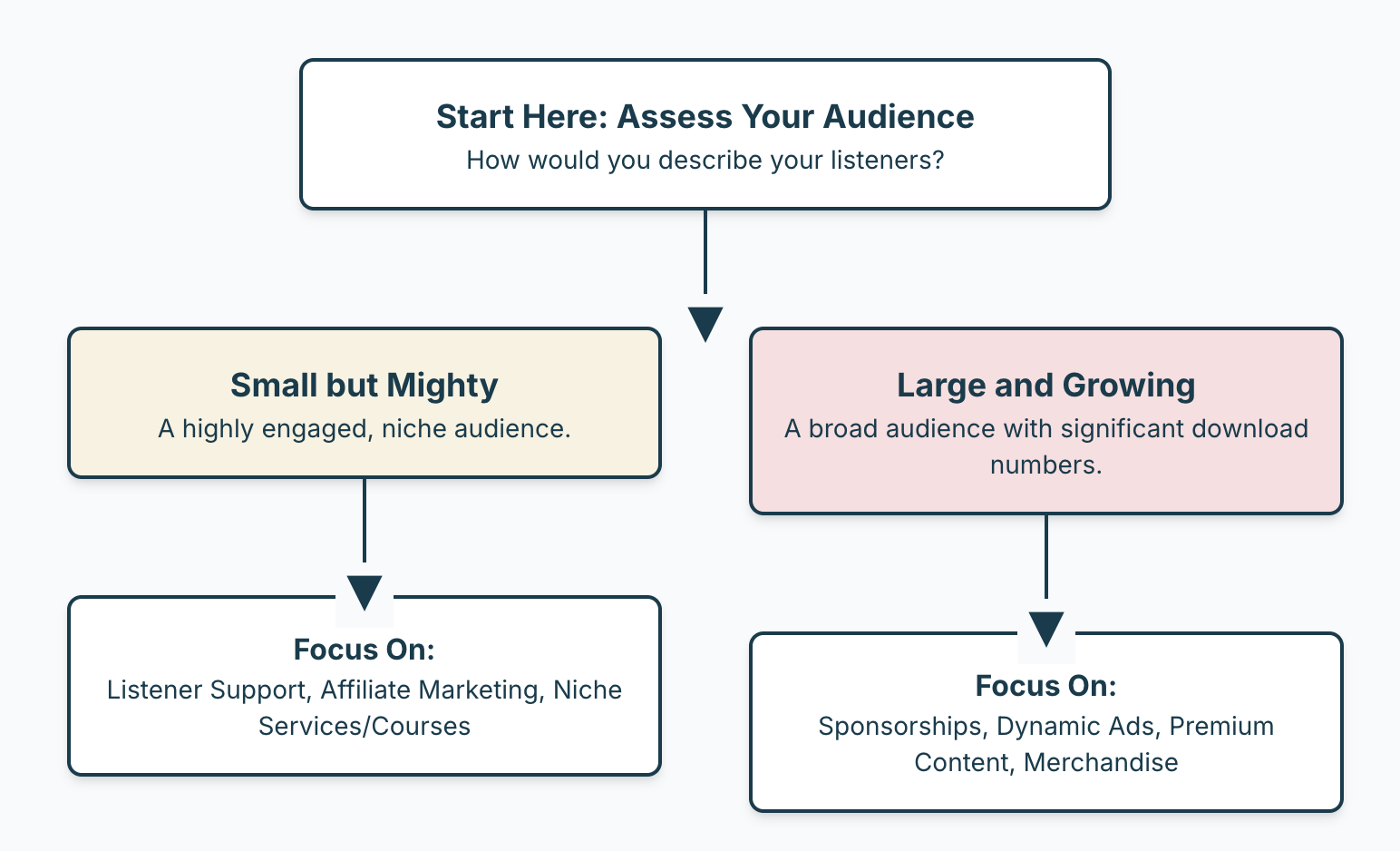
- You don’t need massive downloads to start; even small, engaged audiences can support a profitable show.
Understanding Your Audience
- Analyze your audience’s needs, habits, and interests using analytics tools and surveys.
- Define your niche and ideal listener—what problems can you help them solve?
Podcast Monetization Strategies That Work
Sponsorships & Advertising
- Host-Read Ads: Ads delivered in your voice build trust and drive higher engagement.
- Dynamic Ad Insertion: Automate ad placement to serve targeted, relevant ads across your entire catalog.
- Direct Sponsorships: Pitch brands that align closely with your audience for higher rates and longer partnerships.
- Case Study: “Crime Junkie” leverages both major sponsors and niche brands, seamlessly integrating ads into their stories for maximum retention.
Listener Support & Crowdfunding
- Patreon, Supercast, and Buy Me a Coffee: Offer exclusive content, early access, or community perks in exchange for monthly support.
- Crowdfunding Campaigns: Launch time-limited campaigns for equipment upgrades or special projects.
Merchandise & Physical Products
- Sell branded apparel, mugs, stickers, or unique items that reflect your podcast’s brand or catchphrases.
- Use print-on-demand services to minimize inventory risks.
Premium Content & Subscriptions
- Offer bonus episodes, early access, ad-free listening, or deep-dive interviews for paying subscribers.
- Consider launching a private podcast feed for members only.
Affiliate Marketing
- Partner with companies whose products genuinely help your audience. Earn commissions for every sale tracked through your links.
- Write blog posts, show notes, or create resource pages featuring your top recommendations.
- Pro Tip: Choose affiliates with recurring commissions (like software or memberships) for long-term passive income.
Courses, Services, and Digital Products
- Package your expertise into guides, checklists, video courses, or consulting sessions.
- Offer live workshops, coaching, or personalized audits for your listeners.
- Example: True crime podcasts may sell research guides, case study packs, or private investigation webinars.
Community Building
- Grow a thriving community on Discord, Facebook Groups, or a private forum.
- Charge for premium access, live Q&A sessions, or mastermind groups.
Optimizing Audience Growth for Revenue
SEO for Podcasts
- Build a website with searchable show notes, transcripts, and blog posts targeting low-competition keywords.
- Example: “Crime Junkie” is a leading resource for true crime fans searching for specific cases, thanks to detailed case pages, maps, and interactive resources.
Social Media & Cross-Promotion
- Share episodes across platforms, collaborate with other podcasters, and guest on related shows.
- Use short video/audio clips to reach new listeners on TikTok, Instagram, or YouTube Shorts.
Engaging Your Audience
- Run Q&A sessions, polls, and interactive contests.
- Collect and feature listener stories or questions.
- Encourage reviews, shares, and word-of-mouth recommendations.
Legal, Copyright, and Compliance
- Always secure the right to use music, interviews, or third-party content—use royalty-free libraries or obtain proper licenses.
- Credit your sources and follow fair use guidelines.
- Be aware of platform policies and any regional privacy or advertising regulations that apply to your show.
Measuring Success & Making Data-Driven Decisions
- Use analytics tools (Apple Podcasts, Spotify, Podtrac, Chartable) to track downloads, retention, and listener demographics.
- Monitor what topics, guests, or formats drive the most engagement and revenue.
- Adjust your monetization and growth strategies based on real listener behavior, not just guesswork.
Real-World Examples and Case Studies
- Joe Rogan Experience: Leveraged audience size into a multimillion-dollar exclusive deal with Spotify.
- How I Built This: Monetizes via NPR sponsorships, live events, and listener donations.
- Crime Junkie: Combines sponsorships, a thriving fan club, exclusive bonus content, and a data-rich website that dominates Google for true crime topics. We’ve got a great breakdown of Crime Junkie here.
- SmartLess: Secured high-profile brand sponsorships while engaging audiences with celebrity guests and live tours.
Action Steps & FAQ
Frequently Asked Questions
- Can small podcasts really make money?
Yes! Small, loyal audiences often monetize better than large but unengaged ones. Start with affiliate links, listener support, or niche sponsors. - Do I need a website to monetize my podcast?
It’s not required—but it will dramatically increase your reach, control, and monetization options. - How do I choose which strategy is right for me?
Consider your audience’s needs, your show’s niche, and your own strengths. Start with one or two strategies and expand as you grow. - What if I’m not in the business or marketing niche?
These strategies work for every genre—from true crime and comedy to health, education, or hobbies.
Turning Passion Into Profit—Ethically and Sustainably
Podcast monetization isn’t just for celebrities or business gurus, in fact if you’re looking for info on the best platforms to monetize with, check this out. With the right strategies and mindset, any creator can turn a show into a sustainable revenue stream. Focus on providing value, building trust, and diversifying your income. The podcasting world is full of opportunity—start building your path today.
Still Struggling to Turn Your Podcast Into Reels? Try This Genius Free Workflow
One of the most frustrating challenges podcasters face today? Turning long-form audio into short-form video that actually performs. It’s not just a nice-to-have anymore—social clips are expected. But the tools we’ve been using haven’t kept up.
Maybe you’ve tried automated tools like Opus. Maybe you’ve spent hours scrubbing through audio. And maybe you’re wondering: why is this still so hard?
This post tackles one of podcasting’s present problems head-on—and offers a smarter, AI-powered workflow that makes creating engaging, on-brand social clips easier than ever.
🚫 What’s Broken with Clip Tools Like Opus
The rise of short-form video has forced podcasters into unfamiliar territory—editing. And tools like Opus tried to fill the gap. But here’s the problem:
Most of these tools use shallow AI models that don’t understand tone, nuance, or context. They:
- Miss your best moments
- Chop up thoughts mid-sentence
- Create captions that feel generic or robotic
- Strip away your voice and vibe
You’re left with awkward clips that don’t convert.
✅ A Smarter Workflow for 2025 and Beyond
Instead of hoping a tool gets it right, build a simple system that combines your transcript, GPT, and your own creative direction.
Here’s the framework:
1. 🎙 Start With a Transcript
Use a tool like Descript, Riverside, or a free Whisper-based transcriber to convert your full episode into text.
2. 🧠 Use AI to Find the Gold
Feed your transcript into a GPT prompt designed to find:
- Tension or conflict
- Strong opinions
- Humor or surprise
- Quotable takeaways
Pro Tip: Use a prompt like “Pull 3–5 short moments ideal for Reels or TikTok. Include timestamps, catchy clip titles, and format tips.”
3. 📝 Get Back Structured Clip Ideas
You’ll receive:
- Timestamped segments
- Suggested hooks and titles
- Visual formatting recommendations (e.g., 9:16 with captions)
4. 🎨 Style With Templates
Use CapCut, Canva, or Veed to:
- Add branding
- Format for social
- Insert captions and motion elements
We even offer free templates if you need a head start.
⚙️ Want to Automate the Whole Thing?
Use this free n8n automation template that does all of this for you:
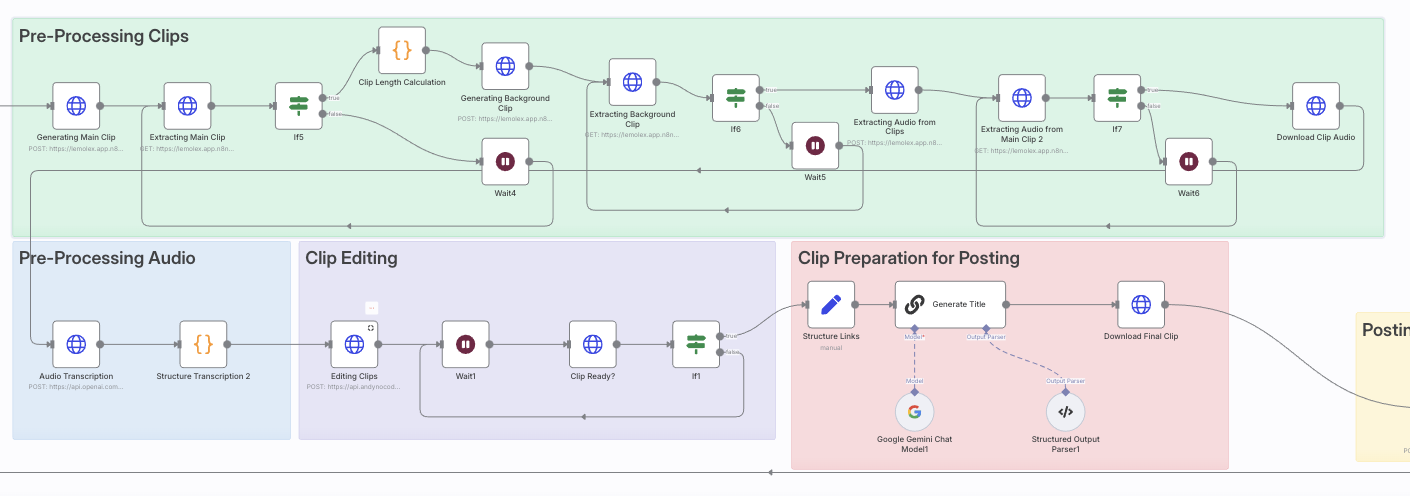
👉 Download the Free AI Clip Generator Template
You’ll also get:
- Setup instructions
- Bonus templates
- Support if you get stuck
💡 Final Thought: Podcasting’s Present Problem Is Visibility
If you’re making great episodes but struggling to be seen, short-form content isn’t optional anymore. It’s the new front door to your podcast.
This AI-powered workflow helps you consistently show up where your audience scrolls—without burning out.
How to Animate Your Podcast Show with AI (No Animation Skills Needed)
More Than Just Ads: How Crime Junkie Monetizes Smarter
If you’re running a true crime podcast, you’ve probably thought about monetization—and the most obvious method is running sponsored ads on your episodes.
Maybe you’re already pitching sponsors or considering mid-roll spots. Yes, ads can bring in money. But what if there’s a whole ecosystem of income streams that can multiply your revenue, often with less effort, and help you build a sustainable business around your podcast?
The Sponsored Ad Mindset: What You’re Missing
Running sponsored ads is just the first step on a longer journey. It’s important, but it’s only one piece of the puzzle.
Ads:
- Depend on your current download numbers to command decent rates
- Require you to constantly find new sponsors or renew deals
- Are limited to direct ad reads or pre-produced spots
- Can feel like you’re “selling out” if the sponsor doesn’t really align with your audience
If you want to grow your income without chasing sponsors every month, it’s time to start thinking bigger.
Enter Crime Junkie: The True Crime Monetization Masterclass
Let’s look at one of the biggest true crime podcasts: Crime Junkie. Their monetization success isn’t just from ad reads.
Their secret? They’ve built a monetization machine that leverages their podcast and their website, community, and brand into multiple income streams.
How Crime Junkie Does It
1. Website as a True Crime Hub
Their site isn’t just a landing page. It’s a rich resource center with:
- Detailed case summaries, photos, timelines
- Interactive maps and quizzes about cases
- Links to cold case resources, news articles, and support groups
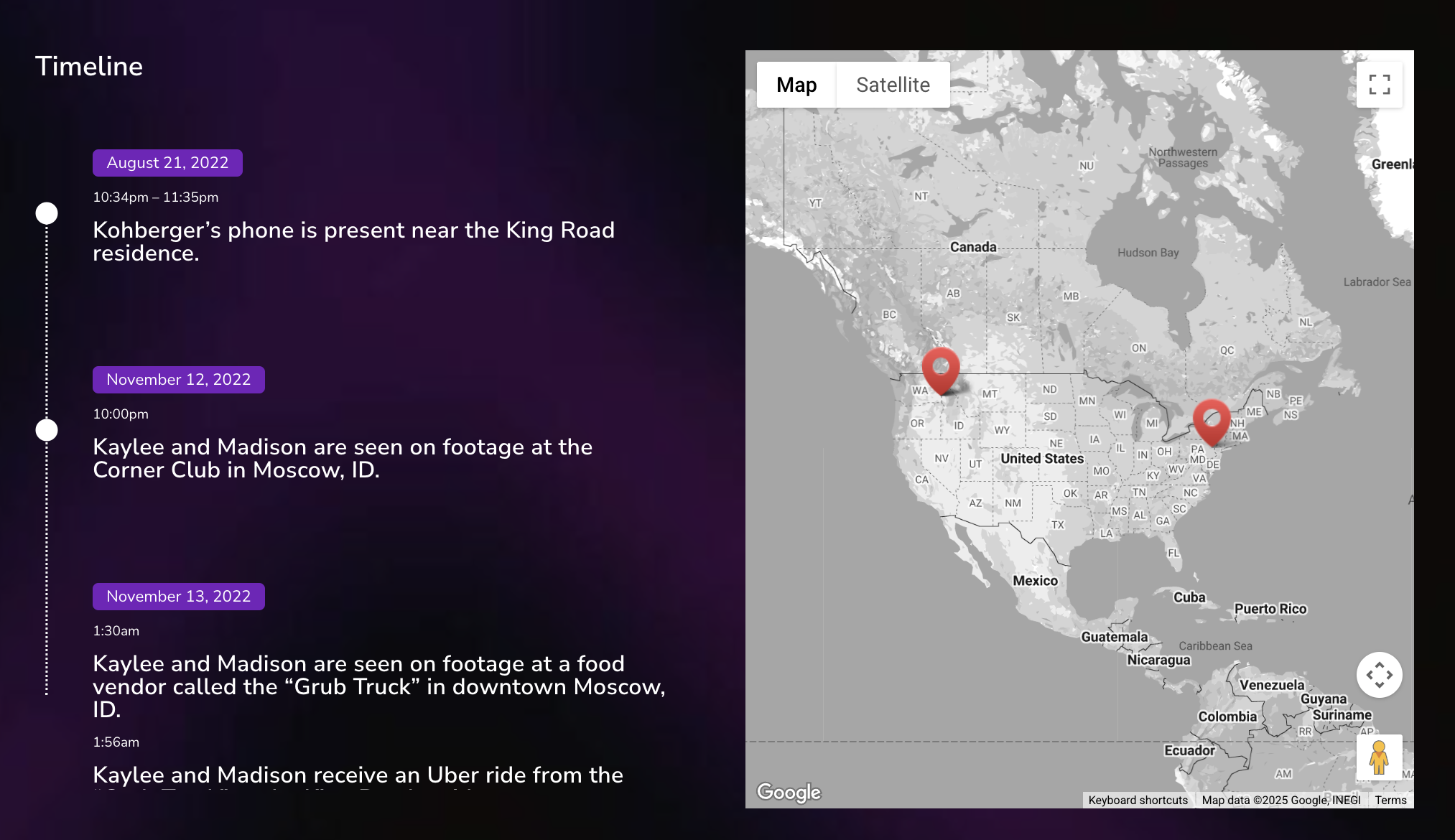
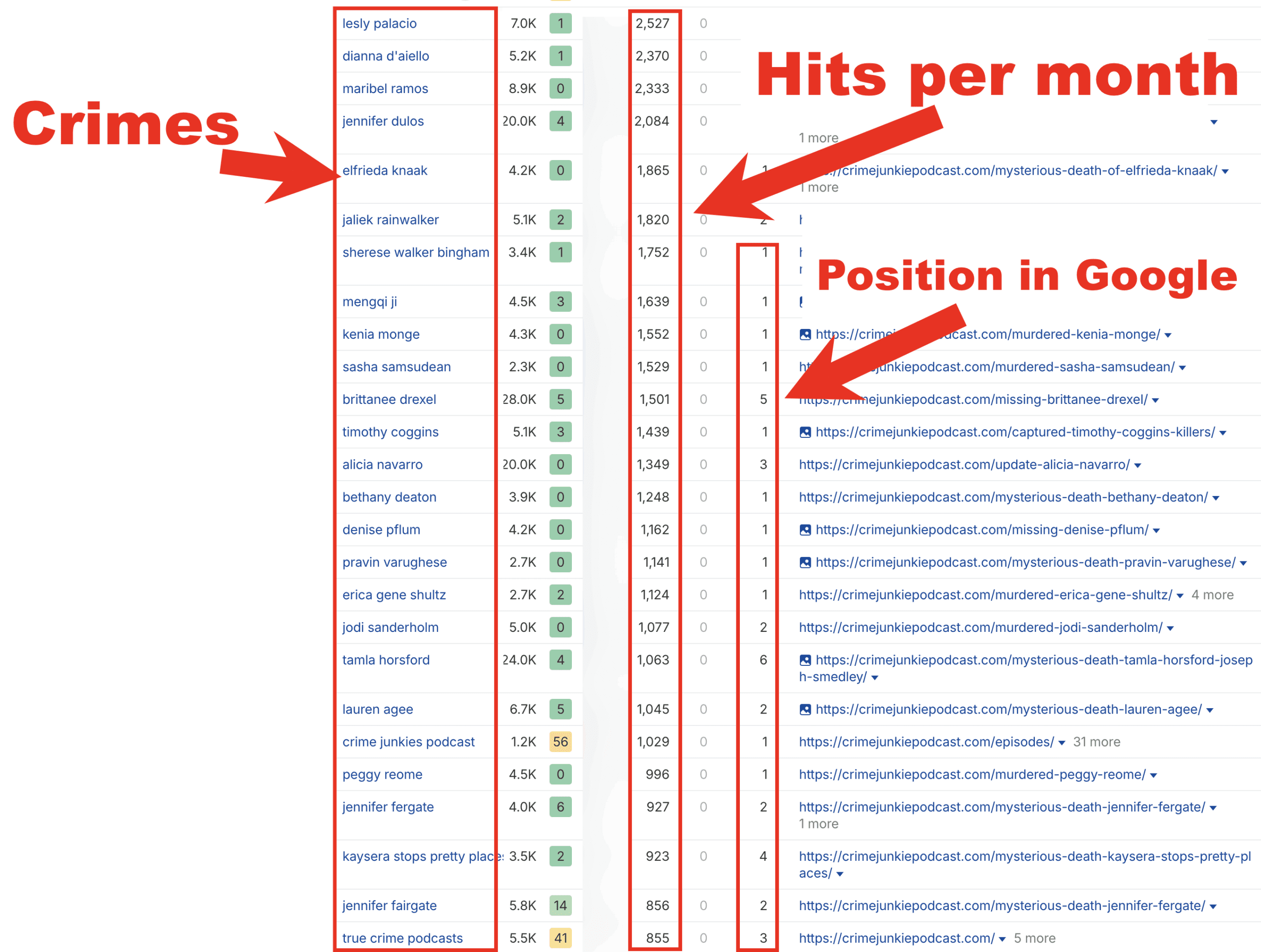
This content ranks high on Google, pulling in search engine traffic from people looking for crime info—many discovering the podcast through the site.

And if you were to search the keywords they show up for in my fancy tool you’d see them for yourself!
2. Building a Loyal, Engaged Community
Beyond listeners, Crime Junkie cultivates superfans:
- Email newsletters with exclusive content
- Membership perks with bonus episodes or early access
- Fan club and social media engagement that keeps listeners coming back
This community is a direct channel for monetization beyond podcast platforms.
3. Smart Sponsorships & Brand Partnerships
They partner with companies that fit their true crime audience:
- Mystery subscription boxes (e.g., Hunt a Killer)
- True crime books and documentaries
- Crime-themed games and collectibles
These partnerships include ads on the podcast, website banners, newsletter placements—creating bundled, high-value sponsorship packages.
4. Affiliate Marketing & Merchandising
Crime Junkie promotes products their fans actually want—often earning commissions on sales or offering exclusive merchandise:
- Mystery box affiliate programs
- True crime books and streaming services
- Themed merchandise sold directly or through third parties
Click For Free Podcast Monetization Strategy
What This Means For Your Podcast
If you’re only thinking “I need a sponsor to make money,” it’s time to expand your view. You can start building your own monetization ecosystem:
- Create a website packed with rich content that ranks in Google for true crime searches
- Grow an email list to communicate directly with your listeners—offering exclusive content and offers
- Find sponsors and partners that deeply align with your niche, then bundle ad opportunities across your podcast, website, and newsletter
- Add affiliate promotions for products your audience cares about, generating passive income
- Offer premium content or memberships for superfans willing to pay for bonus episodes, behind-the-scenes access, or ad-free listening
Starting Small: Your First Steps Beyond Ads
Even with a modest audience, you can:
- Build a simple website with episode show notes, transcripts, and resources
- Create a lead magnet (like a checklist or case tracker) to start collecting emails
- Reach out to a handful of sponsors that fit your niche and propose simple ad deals
- Add 1–2 affiliate links into your show notes or website content
- Engage your listeners with bonus content on Patreon or a private community
Click For Free Podcast Monetization Strategy
Why This Matters
Ads alone can be a fickle income source. But with a diverse, audience-centered monetization strategy, you create:
- Multiple income streams
- Stability if sponsors leave or platforms change
- Greater creative freedom—you’re not tied to just one revenue source
- A valuable asset you own and control: your website, email list, and community
Final Thought
If you want to go beyond “just sponsored ads” and build a podcast monetization machine like Crime Junkie’s, the best time to start is now.
Your podcast deserves more than just ads—it deserves a smart, diversified strategy that grows with your audience and maximizes your earning potential.
Ready to build a real, scalable monetization system for your podcast?
Click For Free Podcast Monetization Strategy
Transistor.fm Pricing: Plans, Costs, and Whether It’s Worth It
Last Updated: June 2026 | By Matt
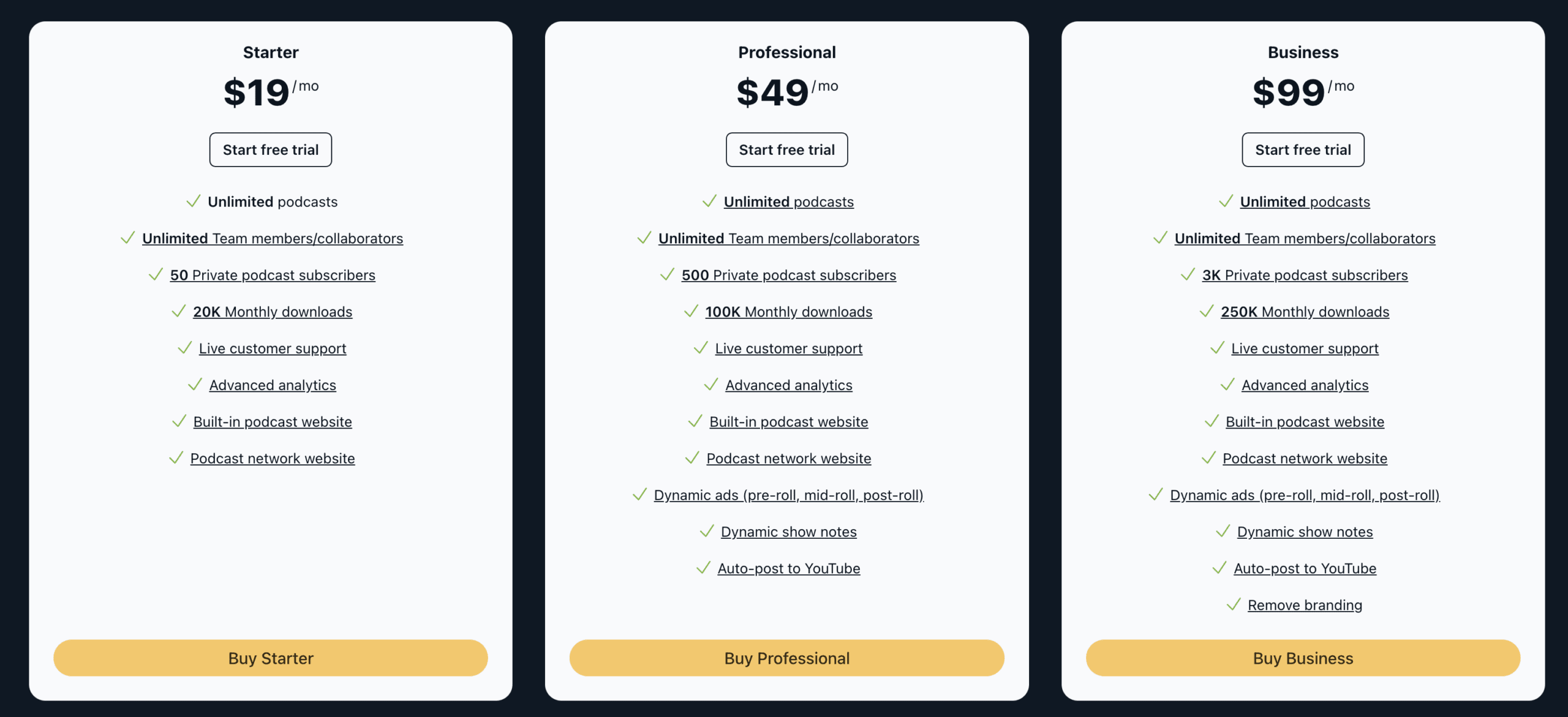
Transistor.fm pricing starts at $19/month (Starter), with Professional at $49/month, Business at $99/month, and an Enterprise tier from $199/month. Every paid plan includes unlimited podcasts, unlimited team members, and private podcasting, plus a 14-day free trial. Pay yearly and you get 12 months for the price of 10.
There’s no permanently free plan, so if cost is your only concern you may want to compare it against free podcast hosting options first. But for creators who want to run more than one show without paying per podcast, Transistor is one of the few podcast hosting platforms that makes unlimited shows the default at every tier.
Start your free 14-day Transistor.fm trial
How Much Does Transistor.fm Cost in 2026?
Here are Transistor’s current plans. Pricing is based on monthly downloads, not the number of shows, and the yearly column reflects Transistor’s “12 months for the price of 10” annual discount.
| Plan | Monthly | Yearly | Monthly Downloads | Private Subscribers | Standout Features |
|---|---|---|---|---|---|
| Starter | $19 | $190 | 20,000 | 50 | Unlimited shows, podcast website, advanced analytics, API access |
| Professional | $49 | $490 | 100,000 | 500 | Everything in Starter + dynamic ad insertion, dynamic show notes, auto-post to YouTube |
| Business | $99 | $990 | 250,000 | 3,000 | Everything in Professional + remove Transistor branding |
| Enterprise | $199+ | $1,990+ | 250,000+ | 3,000+ | Custom limits for high-volume shows; contact sales |
All paid plans include unlimited podcasts, unlimited team members, and private podcasting. Transcription is available as a paid add-on (sold in monthly hour blocks) rather than being bundled into the base price.
Does Transistor.fm Have a Free Plan?
No. Transistor does not offer a permanently free tier. The lowest paid plan is Starter at $19/month. What you do get is a 14-day free trial on every plan, with full access to publishing, your podcast website, and analytics. If you don’t upgrade, your account simply pauses rather than charging you automatically.
If a $0 starting point is non-negotiable, it’s worth weighing Transistor against budget-focused hosts. I’ve covered the trade-offs in detail in my Buzzsprout pricing breakdown and Podbean pricing guide, both of which offer lower or free entry points with tighter limits.
What Do You Actually Get With Transistor?
Transistor leans toward power-without-clutter rather than a sprawling feature list. The features that matter most for day-to-day podcasting:
- Unlimited podcasts — one account hosts as many shows as you want, with no per-show fee.
- Private podcasting on every plan — secure RSS feeds for internal, paid, or course content, starting at the Starter tier.
- Video podcast hosting — Transistor now hosts and distributes video episodes, a meaningful upgrade from its older audio-to-YouTube-only approach.
- Dynamic ad insertion — add or swap pre-roll, mid-roll, and post-roll ads after publishing (Professional and above).
- Auto-post to YouTube — push new episodes to YouTube automatically (Professional and above).
- Built-in podcast website — a one-click site plus a separate network site if you run multiple shows.
- AI transcription — available as a paid add-on for accessibility and show notes.
- Advanced analytics and API access — included on every plan, even Starter.
Who Is Transistor.fm Best For?
Transistor fits a specific kind of podcaster especially well:
- Creators running multiple shows — the unlimited-podcasts model is the cheapest path if you publish more than one feed.
- Teams and agencies — unlimited collaborators and role management come standard.
- Coaches and course creators — private podcasting at every tier supports membership and client-only feeds.
- Businesses wanting clean branding — the Business plan removes Transistor branding entirely.
If your priority is a built-in ad marketplace or the deepest possible analytics, a different host may serve you better. For private-feed-heavy workflows specifically, compare it against the field in my guide to the best private podcast platforms.
Is Transistor’s Yearly Plan Worth It?
Annual billing gives you 12 months for the price of 10, which works out to roughly 17% off versus paying monthly. In real numbers: Starter drops from $228 to $190 a year, Professional from $588 to $490, and Business from $1,188 to $990. If you’re committed to podcasting for the next year, the annual plan is an easy win.
How Does Transistor Compare to Other Hosts?
The clearest way to read Transistor against the competition is by its pricing model. Most budget hosts charge per show or restrict private feeds; Transistor prices by downloads and includes unlimited shows and private podcasting on every plan.
| Feature | Transistor | Typical Budget Host |
|---|---|---|
| Pricing basis | Monthly downloads | Often per show or per hour uploaded |
| Number of shows | Unlimited on every plan | Frequently one show per plan |
| Private podcasting | Included on every plan | Often higher tiers only |
| Video podcast hosting | Yes | Varies |
| Built-in ad marketplace | No (run your own / dynamic ads) | Sometimes included |
| Free trial | 14 days | Varies |
For head-to-head detail on the budget options, see my Buzzsprout pricing, Podbean pricing, and Acast pricing guides.
Switching to Transistor: What to Expect
Migrating from another host is straightforward and won’t disrupt your audience:
- Import your existing show via its RSS feed.
- Set up a 301 redirect from your old feed (Transistor provides the instructions).
- No audio re-compression or quality loss on imported episodes.
- Your existing subscribers stay subscribed automatically.
Most creators complete the move in well under an hour. If you’re also rethinking your web presence during the switch, my walkthrough on how to create a podcast website pairs well with Transistor’s built-in site builder.
The Verdict: Is Transistor.fm Worth the Price?
For podcasters who run multiple shows, need private feeds, or want a clean, reliable platform that scales, Transistor is well worth $19–$99/month. You’re paying a modest premium over the cheapest hosts in exchange for unlimited shows and private podcasting baked into every tier. The main reasons to look elsewhere are if you need a built-in ad marketplace or a permanently free plan.
Try Transistor.fm free for 14 days
Frequently Asked Questions
How much does Transistor.fm cost?
Transistor.fm costs $19/month for Starter, $49/month for Professional, and $99/month for Business, billed monthly. An Enterprise tier starts at $199/month for high-volume shows. Paying annually gives you 12 months for the price of 10, dropping the effective cost to roughly $190, $490, and $990 per year respectively.
Does Transistor.fm have a free plan?
No, Transistor.fm does not offer a permanently free plan. The lowest paid tier is Starter at $19/month. However, every plan includes a 14-day free trial so you can publish episodes and test the full platform before committing. If you don’t upgrade, your account pauses rather than charging you automatically.
Is there a Transistor.fm free trial?
Yes. Transistor.fm offers a 14-day free trial on every plan, including Starter. During the trial you can publish episodes, build your podcast website, and explore analytics. You won’t be charged automatically at the end—you have to actively choose and confirm a paid plan to continue past the trial period.
How much do you save with Transistor’s yearly plan?
Transistor’s annual billing gives you 12 months for the price of 10, effectively two free months a year. That makes Starter about $190/year instead of $228, Professional $490 instead of $588, and Business $990 instead of $1,188—saving roughly 17% compared with paying month to month.
Can you host multiple podcasts on one Transistor plan?
Yes. Every Transistor.fm plan, including the $19 Starter tier, lets you host unlimited podcasts under a single account at no extra cost. Each show gets its own RSS feed, website, and analytics. This is Transistor’s biggest differentiator, since most competitors charge per show or cap the number of feeds you can run.
Does Transistor.fm support video podcasts?
Yes. Transistor now offers video podcast hosting and distribution, a change from earlier years when it only auto-posted audio to YouTube as a static image. You can host video episodes and distribute them to platforms like YouTube and Spotify, making it a viable choice for creators producing video-first shows.
Does Transistor include private podcasting?
Yes. Private podcasting is included on every Transistor plan. Starter supports 50 private subscribers, Professional supports 500, and Business supports 3,000. This makes Transistor a strong pick for internal company podcasts, paid membership feeds, or course content—features many hosts restrict to higher tiers or charge extra to unlock.
What happens if you exceed your Transistor download limit?
Transistor doesn’t shut off your audio if you exceed your monthly download cap. According to Transistor, they keep serving episodes to your listeners and reach out to move you to a higher tier if you consistently go over. There’s no automatic overage fee or sudden interruption for your audience.
Can you monetize a podcast on Transistor?
Yes, though Transistor has no built-in ad marketplace. You keep full ownership of your content and can run your own sponsorships, use dynamic ad insertion (Professional and up), or sell access to a paid private feed. If you want an automated ad network, a host with built-in monetization may suit you better.
How does Transistor pricing compare to Buzzsprout and Podbean?
Transistor starts higher ($19/month) than the entry tiers at Buzzsprout or Podbean, but it prices by monthly downloads and includes unlimited shows and private podcasting on every plan. Budget hosts often charge per show or limit private feeds, so Transistor can actually be cheaper for creators running multiple podcasts.
Podcasting for Goodness’ Sake: How to Create Purpose-Driven Content That Helps, Inspires, and Grows
In a world saturated with content, it’s easy to feel like your voice might get lost. But when your podcast is driven by a genuine desire to help, uplift, or inform, it stands out in the best possible way.
It’s about podcasting with purpose. Whether you’re sharing stories that heal, offering actionable tips, or simply creating space for laughter in tough times, your voice has power.
This guide is for podcasters who want to make an impact—whether you’re just starting or feeling stuck.
🧬 Define What “Goodness” Means for You
Before you plan your next episode, ask yourself:
- Who do I want to help or serve?
- What transformation do I want my audience to experience?
- What values drive this show?
Create a “Goodness Statement.” For example:
“I help first-time moms navigate postpartum life with compassion, humor, and science-backed tools.”
Align every episode with that statement.
🎧 Craft a Mission-Driven Format & Voice
Your show doesn’t need to follow industry norms. Choose a format that reflects your strengths:
- Solo reflections for personal insights
- Interviews with everyday heroes or experts
- Stories that celebrate kindness, creativity, or resilience
Stay consistent with your voice. Speak how you write. Laugh. Share. Be you. The right listeners will connect.
Example: The “Kind World” podcast tells short stories about real acts of kindness. Simple. Powerful. Memorable.
📚 Content Ideas That Teach, Heal, or Entertain
Here are purpose-driven topic ideas you can adapt:
Educate
- “Budgeting for single parents”
- “How to talk to kids about grief”
- “Quick mental health resets for stressful days”
Inspire
- “Stories of second chances”
- “Interview with a burn survivor turned coach”
- “How I left my job and started a nonprofit”
Entertain
- “Wholesome prank stories”
- “Uplifting headlines of the week”
- “Things that restored my faith in humanity this month”
🤔 Frequently Asked Questions
What does “Podcasting for Goodness’ Sake” mean?
It means using your platform to make a positive impact—whether that’s through education, inspiration, humor, or storytelling.
I want to help people, but I don’t know where to start.
Start with who you want to help and how you want them to feel after listening. Clarity comes from service.
Can I still make money doing this?
Yes. Monetization can come from aligned sponsors, memberships, listener support, and digital products. Trust drives conversions.
I’m not an expert—can I still teach or inspire?
Yes. Share your journey, research insights, or bring others on. Your perspective matters.
What if I don’t have a big audience?
Serve the listeners you do have deeply. Word-of-mouth growth is powerful in mission-driven podcasting.
How do I stay consistent without burning out?
Batch episodes, allow imperfection, and protect your creative joy. You don’t need to be everywhere—just present.
💰 Monetize Without Selling Your Soul
You don’t need to choose between purpose and profit. Instead, use trust-based monetization:
- Invite ethical sponsors who align with your message.
- Offer a course or guide that extends your mission.
- Use listener support platforms like Patreon or Buy Me a Coffee.
Transparency, value, and mission alignment build income that feels good to earn.
📊 Growth Through Goodness
Marketing doesn’t have to feel spammy. Try this instead:
- Share impactful episode clips on social.
- Build a newsletter that adds value, not clutter.
- Partner with other creators on guest episodes.
- Create content people are proud to share.
Goodness spreads naturally—you just need to make it easy to share.
♻️ Stay Consistent Without Burning Out
Even mission-driven work can drain you. Here’s how to stay sustainable:
- Keep episodes short and batch when possible.
- Use templates for outlines and show notes.
- Take breaks and communicate with your audience honestly.
- Ask for help. Collaborate.
Your well-being is part of the mission.
Click Here To Learn More About Finding The Audience & Monetizing
How to Present Information Clearly on Your Podcast (Audio-Only or Video)
Podcasting isn’t just about talking into a microphone—it’s about clearly delivering value to your audience in a way that sticks. Whether you’re hosting an audio-only show or a full video production, the way you present information directly impacts how well your listeners absorb, remember, and act on what you share.
This guide walks you through proven strategies for both audio and video formats, ensuring your content is clear, compelling, and impossible to tune out.
Why Presentation Style Matters in Podcasting
Podcasting is unique in that it’s an intimate, one-to-one medium—often consumed while driving, cooking, or exercising. If your ideas aren’t clearly delivered, they’re gone. Listeners can’t skim or re-read like on a blog.
Why clarity is essential:
- Listeners may tune out quickly if confused or overwhelmed
- Retention and loyalty increase with clarity and pacing
- More effective storytelling = better word-of-mouth
- Sponsors and guests respect professional delivery
Core Principles for Presenting Information (Both Formats)
| Principle | Why It Matters | How to Apply It |
|---|---|---|
| Use Conversational Tone | Makes you more relatable and easier to follow | Avoid jargon, speak like you’re talking to a friend |
| Break It Into Segments | Helps listeners process and retain information | Use headings, segments, and transitions |
| Repeat Key Points | Reinforces takeaways and helps with recall | Paraphrase important ideas 2–3 times per episode |
| Use Examples & Stories | Makes abstract or complex ideas easier to digest | Insert relevant metaphors, stories, or analogies |
| Summarize Frequently | Keeps listeners oriented and reminds them of value | End each section with a mini-recap or listener takeaway |
Strategies for Audio-Only Podcasts
Without visuals, you need to make your information “seeable” with your voice.
🌟 Paint Pictures With Words
- “Imagine standing in front of a giant whiteboard…”
- Use storytelling, analogies, and sensory language
- Think of each episode as an audio TED Talk with visuals in your voice
⚠️ Signpost and Structure
- Start by telling listeners what to expect
- Use phrases like:
- “Here’s what we’re going to cover…”
- “That brings us to part two…”
- “So, what’s the big takeaway here?”
♻️ Repeat & Reinforce
- Use the Power of Three: introduce, explain, summarize
- Give examples after explanations
- Say: “Let me break that down again quickly…”
🔗 Show Notes & External Resources
- Tease downloads early: “Don’t worry about remembering all this—I’ve got a cheat sheet in the show notes.”
- Drive action: “Visit [yourdomain.com/framework] for the visual guide.”
😊 Invite Real-Time Interaction
- “Pause and write this down.”
- “Picture this in your head for a second…”
- Ask reflective questions that listeners mentally respond to
Strategies for Video Podcasts
With visuals, you can directly show your ideas, not just describe them.
🖼️ On-Screen Text and Overlays
- Add text overlays during key insights
- Use bullet points for list segments
- Highlight quotes or stat comparisons while speaking
🎥 Screen Share or Cutaway Footage
- Screen share for walkthroughs, tutorials, data visualizations
- Cut to relevant B-roll to keep things dynamic and multi-sensory
📊 Slides or Whiteboards
- Think of your podcast as a mini masterclass
- Use pre-designed slides (Canva, Google Slides)
- Call out each visual: “Take a look at the bottom right corner…”
- Use an onscreen whiteboard to demonstrate and teach
➡️ Camera Cuts & Transitions
- Use multi-camera setups or zooms for emphasis
- Hard cuts between segments help keep viewers engaged
🧡 Real Props
- Hold up a book you’re referencing
- Demonstrate a tool or physical item
- Creates trust and energy through tactile connection
📰 Companion Visual Downloads
- Turn your slides or frameworks into downloadable PDFs
- Mention them early and at the end
- “You can get the visual breakdown of this at podname.com/visualguide”
Repurposing Visuals for Other Platforms
| Platform | Repurposing Ideas | Benefits |
| YouTube Shorts | Clip a key visual moment + add captions | Expands reach and improves discoverability |
| Turn slides into carousels or reels | Builds community and boosts visual storytelling | |
| Pin episode takeaways or visual summaries | Drives evergreen traffic to episodes and show notes | |
| Blog | Embed visuals as support for written posts | Improves SEO and on-page engagement |
| Send recap graphics, visual outlines, or download links | Increases opens and clickthroughs with added value content |
❓ Podcast Presentation FAQ
Q: Should I script or speak freely?
A: Use a hybrid method. Scripts help with clarity, especially for intros, transitions, or complex content. Freestyle speaking helps you sound authentic and human. Many podcasters bullet their points and freestyle around them.
Q: What if my topic is complex or data-heavy?
A: Break it into small, digestible parts. Offer analogies. Use repetition. And always pair the episode with a cheat sheet or visual reference in the show notes.
Q: How do I make listeners remember what I said?
A: Echo ideas using the Rule of Three: say it, show it, summarize it. Connect each point to something relatable or emotional. Stories work better than stats.
Q: Can I use visuals if my podcast is audio-only?
A: Absolutely. Visuals can live in your:
- Show notes
- Blog posts
- Social media clips
- Downloadable resources (e.g., PDFs, mind maps, swipe files)
Q: What tools help with presenting visually on video?
A: Top tools include:
- OBS Studio for live overlays and scenes
- Riverside.fm for recording guests and split-screen
- Ecamm Live for live shows and presentations
- Descript for editing and adding text/visuals post-recording
Q: How long should visual segments stay on screen?
A: Long enough for the viewer to read (5–10 seconds), but not so long that it stalls the flow. Use animations or fades to guide the eye.
Q: How can I turn these ideas into email growth or monetization?
A: Offer companion resources:
- Visual guides, swipe files, checklists
- Mention them mid-episode and place CTAs in the show notes
- Use these to build your list or offer tripwire products
Final Thoughts
Great podcasting isn’t just about having something to say—it’s about saying it clearly, memorably, and visually. Your listeners need help following along, retaining what they hear, and applying your ideas. The clearer your delivery, the deeper your impact.
Whether you’re narrating a story, teaching a process, or explaining a product—clarity builds trust.
From Podcast Listeners to Podcast Learners: What Every Podcaster Needs to Know
Podcasting isn’t just about being heard—it’s about being remembered. While most podcasters focus on downloads, the most successful ones focus on transformation. They don’t just collect listeners. They create learners—people who take action, apply insights, and keep coming back for more.
Whether you’re building your first show or refining your 200th episode, this guide will show you what it takes to turn passive listeners into engaged learners—and how to grow your podcast and business along the way.
🎧 Turning Listeners Into Learners
Most people hit “play” and never look back. But imagine if your audience…
-
Took notes from your episodes
-
Shared key takeaways on social media
-
Signed up for a freebie or joined your email list
-
Bought your course, booked a call, or supported your Patreon
That’s the difference between a listener and a learner. Here’s how to make it happen.
🧠 How to Design a Learnable Podcast
1. Add structure to your episodes.
Tell your audience what they’re going to learn, walk them through it, and recap at the end. Simple, but powerful.
2. Include actionable takeaways.
Wrap each episode with “3 Things to Do This Week” based on your topic.
3. Create companion resources.
Notion templates, checklists, and downloadable guides help your listeners go from theory to practice.
4. Start an email list.
Give listeners a place to continue learning off-platform—through your weekly newsletter, exclusive downloads, or member content.
5. Use tools that encourage active listening.
Recommend apps like Snipd or Airr that let people take timestamped notes and export highlights.
📈 What Podcasters Really Want (and Need) to Know
Here’s a full breakdown of what can help you grow, monetize, and systemize your podcast today:
🚀 Podcast Growth & Engagement
-
How to keep listeners engaged past the 5-minute mark
-
The best CTA formats to boost clicks and conversions
-
How to build and grow a podcast email list
-
Social media strategies for TikTok, Reels, and Shorts
-
Creating a lead magnet that ties directly to your episode content
-
Setting up a podcast website for SEO + lead capture
💸 Podcast Monetization
-
How to turn your content into a digital product (checklists, ebooks, templates)
-
Setting up premium/private podcast feeds with Supercast or Patreon
-
Making money through affiliate links (gear reviews, book recaps, tools)
-
Crafting a sponsorship pitch and pricing your ad slots
-
Launching a paid newsletter, course, or coaching offer from your podcast
🎓 Teaching Through Podcasting
-
How to design episodes that teach, not just talk
-
Creating series arcs that build skill over time
-
Adding worksheets or templates as “homework”
-
Running listener challenges and tracking results
-
Turning your podcast into a course or masterclass
🧰 Tools & Workflow
-
Best AI tools for editing (Descript, Adobe Enhance, Hindenburg)
-
Automating content distribution with Zapier or n8n
-
Building an episode database in Notion or Airtable
-
Setting up systems to repurpose episodes into blog posts, social clips, and emails
-
Using Riverside or SquadCast for studio-quality remote interviews
🧭 Strategy & Branding
-
Naming your podcast for SEO and brand identity
-
Designing scroll-stopping episode titles
-
Choosing the right niche and show format for your goals
-
Building a podcast that leads to paid opportunities
-
Making your show stand out in a crowded directory
🛠️ Want to Take the Next Step?
Turn your podcast into a money making machine people rave about.
✅ Download the free Podcast Monetization Toolkit
✅ Access revenue stream ideas + steps to implement
✅ Get my full workflow to repurpose episodes, grow your list, and monetize smarter
Final Thoughts
The world doesn’t need more passive content. It needs transformative content. By helping your listeners learn, not just listen, you create real value—and real momentum for your brand, business, or mission.
The future of podcasting isn’t just in audio—it’s in application.
Forget True Crime — The Real Opportunity for New Podcasters Is AI
Why automation, agents, and innovation are the niches worth jumping into now.
The Podcast Niche No One’s Dominating (Yet)
Let’s face it: true crime, comedy, and personal development are packed. Everyone has their version of a murder mystery, motivational Monday, or laugh-out-loud life story. While those niches can work, breaking through is tough without a massive budget or a celebrity name.
But here’s the secret: the most exciting niche for new podcasters isn’t found on the front page of Apple Podcasts—it’s buried inside GitHub repos, Discord chats, and quiet YouTube tutorials.
That niche? AI, automation, and the agent economy.
It’s exploding with new tech, new ideas, and almost zero saturation in the podcasting space. If you want to find a unique angle, grow fast, and monetize early, this is where your mic belongs.
Why AI Is the Perfect Niche for Aspiring Podcasters
AI and automation are evolving daily. That means you get:
- Unlimited content ideas from product updates, breakthroughs, and controversies
- Built-in virality thanks to buzzwords like “agentic AI,” “no-code automation,” and “autonomous systems”
- An underserved audience hungry for explainers, case studies, and human insight
Even better: you don’t have to be a technical expert. You just have to be curious and willing to explore.
Let These Podcasts & YouTube Channels Feed Your Idea Machine
Whether you want to learn the lingo or find a repeatable format, these podcasts and YouTube channels are your springboard.
📊 For Business & Monetization Inspiration
- Me, Myself and AI – Real-world case studies of how companies use AI to scale.
- AI in Business – Deep dives into AI strategy and ROI.
- Practical AI – Covers automation tools, agents, and ethical dilemmas in a relatable way.
🧠 For Cutting-Edge Insights & Thought Leadership
- The TWIML AI Podcast – Features OpenAI, LangChain, and agent system designers.
- The Cognitive Revolution – Multi-agent collaboration, agent economies, and interviews with AI thinkers.
- No Priors – Where tech meets economics, featuring AlphaEvolve, DeepMind, and more.
📺 For Builders & Visual Learners
- Krish Naik (YouTube) – End-to-end LangGraph + LangChain builds.
- Serverless Land (AWS) – Enterprise-ready AIOps and serverless agent setups.
- Cole Medin, Nate Herk (YouTube) – n8n tutorials and practical automation guides.
- I-X by Imperial College – Academic deep dives into LLMs, agentic behavior, and AGI.
10 AI Podcast Niche Ideas You Could Launch Tomorrow
Feeling inspired? Here are plug-and-play ideas based on what the pros are covering:
- Agent Dispatch – Weekly roundups of the best AI agents launched
- Behind the Bots – Interviews with indie developers building agentic systems
- Workflow Weekly – A show focused on creator and business automations
- Build Me a Bot – Live experiments with GPT agents, BabyAGI, etc.
- AI for Podcasters – Teaching podcasters to use AI to grow
- Prompt & Profit – How to monetize with prompt engineering
- Human in the Loop – Ethical and hybrid system discussions
- The Automation Edge – Use cases for automating operations
- No-Code Agents – n8n and Zapier automation builds
- The Agent Economy – How agents might earn, spend, and scale
How to Monetize a Podcast in the AI/Automation Space
Even with a small audience, here are proven ways to earn:
- Sell workflows & templates (Zapier, n8n, LangChain agents)
- Create and sell mini-courses or guides
- Offer consulting or launch a micro AI agency
- Use affiliate marketing for tools you talk about
- Open a Patreon or membership community
- Get freelance gigs from listeners who trust you
- Pitch early sponsors in the AI space (they’re hungry for niche creators)
You Don’t Need to Code. You Just Need Curiosity.
Seriously.
Most of the creators dominating this space aren’t academics or engineers. They’re curious learners who publish what they’re exploring. They react to the latest LangChain demo. They test a Zapier agent and talk about it. They turn tutorials into a content series.
That could be you.
Final Thoughts: Don’t Just Listen to the AI Boom. Document It.
If you’ve been stuck in niche paralysis, here’s your sign. The agent economy is forming now. AI is becoming a daily tool. Businesses are desperate to understand it.
And your voice could be the one that helps them.
So forget true crime. Forget following trends.
Be early. Be useful. Be the voice of what’s next.